Network Security, Privacy and Remote Access Architecture
Document Control:
Version: 1.2
Last Updated: March 19, 2026
Owner: Paul Leone
Network Security Architecture
A defense-in-depth edge security architecture implements multiple layers of inspection, filtering, and threat mitigation across network perimeter, application layer, and endpoint boundaries. The security stack spans four independent firewall platforms (pfSense HA, OPNsense, FortiGate 30D, Palo Alto VM-Series), multi-engine intrusion detection and prevention (Suricata, Snort, CrowdSec), next-generation application and identity-layer controls (Palo Alto App-ID/User-ID, WildFire), application-layer filtering (SafeLine WAF), network security monitoring (Zeek, ntopng), and encrypted tunneling (VPN/Zero-Trust access) to provide enterprise-grade network protection.
Security Impact: Four independent policy engines provide overlapping enforcement that no single platform can deliver alone. Palo Alto NGFW adds App-ID and User-ID layers that signature-based firewalls cannot replicate. Multi-engine IDS/IPS (Suricata + Snort + CrowdSec) reduces single-engine miss rates from ~15-20% to <5%. Passive NSM (Zeek + ntopng) captures full protocol metadata and NetFlow across all monitored segments without disrupting traffic flows. High-availability clustering ensures uninterrupted perimeter protection during maintenance. Centralized logging and NetFlow aggregation from all firewall and routing platforms enables threat correlation across the entire security stack.
Deployment Rationale: Enterprise networks deploy layered security controls because attackers increasingly use evasion techniques (encryption, polymorphic malware, living-off-the-land tactics) that bypass signature-based detection. This architecture mirrors enterprise SOC designs where multiple detection engines provide overlapping coverage. The inclusion of Palo Alto NGFW alongside traditional stateful firewalls reflects production environments where App-ID and User-ID enforcement replaces port-based rules and IP-to-user mapping tables. The physical Cisco 3560X and virtual Cisco IOS/IOS XE routers demonstrate proficiency with enterprise routing infrastructure, OSPF dynamic routing, and L2 security hardening. The NSM sensor fills the gap general infrastructure monitoring tools leave — providing protocol-level and flow-level network visibility that EDR and SIEM alone cannot cover.
Architecture Principles Alignment:
- Defense in Depth: Seven security layers — firewall ACLs (four platforms) → App-ID/User-ID NGFW enforcement → IDS/IPS inline blocking (Suricata + Snort) → behavioral detection (CrowdSec) → WAF (SafeLine) → NSM passive monitoring (Zeek + ntopng) → endpoint protection (Wazuh EDR) — ensure a single-layer bypass cannot compromise the full network.
- Secure by Design: Default-deny firewall policies across all platforms; encrypted VPN tunnels for remote access; automated signature updates for IDS/IPS; OSPF MD5 authentication prevents route injection; Palo Alto WildFire sandbox analysis applied to all permitted flows; NSM sensor operates as observe-only with no routing function, eliminating it as an attack surface.
- Zero Trust: Palo Alto User-ID maps Active Directory group membership to firewall policy — enforcement follows identity, not IP address; Tailscale device authentication required for remote access; no implicit trust between network zones; microsegmentation isolates workloads across dedicated VLANs with explicit inter-zone ACLs; all east-west and north-south traffic flows visible via Zeek metadata and ntopng NetFlow.
Security Platform Overview
| Layer | Platform | Function | Coverage |
|---|---|---|---|
| Perimeter Firewall | pfSense HA Cluster | Active/passive HA; stateful inspection; VPN termination; IDS/IPS; CrowdSec bouncer | All inbound/outbound traffic |
| NGFW | Palo Alto VM-Series (x2) | App-ID, User-ID (AD), WildFire, IPSec site-to-site, GlobalProtect VPN, OSPF, NetFlow | DMZ, ISO_LAN1, Prod_LAN, Site2 |
| Microsegmentation FW | OPNsense | Zone-based ACLs; CrowdSec enforcement; inter-VLAN isolation | ISO_LAN boundary |
| Management FW | FortiGate 30D (Physical) | L3/L4 policy; SSL VPN; FortiOS management platform | VLAN 3 / 192.168.3.0/24 |
| Routing Infrastructure | Cisco vIOS R1/R2, CSR1000V R3, 3560X | OSPF Area 0; NetFlow export; L2/L3 switching; DHCP snooping; port-security | All lab segments |
| Intrusion Detection/Prevention | Suricata + Snort | Signature + anomaly detection; inline blocking; 40,000+ rules | All LAN, VPN interfaces |
| Behavioral Detection | CrowdSec | Community-driven behavioral analytics; firewall bouncer enforcement | Logs from all platforms |
| Application Firewall | SafeLine WAF | OWASP Top 10; bot mitigation; HTTP-flood DDoS; ML anomaly detection | All protected web portals |
| Network Security Monitoring | Zeek + ntopng | Protocol metadata (DNS, HTTP, TLS, SSH, SMB, RDP); NetFlow aggregation from all sources | prod_lan, lab_lan1, lab_lan2 |
| Threat Intelligence | pfBlockerNG + MISP | IP reputation; GeoIP blocking; IOC correlation | Firewall and SIEM |
Network Segmentation and Zone Architecture
| Zone / VLAN | Subnet | Gateway | Purpose |
|---|---|---|---|
| Prod_LAN (VLAN 10) | 192.168.1.0/24 | pfSense 192.168.1.254 | Production environment; lab services |
| Lab_LAN1 (VLAN 100) | 192.168.100.0/24 | pfSense / R1 192.168.100.6 | Lab services, VMware, PKI |
| Lab_LAN2 (VLAN 200) | 192.168.200.0/24 | pfSense / R1 192.168.200.6 | K3s cluster, SOC namespace, server-admin workloads |
| Ext_LAN / DMZ (VLAN 20) | 192.168.2.0/24 | PA-FW 192.168.2.138 / R3 192.168.2.9 | DMZ services; external-facing workloads |
| ISO_LAN1 (VLAN 120) | 10.20.0.0/24 | PA-FW 10.20.0.138 | NGFW-enforced isolated segment |
| ISO_LAN2 / MGMT (VLAN 30) | 192.168.3.0/24 | FortiGate 192.168.3.1 / R2 192.168.3.9 | Management VLAN; isolated testing |
| HA Sync (VLAN 110) | 10.10.0.0/24 | pfSense dedicated | pfSense CARP state synchronization |
| Cisco P2P + PA OSPF | 10.30.0.0/29 | R1 10.30.0.1 / PA-FW 10.30.0.4 | OSPF peering between Cisco routers and PA-FW |
| Site2 Branch (simulated) | 10.40.0.0/24 | PA-FW Site2 10.40.0.2 | Simulated remote branch via IPSec tunnel |
Detection and Response Capabilities
| Metric | Detail |
|---|---|
| Alert latency | Suricata/Snort alerts forwarded to Splunk/Elastic within seconds |
| Automated blocking | CrowdSec decisions enforced at firewall in <5 seconds via LAPI bouncer |
| IDS rule coverage | 40,000+ rules across Suricata and Snort (Emerging Threats, Snort Community, Talos) |
| Community intelligence | CrowdSec shares threat data with global network; >1M malicious IPs in feed |
| NetFlow visibility | pfSense, OPNsense, Cisco R1/R2/R3, Palo Alto all exporting to ntopng (192.168.1.48:2056) |
| Protocol metadata | Zeek captures full L7 metadata across prod_lan, lab_lan1, lab_lan2 (AF_PACKET cluster, 3 workers) |
| Log retention | 90 days in Splunk/Elastic; 30 days on local firewall storage |
| Incident response | Documented playbooks for DDoS, brute force, lateral movement, ransomware |
Network Firewall/Router Architecture
High-Availability pfSense Cluster
Deployment Overview
Two pfSense virtual machines operate in an active/passive high‑availability configuration using CARP (Common Address Redundancy Protocol). The primary node synchronizes all configuration and state information to the secondary via a dedicated SYNC interface. In the event of failure, CARP provides sub‑second failover with minimal packet loss, ensuring uninterrupted perimeter protection. Both nodes enforce default‑deny firewall policies, NAT rules, VPN termination, and IDS/IPS inspection.
Security Impact
- Continuous perimeter protection even during maintenance or node failure
- Stateful failover preserves active connections, preventing session drops
- Inline Suricata/Snort inspection blocks malicious traffic at the edge
- Centralized logging feeds Splunk for correlation with internal telemetry
- VPN termination provides encrypted remote access without exposing internal networks
Deployment Rationale
High‑availability firewalls are standard in enterprise networks where downtime directly impacts business operations. This deployment mirrors production‑grade designs using redundant nodes, synchronized configuration, and automated failover. It demonstrates proficiency with CARP, state synchronization, multi‑WAN routing, and perimeter‑level security enforcement.
Architecture Principles Alignment
Defense in Depth: Redundant perimeter firewalls ensure continuous enforcement of ACLs, NAT, and IDS/IPS
Secure by Design: Default‑deny rules, TLS‑secured VPNs, and synchronized configurations
Zero Trust: Remote access requires identity verification; no implicit trust in network location
Cluster Configuration
| Node Role | Management IP | CARP VIP | State Sync |
|---|---|---|---|
| pfSense-Primary | 192.168.100.2/24 | 192.168.100.1/24 | Master |
| pfSense-Secondary | 192.168.100.3/24 | 192.168.100.1/24 | Backup |
| Sync Network | 10.10.0.0/24 | Dedicated | xmlrpc |
Interface Design
| Interface | Physical/Virtual | Network | Purpose |
|---|---|---|---|
| Prod_LAN | vtnet0 | 192.168.1.253/24 | Prod LAN hosts, Upstream gateway to ISP router |
| Lab_LAN1 | vtnet1 (bridge) | 192.168.100.2/24 | Primary lab network |
| SYNC | vtnet2 | 10.10.0.2/24 | HA state synchronization |
| PIA_NY | ovpnc1 | (Dynamic) | VPN egress - New York endpoint |
| PIA_CA_MONT | ovpnc2 | (Dynamic) | VPN egress - Montreal endpoint |
| TSCALE | tailscale0 | (Dynamic /32) | WireGuard mesh VPN for remote access |
| Lab_LAN2 | vtnet3 | 192.168.200.2/24 | Kubernetes cluster network |
| EXT_LAN | vtnet4 | 192.168.2.2/24 | External lab services (DMZ-style) |
Traffic Flow Architecture:
- Default Route: LAN traffic (192.168.100.0/24) → PIA VPN → Internet
- Policy-Based Routing: Selective traffic bypass for latency-sensitive apps
- VPN Failover: Automatic failover between PIA_NY and PIA_CA_MONT on tunnel failure
- Kill Switch: Floating rule blocks LAN egress if all VPN tunnels are down
Security Enhancement Packages
pfBlockerNG - IP Reputation and Geofencing
Purpose: Network-layer blocking of malicious IPs and geographic regions
Configuration:
- Blocklists: 15+ curated feeds (Emerging Threats, Spamhaus, Abuse.ch)
- Update Frequency: Hourly refresh of threat intelligence feeds
- Geo-blocking: Block inbound from high-risk countries (configurable whitelist)
- Integration: Feeds alias tables used in firewall rules
- Use Case: Prevent C2 callbacks, block known botnets, reduce attack surface
Suricata IDS/IPS
Deployment: Active on all internal LAN interfaces (both pfSense nodes)
Mode: Inline IPS with legacy blocking (balances performance vs. protection)
Rulesets:
- Emerging Threats Open (ET Open) - 40,000+ signatures
- Suricata Community Rules
- Custom local rules for lab-specific threat patterns
Configuration:
- Action: Drop + Alert on HIGH/CRITICAL severity events
- Performance: Disabled CPU-intensive rules for lab environment constraints
- Logging: JSON output forwarded to Splunk and Elastic via syslog-ng
Use Case: Real-time detection of exploits, malware, and lateral movement attempts
Snort IDS/IPS
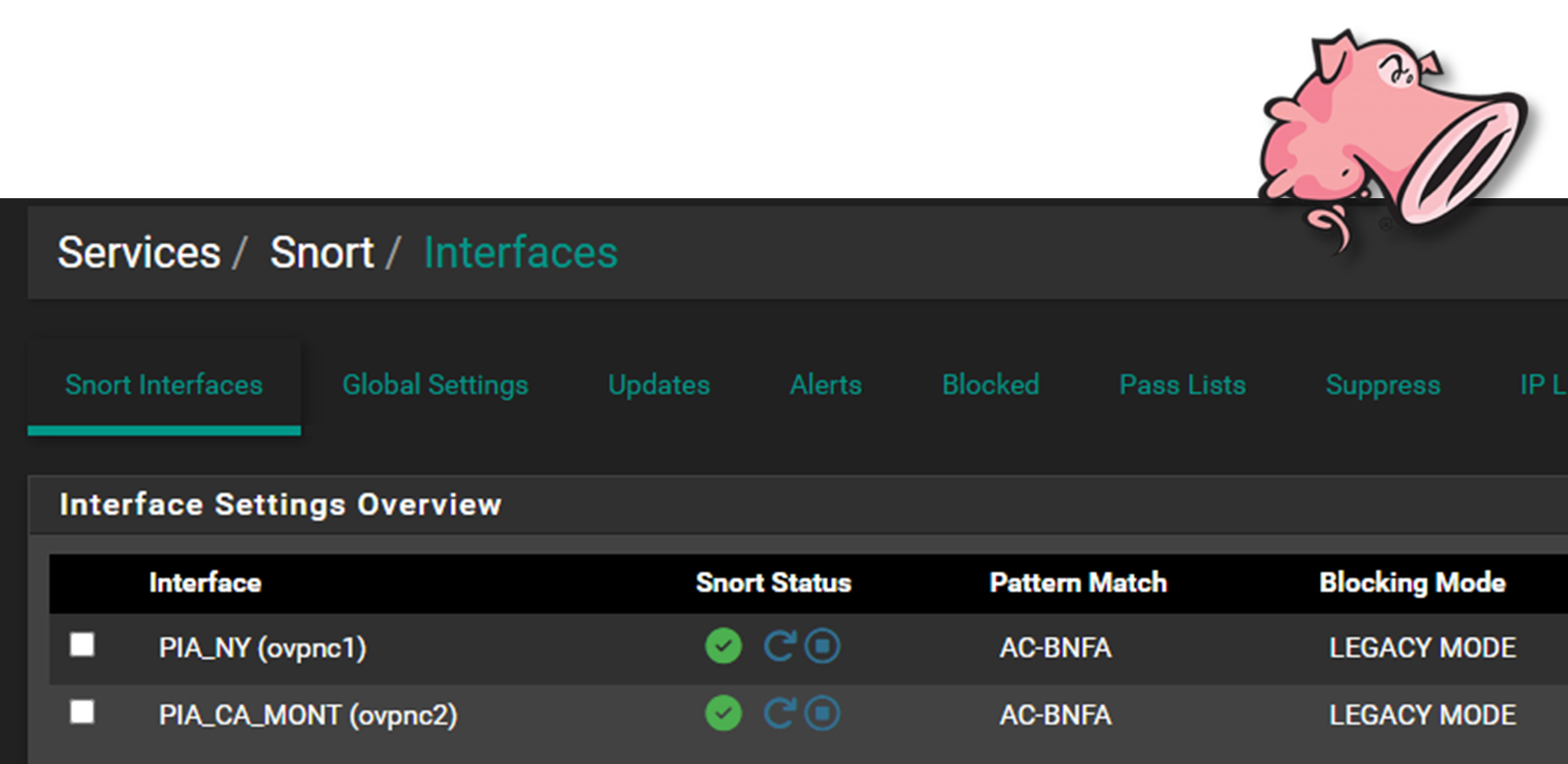
Deployment: Active on PIA VPN interfaces (monitors encrypted tunnel egress)
Mode: LEgacy (IDS) mode for outbound traffic inspection
Rulesets:
- Snort Community Rules
- Talos Intelligence Registered User Rules
- Custom rules for data exfiltration patterns
Rationale: While Suricata monitors north-south and east-west traffic, Snort provides additional coverage on VPN tunnels where traffic exits the lab. This dual-engine approach catches threats that might evade a single detection system.
CrowdSec - Behavioral Threat Intelligence
Architecture: Remediation Bouncer receives block decisions via LAPI, enforces at firewall
OPNsense Microsegmentation Firewall
Deployment Overview
A standalone OPNsense VM provides an additional security boundary for sensitive lab assets. Positioned behind the pfSense perimeter, it enforces microsegmentation policies, isolates high‑value systems, and applies independent firewall rules, IDS/IPS policies, and access controls.
Security Impact
- Prevents lateral movement into sensitive subnets
- Independent policy engine ensures compromise of pfSense does not expose protected assets
- Additional IDS/IPS layer increases detection coverage
- Segmented logging improves visibility into east‑west traffic
Deployment Rationale
Microsegmentation is a core zero‑trust principle used in enterprise environments to isolate critical systems. Deploying OPNsense as a "firewall within a firewall" demonstrates layered security design, redundancy, and compartmentalization of trust domains.
Architecture Principles Alignment
Defense in Depth: Independent firewall layer behind pfSense perimeter
Secure by Design: Segmented networks, isolated rule sets, and dedicated IDS/IPS
Zero Trust: No internal subnet is implicitly trusted; access requires explicit policy
Interface Configuration
| Interface Name | Type | Network | Security Zone | Role |
|---|---|---|---|---|
| PROD_LAN | Physical (eth0) | 192.168.1.0/24 | Trusted | Uplink to production network; allows controlled ingress from ISO_LAN |
| ISO_LAN | Virtual (OPTx) | 10.20.0.0/24 | Restricted | Isolated segment for sensitive hosts; tightly scoped egress rules |
Protected Assets (ISO_LAN):
- Vulnerability management scanners (OpenVAS, Nessus)
- Configuration management (Ansible control node)
- Security logging infrastructure (Splunk forwarder)
- Certificate authority and PKI services
- Backup repositories with encrypted data
Firewall Policy Philosophy:
Default Deny with Explicit Allow - Zero trust model where all traffic is blocked unless explicitly permitted by rule. This inverts traditional firewall logic and ensures unknown traffic patterns are automatically rejected.
Fortinet FortiGate 30D Appliance
Deployment Overview
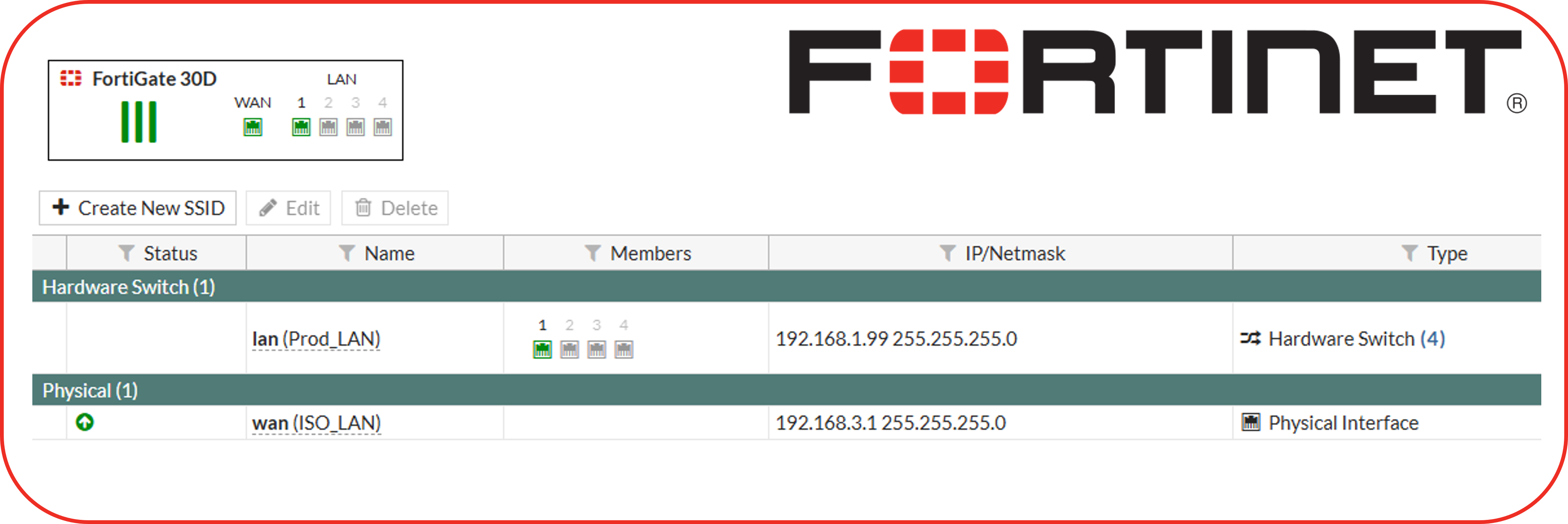
The FortiGate 30D serves as a dedicated microsegmentation firewall protecting the management VLAN (192.168.3.0/24). Operating in unlicensed mode as an end-of-support device, it provides basic Layer 3/4 firewall functionality, SSL VPN access, and serves as a hands-on platform for FortiOS CLI and GUI administration. Despite lacking current threat intelligence updates, the appliance demonstrates enterprise firewall concepts including policy-based routing, SSL VPN configuration, and interface-based security zones.
Security Impact
- Enforces strict access controls to management subnet (VLAN 3)
- SSL VPN provides encrypted remote access to administrative interfaces
- Policy-based firewall rules segment management traffic from production workloads
- Hands-on experience with enterprise-grade firewall appliance management
- Demonstrates defense-in-depth by adding physical firewall layer behind virtual pfSense/OPNsense
Deployment Rationale
Fortinet holds significant market share in enterprise network security, making FortiOS proficiency valuable for security roles. Operating an end-of-life appliance demonstrates understanding of legacy system risk management, compensating controls deployment, and resource-constrained security operations. The appliance serves educational purposes for Fortinet NSE certification preparation and FortiOS command-line interface skill development.
Architecture Principles Alignment
- Defense in Depth: Physical appliance provides hardware-based firewall enforcement independent of virtual infrastructure
- Secure by Design: Default-deny firewall policies; SSL VPN requires certificate-based authentication
- Zero Trust: Management VLAN access requires explicit firewall rules; no implicit trust between zones
Diagram Placeholder: FortiGate Dashboard Screenshot
Configuration Highlights
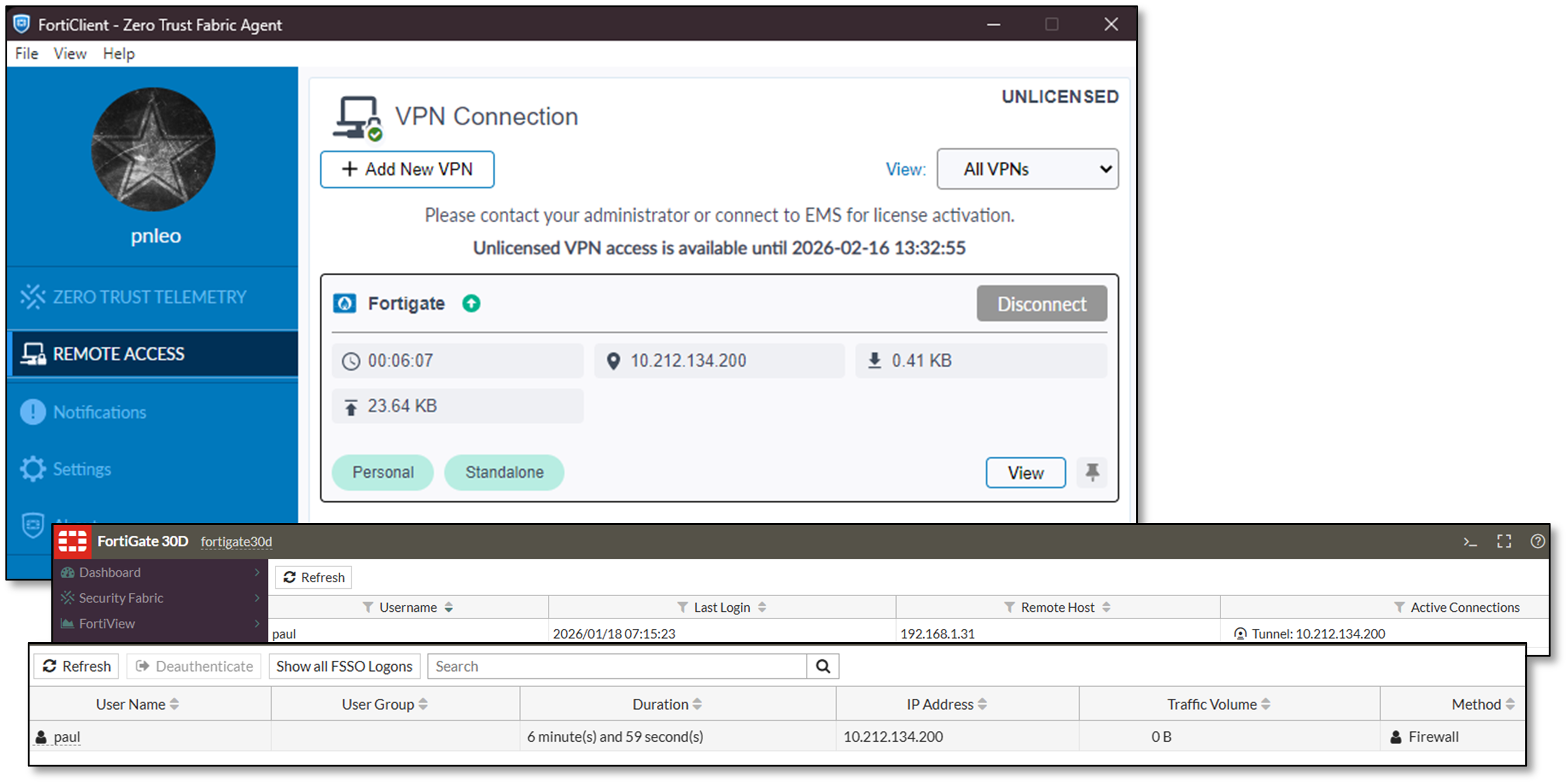
SSL VPN Configuration:
- Certificate-based authentication for remote administrative access
- Split-tunnel routing directs only management traffic through VPN
- FortiClient compatibility for Windows, macOS, Linux endpoints
- Per-user access policies restrict VPN access to authorized administrators
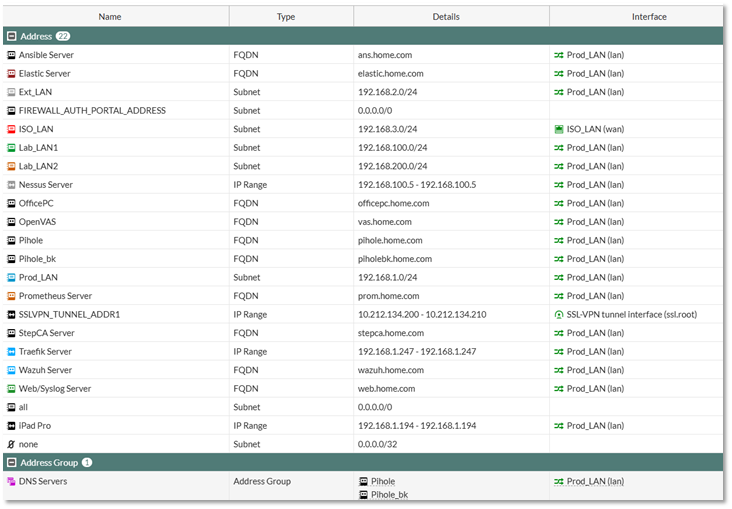
Firewall Policy Architecture (VLAN 3 Protection):
- Default-deny ingress from all external zones
- Explicit allow rules for SSH (port 22), HTTPS (port 443) from trusted source IPs
- Stateful inspection tracks connection state for allowed flows
- Logging enabled for all policy hits to support forensic analysis
Interface Configuration:
- Internal (port1): 192.168.3.1/24 - Management VLAN gateway
- External (port2): 192.168.1.x/24 - Uplink to production network
- DMZ (port3): Reserved for future isolated services deployment
Limitations and Compensating Controls
Due to end-of-support status:
- No current threat intelligence updates - Compensated by pfSense Suricata/Snort IDS/IPS
- No firmware updates available - Mitigated by restricting management VLAN exposure
- Limited UTM features - Supplemented by pfBlockerNG, CrowdSec, SafeLine WAF
- Educational use only - Not relied upon for production-critical security enforcement
Use Cases
- Fortinet NSE certification lab environment
- FortiOS CLI command practice and automation scripting
- SSL VPN troubleshooting and configuration testing
- Firewall rule optimization and policy analysis
- Vendor-neutral firewall concepts demonstration
Palo Alto PAN-OS KVM Virtual Firewalls
Deployment Overview
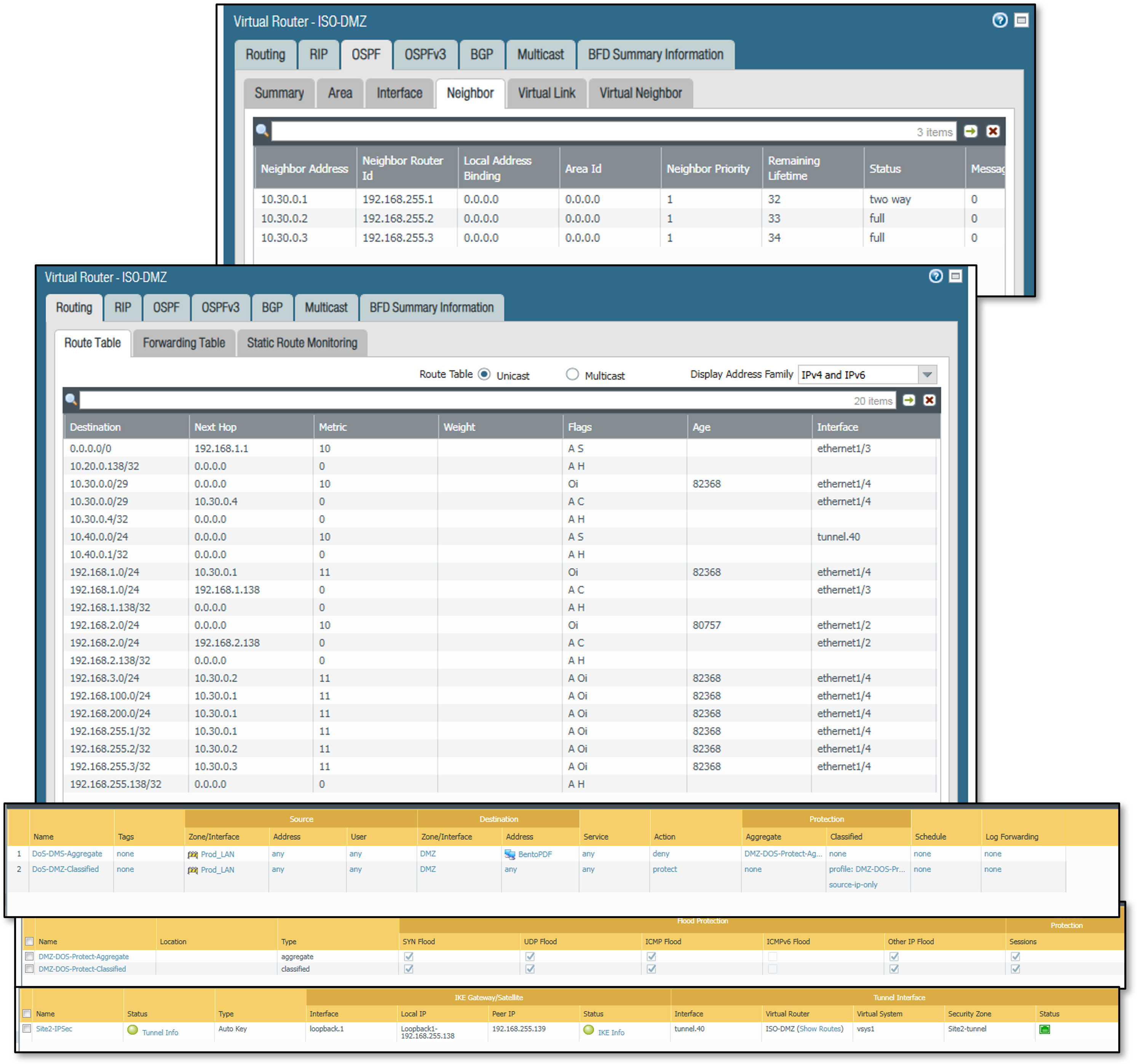
Two Palo Alto VM-Series firewalls deployed as KVM guests extend the security architecture with next-generation firewall (NGFW) capabilities including App-ID, User-ID, and advanced threat prevention. The first instance (PA-FW DMZ-ISO, mgmt: 192.168.99.138) functions as the primary NGFW, providing zone enforcement across the DMZ (192.168.2.0/24), isolated LAN segment ISO_LAN1 (10.20.0.0/24), and the production network (Prod_LAN, 192.168.1.0/24). The second instance (PA-FW Site2, mgmt: 192.168.99.139) simulates a remote branch site (10.40.0.0/24) connected to the primary firewall via an IPSec site-to-site tunnel. Both VMs operate within the ISO-DMZ virtual router and integrate with the home.com Active Directory domain for identity-based policy enforcement.
Security Impact
- App-ID inspects traffic at Layer 7, blocking disallowed applications regardless of port or protocol
- User-ID maps Active Directory group membership to firewall policy, enabling identity-aware access control without per-host rules
- IPSec site-to-site tunnel (AES-256/SHA-1) simulates branch office connectivity and validates encrypted inter-site traffic flows
- NAT policies enforce strict address translation boundaries between DMZ, internal, and external zones
- Security profiles (AV, anti-spyware, URL filtering, WildFire) applied per-policy provide multi-layer inline threat inspection
- OSPF adjacencies with Cisco lab routers (R1, R2, R3) over a dedicated OSPF zone (10.30.0.4/29) validate dynamic routing in a mixed-vendor environment
- Netflow export to NSM (192.168.1.48:2056) feeds network traffic visibility into the observability stack
Deployment Rationale
Palo Alto Networks holds a leading position in enterprise NGFW deployments. Operating VM-Series on KVM demonstrates platform-agnostic deployment and validates key NGFW differentiators: application-layer enforcement, identity integration, and advanced threat prevention. The dual-VM topology with IPSec interconnect mirrors hub-and-spoke branch architectures. Active Directory User-ID integration reflects production policy models where enforcement follows the user rather than the IP address.
Architecture Principles Alignment
- Zero Trust: Identity-based policies require explicit AD group membership for access; zone membership alone grants no implicit trust
- Defense in Depth: PA-FW sits inline between Prod_LAN, ISO_LAN1, and DMZ, adding a dedicated NGFW inspection layer independent of the pfSense/OPNsense perimeter
- Least Privilege: Differentiated group policies (VIPUserGroup, RestrictedUserGroup, Domain Users) enforce tiered access to internet resources, applications, and server segments
Interface and Zone Architecture
PA-FW DMZ-ISO operates with four routed Layer 3 interfaces plus virtual wire, loopback, and tunnel interfaces — all within the ISO-DMZ virtual router:
| Interface | Zone | Address | Function |
|---|---|---|---|
| ethernet1/1 | ISO_LAN1 | 10.20.0.138/24 | Isolated LAN (inside) |
| ethernet1/2 | DMZ | 192.168.2.138/24 | DMZ segment |
| ethernet1/3 | Prod_LAN | 192.168.1.138/24 | Production LAN (outside/uplink) |
| ethernet1/4 | OSPF | 10.30.0.4/29 | OSPF peering with lab routers |
| ethernet1/10-11 | Prod-vWire | N/A | Virtual wire — transparent L2 inspection |
| ethernet1/24.10/20/30 | L2-wired | N/A | L2 subinterfaces for VLAN switching |
| loopback.1 | Site2-tunnel | 192.168.255.138/32 | IPSec tunnel source / OSPF router-ID |
| tunnel.1 | GlobalProtect | N/A | GlobalProtect VPN termination |
| tunnel.40 | Site2-tunnel | N/A | IPSec tunnel to Site2 |
PA-FW Site2 uses a two-interface topology:
| Interface | Zone | Address | Function |
|---|---|---|---|
| ethernet1/1 | site2-local | 10.40.0.2/24 | Local site network |
| ethernet1/2 | Prod_LAN | 192.168.1.139/24 | Uplink / tunnel source |
| loopback.1 | Site1-tunnel | 192.168.255.139/32 | IPSec tunnel source |
| tunnel.40 | Site1-tunnel | N/A | IPSec tunnel to DMZ-ISO |
IPSec Site-to-Site Tunnel
A site-to-site IPSec tunnel connects ISO_LAN1 (10.20.0.0/24) on PA-FW DMZ-ISO to the Site2 local network (10.40.0.0/24) on PA-FW Site2. The tunnel is sourced from loopback.1 on each device (192.168.255.138 and 192.168.255.139), decoupling the IKE endpoint from physical interface addressing.
- Phase 1 (IKEv1 Main Mode): AES-256-CBC, SHA-1, DH Group 2, 8-hour lifetime, pre-shared key authentication
- Phase 2 (ESP tunnel): AES-256-CBC, SHA-1, no PFS, 8-hour lifetime, proxy IDs 10.20.0.0/24 ↔ 10.40.0.0/24. Security policies on both devices permit bidirectional IPSec traffic between protected subnets. Loopback keepalive rules maintain health monitoring between the 192.168.255.x endpoints.
NAT Configuration
- Destination NAT — Outside-Access-to-BentoPDF: Inbound traffic from Prod_LAN destined to 192.168.1.138 is translated to DMZ server 192.168.2.12. WildFire, AV (Custom1), and strict anti-spyware profiles applied.
- Source NAT — DMZ-to-Outside-NAT: Outbound traffic from the DMZ zone is dynamically translated to the PA-FW Prod_LAN interface address (192.168.1.138) using dynamic IP-and-port (NAPT), providing DMZ hosts internet access while blocking direct inbound connections.
Active Directory Integration (User-ID)
PA-FW DMZ-ISO integrates with the home.com Active Directory domain (dc01.home.com, 192.168.1.152) via LDAP on port 389. User-ID maps authenticated domain users and group memberships to source-user fields in security policy, enabling identity-based enforcement independent of IP address.
AD global security groups defined for policy assignment:
- VIPUserGroup — Permits expanded application set including streaming media and executive internet access
- RestrictedUserGroup — Explicitly denies netflix and youtube; URL filtering enforced
- VPNGroup — Controls GlobalProtect VPN access via allow-list
- FirewallAdmins — Controls who can administer the Palo Alto VMs
- ServerAdmins — Controls access to various Microsoft servers
- Monitoring-Server-Admins — Controls access to various monitoring servers
User identification is enabled on ISO_LAN1, DMZ, Prod_LAN, and OSPF zones.
Firewall Policy Architecture
Deployment Overview
The lab implements a four-platform firewall architecture (pfSense, OPNsense, FortiGate, Palo Alto PAN-OS) using zone-based segmentation with zero-trust principles. Each VLAN and network segment operates as an isolated security zone with explicit allow rules — no implicit trust between networks. pfSense/OPNsense and FortiGate rules are deployed directionally on ingress interfaces. Palo Alto policies are enforced via vsys1 rulebase with bidirectional zone-pair matching augmented by App-ID application identification and User-ID AD group membership.
Security Impact:
- Zone-based segmentation prevents lateral movement between network tiers
- Default-deny policies block unauthorized traffic at all zone boundaries
- Palo Alto App-ID enforces application control at Layer 7 independent of port or protocol
- User-ID group policies ensure access decisions follow the identity, not the IP address
- IPSec tunnel policies on PA-FW enforce encrypted path enforcement between sites at the firewall policy layer
- Alias-driven rule definitions on pfSense/OPNsense/FortiGate enable rapid updates without rule rewrites
- Comprehensive logging across all platforms feeds SOC visibility and threat correlation
Deployment Rationale:
Enterprise networks rely on zone-based firewalls to enforce trust boundaries between segments (DMZ, production, management). The addition of Palo Alto NGFW introduces application-layer and identity-layer controls that traditional stateful firewalls cannot replicate — App-ID replaces port-based rules, User-ID eliminates the need for IP-to-user mapping tables, and security profiles apply inline threat inspection consistently across all permitted flows.
Architecture Principles Alignment:
- Defense in Depth: Four independent policy engines with overlapping enforcement; Palo Alto adds App-ID and User-ID layers on top of pfSense/OPNsense stateful inspection
- Secure by Design: Default-deny baseline with explicit allow rules across all platforms; automated threat feed integration
- Zero Trust: Cross-zone traffic requires explicit authorization; Palo Alto policies additionally require AD group membership for identity-sensitive rules
Policy Framework
Directional Rule Placement
Rules apply on the ingress interface where traffic enters the firewall, ensuring deterministic packet flow, predictable state table creation, and consistent logging. Palo Alto zone-pair matching operates bidirectionally on source zone, destination zone, source address, destination address, source-user (AD group), and application (App-ID).
Alias Architecture
Host, network, and service definitions use reusable aliases:
- Host Groups: WEB_SERVERS, SOC_APPS, K3S_NODES, ADMIN_HOSTS, DNS_SERVERS, PROXY_HOST
- Network Groups: INTERNAL_SUBNETS, ISO_SUBNETS, LAB_NETWORKS
- Service Groups: WEB_PORTS, SOC_PORTS, K3S_PORTS, ADMIN_PORTS, WAZUH_PORTS
Aliases enable single-point updates — adding a new web server requires updating WEB_SERVERS alias, not 15+ individual rules.
Logging and Detection
All security-relevant rules generate logs tagged for SIEM ingestion (Splunk/Elastic/Wazuh). Suricata/Snort rules normalize alerts across platforms for consistent threat detection and correlation.
Ruleset Summary
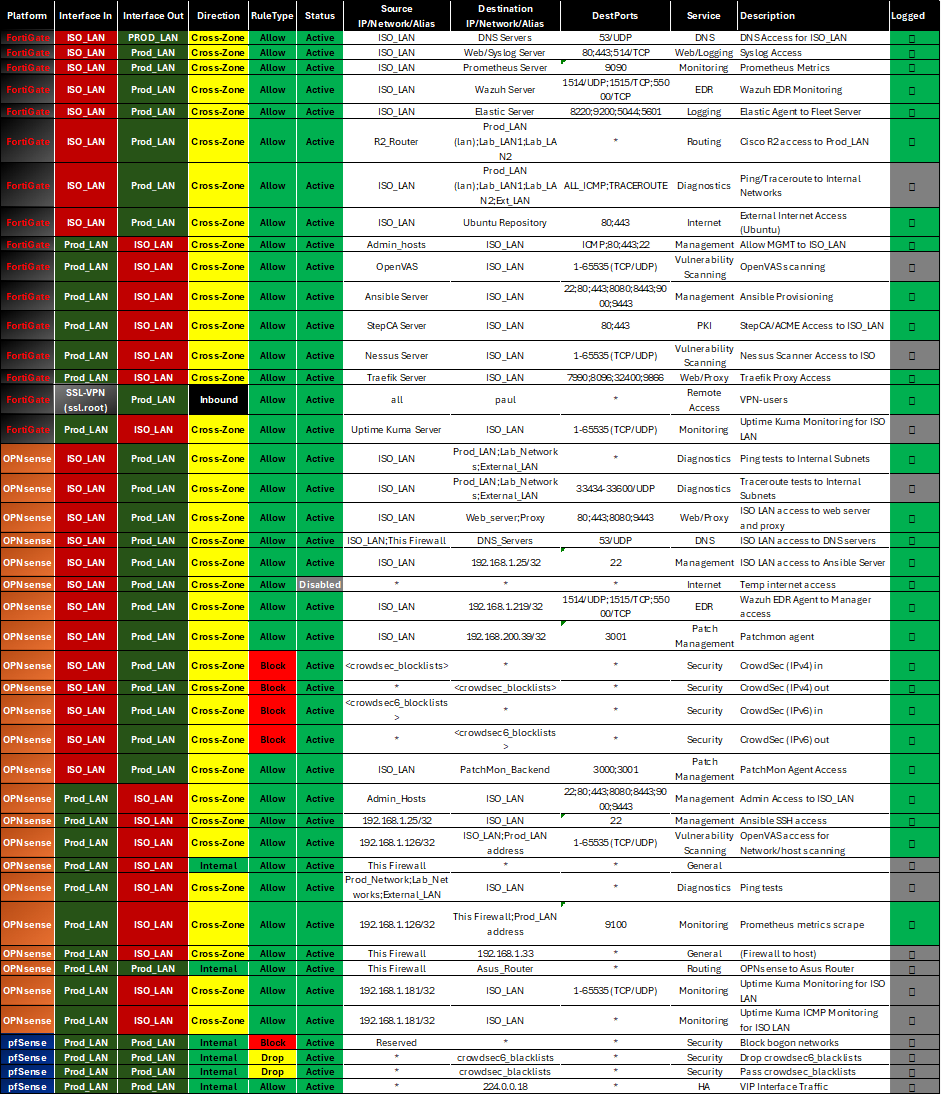
Total Rules Deployed: 133 rules across three platforms
Rule Distribution by Platform:
- FortiGate (Management Firewall): 16 rules protecting Management and ISO_LAN2 192.168.3.0/24 subnet
- OPNsense (Microsegmentation): 23 rules isolating sensitive ISO_LAN (10.20.0.0/24)
- pfSense (Edge/Core): 94 rules managing perimeter, inter-VLAN routing, VPN policy
Rule Categories:
- Cross-Zone Access: 78 rules (59%) — traffic between security zones
- Security Controls: 18 rules (14%) — CrowdSec blocks, bogon filters, CARP HA
- Diagnostics: 12 rules (9%) — ICMP/traceroute for network troubleshooting
- Management Access: 15 rules (11%) — administrative SSH/HTTPS to infrastructure
- Monitoring/EDR: 10 rules (8%) — Wazuh agents, Prometheus metrics, log forwarding
Representative Rules:
| Platform | Source | Destination | Application / Service | Source User | Action | Logged |
|---|---|---|---|---|---|---|
| pfSense | Ext_LAN | Web_Server | TCP 80, 443, 8080 | — | Allow | Yes |
| pfSense | ANY | crowdsec_blocklists | ANY | — | Drop | No |
| pfSense | Lab_LAN2 | Elastic_Server | TCP 8220, 9200, 5044 | — | Allow | Yes |
| FortiGate | ISO_LAN | DNS_Servers | UDP 53 | — | Allow | Yes |
| FortiGate | ISO_LAN | Wazuh_Server | UDP 1514, TCP 1515 | — | Allow | Yes |
| OPNsense | Admin_Hosts | ISO_LAN | TCP 22, 80, 443, 8080 | — | Allow | Yes |
| Palo Alto | ISO_LAN1 | Site2-tunnel | Any (IPSec proxy: 10.20.0.0/24 → 10.40.0.0/24) | Any | Allow | Yes |
| Palo Alto | Site2-tunnel | ISO_LAN1 | Any (IPSec proxy: 10.40.0.0/24 → 10.20.0.0/24) | Any | Allow | Yes |
| Palo Alto | ISO_LAN1 | DMZ, Prod_LAN | netflix, youtube | RestrictedUserGroup (AD) | Deny | Yes |
| Palo Alto | ISO_LAN1 | DMZ, Prod_LAN | google-base, http-video, web-browsing | VIPUserGroup (AD) | Allow + Profiles | Yes |
| Palo Alto | Any | Any | ms-teams, O365, SharePoint, ssl | Domain Users (AD) | Allow + File Block | Yes |
| Palo Alto | Prod_LAN | DMZ | Any → DNAT 192.168.2.12 | Any | Allow + WildFire/AV | Yes |
Security Enforcement Highlights:
- CrowdSec Integration: 12 block rules across pfSense/OPNsense/FortiGate enforce behavioral threat intelligence
- Bogon Filtering: Reserved/private IP ranges blocked on WAN-facing interfaces
- Default Deny: Implicit deny-all terminates each interface ruleset and Palo Alto zone-pair rulebase
- VPN Kill Switch: pfSense floating rules block LAN egress when VPN tunnels fail
- Palo Alto IPSec Enforcement: Tunnel security policies enforce that inter-site traffic traverses the encrypted path; direct routing between 10.20.0.0/24 and 10.40.0.0/24 outside the tunnel is denied
- Identity-Driven Deny: Palo Alto RestrictedUserGroup rules enforce application-level restrictions based on AD group membership at the firewall layer, independent of endpoint controls
Zone Trust Model:
Trusted Zone (Prod_LAN) ←→ Restricted Zone (ISO_LAN)
  ↓                              ↓
Lab Zones (Lab_LAN1/2) ←→ DMZ (Ext_LAN)
  ↓
Internet (via VPN/direct routing)
Cross-zone traffic requires explicit firewall rules with service-level restrictions. No zone has blanket access to another—even administrative subnets require per-service authorization.
Configuration Examples
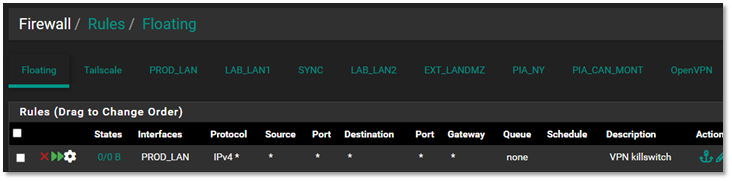
pfSense Rule Configuration (Prod_LAN Interface)
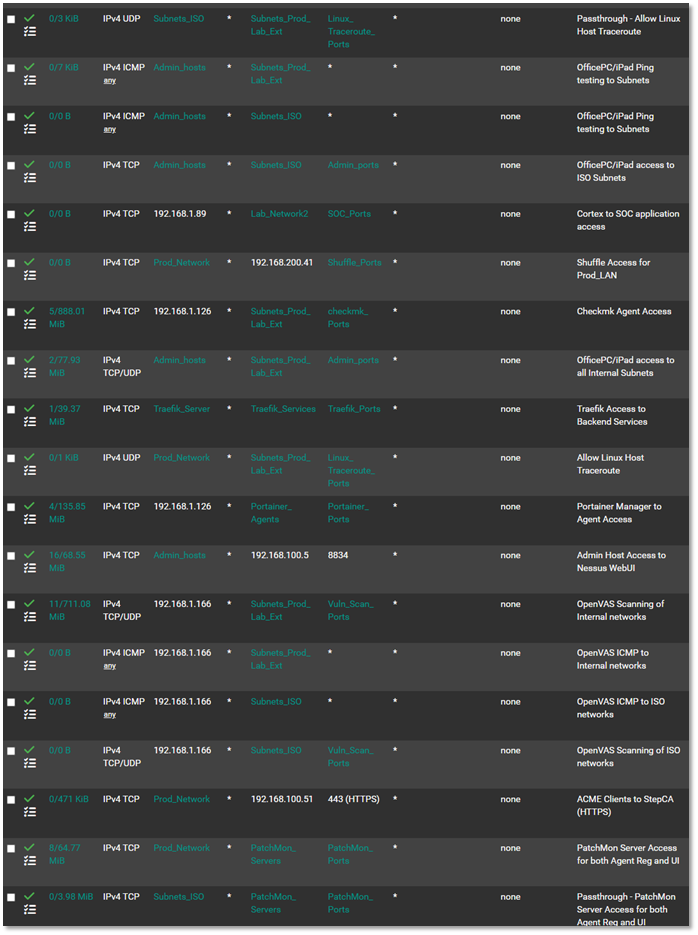
VPN Floating Rule Configuration
VPN Kill Switch Details:
This critical floating rule ensures that if the PIA VPN tunnel drops (failure, misconfiguration, or provider outage), traffic from LAN/LAN2 networks cannot egress through the unencrypted Verizon WAN connection. The rule triggers when the gateway is not one of the PIA interfaces, immediately blocking traffic to prevent IP leakage or unintended cleartext transmission.
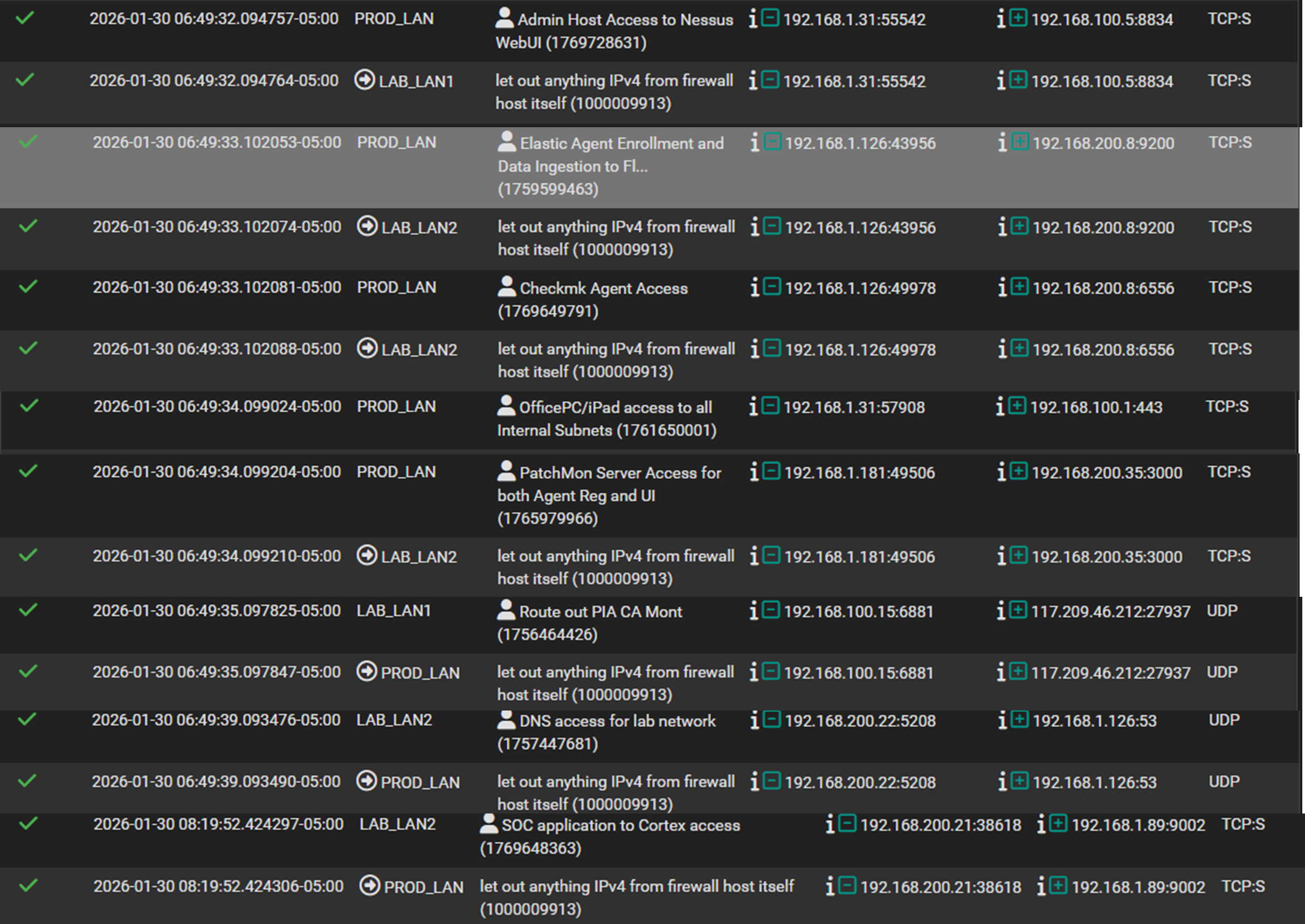
pfSense Log Examples
OPNsense Rule Configuration
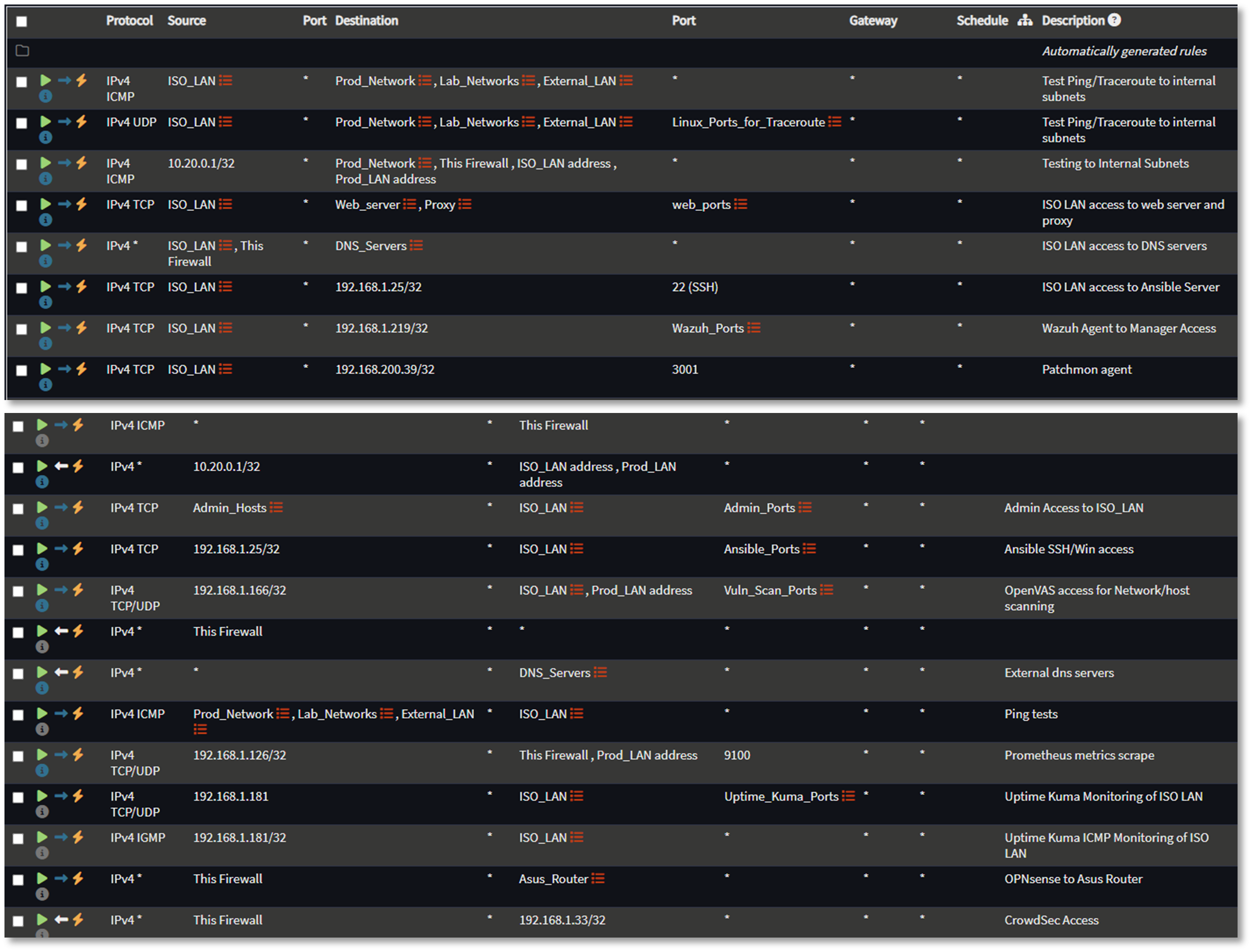
FortiGate Rule Configuration
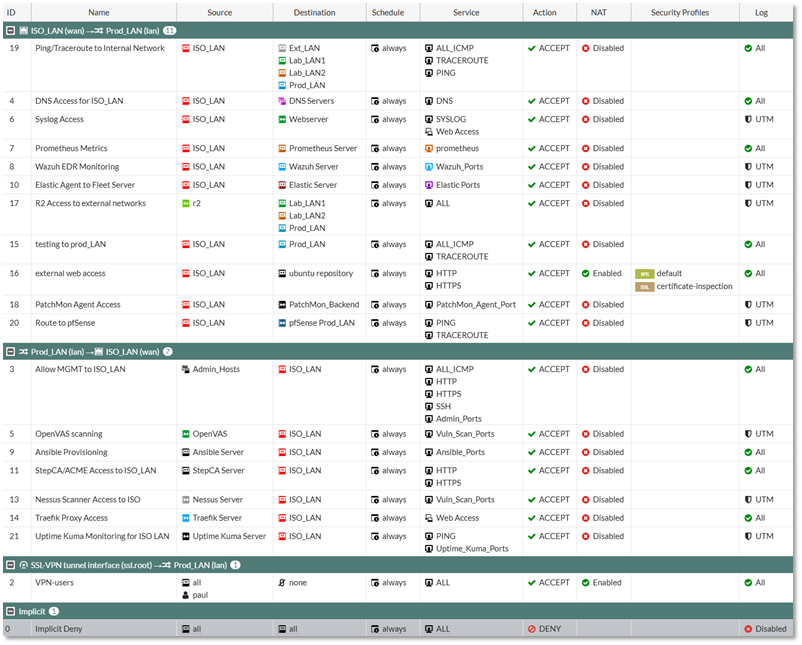
Palo Alto Security Policies
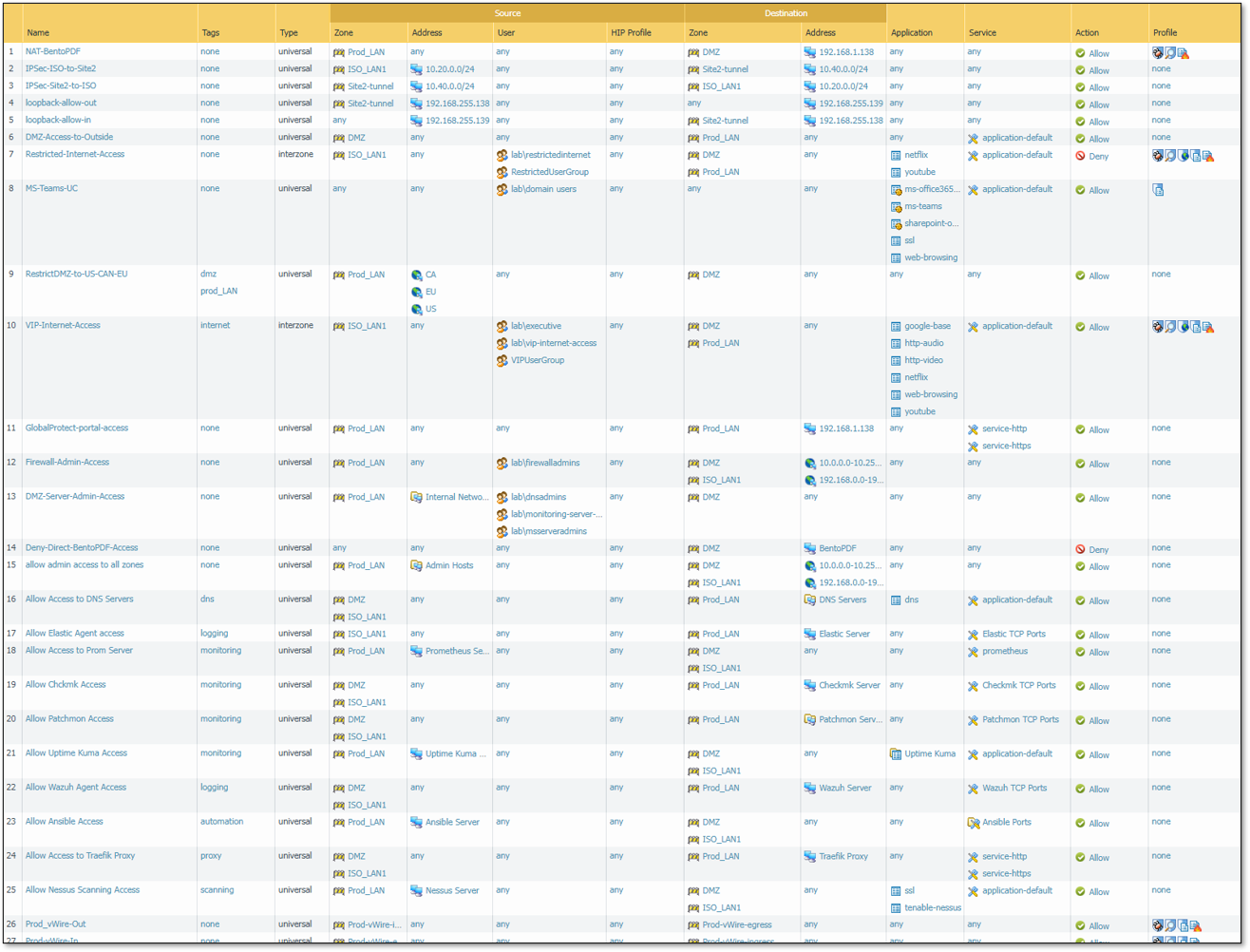
Firewall Rule Table
Intrusion Detection/Prevention Solutions
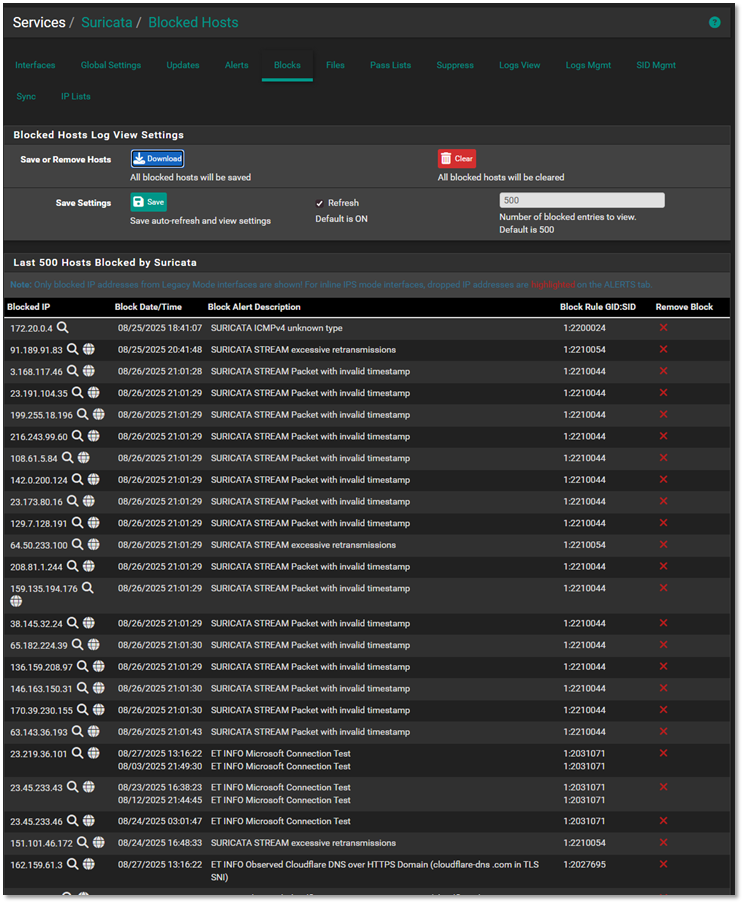
Suricata Intrusion Detection/Prevention System on pfSense
Deployment Overview
Each pfSense node runs Suricata in inline IPS mode, inspecting four internal LAN interfaces. Suricata performs deep packet inspection, signature‑based detection, and behavioral anomaly detection. Rule sets include Emerging Threats, custom local rules, and tuned signatures for lab‑specific traffic patterns.
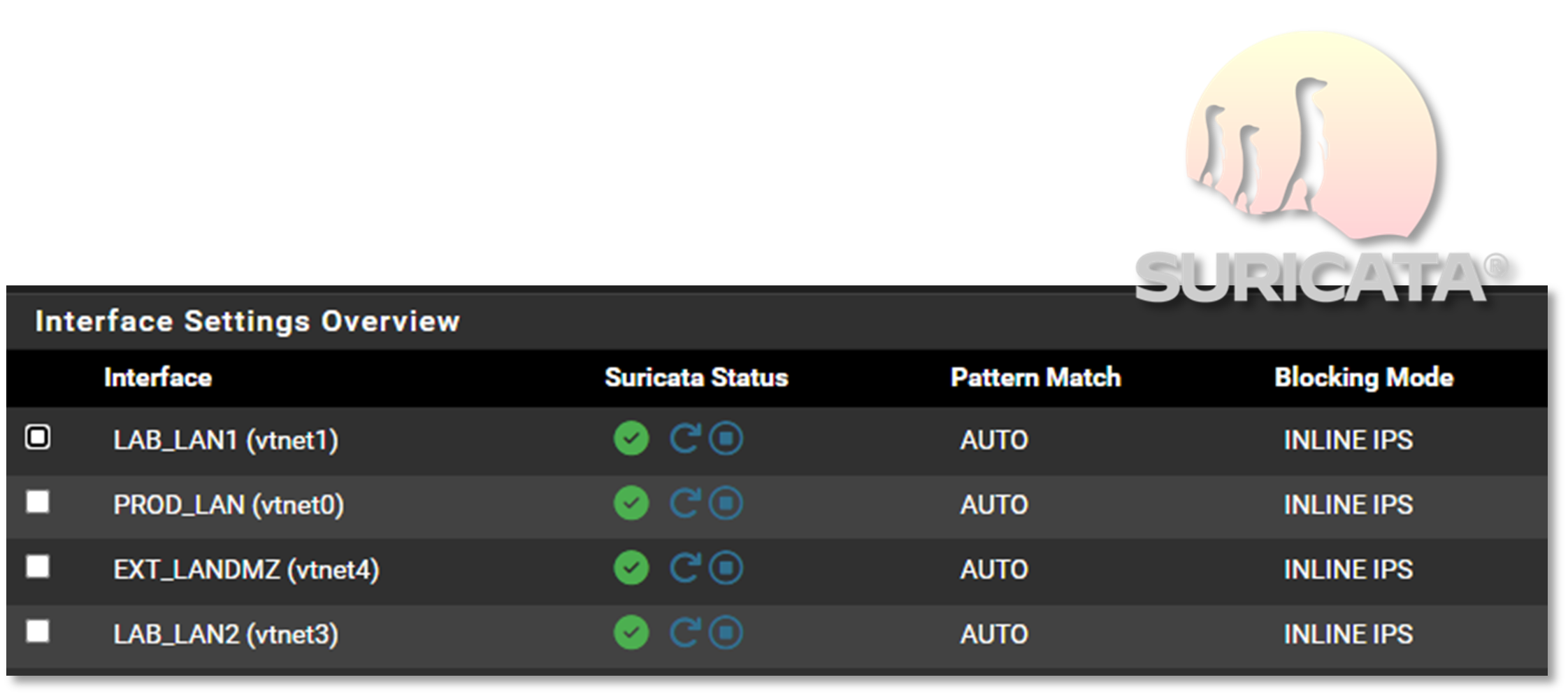
Security Impact
- Real‑time blocking of known attack signatures
- Deep packet inspection identifies malicious payloads and protocol anomalies
- Custom rules detect lab‑specific threats and reconnaissance
- Alerts forwarded to Splunk for centralized correlation
- Inline mode prevents malicious traffic before it reaches internal systems
Deployment Rationale
Suricata is widely used in enterprise IDS/IPS deployments due to its performance, rule flexibility, and multi‑threaded architecture. Running Suricata inline on pfSense mirrors production edge security designs and demonstrates proficiency with rule tuning, packet inspection, and IPS enforcement.
Architecture Principles Alignment
Defense in Depth: IDS/IPS layer reinforces firewall ACLs and WAF protections
Secure by Design: Inline blocking, updated rule feeds, and custom signatures
Zero Trust: All traffic inspected; no packet trusted without validation
Snort Intrusion Detection/Prevention System on pfSense
Deployment Overview
Snort runs in legacy (IDS) mode on each pfSense node, monitoring PIA VPN interfaces for malicious traffic. This provides an additional detection engine specifically focused on encrypted or tunneled traffic paths.
Security Impact
- Detects threats traversing VPN tunnels
- Provides signature diversity alongside Suricata
- Alerts forwarded to Splunk for unified SOC visibility
Deployment Rationale
Running both Suricata and Snort mirrors enterprise SOC environments where multiple IDS engines provide overlapping detection coverage. This reduces blind spots and increases detection accuracy across encrypted or obfuscated traffic.
Architecture Principles Alignment
Defense in Depth: Dual IDS engines reduce reliance on a single detection method
Secure by Design: Custom updated rule sets
Zero Trust: VPN traffic inspected and validated; no implicit trust in encrypted tunnel
Custom Ruleset Architecture
Overview
Interface-specific Suricata and Snort rulesets deployed per subnet. Each ruleset addresses the security requirements of its associated network segment.
Rule Categories
- Linux/SSH Security Controls
- Reconnaissance & Scanning Detection
- Lateral Movement Prevention
- SMB/NetBIOS Hygiene
- Test & Validation Rules
Network Segments & Security Posture
Prod_LAN (192.168.1.0/24)
Role: Primary production network
Security Objectives:
- Block LAB/ISO → PROD lateral movement
- Detect reconnaissance and SSH abuse
- Enforce SMB protocol hygiene
Detection Coverage:
- SSH brute-force attacks (threshold-based)
- Privilege escalation keywords (sudo detection)
- Nmap OS fingerprinting
- Cross-segment port access (LAB→PROD high-risk ports)
- ISO network isolation violations
- SMBv1/NetBIOS legacy protocol usage
- Rule validation traffic
Lab_LAN1 (192.168.100.0/24)
Role: Primary development and testing environment
Security Objectives:
- Prevent LAB1 → PROD unauthorized access
- Detect internal reconnaissance activity
- Maintain ISO network isolation
Detection Coverage:
- SSH authentication abuse
- Privilege escalation indicators
- Network scanning (Nmap signatures)
- Cross-segment violations (LAB1→PROD)
- ISO→LAB1 boundary violations
- SMB/NetBIOS misuse
Lab_LAN2 (192.168.200.0/24)
Role: Isolated sandbox for malware analysis and adversary simulation
Security Objectives:
- Prevent LAB2 → PROD compromise
- Detect malicious reconnaissance patterns
- Enforce strict ISO network containment
Detection Coverage:
- SSH attack patterns
- Command execution monitoring
- Active scanning detection
- LAB2→PROD isolation enforcement
- ISO→LAB2 traffic violations
- Protocol security controls
EXT_LAN/DMZ (192.168.2.0/24)
Role: DMZ for external-facing and semi-trusted services
Security Objectives:
- Prevent DMZ → Internal lateral movement
- Detect DMZ-originated reconnaissance
- Protect HA Sync and ISO infrastructure
Detection Coverage:
- DMZ→Internal SSH blocking
- Brute-force detection
- DMZ→Internal scan attempts
- DMZ→ISO isolation enforcement
- DMZ→HA Sync protection
- SMB protocol controls
Rule Engineering Methodology
Detection Logic
Rules implement defense-in-depth through:
- Signature-based detection: Pattern matching (content, pcre)
- Behavioral analysis: Statistical thresholds (detection_filter, threshold)
- Policy enforcement: Network segmentation violations
- Anomaly detection: Protocol abuse and legacy service usage
Rule Performance Optimization
- Interface-specific deployment reduces ruleset overhead
- Fast-pattern matching on content rules
- Stateful tracking (by_src, by_dst) for threshold efficiency
- Tuned thresholds based on network baseline (e.g., count 5 in 60s for SSH)
False Positive Mitigation
- Environment-specific tuning per network segment
- Stateful detection (detection_filter vs. threshold)
- Protocol-aware inspection (flags, content depth)
- Contextual alerting (source/destination network awareness)
Rule Examples
SSH / Linux Security Controls
# Brute-force detection with stateful tracking
alert tcp any any -> 192.168.100.0/24 22 \
(msg:"LAB1: SSH Brute Force Attempt"; flags:S; detection_filter:track by_src, count 5, seconds 60; sid:910001; rev:2;)

# Cross-segment SSH policy enforcement
alert tcp 192.168.2.0/24 any -> 192.168.100.0/24 22 \
(msg:"LAB1: SSH Attempt from EXT_LAN"; sid:910002; rev:1;)

# Privilege escalation keyword monitoring
alert tcp any any -> 192.168.100.0/24 22 \
(msg:"LAB1: sudo Keyword in SSH Session"; content:"sudo"; sid:910003; rev:1;)
Reconnaissance & Scanning Detection
# Tool-specific signature detection
alert tcp any any -> 192.168.100.0/24 any \
(msg:"LAB1: Nmap OS Detection Scan"; content:"|4E 4D 41 50|"; sid:910004; rev:1;)

# Behavioral scan detection via port sweep threshold
alert tcp 192.168.100.0/24 any -> 192.168.1.0/24 any \
(msg:"LAB1: LAB → PROD Port Scan"; flags:S; threshold:type both, track by_src, count 20, seconds 10; sid:900008; rev:1;)
Lateral Movement Prevention
# High-risk port blocking across trust boundaries
alert tcp 192.168.200.0/24 any -> 192.168.1.0/24 [22,135,139,445,3389] \
(msg:"LAB2: LAB → PROD Unauthorized High-Risk Port"; sid:920005; rev:3;)

# Isolation network policy enforcement
alert ip [10.20.0.0/24,192.168.3.0/24] any -> 192.168.200.0/24 any \
(msg:"LAB2: ISO → LAB2 Traffic (Policy Violation)"; sid:920006; rev:1;)
SMB / NetBIOS Hygiene
# Legacy protocol detection
alert tcp any any -> any 139 \
(msg:"NetBIOS Session Service Detected"; sid:9xxxxx; rev:1;)

# SMBv1 usage monitoring
alert tcp any any -> any 445 \
(msg:"SMBv1 Protocol Negotiation"; content:"|ff|SMB"; depth:8; sid:9xxxxx; rev:1;)
Custom Rule Breakdown Example:
SSH Brute Force Detection
Rule
alert tcp any any -> 192.168.100.0/24 22 \
(msg:"LAB1: SSH Brute Force Attempt"; flags:S; detection_filter:track by_src, count 5, seconds 60; sid:910001; rev:2;)
Field Breakdown:
| Field | Meaning | Impact |
|---|---|---|
alert |
Generate an alert when matched | Visible in Suricata → Elastic/Wazuh |
tcp |
Match only TCP traffic | SSH is TCP‑based |
any any |
Any source IP, any source port | Detects brute force from anywhere |
-> |
Direction operator | Only inbound SSH attempts |
192.168.100.0/24 22 |
Destination network + port | LAB1 SSH servers |
flags:S |
Match SYN packets only | Prevents noisy alerts from full SSH sessions |
detection_filter: track by_src, count 5, seconds 60 |
Threshold: 5 SYNs in 60 seconds from same IP | Classic brute‑force pattern |
sid:910001 |
Unique rule ID | Required for management |
rev:2 |
Revision number | Tracks rule updates |
Operational Impact
- Detects brute force attempts before authentication begins
- Low noise due to SYN only matching
- Helps identify compromised hosts or bots scanning SSH
- Works across VLAN boundaries
Suricata event log example

CrowdSec Behavioral Threat Intelligence
Deployment Overview
CrowdSec analyzes logs from firewalls, web servers, containers, and authentication systems to detect behavioral anomalies. It identifies brute‑force attempts, scanning activity, credential stuffing, and distributed attacks using a community‑driven threat intelligence model. Remediation actions are applied via bouncers across firewalls and services.
Security Impact
- Detects zero‑day and behavioral attacks missed by signature‑based IDS
- Community‑driven blocklists provide real‑time global threat intelligence
- Automated remediation reduces response time
- Integrates with pfSense, NGINX, and container workloads
Deployment Rationale
Behavior‑based detection is essential in modern environments where attackers use evasion techniques to bypass signature‑based systems. CrowdSec mirrors enterprise UEBA (User and Entity Behavior Analytics) platforms and demonstrates proficiency with log‑driven threat detection.
Architecture Principles Alignment
Defense in Depth: Behavioral analytics complements IDS/IPS and WAF layers
Secure by Design: Automated remediation and continuous log analysis
Zero Trust: No IP or user trusted without behavioral validation
| Component | Location | Role |
|---|---|---|
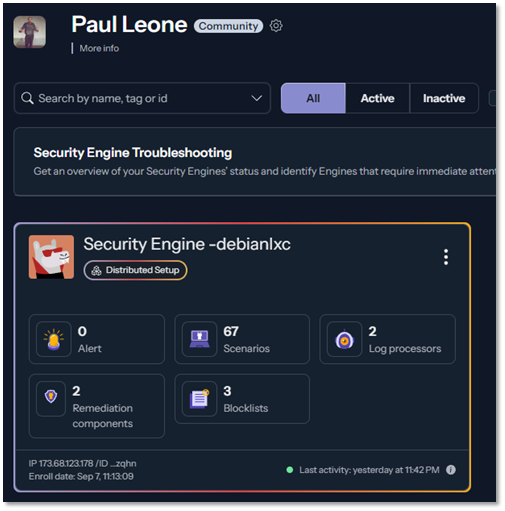
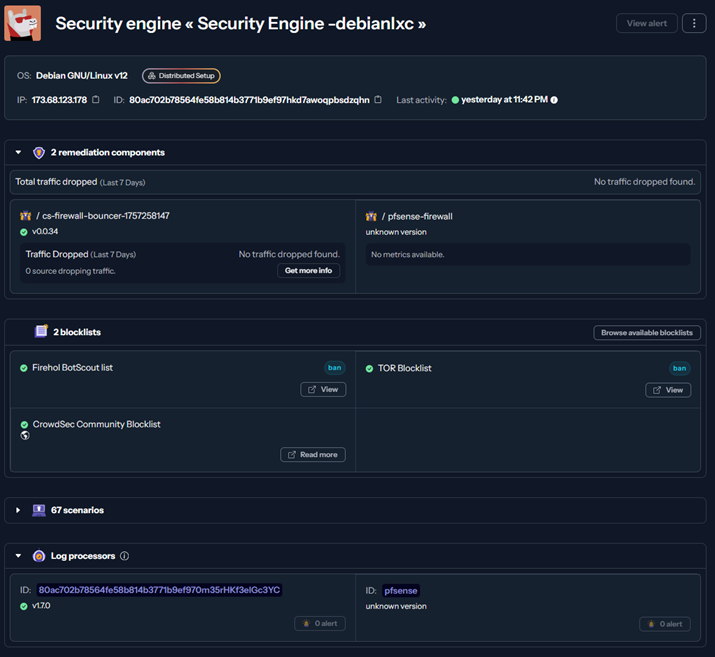
| CrowdSec Engine | Debian LXC | Log parsing, scenario evaluation, decision making |
| CrowdSec Logger | Debian LXC | Structured log collection from pfSense, Suricata, SSH |
| Remediation Bouncer | pfSense Firewall | Receives block decisions via LAPI, enforces at firewall |
| Hub Collections | CrowdSec Hub | Pre-configured parsers and scenarios for common attack patterns |
- Engine + Logger in LXC: The CrowdSec engine is running in a lightweight container. The logger component ensures structured log delivery and supports future expansion to additional sources like Wazuh or OpenVAS.
- pfSense Remediation: The firewall bouncer on pfSense receives decisions from the LAPI and applies real-time blocks at the network edge. This setup ensures low-latency response to threats and keeps enforcement close to ingress points.
- Hub Collections: Deployment of curated collections from the CrowdSec Hub, including:
- Blocklists
- Scenarios (SSH brute force, port scans)
- Parsers for pfSense
- LAPI Connectivity: The pfSense bouncer is authenticated via API key and successfully pulling decisions from the LAPI endpoint. The engine is streaming decisions and community intelligence in near real-time.
Scenarios Enabled:
- SSH brute force detection (10 failed attempts in 60s)
- HTTP scanning and enumeration
- Port scan detection
- CVE-specific exploit attempts
Community Intelligence:
- Shares anonymized attack signatures to global CrowdSec network
- Receives proactive blocks for IPs flagged by other CrowdSec users
- Real-time threat feed updates (>1M malicious IPs maintained)
Integration Points:
- Log Sources: pfSense (firewall logs), Suricata (IDS alerts), SSH (auth logs)
- Enforcement: Dynamic firewall rules via pfSense bouncer API
- Visibility: Decision stream visible in CrowdSec dashboard
Multi-Engine Intrusion Detection and Prevention
Layered IDS/IPS Strategy
| Engine | Vendor | Deployment Location | Detection Method | Rule Sets | Purpose |
|---|---|---|---|---|---|
| Suricata | OISF | pfSense LAN interfaces | Signature + Protocol Anomaly | Emerging Threats, ET Pro | Primary IPS (inline blocking) |
| Snort | Cisco/Talos | pfSense VLAN interfaces | Signature-based | Snort Community, VRT | Secondary IDS (monitoring) |
| CrowdSec | CrowdSec SAS | Dedicated Debian LXC | Behavioral Analytics | Community scenarios + custom | Brute-force/scan detection |
Why Multiple IDS/IPS Engines?
- Evasion Resistance: Attackers design exploits to bypass specific IDS engines; multiple engines provide redundancy
- Complementary Coverage: Suricata excels at protocol analysis (HTTP, TLS, DNS deep inspection); Snort strong on signature matching; CrowdSec detects behavioral patterns (brute force, port scans)
- Reduced False Negatives: Single engine misses ~15-20% of threats; dual engines reduce miss rate to <5%
- Signature Diversity: Different rule sets (Emerging Threats vs. Snort VRT) cover different threat landscapes
SafeLine Web Application Firewall (WAF)
Deployment Overview
SafeLine (SafePoint) is an open‑source, enterprise‑grade WAF protecting multiple web portals, including the Apache external dashboard and NGINX workloads in K3s. It provides real‑time threat detection, automated blocking, and protection against OWASP Top 10 vulnerabilities. SafeLine also includes bot mitigation, HTTP‑flood DDoS protection, and machine‑learning‑based anomaly detection.
Security Impact
- Protects against SQL injection, XSS, command injection, and path traversal
- Blocks malicious bots, credential stuffing, and scraping attempts
- Mitigates HTTP flood and application‑layer DDoS attacks
- Detects zero‑day patterns via behavioral analysis
- Adds a dedicated Layer‑7 security boundary before backend services
Deployment Rationale
- Application Layer Protection: Provides granular inspection and filtering of HTTP/HTTPS traffic that network firewalls and IDS/IPS cannot effectively analyze
- OWASP Top 10 Coverage: Protects against SQL injection, cross-site scripting (XSS), command injection, path traversal, and other common web application vulnerabilities
- Bot Mitigation: Distinguishes between legitimate users and malicious bots, preventing automated attacks, credential stuffing, and web scraping
- DDoS Protection: Mitigates HTTP flood attacks and application-layer DDoS attempts that bypass network-level protections
- Zero-Day Defense: Utilizes machine learning and behavioral analysis to detect novel attack patterns not covered by signature-based systems
- Defense in Depth: Adds an additional security layer between the reverse proxy (Traefik) and backend applications, implementing the principle of layered security
- Compliance Requirements: Meets regulatory requirements for web application security controls (PCI DSS 6.6, HIPAA, SOC 2)
- Centralized Security Policy: Provides unified protection for multiple web applications with consistent security policies and centralized management
Architecture Principles Alignment
Defense in Depth: Adds a Layer‑7 security layer above firewall and IDS/IPS
Secure by Design: OWASP Top 10 protections, bot filtering, and DDoS mitigation
Zero Trust: Every HTTP request inspected; no implicit trust in client behavior
Component Architecture
Deployed on a Debian 13 host with an embedded Docker engine, the solution follows a microservices architecture pattern with specialized containers handling distinct security and operational functions. The platform operates on a dedicated Docker bridge network (172.22.222.0/24) with internal service-to-service communication.
| Container Name | Image | IP | Description |
|---|---|---|---|
| safeline-chaos | chaitin/safeline-chaos-g:latest | 172.22.222.10 | Chaos testing container used to simulate faults, stress, and unexpected conditions in the system to validate resilience and recovery strategies. |
| safeline-detector | chaitin/safeline-detector-g:latest | 172.22.222.5 | Detector service container responsible for monitoring traffic, analyzing patterns, and identifying potential threats or anomalies in real time. |
| safeline-fvm | chaitin/safeline-fvm-g:latest | 172.22.222.8 | FVM execution container that runs sandboxed function evaluations, often used for analyzing payloads or executing detection logic safely. |
| safeline-luigi | chaitin/safeline-luigi-g:latest | 172.22.222.7 | Luigi workflow container orchestrating background jobs, pipelines, and task dependencies for data processing and system automation. |
| safeline-mgt | chaitin/safeline-mgt-g:latest | 172.22.222.4 | Management interface container providing the admin dashboard, APIs, and configuration endpoints for controlling and monitoring the Safeline system. |
| safeline-pg | chaitin/safeline-postgres:15.2 | 172.22.222.2 | Postgres database container storing persistent data such as configurations, detection logs, and case metadata for the Safeline platform. |
| safeline-tengine | chaitin/safeline-tengine-g:latest | Tengine web server container acting as the reverse proxy and load balancer, handling inbound traffic and routing requests to the appropriate backend services. |
Configuration Overview
SafeLine WAF currently protects four separate web portals:
- Heimdall main lab dashboard
- Apache external lab dashboard
- Nginx web server in K3s
- Proxmox PVE admin portal
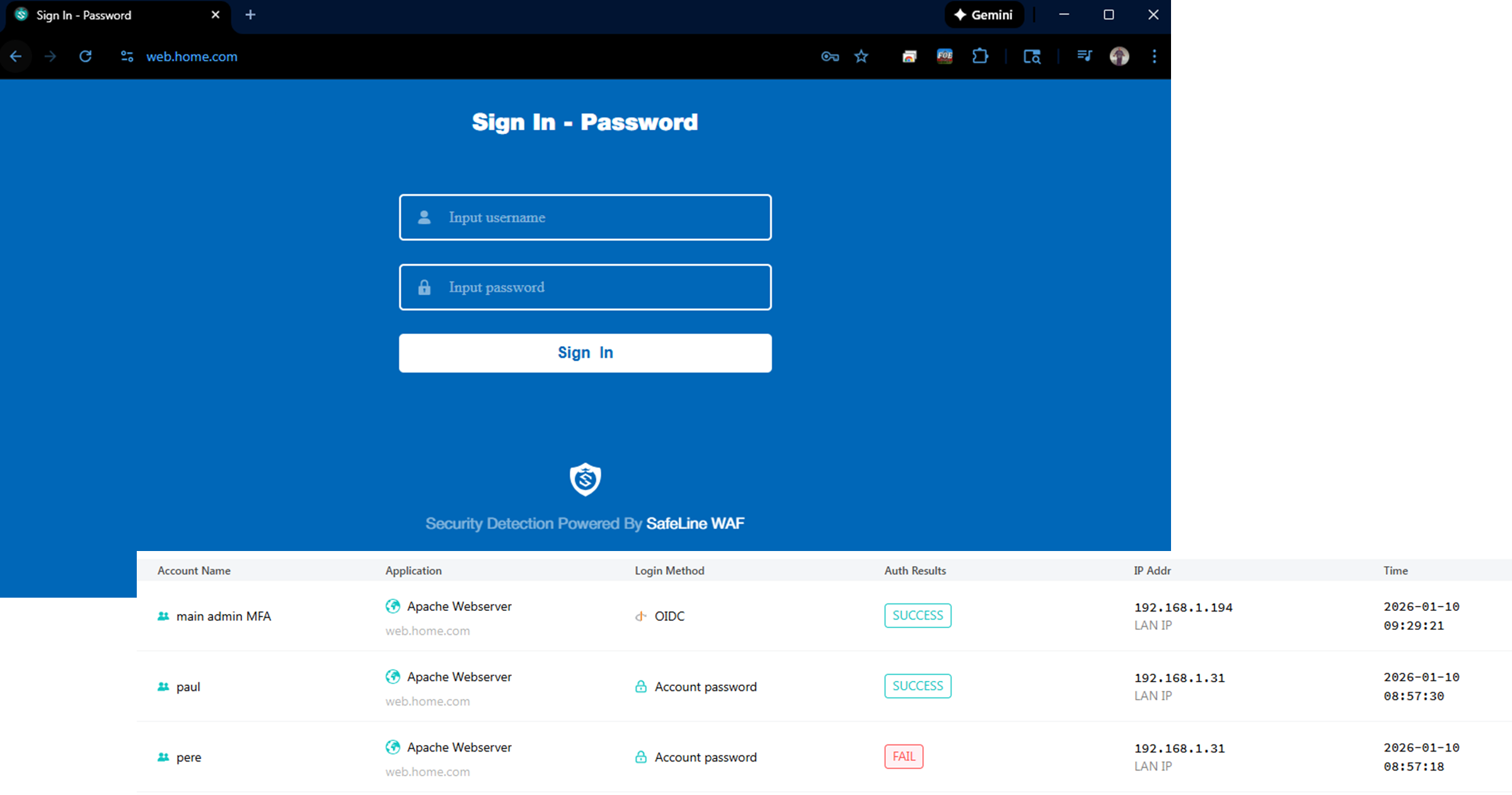
Active protections include Intelligent web threat detection, bot and HTTP flood DDoS protection. Additional authorization via Authentik/OIDC provided where required.
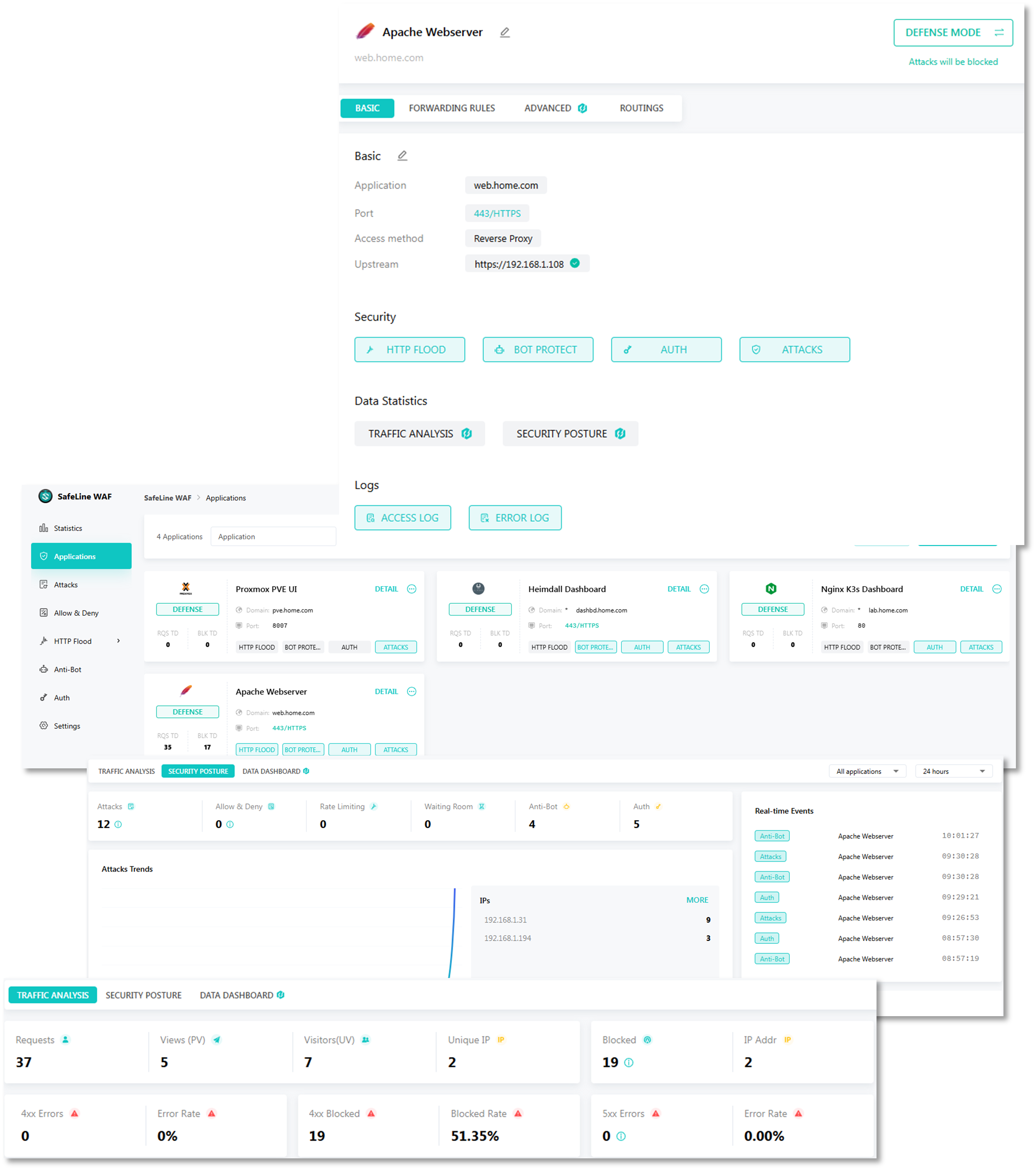
Active Protection Modules
1. Intelligent Web Threat Detection
- SQL Injection Protection: Pattern matching and syntax analysis detecting SQL injection attempts across GET/POST parameters, headers, and cookies
- Cross-Site Scripting (XSS) Prevention: Context-aware detection of reflected, stored, and DOM-based XSS attacks
- Command Injection Defense: Identifies attempts to execute operating system commands through web application vulnerabilities
- Path Traversal Detection: Blocks directory traversal attacks attempting to access files outside the web root
- Remote File Inclusion (RFI/LFI): Prevents inclusion of malicious remote or local files
- XML External Entity (XXE) Prevention: Detects and blocks XXE injection attempts in XML parsers
- Server-Side Request Forgery (SSRF): Identifies attempts to make the server perform unintended requests
- Machine Learning Anomaly Detection: Behavioral analysis identifying zero-day attacks and novel exploitation techniques
2. Bot and Automated Attack Protection
- Bot Classification Engine: Distinguishes between legitimate bots (search engines, monitoring tools) and malicious bots
- Credential Stuffing Prevention: Detects and blocks automated login attempts using compromised credential lists
- Account Takeover Protection: Behavioral analysis identifying suspicious authentication patterns
- Web Scraping Mitigation: Rate limiting and fingerprinting to prevent data extraction attacks
- CAPTCHA Integration: Challenge-response mechanism for suspicious sessions (future roadmap)
- JavaScript Challenge: Browser validation ensuring requests originate from legitimate browsers
3. HTTP Flood DDoS Protection
- Connection Rate Limiting: Per-IP connection limits preventing resource exhaustion (default: 100 connections/IP)
- Request Rate Limiting: Application-level rate limiting (30-100 requests/minute depending on endpoint sensitivity)
- Slowloris Protection: Timeouts for slow HTTP attacks attempting to exhaust server connections
- HTTP GET/POST Flood Mitigation: Detects and blocks high-volume application-layer DDoS attacks
- Burst Handling: Allows legitimate traffic spikes while blocking sustained flood attacks
- Geo-Rate Limiting: Stricter rate limits for high-risk geographic regions
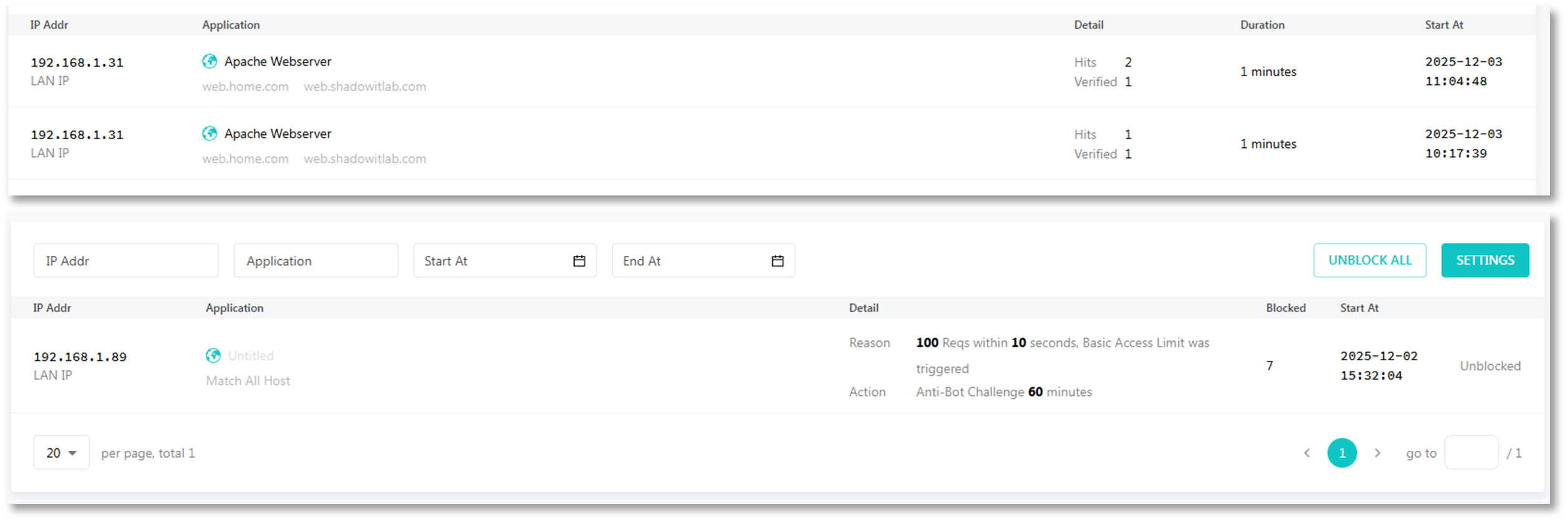
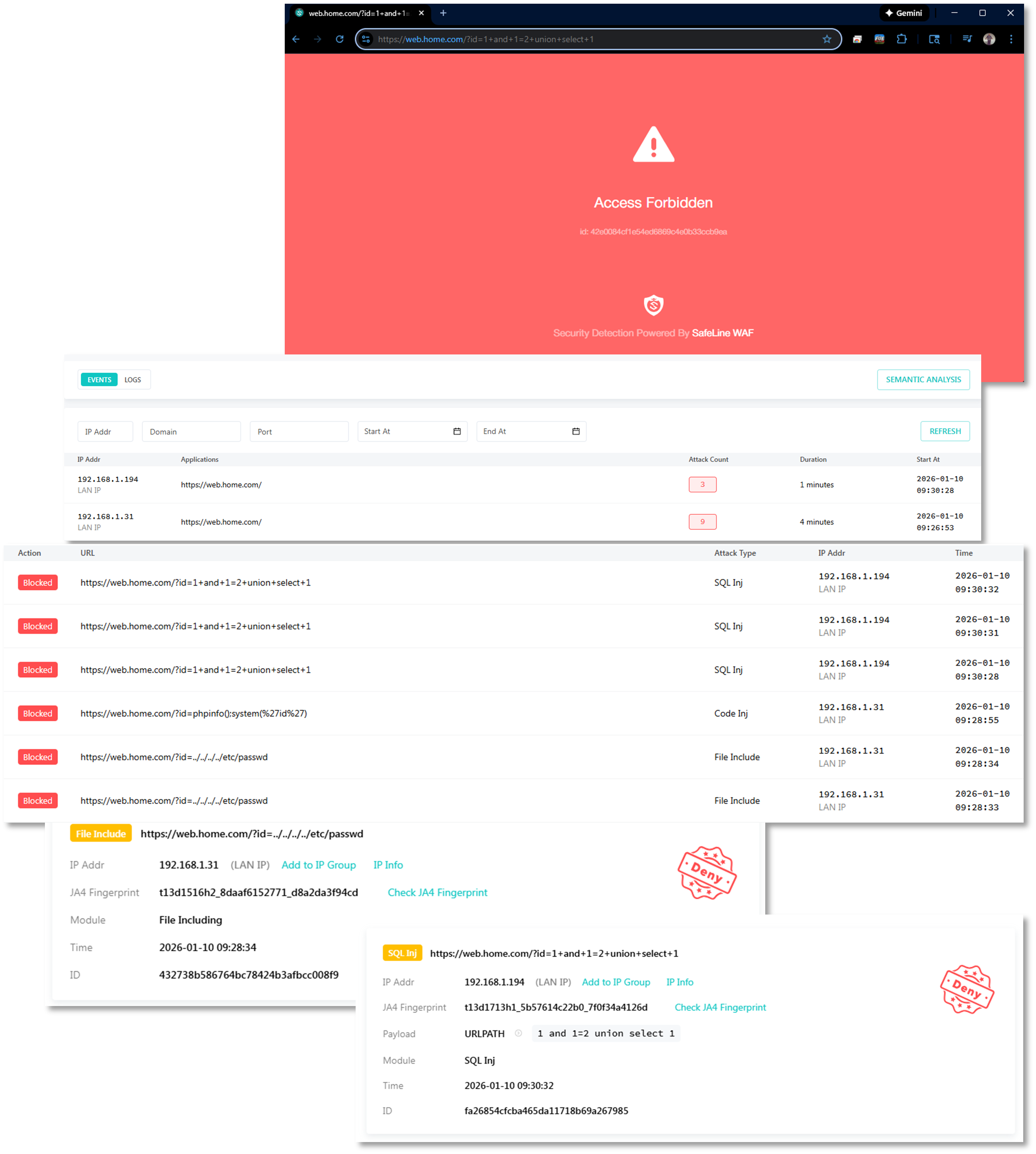
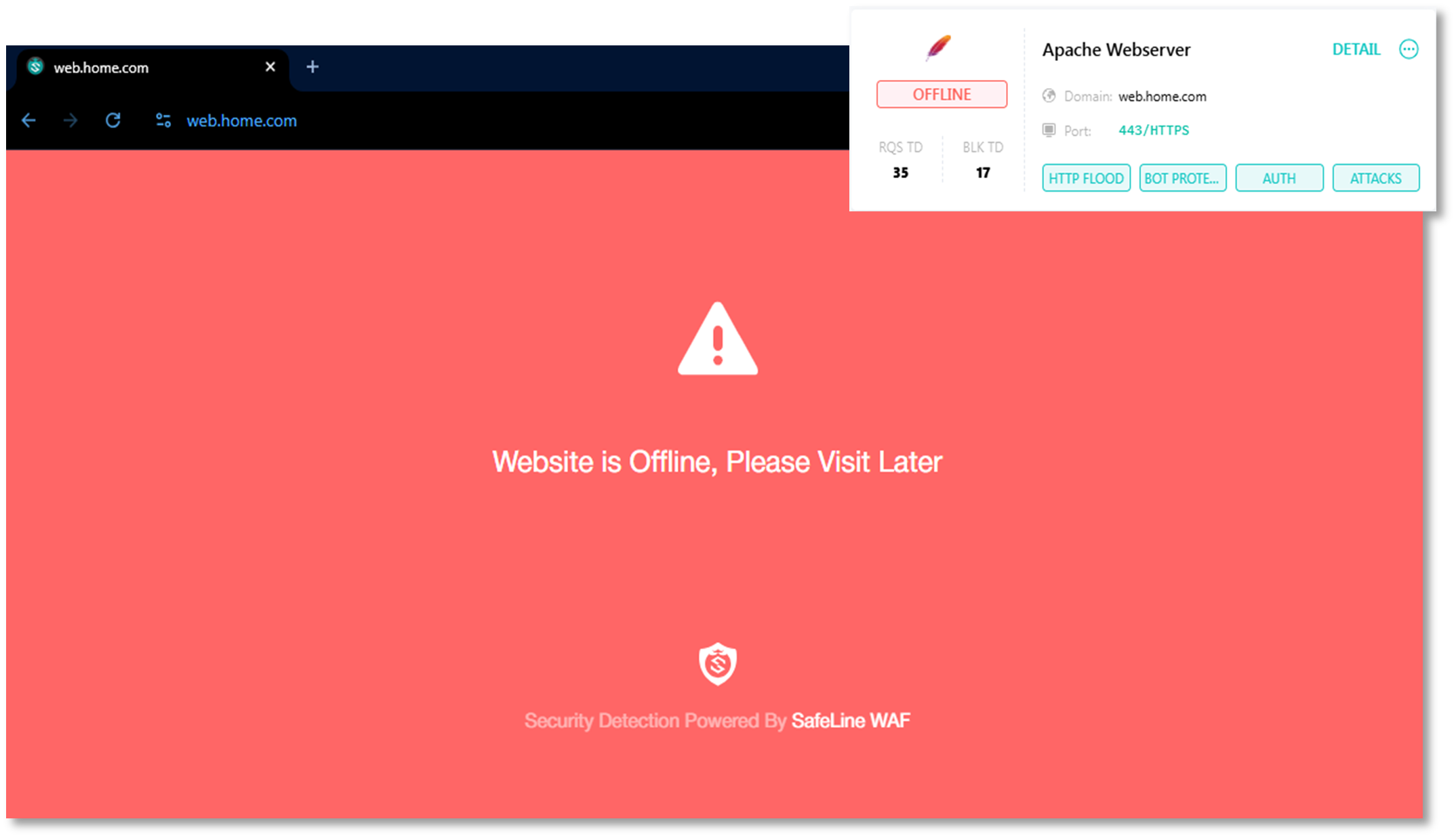
Offline Mode:
Password and OIDC Authorization:
Security Control Summary
Security Control Framework
Network Security Controls
| Control Type | Implementation | Coverage |
|---|---|---|
| Perimeter Defense | pfSense HA cluster with IDS/IPS | 100% inbound/outbound |
| Microsegmentation | OPNsense and FortiGate isolated zones | Critical assets only |
| Threat Intelligence | CrowdSec + pfBlockerNG | 1M+ malicious IPs blocked |
| Intrusion Detection | Suricata + Snort (dual-engine) | WAN; LAN; VPN interfaces |
| Geographic Blocking | pfBlockerNG GeoIP | 15+ high-risk countries |
| VPN Privacy | PIA multi-region tunnels, FortiGate VPN | 192.168.100.0/24; 192.168.2.0/24 |
| Zero Trust Access | Tailscale mesh VPN + ACLs | Remote administrative access |
| Data Loss Prevention | VPN kill switch floating rule | Prevents cleartext fallback |
Detection and Response Capabilities
- Real-Time Alerting: Suricata/Snort alerts forwarded to Splunk within seconds
- Automated Blocking: CrowdSec decisions enforced at firewall in <5 seconds
- Signature Coverage: 40,000+ IDS rules across Suricata and Snort
- Community Intelligence: CrowdSec shares threat data with global network
- Logging Retention: 90 days in Splunk/Elastic, 30 days on firewall local storage
- Incident Response: Playbooks for common scenarios (DDoS, brute force, scanning)
Operational Resilience
Operational Resilience and High Availability
Redundancy Architecture
| Component | Primary Node | Secondary Node | Failover Time | Mechanism |
|---|---|---|---|---|
| pfSense Firewall | pfSense-01 | pfSense-02 | <5 seconds | CARP + pfsync |
| PIA VPN Tunnels | PIA_NY | PIA_CA_MONT | <10 seconds | Gateway monitoring |
| Suricata IDS | Active | Active | N/A | Distributed |
| CrowdSec LAPI | LXC-Primary | Manual failover | <1 minute | API endpoint change |
Failure Scenarios and Response
| Scenario | Detection Method | Automated Response |
|---|---|---|
| pfSense primary failure | CARP heartbeat timeout | Secondary assumes VIP; routing continues |
| PIA VPN tunnel down | Gateway ping monitoring | Failover to alternate tunnel or kill switch |
| Suricata process crash | Service Watchdog package | Automatic restart within 30s |
| CrowdSec engine failure | Systemd watchdog | Service restart; alert to monitoring |
| Network interface failure | Link state monitoring | Traffic reroutes to alternate interface |
Monitoring and Alerting
- Prometheus Node Exporter: Collects firewall metrics (CPU, memory, connection count)
- Splunk/Elastic Dashboards: Real-time visibility into blocked threats, VPN status, rule hits
- Service Watchdog: Monitors critical services (OpenVPN, Suricata, Snort, CrowdSec)
- Uptime Kuma: External health checks on firewall management interfaces
- Discord Alerts: Triggered on VPN failure, IPS signature hits (HIGH severity)
Backup and Recovery
- Configuration Backups: Weekly to Proxmox Backup Server and Synology NAS
- Disaster Recovery: Restore from backup to new VM in <15 minutes
- Change Management: Version control for rule sets via Git repository
Use Cases and Deployment Scenarios
Practical Use Cases
Scenario 1: Privacy-Enhanced Web Browsing
Objective: Anonymize lab traffic and prevent ISP tracking
Implementation:
- User traffic from 192.168.100.0/24 → pfSense LAN → PIA VPN → Internet
- Policy-based routing ensures all HTTP/HTTPS uses encrypted tunnel
- Kill switch prevents accidental cleartext transmission
- Geolocation appears as VPN endpoint (New York or Montreal)
Result: ISP sees only encrypted VPN tunnel, not individual browsing sessions
Scenario 2: Remote Lab Access While Traveling
Objective: Securely access lab infrastructure from untrusted networks
Implementation:
- Laptop connects to Tailscale mesh VPN (WireGuard)
- Traffic routed through pfSense TSCALE interface
- ACLs restrict access to management subnets only
Result: Zero-trust remote access without exposed public IPs or open firewall ports
Scenario 3: Threat Intelligence Sharing and Automated Response
Objective: Leverage community threat data for proactive blocking
Implementation:
- CrowdSec engine analyzes logs from pfSense, Suricata, SSH
- Detects brute force attempt on SSH (10 failed logins in 60s)
- Decision sent to pfSense bouncer via LAPI
- IP immediately blocked at firewall, shared with CrowdSec community
Result: Lab benefits from global threat intelligence; contributes to community defense
Scenario 4: Multi-Region Content Testing
Objective: Test geo-restricted services from different regions
Implementation:
- Policy-based routing sends test traffic to PIA_NY or PIA_CA_MONT
- Applications see requests originating from US or Canada
- Used for CDN behavior testing, regional service validation
Result: Simulates distributed user base without physical infrastructure in multiple regions
Threat Modeling
Threat Landscape and Mitigation Strategy
Threats Addressed
| Threat Category | Attack Vectors | Mitigation Controls |
|---|---|---|
| Network Reconnaissance | Port scans; host enumeration | Suricata port scan detection; pfBlockerNG |
| Brute Force Attacks | SSH; web panel login abuse | CrowdSec behavioral detection; fail2ban integration; Key-based authentication for endpoints; WAF bot-credential stuffing prevention |
| Malware C2 Communication | Botnet callbacks | pfBlockerNG IP reputation; IDS signatures |
| Data Exfiltration | Unauthorized outbound traffic | Egress filtering; VPN kill switch |
| Man-in-the-Middle | ARP spoofing; SSL stripping | Encrypted tunnels (VPN; Tailscale) |
| DDoS / Resource Exhaustion | High-volume flood attacks | Connection limits; SYN flood protection; WAF HTTP flood prevention |
| Lateral Movement | Post-compromise pivoting | Microsegmentation (OPNsense); VLAN isolation |
| Zero-Day Exploits | Unknown vulnerabilities | Multi-engine IDS (overlapping signatures) |
| Web Application Exploits | SQL injection, XSS, XXE, command injection, LDAP injection, template injection | OWASP ModSecurity CRS rules; ML-based anomaly detection; input validation enforcement; output encoding verification |
| Bot Attacks | Web scraping, automated account creation, inventory hoarding, content theft, fake account registration | Bot fingerprinting; JavaScript challenge; CAPTCHA integration; behavioral analysis; rate limiting per user-agent pattern |
| Server-Side Request Forgery (SSRF) | Internal network reconnaissance, cloud metadata access, backend service exploitation | URL validation; whitelist of allowed domains; blocking private IP ranges; DNS rebinding protection |
| Directory Traversal | Path manipulation, file system access, configuration file disclosure | Path normalization; restricted file access; chroot enforcement; symbolic link traversal prevention |
| XML/JSON Attacks | Billion Laughs attack, entity expansion, JSON injection, XML bomb | Entity expansion limits; recursive depth restrictions; parser hardening; size limits |
| Protocol Manipulation | HTTP request smuggling, header injection, response splitting, HTTP/2 desync | HTTP protocol validation; header sanitization; request/response consistency checks |
Attack Surface Reduction
- No exposed public services (all ingress via Cloudflare Tunnel or Tailscale)
- Default-deny firewall/WAF posture on all interfaces
- Geo-blocking of high-risk countries
- Regular vulnerability scanning of exposed services
- Minimal services running on hosts
Privacy and Remote Access Architecture
Deployment Overview
The privacy and remote access architecture implements layered VPN, zero‑trust access, and anonymization technologies to protect outbound traffic, secure inbound access, and preserve user privacy. Private Internet Access (PIA) provides encrypted egress and IP obfuscation, Tailscale delivers authenticated zero‑trust remote access, Cloudflare Tunnels expose internal services securely without opening firewall ports, and Tor enables anonymous outbound browsing. Together, these systems create a defense‑in‑depth privacy model that maintains operational visibility while preventing unauthorized access or data exposure.
Security Impact
- Encrypted outbound traffic prevents ISP monitoring and metadata collection
- Zero‑trust remote access ensures only authenticated devices and identities can reach internal services
- Cloudflare Tunnels eliminate the need for public IP exposure or port forwarding
- Tor provides anonymized browsing for research and threat intelligence
- Centralized DNS, tunneling, and identity enforcement reduce attack surface
- Policy‑based routing ensures sensitive applications always use encrypted egress
Deployment Rationale
Modern environments require privacy‑preserving egress, secure remote access, and controlled service exposure. This architecture mirrors enterprise zero‑trust designs where VPNs, identity‑aware proxies, and encrypted tunnels work together to protect both inbound and outbound traffic. The combination of PIA, Tailscale, Cloudflare, and Tor demonstrates proficiency with encrypted transport, NAT traversal, identity‑based access control, and anonymization technologies.
Architecture Principles Alignment
Defense in Depth: Multiple privacy layers (VPN → Zero‑Trust → Tunnel → Anonymization)
Secure by Design: Encrypted tunnels, identity‑based access, no exposed ports
Zero Trust: Every remote connection authenticated; no implicit trust in network location
Private Internet Access (PIA) Encrypted Egress VPN
Deployment Overview
PIA provides encrypted outbound VPN tunneling using OpenVPN with AES‑256 encryption and SHA256 authentication. It masks the lab's public‑facing identity, supports multi‑hop routing, and enables region‑based egress selection. PIA is configured directly on the pfSense firewalls and serves as the default outbound path for the 192.168.100.0/24 and 192.168.2.0/24 networks. Policy‑based routing ensures selected applications always use the VPN tunnel.
Security Impact
- Prevents ISP logging of DNS queries, browsing history, and outbound traffic
- Obfuscates public IP, reducing exposure to targeted attacks
- Multi‑hop routing increases anonymity and complicates traffic correlation
- Encrypted tunnels protect data in transit from interception
Deployment Rationale
Encrypted egress is essential for privacy‑sensitive environments and aligns with enterprise practices where outbound traffic is anonymized or routed through secure gateways. PIA provides a stable, commercial‑grade VPN solution with strong encryption and global exit nodes.
Architecture Principles Alignment
Defense in Depth: Adds encrypted egress beneath firewall and IDS/IPS layers
Secure by Design: AES‑256 encryption, SHA256 authentication, OpenVPN tunneling
Zero Trust: No outbound traffic trusted without encryption and policy enforcement
Use Case:
- ISP Privacy: Prevents ISP from logging DNS queries, browsing history, torrent activity
- Geolocation Obfuscation: Appears to originate from VPN exit node location (useful for testing geolocation-based access controls)
Integration Notes:
- PIA is configured on the pfSense firewalls and configured as the default egress for 192.168.100.0/24 and 192.168.2.0/24 traffic.
- Traffic from selected applications is routed through PIA using policy-based routing.
- Encryption protocols: AES-256 and SHA256 authentication
Tailscale Zero Trust Remote Access
Deployment Overview
Tailscale provides secure, identity‑based remote access using a WireGuard mesh VPN. It enables seamless NAT traversal, device‑level ACLs, and OAuth/OIDC authentication. MagicDNS provides internal name resolution across the Tailscale network. Tailscale is deployed on key lab VMs and used for remote SSH, dashboard access, and secure file transfers.
Security Impact
- Identity‑based access ensures only authorized users and devices can connect
- WireGuard (ChaCha20‑Poly1305) provides high‑performance encrypted tunnels
- NAT traversal eliminates the need for exposed ports
- Audit logs track session activity for governance and incident response
Integration Notes:
- Tailscale is deployed on key lab VMs
- Used for remote SSH, dashboard access, and secure file transfers.
- WireGuard / ChaCha20-Poly1305 encryption
Deployment Rationale
Tailscale mirrors enterprise zero‑trust remote access solutions by replacing traditional VPN concentrators with identity‑aware, device‑bound tunnels. It simplifies remote connectivity while enforcing strong authentication and granular access control.
Architecture Principles Alignment
Defense in Depth: Adds identity‑based access on top of encrypted tunnels
Secure by Design: WireGuard encryption, OAuth/OIDC authentication, device ACLs
Zero Trust: Every connection authenticated; no implicit trust in IP or location
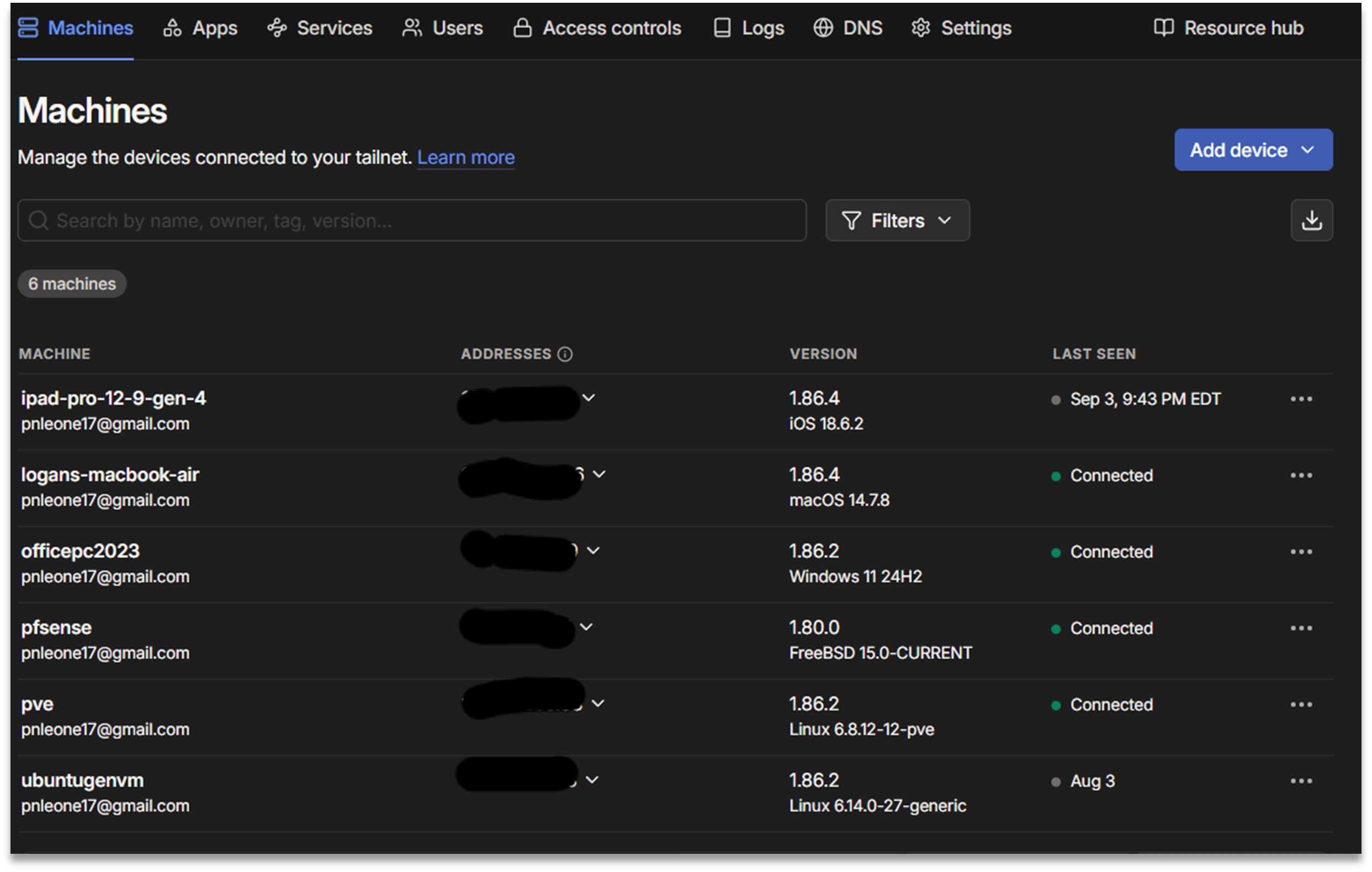
Tailscale Use Cases:
- Remote Lab Access: Securely access Grafana, Portainer, SSH from anywhere without exposing ports
- Site-to-Site Connectivity: Connect home lab to cloud VMs for hybrid deployments
- Ephemeral Access: Generate one-time-use keys for contractors/guests
Cloudflare Secure Service Exposure and DNS Management
Deployment Overview
Cloudflare Tunnels provide secure, authenticated inbound access to internal services without exposing public IPs or opening firewall ports. Cloudflare acts as a reverse proxy with TLS termination, identity‑aware access control, and automatic failover. Cloudflare also manages public DNS for shadowitlab.com, dynamic DNS updates, and S3‑compatible object storage via R2.
Security Impact
- Eliminates need for inbound port forwarding
- TLS‑encrypted tunnels protect dashboards, APIs, and UIs
- Cloudflare Access enforces identity‑based service gating
- Dynamic DNS ensures stable service resolution despite WAN IP changes
- R2 object storage provides secure, globally accessible file hosting
Deployment Rationale
Cloudflare Tunnels mirror enterprise zero‑trust access patterns where applications are published through identity‑aware proxies rather than exposed directly. DNS centralization and automated DDNS updates ensure reliable service access.
Architecture Principles Alignment
Defense in Depth: Tunnel layer sits above firewall and VPN protections
Secure by Design: TLS termination, identity‑aware access, no open ports
Zero Trust: Every inbound request authenticated and authorized
Public Domain and DNS Management
- Primary Domain: shadowitlab.com is registered and managed via Cloudflare, enabling centralized control over DNS, security policies, and tunneling endpoints.
- Dynamic DNS Resilience:
- A Dockerized Cloudflare DDNS client monitors the WAN IP assigned by Verizon Fios.
- On IP change, the client automatically updates the A record in Cloudflare using API integration.
- This ensures persistent domain resolution despite dynamic IP churn, enabling stable access to exposed services.
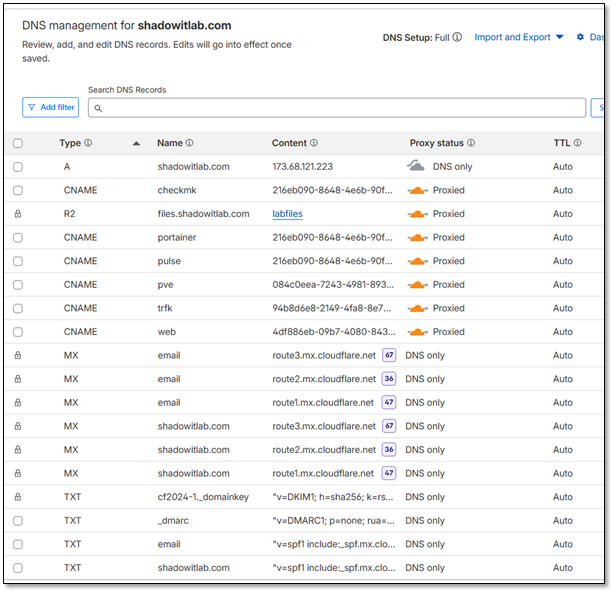
Object Storage and File Sharing
- Cloudflare R2 Bucket: Used for lightweight, S3-compatible object storage.
- Public Access Endpoint: files.shadowitlab.com
Secure Service Exposure via Cloudflare Tunnel
Each internal service is mapped to a dedicated Cloudflare Tunnel endpoint under the shadowitlab.com domain. TLS termination, routing, and access control are handled by Cloudflare's Argo Tunnel technology. This enables secure, high‑availability access to internal dashboards, APIs, and management interfaces.
Webserver Tunnel
- Endpoint: web.shadowitlab.com
- Purpose: Hosts static and dynamic content for lab documentation and dashboards.
Traefik Tunnel
- Endpoint: trfk.shadowitlab.com
- Purpose: Acts as a reverse proxy and ingress controller for DockerVM1 services.
- Features: TLS passthrough, service routing, and dashboard access.
Proxmox Tunnel
- Endpoint: pve.shadowitlab.com
- Purpose: Provides secure access to the Proxmox VE UI for VM and container orchestration.
DockerVM1 Tunnel
This tunnel multiplexes several key services hosted on DockerVM1:
| Subdomain | Service Description |
|---|---|
| portainer.shadowitlab.com | Portainer UI for container and K3s workload management |
| pulse.shadowitlab.com | Uptime monitoring and alerting dashboard |
| checkmk.shadowitlab.com | Infrastructure monitoring and metrics aggregation |
| piholebk.shadowitlab.com | Backup Pi-hole instance for DNS filtering |
| prom.shadowitlab.com | Prometheus metrics endpoint |
| wud.shadowitlab.com | Watchtower UI for Docker image update visibility |

Use Case:
- Public Demo: Showcase Grafana dashboards to potential employers without exposing lab IP
- API Access: Provide external services (webhooks, monitoring checks) access to internal APIs
- Failover Access: If Tailscale fails, Cloudflare Tunnels provide backup remote access
Tor Browser Anonymous Outbound Browsing
Deployment Overview
Tor provides anonymized web browsing by routing traffic through a decentralized network of volunteer‑operated nodes. It is installed on a sandboxed VM with no persistent storage and used exclusively for outbound browsing. No inbound Tor services (hidden services) are hosted.
Security Impact
- Prevents tracking, fingerprinting, and metadata collection
- Enables privacy‑sensitive research and threat intelligence gathering
- Bypasses geo‑restrictions and censorship
- Sandboxed VM prevents persistence or cross‑system contamination
Deployment Rationale
Tor is widely used in security research, OSINT, and threat intelligence workflows. Running it in a disposable VM mirrors enterprise practices for isolating high‑risk browsing environments.
Architecture Principles Alignment
Defense in Depth: Sandboxed VM isolates Tor from production systems
Secure by Design: No persistent storage; outbound‑only usage
Zero Trust: No trust in external nodes; isolation prevents lateral movement
Summary
Multi-Layered VPN and Zero-Trust Access
| Technology | Use Case | Protocol | Encryption | Trust Model |
|---|---|---|---|---|
| Private Internet Access (PIA) | Egress privacy (hide ISP visibility) | OpenVPN | AES-256 | Commercial VPN provider |
| Tailscale | Remote access to lab (peer-to-peer) | WireGuard | ChaCha20-Poly1305 | Zero-trust mesh VPN |
| Cloudflare Tunnels | Inbound service access (no open ports) | QUIC (HTTP/3) | TLS 1.3 | Cloudflare edge network |
| Tor Browser | Anonymous browsing (threat research) | Tor (onion routing) | Multi-layer encryption | Tor network |
Security Controls
- Split-tunnel policy prevents VPN leakage
- Tailscale ACLs enforce least-privilege access per device/user
- Cloudflare Access policies require MFA for administrative endpoints
- Tor VM operates in ephemeral mode with no disk persistence
- DNS queries flow through Pi-hole for ad-blocking and threat intelligence
Operational Resilience
- Cloudflare DDNS automation ensures 99.9% domain availability
- Prometheus + CheckMK provide real-time health monitoring
- Uptime Kuma alerts on tunnel/service degradation
- Automated container updates via Watchtower with rollback capability
Deployment Scenarios
- Remote administration: Tailscale → SSH/Proxmox access from mobile devices
- Public service hosting: Cloudflare Tunnel → web.shadowitlab.com (no exposed ports)
- Threat research: Tor Browser on isolated VM → anonymous OSINT gathering
- Content access: PIA multi-hop → region-specific service testing
Custom IPS/IDS Ruleset – Additional Detail
SSH / Linux Security Controls
SSH Brute Force Detection
Rule
alert tcp any any -> 192.168.100.0/24 22 \
(msg:"LAB1: SSH Brute Force Attempt"; flags:S; detection_filter:track by_src, count 5, seconds 60; sid:910001; rev:2;)
Field Breakdown
| Field | Meaning | Impact |
|---|---|---|
alert |
Generate an alert when matched | Visible in Suricata → Elastic/Wazuh |
tcp |
Match only TCP traffic | SSH is TCP based |
any any |
Any source IP, any source port | Detects brute force from anywhere |
-> |
Direction operator | Only inbound SSH attempts |
192.168.100.0/24 22 |
Destination network + port | LAB1 SSH servers |
flags:S |
Match SYN packets only | Prevents noisy alerts from full SSH sessions |
detection_filter: track by_src, count 5, seconds 60 |
Threshold: 5 SYNs in 60 seconds from same IP | Classic brute force pattern |
sid:910001 |
Unique rule ID | Required for management |
rev:2 |
Revision number | Tracks rule updates |
Operational Impact
- Detects brute force attempts before authentication begins
- Low noise due to SYN only matching
- Helps identify compromised hosts or bots scanning SSH
- Works across VLAN boundaries
Cross Segment SSH Policy Enforcement
Rule
alert tcp 192.168.2.0/24 any -> 192.168.100.0/24 22 \
(msg:"LAB1: SSH Attempt from EXT_LAN"; sid:910002; rev:1;)
Field Breakdown
| Field | Meaning | Impact |
|---|---|---|
192.168.2.0/24 |
EXT_LAN source | DMZ/External facing internal network |
-> 192.168.100.0/24 22 |
SSH into LAB1 | Not allowed by segmentation policy |
msg |
Alert message | Clear policy violation |
sid |
Rule ID | Tracking |
rev |
Revision | Versioning |
Operational Impact
- Detects lateral movement attempts from DMZ → LAB
- Enforces segmentation boundaries
- Helps identify compromised DMZ hosts attempting privilege escalation
Privilege Escalation Keyword Monitoring
Rule
alert tcp any any -> 192.168.100.0/24 22 \
(msg:"LAB1: sudo Keyword in SSH Session"; content:"sudo"; sid:910003; rev:1;)
Field Breakdown
| Field | Meaning | Impact |
|---|---|---|
content:"sudo" |
Look for the string "sudo" in SSH payload | Detects privilege escalation attempts |
tcp |
SSH is TCP | Required |
any any |
Any source | Global monitoring |
-> 192.168.100.0/24 22 |
SSH into LAB1 | Target zone |
Operational Impact
- Detects sudo usage inside SSH sessions
- Useful for insider threat monitoring
- Helps identify suspicious privilege escalation attempts
- Works best when SSH is not encrypted (lab/testing only)
Reconnaissance & Scanning Detection
Nmap OS Detection Signature
Rule
alert tcp any any -> 192.168.100.0/24 any \
(msg:"LAB1: Nmap OS Detection Scan"; content:"|4E 4D 41 50|"; sid:910004; rev:1;)
Field Breakdown
| Field | Meaning | Impact |
|---|---|---|
content:"\|4E 4D 41 50\|" |
Hex for "NMAP" | Matches Nmap OS detection probes |
any any |
Any source | Detects internal or external recon |
-> 192.168.100.0/24 any |
Any port | OS detection uses multiple ports |
Operational Impact
- Detects active reconnaissance
- Identifies compromised hosts performing mapping
- Useful for early stage intrusion detection
Behavioral Port Sweep Detection
Rule
alert tcp 192.168.100.0/24 any -> 192.168.1.0/24 any \
(msg:"LAB1: LAB → PROD Port Scan"; flags:S; threshold:type both, track by_src, count 20, seconds 10; sid:900008; rev:1;)
Field Breakdown
| Field | Meaning | Impact |
|---|---|---|
flags:S |
SYN packets only | Detects scan attempts, not full sessions |
threshold:type both |
Count both directions | More accurate scan detection |
track by_src |
Track per source IP | Identifies scanning host |
count 20 seconds 10 |
20 SYNs in 10 seconds | Classic port sweep behavior |
192.168.100.0/24 -> 192.168.1.0/24 |
LAB → PROD | Enforces segmentation |
Operational Impact
- Detects port sweeps from LAB → PROD
- Helps identify malware propagation attempts
- Low false positives due to SYN only matching
Lateral Movement Prevention
High Risk Port Access Attempt
Rule
alert tcp 192.168.200.0/24 any -> 192.168.1.0/24 [22,135,139,445,3389] \
(msg:"LAB2: LAB → PROD Unauthorized High-Risk Port"; sid:920005; rev:3;)
Field Breakdown
| Field | Meaning | Impact |
|---|---|---|
192.168.200.0/24 |
LAB2 | Lower trust zone |
-> 192.168.1.0/24 |
PROD | High trust zone |
[22,135,139,445,3389] |
SSH, RPC, NetBIOS, SMB, RDP | Classic lateral movement ports |
msg |
Clear violation message | SOC visibility |
sid |
Rule ID | Tracking |
rev |
Revision | Versioning |
Operational Impact
- Detects attempts to pivot into PROD
- Flags malware using SMB/RDP propagation
- Enforces strict trust boundaries
Isolation Network Enforcement
Rule
alert ip [10.20.0.0/24,192.168.3.0/24] any -> 192.168.200.0/24 any \
(msg:"LAB2: ISO → LAB2 Traffic (Policy Violation)"; sid:920006; rev:1;)
Field Breakdown
| Field | Meaning | Impact |
|---|---|---|
alert ip |
Match any protocol | Covers TCP, UDP, ICMP, etc. |
[10.20.0.0/24,192.168.3.0/24] |
ISO networks | Quarantined/isolated zones |
-> 192.168.200.0/24 |
LAB2 | Should never communicate |
any |
Any port | Full isolation enforcement |
Operational Impact
- Detects policy violations from isolated networks
- Helps identify misconfigured hosts or malware breakout attempts
- Ensures ISO networks remain fully contained
SMB / NetBIOS Hygiene
NetBIOS Session Service Detection
Rule
alert tcp any any -> any 139 \
(msg:"NetBIOS Session Service Detected"; sid:9xxxxx; rev:1;)
Field Breakdown
| Field | Meaning | Impact |
|---|---|---|
port 139 |
NetBIOS Session Service | Legacy Windows protocol |
any any -> any |
Global detection | Hygiene monitoring |
Operational Impact
- Detects legacy SMB/NetBIOS traffic
- Useful for identifying outdated systems
- Helps enforce modern SMB hygiene
SMBv1 Protocol Negotiation Detection
Rule
alert tcp any any -> any 445 \
(msg:"SMBv1 Protocol Negotiation"; content:"|ff|SMB"; depth:8; sid:9xxxxx; rev:1;)
Field Breakdown
| Field | Meaning | Impact |
|---|---|---|
port 445 |
SMB | Modern SMB port |
content:"\|ff\|SMB" |
SMBv1 signature | Detects deprecated protocol |
depth:8 |
Only inspect first 8 bytes | Performance optimization |
Operational Impact
- Detects SMBv1 usage (deprecated, insecure)
- Helps enforce compliance and hygiene
- Identifies vulnerable hosts susceptible to EternalBlue class exploits
Security Homelab Section Links
- Executive Summary and Security Posture
- Infrastructure Platform, Virtualization Stack and Hardware
- Network Security, Privacy and Remote Access
- Identity, Access, Secrets and Trust Management
- Automation and IaC
- Applications and Services
- Observability and Response, Part 1
- Observability and Response, Part 2
- Cloud IaaS Integration – AWS, Azure and GCP