Identity, Access, Secrets and Trust Management
Document Control:
Version: 1.0
Last Updated: January 30, 2026
Owner: Paul Leone
1. Architecture Overview
A comprehensive zero-trust identity architecture combines hierarchical Public Key Infrastructure (PKI), centralized authentication (SSO/MFA), enterprise directory services (Active Directory), and encrypted secrets management (Vaultwarden) to provide defense-in-depth identity controls. This multi-layered approach ensures every user, device, and service is continuously authenticated, authorized, and audited across the entire infrastructure stack.
Security Impact
- Centralized identity eliminates password sprawl and reduces credential-stuffing risk
- MFA enforcement prevents compromised passwords from granting unauthorized access
- Hierarchical PKI provides cryptographic trust anchors for TLS/mTLS
- Offline root CA protects high-value signing keys from online attacks
- Automated certificate lifecycle management prevents outages caused by expired certificates
- Encrypted secrets vault centralizes sensitive data with zero-knowledge encryption
Deployment Rationale
Enterprise environments deploy similar architectures where Active Directory manages Windows domain authentication, OAuth2/OIDC provides SSO for web applications, PKI issues certificates for TLS encryption, and password managers centralize secrets. This lab demonstrates hands-on proficiency with protocols used in Fortune 500 identity stacks (LDAP, Kerberos, OAuth2, OIDC, SAML, ACME) and modern zero-trust patterns (continuous verification, least-privilege access, encrypted communications). The separation of concerns (PKI, SSO, directory, secrets) provides defense-in-depth where compromise of one system doesn't expose all identity data.
Architecture Principles Alignment
- Defense in Depth: Multiple authentication factors (password + TOTP), separate trust domains (AD for Windows, Authentik for web), offline root CA isolation
- Secure by Design: Mandatory TLS via PKI, MFA enforced by default, secrets encrypted at rest with zero-knowledge encryption
- Zero Trust: Every request authenticated (SSO/MFA); certificates verify service identity (mutual TLS); no implicit trust based on network location
Diagram Placeholder: Identity Architecture Overview (2 images)
2. PKI/Certificate Authority Configuration
2.1 Overview and Hierarchy
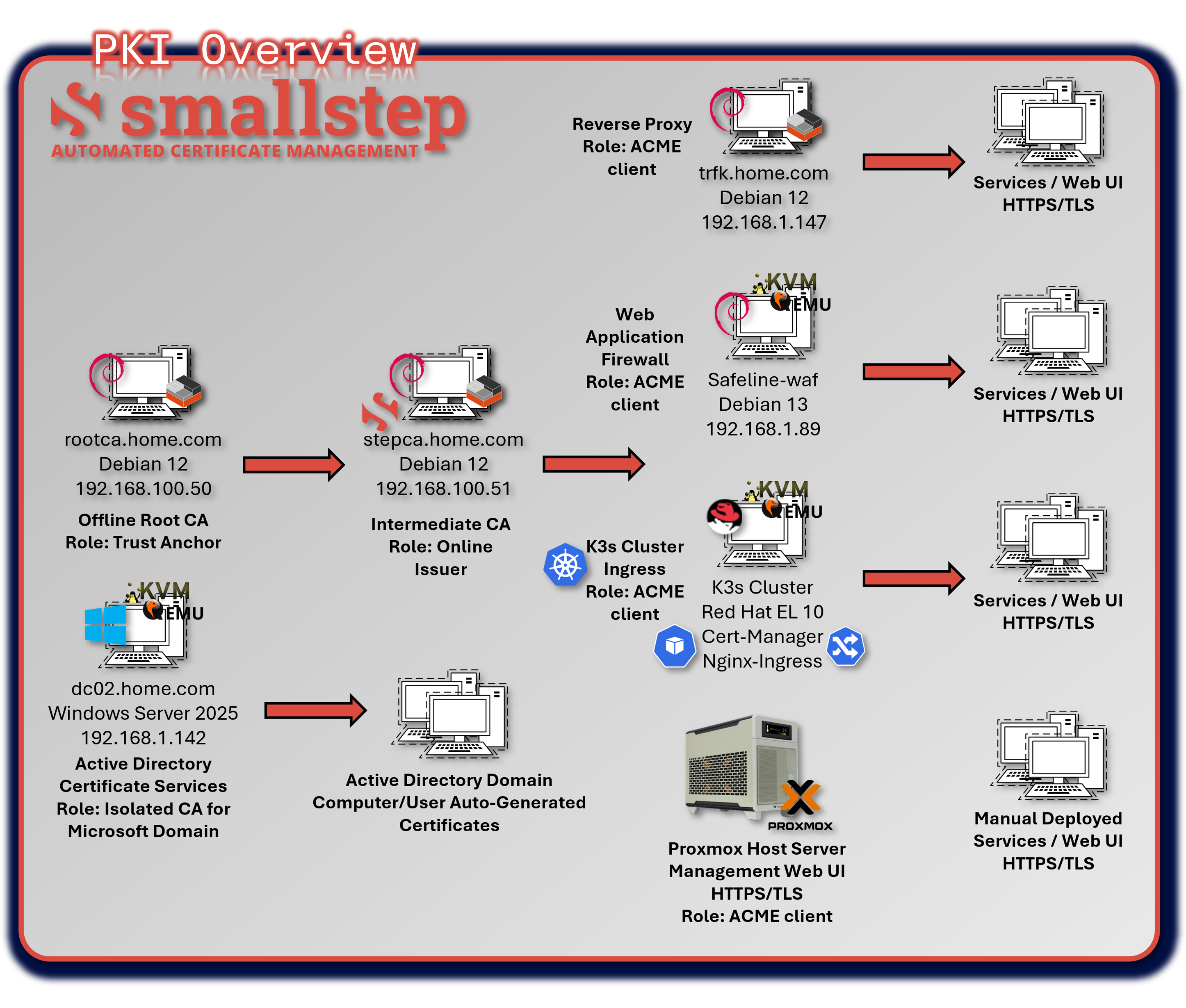
The lab PKI follows a two-tier architecture with an offline root CA and an online intermediate CA powered by StepCA. The offline root CA acts as the long-term trust anchor, while the intermediate CA handles day-to-day certificate issuance for internal services, Kubernetes workloads, web applications, and mTLS-enabled components.
Security Impact
- Offline root CA prevents exposure of high-value signing keys
- Intermediate CA enables automated certificate issuance and rotation
- TLS/mTLS ensures encrypted communication and service identity validation
- PKI-backed trust anchors support zero-trust service-to-service authentication
Deployment Rationale
A two-tier PKI mirrors enterprise best practices by separating long-term trust from operational issuance. This design minimizes root CA exposure, simplifies certificate lifecycle management, and supports automated issuance through ACME/StepCA for Kubernetes, web services, and internal APIs.
Architecture Principles Alignment
- Defense in Depth: Root and intermediate CAs form layered trust boundaries
- Secure by Design: Automated certificate rotation prevents outages and stale credentials
- Zero Trust: Certificates validate every service identity; no implicit trust in network location
2.2 PKI Architecture and Roles
| Tier | Host/IP | Role | Key Functions |
|---|---|---|---|
| Offline Root CA | 192.168.100.50 | Trust Anchor | Signs Intermediate CA certificate; stored offline |
| StepCA (Intermediate CA) | 192.168.100.51 | Online Issuer | Issues leaf certificates via ACME or manual process; enforces policy |
| ACME Clients | Various | Certificate Consumers | Request certificates via ACME protocol (e.g., Traefik, Vaultwarden, NGINX) |
| Active Directory Certificate Services | 192.168.1.142 | AD Auto-enroll | Computer and User auto-enroll domain services. Isolated RootCA |
Root CA Configuration
- Platform: Debian 12 LXC container (stopped when not in use)
- Software: OpenSSL 3.0.x
- Key Type: ECC P-384 (modern alternative)
- Storage: Private key encrypted with AES-256
- Access Control: Root key file permissions set to 0400 (read-only by owner)
- Lifecycle: Used only for signing intermediate CA cert and CRL generation
- Validity: 20 years (root), 10 years (intermediate)
Security Hardening
- Root CA container only powered on during signing operations
- Private key passphrase stored in Vaultwarden, never saved to disk
- Regular backups
StepCA Intermediate CA
- Platform: Debian 12 LXC container (always online)
- Software: Smallstep Step-CA v0.25.x
- Endpoints:
- ACME: https://stepca.home.com/acme/acme/directory
- Admin API: https://stepca.home.com (mTLS authentication)
- Key Type: ECC P-256 (default for leaf certificates)
- Validity Periods:
- Default: 24 hours (short-lived for automated rotation)
- Max: 1 year (for services requiring longer validity)
Certificate Lifecycle Management
| Phase | Automation | Frequency |
|---|---|---|
| Initial Request | ACME client (Traefik, certbot) | On-demand |
| Issuance | StepCA auto-validates domain | <5 seconds |
| Renewal | Traefik automatic renewal | 30 days before expiry |
| Revocation | Manual via step-ca CLI | As needed |
| CRL Updates | StepCA generates CRL | Daily |
2.3 Trust Chain and Workflow
- Root CA is created offline and used to sign the Intermediate CA certificate. The RootCA was configured as an LXC running Debian Linux, Certificate was created using OpenSSL.
- StepCA runs online and handles certificate requests via ACME. StepCA is also running in a Debian-based LXC.
- ACME Clients authenticate and request certificates for their FQDNs.
- Leaf certificates are issued with appropriate X.509 extensions and validity periods.
- Clients and services trust the Intermediate CA, which chains up to the RootCA.
2.4 X.509 Certificate Profile
General Attributes
| Field | Value |
|---|---|
| Version | X.509 v3 |
| Signature Algorithm | ecdsa-with-SHA256 |
| Issuer | O=Intermediate CA - Leone Lab, CN=Intermediate CA - Leone Lab Intermediate CA |
| Subject | CN=[servername].home.com |
| Validity | 1 year |
| Public Key Algorithm | id-ecPublicKey (Elliptic Curve Cryptography) |
| Key Size | 256-bit |
| Curve | prime256v1 (NIST P-256) |
| Key Usage | Digital Signature (critical) |
| Extended Key Usage | TLS Web Server Authentication; TLS Web Client Authentication |
| Subject Alternative Name (SAN) | DNS:servername.home.com |
Subject Public Key Info
- Algorithm: id-ecPublicKey (Elliptic Curve Cryptography)
- Key Size: 256-bit
- Curve: prime256v1 (NIST P-256)
X.509v3 Extensions
| Extension | Value |
|---|---|
| Key Usage | Digital Signature (critical) |
| Extended Key Usage | TLS Web Server Authentication, TLS Web Client Authentication |
| Subject Alternative Name (SAN) | DNS:[servername].home.com, home.com |
2.5 Operational Considerations
Diagram Placeholder: Root CA Security Screenshot
Root CA Security
- Stored offline (air-gapped)
- Used only to sign Intermediate CA
- Private key protected with strong passphrase
StepCA Configuration
- Runs as a systemd service on 192.168.100.51
- ACME endpoint exposed to internal clients
- Policy templates enforce:
- Allowed domains (*.home.com)
- Validity periods
- Key types (ECC and RSA)
2.6 Active Directory Certificate Services
Windows 2025 Server, dc02.home.com configured as the domain enterpriseCA supporting local AD auto-enrollment.
User and Computer home.com templates supporting domain auto-enrollment. Computer/policies/Windows settings/security settings/public key policies/certificate services client-auto-enrollment/Enabled in the default domain policy.
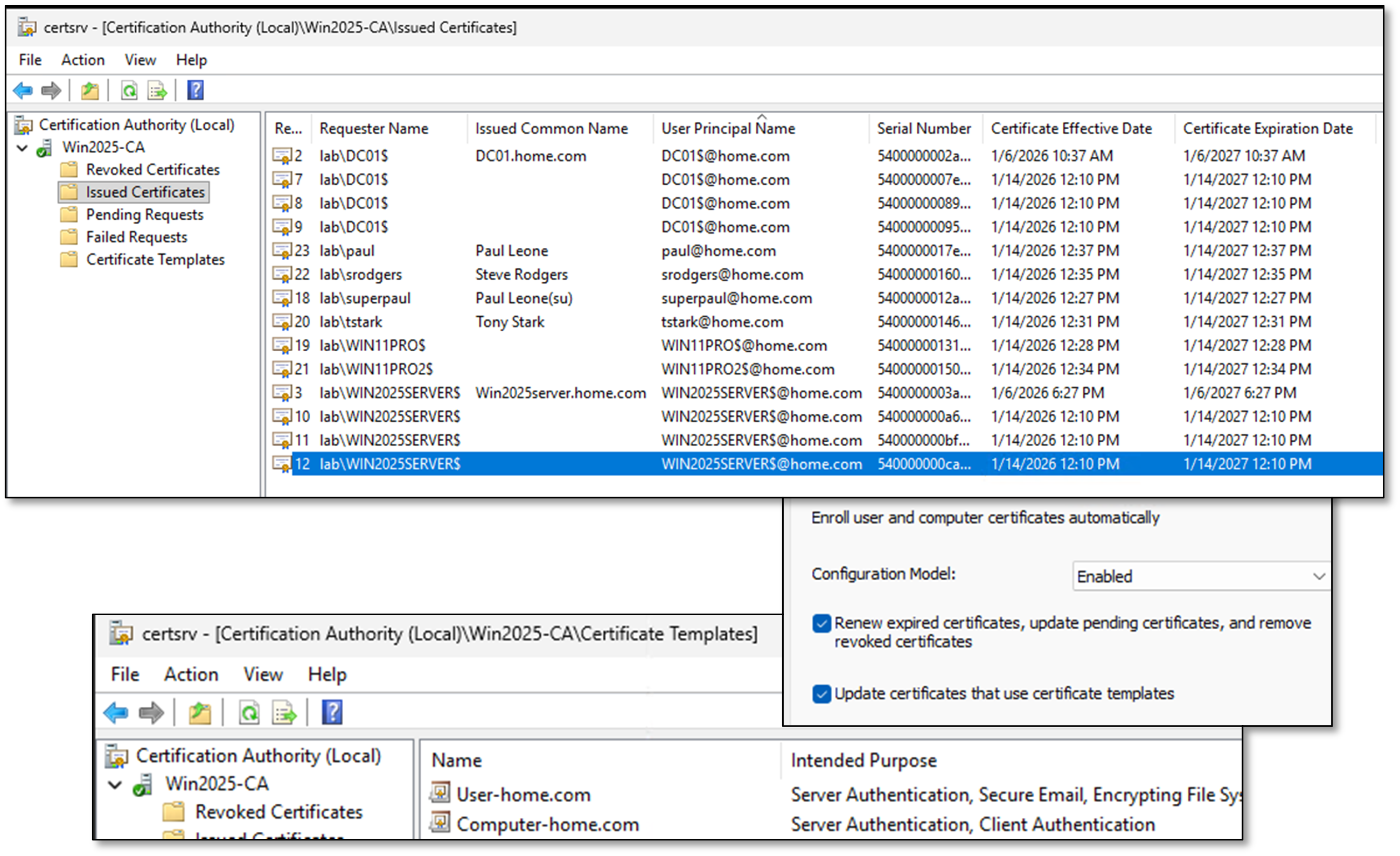
Certificate Details Trusted Root Certificate: Win2025-CA
3. Identity and Access Management
Identity services are split between Authentik for modern SSO/OIDC-based authentication and Microsoft Active Directory for Windows domain services. This dual-stack approach mirrors hybrid enterprise environments where Linux, containerized workloads, and Windows systems coexist.
3.1 Authentik Identity Stack
Deployment Overview
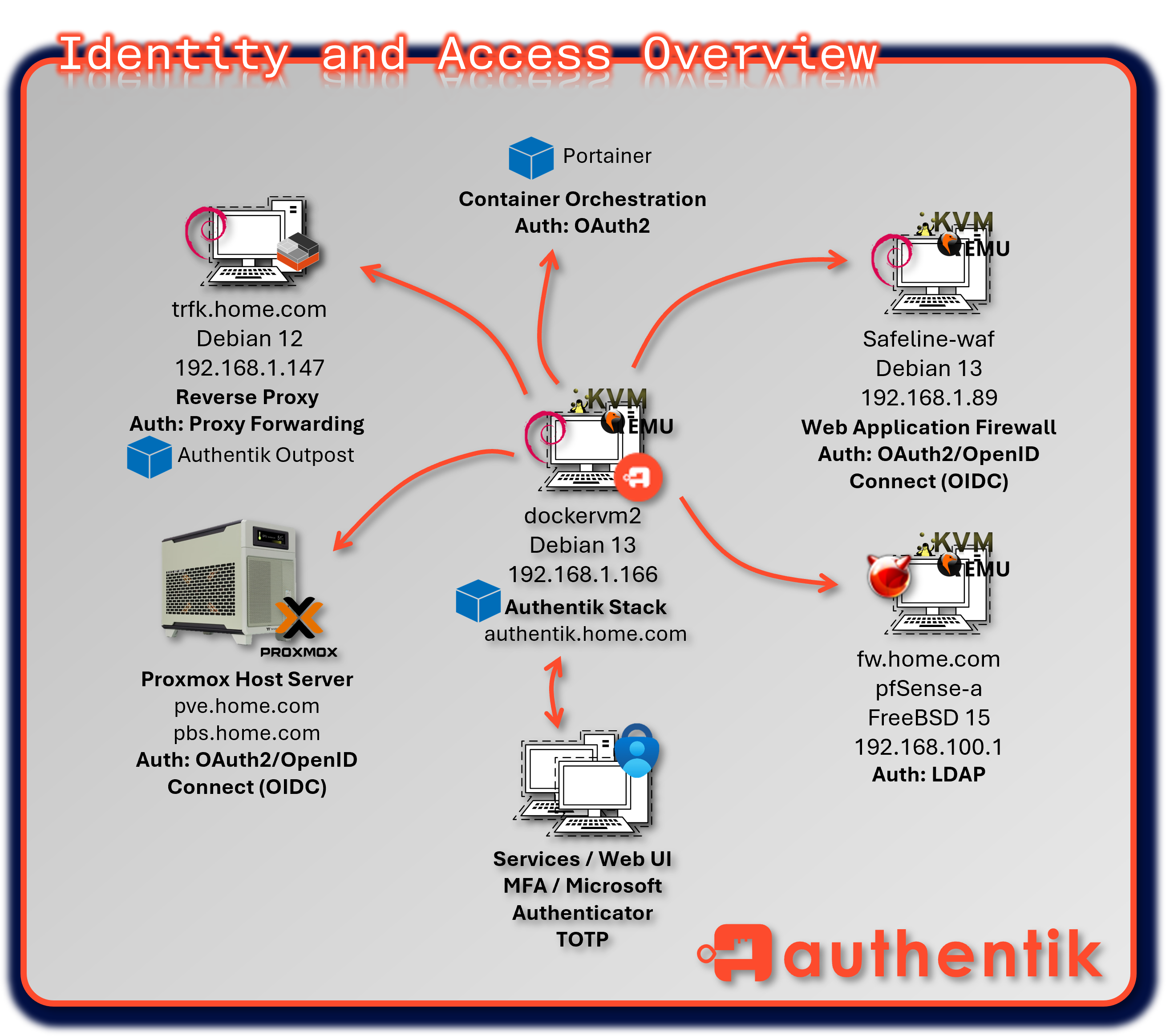
Authentik provides centralized identity and access management using OAuth2, OIDC, and proxy-forwarding protocols. It acts as the primary identity provider for web applications, Kubernetes workloads, dashboards, and internal services. Policy-driven access control enforces MFA, group-based authorization, and conditional access rules.
Security Impact
- Consolidates authentication across VMs, containers, and web apps
- Enforces MFA and policy-based access control
- Provides OIDC/OAuth2 SSO for dashboards, WAF-protected portals, and internal services
- Reduces password reuse and improves auditability
Deployment Rationale
Authentik mirrors enterprise SSO platforms (Azure AD, Okta, Ping) and demonstrates proficiency with modern identity protocols. It centralizes authentication for Linux-based and containerized workloads while integrating cleanly with reverse proxies, WAFs, and Kubernetes ingress controllers.
Architecture Principles Alignment
- Defense in Depth: Separate trust domain for web and application authentication
- Secure by Design: MFA, OIDC/OAuth2, and policy-driven access
- Zero Trust: Every request authenticated; no implicit trust in session or network
Configuration
The Authentik identity stack is deployed within a Docker environment and comprises four core containers:
- Authentik Server -- main application interface and API layer
- Authentik Worker -- handles background tasks, flows, and integrations
- PostgreSQL -- primary relational database for Authentik
- Redis -- caching and session management for performance optimization
- Outpost for Traefik and various services
The Authentik interface is secured using TLS certificates issued by Step CA, ensuring encrypted communication across all services. Multi-Factor Authentication (MFA) is enforced using the Microsoft Authenticator app, adding a layer of security for user logins and administrative access.
Authentik acts as the unified identity provider for multiple services in the lab, streamlining authentication and access control through OAuth2 and reverse proxy integration:
Diagram Placeholder: Proxmox OAuth2 Login Screenshot
- Proxmox VE - Web-based virtualization management protected via OAuth2/OpenID Connect (OIDC), allowing users to log in through Authentik via federated identity and benefit from centralized governance.
Diagram Placeholder: Portainer OAuth2 Login Screenshot
-
Portainer - Container orchestration and Docker management secured using OAuth2 authorization framework, enabling SSO and role-based access control.
-
pfSense - Firewall and network management access connected to Authentik's LDAP interface, validating username/passwords against the LDAP directory.
-
Webservers - Apache and Nginx websites protected via OAuth2/OpenID Connect (OIDC), allowing users to log in through Authentik via federated identity and benefit from centralized governance.
-
Traefik and Services - Reverse proxy and ingress controller secured via proxy forwarding, with Authentik injecting identity headers and managing session-based access to backend services.
- Services: Checkmk, Pi-hole, Pulse, WUD, Uptime Kuma, Changedetection.io, Heimdall, Elastic and Safeline admin UI
Authentication Flows
- User Access Request: User navigates to protected service (e.g., Portainer)
- Redirect to Authentik: Service redirects to Authentik login page
- Primary Authentication: User provides username/password
- MFA Challenge: Microsoft Authenticator TOTP code required
- Consent Screen: User authorizes service access (if first time)
- Token Issuance: Authentik issues JWT access token
- Service Access: User redirected back with token, gains access
Multi-Factor Authentication
- Primary: Microsoft Authenticator (TOTP)
- Backup: WebAuthn (FIDO2 security keys)
- Recovery: One-time backup codes (10 codes, single-use)
- Enrollment: Required on first login, cannot be bypassed
- Policy: MFA mandatory for all roles
Security Features
- Account Lockout: 5 failed attempts, 15-minute lockout
- Session Management: 12-hour session timeout, refresh token rotation
- Audit Logging: All authentication events logged to PostgreSQL, forwarded to Elastic SIEM
- Reputation: IP-based rate limiting and geo-blocking
TLS Configuration
- Certificate: Issued by StepCA Intermediate CA
- Validity: 365 days with automated renewal via ACME
- Protocol: TLS 1.3/1.2 only (TLS 1.1 disabled)
- Cipher Suites: Modern ECDHE+AES-GCM only
Diagram Placeholder: Authentik Screenshots (3 images)
3.2 Microsoft Active Directory
Deployment Overview
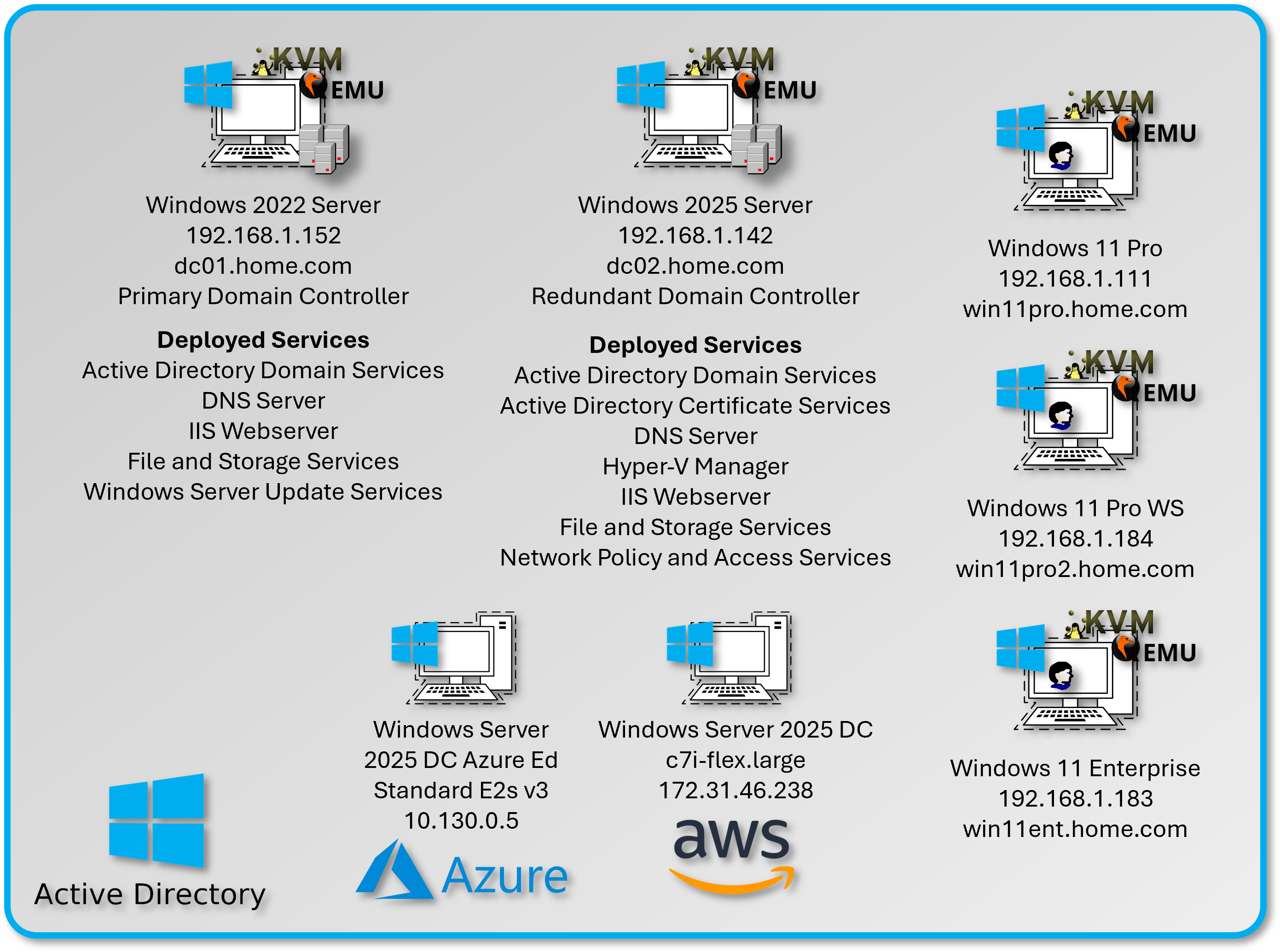
Active Directory provides enterprise-grade identity services for Windows-based infrastructure. A subset of Windows 11 Pro VMs are joined to a centralized domain hosted on Windows Server 2022 (dc01) and Windows Server 2025 (dc02). AD manages Kerberos authentication, Group Policy enforcement, and domain-joined machine trust.
Security Impact
- Centralized Windows authentication reduces credential sprawl
- Kerberos provides secure, ticket-based authentication
- Group Policy enforces security baselines and configuration hardening
- Domain-joined systems support certificate auto-enrollment via PKI
Deployment Rationale
AD remains the backbone of enterprise Windows identity. This deployment simulates production domain environments and demonstrates understanding of Kerberos, LDAP, GPOs, and domain trust relationships.
Architecture Principles Alignment
- Defense in Depth: Windows trust domain isolated from web identity domain
- Secure by Design: Kerberos authentication and GPO-based hardening
- Zero Trust: Domain authentication required for all Windows systems
Configuration
The domain controllers are configured with the following roles:
| Role | Purpose |
|---|---|
| Active Directory Domain Services (AD DS) | Centralized identity, authentication, and directory management |
| Active Directory Lightweight Directory Services (AD LDS) | Lightweight directory for app-specific identity needs |
| DNS Server | Authoritative DNS Service for the AD Domain. Kerberos, LDAP, GPO, Login and General Client Requests |
| File and Storage Services | Network shares and storage provisioning |
| Active Directory Certificate Services | EnterpriseCA supporting the domain |
| IIS Web Services | WSUS Admin Portal |
| Windows Server Update Services (WSUS) | Centralized patch management for Windows clients |
Diagram Placeholder: Domain Controller Screenshots (2 images)
Active Directory Configuration
Diagram Placeholder: AD Configuration Screenshot
Domain Name
- Domain: home.com
- Domain Controllers: dc01.home.com, dc02.home.com
- Forest Functional Level: Windows Server 2016
- Domain Functional Level: Windows Server 2016
- Single forest, single domain design
- Future expansion: Child domains for lab segmentation
- Trust relationships: None (isolated lab environment)
DNS Server
- Authoritative for the Active Directory Domain. Name resolution and SRV record support.
Certificate Authority
- Isolated EnterpriseCA supporting local services, running on dc02.
Organizational Units (OUs)
| OU | Purpose |
|---|---|
| Users | Contains all domain user accounts |
| Server/Domain Admins | Contains privileged accounts |
| Desktop PCs | Contains domain-joined Windows 11 clients |
| Servers | Contains domain-joined Windows Servers |
3.3 User and Group Policy Management
Diagram Placeholder: User and Group Policy Screenshots (2 images)
User Accounts
- Standard domain users created under the Users OU
- Naming convention: first initial+lastname
Security Groups
| Group Name | Purpose |
|---|---|
| Domain_Admins | Full administrative privileges |
| Server Admins | Select server privileges |
| PowerUsers | Elevated access to specific systems |
| StandardUsers | Default access level for lab participants |
| NAS_Access | Mapped drive access to NAS shares |
Groups are used to assign permissions, drive mappings, and GPO filtering.
Group Policies
Group Policies are applied via GPOs linked to the appropriate OUs. Policies are divided into Computer Configuration and User Configuration.
Computer Policies
Diagram Placeholder: Password Complexity Screenshot
Password Complexity
- Minimum Age: 30 days
- Maximum Age: 60 days
- Minimum Password Length: 8
- Windows Complexity Requirements: Enabled
- Password History: 3 Remembered
Diagram Placeholder: Account Lockout Screenshot
Account Lockout Policy
- Account Lockout Duration: 10 mins
- Threshold: 5 Attempts
- Allow Admin Lockout: Enabled
- Reset: 10 mins
User Policies
Diagram Placeholder: Desktop/System Settings Screenshot
Desktop/System Settings
- Custom Desktop Wallpaper: Enabled
- Prohibit Changes: Enabled
- Prohibit adding, closing, deleting, editing items: Disabled
- Power Management
- Prompt for Password on Resume from Hibernation/Suspend: Enabled
- Removable Storage Access
- All Removable Storage classes: Deny all Access: Enabled
Diagram Placeholder: Personalization Screenshot
Personalization
- Password Protect the Screen Saver: Enabled
- Screen Saver Timeout: Enabled
- Force a Specific Screen Saver: Enabled
User Preferences
Drive Mapping
- Drive mapping to local NAS folders.
- \DS\Backups, \DS\Software, \dc01\Documents
Diagram Placeholder: Drive Mapping Screenshot
Assigned Policies/Preferences
Diagram Placeholder: Assigned Policies Screenshot
GPO User Configuration Policies
| Policy Category | Setting | Value/Action |
|---|---|---|
| Desktop Personalization | Custom wallpaper | \dc01\NETLOGON\wallpaper.jpg |
| Desktop Personalization | Prohibit wallpaper changes | Enabled |
| Desktop Personalization | Force specific screensaver | Enabled (Blank.scr) |
| Desktop Personalization | Screensaver timeout | 10 minutes |
| Desktop Personalization | Password-protect screensaver | Enabled |
| Power Management | Require password on resume | Enabled |
| Power Management | Sleep timeout (on battery) | 15 minutes |
| Power Management | Sleep timeout (plugged in) | 30 minutes |
| Removable Storage | All removable storage classes | Read-only (not full deny) |
| Removable Storage | Exceptions | IT Admin group |
| Start Menu & Taskbar | Remove Run command | Enabled (Standard Users only) |
| Start Menu & Taskbar | Disable Command Prompt | Enabled (Standard Users only) |
| Drive Mappings | H: drive | \dc01\Users\%USERNAME% |
| Drive Mappings | S: drive | \DS\Software (read-only) |
| Drive Mappings | B: drive | \DS\Backups (NAS_Access group) |
GPO Computer Configuration Policies
| Policy Category | Setting | Value/Action |
|---|---|---|
| Password Complexity | Minimum length | 8 characters |
| Password Complexity | Complexity requirements | Enabled (upper; lower; number; symbol) |
| Password Complexity | Password history | 3 passwords remembered |
| Password Complexity | Minimum age | 30 days |
| Password Complexity | Maximum age | 60 days |
| Account Lockout | Lockout threshold | 5 invalid attempts |
| Account Lockout | Lockout duration | 10 minutes |
| Account Lockout | Reset counter after | 10 minutes |
| Account Lockout | Administrator lockout | Enabled |
| Windows Firewall | Domain profile | Enabled |
| Windows Firewall | Block inbound (default) | Enabled |
Security Hardening
- Kerberos Authentication: AES256 encryption enforced
- LDAPS: Enabled on port 636 with Step-CA issued certificate
- SMB Signing: Required for all domain communications
- NTLM: Restricted, Kerberos preferred
- Admin Accounts: Separate accounts for daily use vs. privileged access
DNS Integration
- Authoritative for home.com zone
- SRV records for Kerberos (_kerberos._tcp.home.com)
- Isolated DNS: no integration to Pi-hole
4. Secrets Management
Secrets management is centralized through Vaultwarden, which provides encrypted storage for passwords, SSH keys, API tokens, and sensitive notes. This eliminates reliance on commercial password managers while maintaining enterprise-grade encryption and cross-platform access.
4.1 Vaultwarden Password Manager
Deployment Overview
Vaultwarden is a lightweight, self-hosted implementation of the Bitwarden protocol. All data is encrypted client-side before transmission, ensuring zero-knowledge storage. Vaultwarden is accessible via web, desktop, mobile, and browser extensions. Automated backups store encrypted vault data on the NAS and Proxmox Backup Server.
Security Impact
- Zero-knowledge encryption protects credentials even if the server is compromised
- Centralized secrets reduce password reuse and unmanaged credentials
- Multi-platform access ensures secure credential availability across devices
- Automated backups protect against data loss
Deployment Rationale
Vaultwarden mirrors enterprise password managers (Bitwarden, 1Password, Keeper) and demonstrates secure secrets management without relying on third-party cloud services. It supports SSH key storage, API token management, and secure note handling.
Architecture Principles Alignment
- Defense in Depth: Centralized secrets reduce unmanaged credentials
- Secure by Design: Client-side encryption and automated backups
- Zero Trust: Secrets never stored or transmitted unencrypted
Configuration
Vaultwarden is deployed as a self-hosted password manager to secure credentials, SSH keys, and sensitive notes across the lab. Key features include:
- End-to-End Encryption: All data is encrypted client-side before transmission, ensuring zero-knowledge storage
- Multi-Platform Access: Web interface, desktop apps, mobile apps, and browser extensions
- Automated Backups: Vault data is backed up to the NAS and Proxmox Backup Server via scheduled backup jobs
Architecture
| Component | Technology | Location | Purpose |
|---|---|---|---|
| Vaultwarden | LXC Container | 192.168.1.4 | Password vault server |
| Database | SQLite (embedded) | Persistent volume | Vault data storage |
| Reverse Proxy | Traefik | 192.168.1.247 | TLS termination; auth |
| Backup Job | Cron + rsync | NAS + PBS | Automated vault backup |
Security Architecture
Encryption Model: Zero-Knowledge Architecture
- Client-Side Encryption: All vault data encrypted in browser/app before transmission
- Master Password: Never transmitted to server, used to derive encryption key
- Encryption Algorithm: AES-256-CBC for vault items
- End-to-End: Server stores only encrypted blobs, cannot decrypt vault contents
Access Control
- Master Password: Required for vault unlock
- Two-Factor Authentication: TOTP via Microsoft Authenticator
- Session Timeout: 15 minutes of inactivity
- Vault Timeout Action: Lock (not logout, prevents re-sync delay)
TLS Configuration
- Certificate: Step-CA issued, 365-day validity
Integration Points
- CLI Access: Bitwarden CLI (bw) for automation and scripts
- Browser Extensions: Chrome for autofill
- SSH Agent: SSH key stored in vault, agent integration via CLI
Backup Strategy
- Frequency: Weekly automated backup at 1 AM
- Method: SQLite database file + attachments folder
- Destinations:
- Synology NAS (\DS\Backups\Vaultwarden)
- Proxmox Backup Server (deduplicated, encrypted)
- Retention: 6 versions plus 1 monthly
Diagram Placeholder: Vaultwarden Screenshot
5. Security Controls Summary
Identity and Access Security Controls
Control Framework
| Control Domain | Implementation | Coverage |
|---|---|---|
| Authentication | Multi-factor (password + TOTP/FIDO2) | All critical services |
| Authorization | OAuth2/OIDC with RBAC | 12 integrated services |
| Certificate Management | Automated ACME with Step-CA | All internal TLS |
| Secrets Storage | Vaultwarden zero-knowledge vault | 100+ credentials |
| Directory Services | Active Directory + Authentik | Hybrid Windows/Linux |
| Session Management | JWT tokens with refresh rotation | Authentik SSO |
| Policy Enforcement | GPO + Authentik policies | Windows clients + web services |
| Audit Logging | Authentik events + AD logs → Elastic | Centralized visibility |
Authentication Controls
| Technology | Strength | Use Cases |
|---|---|---|
| Password + TOTP | Medium-High | Standard user accounts |
| Password + FIDO2 | High | Admin accounts (WebAuthn keys) |
| Certificate-based mTLS | Very High | Service-to-service auth |
| Kerberos | High | Windows domain authentication |
| LDAP Bind | Medium | pfSense; legacy services |
Access Control Matrix
| User Role | Proxmox | Portainer | pfSense | CheckMK | AD Admin | Vaultwarden |
|---|---|---|---|---|---|---|
| Standard User | No | No | No | View | No | Personal vault |
| Power User | View | Manage | No | View | No | Shared vault |
| Server Admin | Manage | Manage | View | Manage | No | Admin vault |
| Domain Admin | Full | Full | Manage | Full | Full | Full access |
Certificate Lifecycle Security
| Phase | Security Control | Risk Mitigation |
|---|---|---|
| Generation | Root CA air-gapped; passphrase-protected | Prevents root key compromise |
| Issuance | ACME challenge validation (DNS/HTTP) | Prevents unauthorized cert issuance |
| Storage | Private keys in file system (0600 perms) | Limits key exposure |
| Renewal | Automated 30 days before expiry | Prevents service outages |
| Revocation | CRL + OCSP responder | Timely invalidation of compromised certs |
| Distribution | Trusted CA bundles in OS/container | Ensures chain validation |
6. Operational Resilience
Identity Service Continuity
| Service Component | Failure Mode | Recovery Mechanism | RTO |
|---|---|---|---|
| Authentik Server | Container crash | Docker restart policy | <30s |
| PostgreSQL Database | Database corruption | Restore from daily backup | <10 min |
| Step-CA Intermediate | Service failure | Systemd auto-restart | <15s |
| Active Directory DC | VM failure | Restore from Proxmox backup | <20 min |
| Vaultwarden | Container crash | Docker restart policy | <30s |
| Redis Cache | Cache loss | Session re-authentication | <5s (graceful) |
Backup Strategy
| Component | Frequency | Method | Retention | Encryption |
|---|---|---|---|---|
| Authentik DB | Weekly | PostgreSQL dump | 6 months | At rest (NAS) |
| Step-CA Config | Weekly | File-level backup | 6 months | At rest (NAS) |
| AD Domain Controller | Weekly | System State backup | 6 months | Windows backup encryption |
| Vaultwarden Vault | Weekly | SQLite + attachments | 6 months | AES-256 at rest |
| Root CA Private Key | One-time | Encrypted USB drive | Offline storage | Passphrase protected |
Disaster Recovery Procedures
Scenario: Complete Authentik Failure
- Deploy fresh Docker containers from compose file (2 min)
- Restore PostgreSQL database from last backup (5 min)
- Restart Authentik server and worker containers (1 min)
- Verify SSO functionality across test services (2 min)
Total Recovery Time: <10 minutes
Scenario: Active Directory Domain Controller Failure
- Restore DC VM from Proxmox Backup Server (15 min)
- Verify DNS and Kerberos functionality (2 min)
- Test user authentication and GPO application (3 min)
Total Recovery Time: <20 minutes
Scenario: Step-CA Certificate Authority Compromise
- Revoke compromised intermediate CA certificate (immediate)
- Generate new intermediate CA from offline root (15 min)
- Update trust stores across all systems (30 min)
- Re-issue all leaf certificates via ACME (automated, 1 hour)
Total Recovery Time: <2 hours (automated after initial setup)
Monitoring and Alerting
| Metric Monitored | Tool | Alert Threshold | Notification |
|---|---|---|---|
| Authentik login failures | Prometheus | >10 failures in 5 min | Discord webhook |
| Step-CA cert issuance | Prometheus | Failed ACME challenge | Discord webhook |
| AD DC availability | Uptime Kuma | HTTP 5xx or timeout | Discord webhook |
| Vaultwarden API | Uptime Kuma | HTTP error or 5s latency | Discord webhook |
| Certificate expiry | Uptime Kuma | <30 days to expiry | Discord webhook |
7. Use Cases & Deployment Scenarios
Scenario 1: Automated Certificate Renewal for Web Services
Objective: Eliminate manual certificate management
Implementation:
- Traefik configured with Step-CA ACME endpoint
- Service deployment includes ACME labels (service.home.com)
- Traefik requests certificate via ACME protocol
- Step-CA validates domain ownership (DNS challenge)
- Certificate issued with 365-day validity
- Traefik auto-renews 30 days before expiry
Result: Zero-touch certificate management, no expired cert outages
Scenario 2: Centralized Credential Management for Team
Objective: Share admin credentials securely across lab users
Implementation:
- Admin credentials stored in Vaultwarden shared collection
- Collection access limited to Server_Admins group
- Team members access vault via browser extension
- Credentials auto-filled on login pages
- All access logged with user ID and timestamp
Result: No plaintext credentials in wikis/spreadsheets, full audit trail
Scenario 3: Windows Client Provisioning with Group Policy
Objective: Deploy new Windows 11 client with hardened baseline
Implementation:
- Join new VM to home.com domain
- Computer object auto-placed in "Desktop PCs" OU
- GPOs automatically applied within 90 seconds
- User logs in, receives drive mappings and desktop wallpaper
- WSUS policy applies, begins downloading patches
Result: Consistent, policy-driven configuration without manual intervention
Scenario 4: Certificate-Based Service Authentication (mTLS)
Objective: Secure API communication between services
Implementation:
- Service A requests client certificate from Step-CA
- Certificate includes Extended Key Usage: clientAuth
- Service B configured to require client certificate
- TLS handshake validates Service A cert against Step-CA chain
- Mutual authentication established, API call succeeds
Result: Service-to-service authentication without shared secrets
8. Standards Alignment
Industry Framework Alignment
| Framework/Standard | Alignment | Implementation Evidence |
|---|---|---|
| NIST 800-63B (Digital Identity) | High | MFA enforcement; password complexity |
| NIST 800-207 (Zero Trust) | Moderate | OAuth2/OIDC; microsegmentation |
| CIS Controls v8 | High | IAM controls (5.x; 6.x) |
| ISO 27001 (A.9 Access Control) | Moderate | RBAC; MFA; audit logging |
| FIPS 140-2 | Partial | AES-256; SHA-256; ECC P-256 |
NIST 800-63B Authentication Assurance Levels
| AAL Level | Requirements | Lab Implementation |
|---|---|---|
| AAL1 | Single-factor | Standard user accounts (fallback) |
| AAL2 | Two-factor (MFA) | Password + TOTP (default for admins) |
Zero Trust Principles (NIST 800-207)
| Principle | Implementation |
|---|---|
| Verify explicitly | OAuth2 tokens with claims validation |
| Least privilege access | RBAC in Authentik; AD security groups |
| Assume breach | Microsegmentation; certificate-based auth |
| Continuous verification | Session timeouts; token refresh rotation |
| Network segmentation | OPNsense firewall isolates services |
CIS Controls Implementation
| Control | Description | Implementation |
|---|---|---|
| 5.1 | Establish secure configs | GPO baseline; Authentik policies |
| 5.2 | Maintain secure configs | Configuration backup; version control |
| 5.3 | Documented config standards | This documentation |
| 6.1 | Centralized account mgmt | Active Directory; Authentik |
| 6.2 | Use unique passwords | Vaultwarden enforced |
| 6.3 | Disable dormant accounts | AD account expiration policies |
| 6.4 | Restrict admin privileges | Separate admin accounts; RBAC |
| 6.5 | Centralized authentication | Authentik SSO; AD Kerberos |
| 6.6 | Multi-factor authentication | TOTP + FIDO2 for admin access |
| 6.7 | Centralized access control | OAuth2/OIDC; group-based permissions |
| 6.8 | Define and maintain RBAC | AD security groups; Authentik roles |
PKI Standards Compliance
| Standard | Requirement | Implementation |
|---|---|---|
| RFC 5280 | X.509 certificate format | Step-CA compliant certificates |
| RFC 8555 | ACME protocol | Automated cert issuance |
| NIST FIPS 186-4 | Digital signature algorithms | ECDSA with SHA-256 |
| CA/Browser Forum | Baseline requirements | 398-day max validity (browsers) |
| NIST SP 800-57 | Key management | ECC P-256 (128-bit security) |
Password Policy Alignment (NIST 800-63B)
| NIST Recommendation | Lab Implementation |
|---|---|
| Minimum 8 characters | 8 chars (AD); 12 chars (Authentik) |
| No complexity requirements | Complexity required (legacy AD constraint) |
| No mandatory rotation | 60-day rotation (AD); no rotation (Authentik) |
| Check against breached passwords | Planned: HaveIBeenPwned integration |
| Rate limiting | 5 attempts; 10-minute lockout |
9. Integration Architecture
Service Integration Architecture
Identity Provider Mappings
| Service Category | Services (Count) | Auth Method | Provider |
|---|---|---|---|
| Virtualization | Proxmox PVE, PBS (2) | OAuth2/OIDC | Authentik |
| Container Mgmt | Portainer (1) | OAuth2 | Authentik |
| Network Security | pfSense (2) | LDAP | Authentik |
| Monitoring | CheckMK (1); Uptime Kuma (1); Pulse (1) | Proxy Auth | Authentik |
| Network Services | Pi-hole (2) | Proxy Auth | Authentik |
| Automation | WUD (1); Changedetect (1) | Proxy Auth | Authentik |
| Media | Plex (1) | Proxy Auth | Authentik |
| Dashboards | Heimdall (1) | Proxy Auth | Authentik |
| Windows Systems | Domain PCs (2) | Kerberos | Active Directory |
Security Homelab Section Links
- Executive Summary and Security Posture
- Infrastructure Platform, Virtualization Stack and Hardware
- Network Security, Privacy and Remote Access
- Identity, Access, Secrets and Trust Management
- Automation and IaC
- Applications and Services
- Observability and Response, Part 1
- Observability and Response, Part 2
- Cloud IaaS Integration – AWS, Azure and GCP