Automation and Infrastructure as Code (IaC)
Document Control:
Version: 1.0
Last Updated: January 30, 2026
Owner: Paul Leone
1. Automation and Infrastructure as Code (IaC)
Architecture Overview
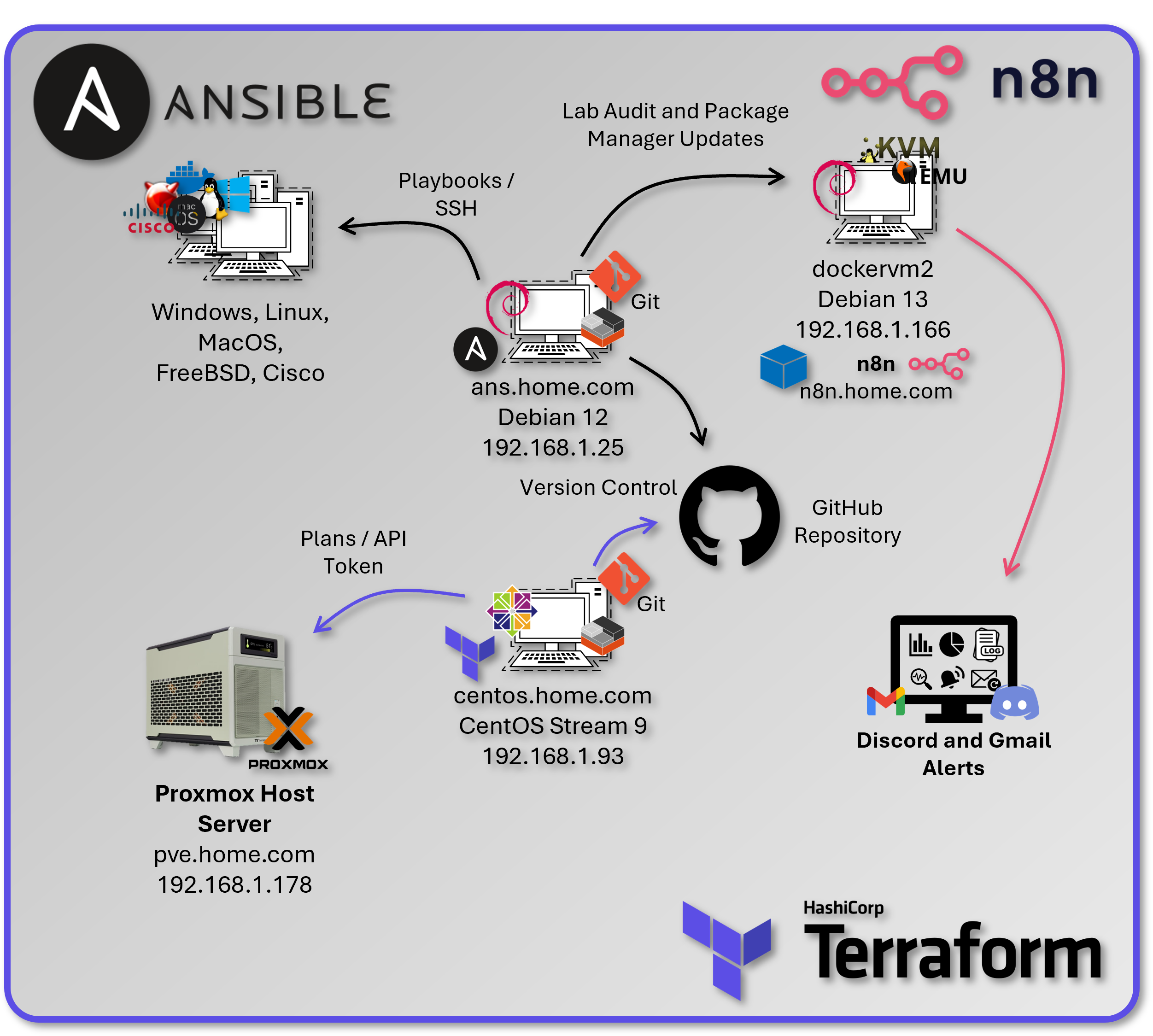
The lab implements a comprehensive automation strategy using infrastructure as code principles, configuration management, and workflow orchestration. This approach provides repeatable deployments, consistent configurations, and automated operations across the entire infrastructure stack.
Security Impact
- Configuration drift eliminated through code‑driven enforcement
- Human error reduced via automated validation
- Credential exposure prevented through integrated secret management
- Unauthorized changes blocked through Git‑based approval workflows
- Disaster recovery enabled through fully reproducible infrastructure
- Audit compliance maintained via immutable version history
Deployment Rationale: Infrastructure as Code eliminates manual configuration drift, reduces human error, and enables rapid disaster recovery. The automation stack transforms a complex 40+ host lab environment into a reproducible, documented system that can be rebuilt from code within hours instead of weeks. This mirrors enterprise DevOps practices and demonstrates proficiency with industry-standard automation tools (Terraform, Ansible, CI/CD pipelines). Enterprise environments leverage IaC to manage hundreds or thousands of servers with consistent security baselines—manual approaches become impossible at scale. This implementation demonstrates understanding of GitOps principles where infrastructure state is declared in version control, changes are peer-reviewed via pull requests, and deployments are automated through CI/CD pipelines.
Architecture Principles Alignment
- Defense in Depth: Infrastructure changes peer-reviewed before deployment; Terraform plan reviewed for security impact; Ansible playbooks enforce CIS Benchmarks; automated testing validates security controls before production
- Secure by Design: Least-privilege service accounts for automation tools; secrets stored in Ansible Vault/Vaultwarden; SSH keys rotated via automated playbooks; no hardcoded credentials in version control
- Zero Trust: Every infrastructure change logged to Git with committer identity; Terraform state files encrypted; API tokens short-lived and rotated; automation execution audited via SIEM
Strategic Value
- Reduced provisioning time: VM deployment from 30 minutes (manual) to <5 minutes (Terraform automation)
- Configuration consistency: Ansible ensures identical baselines across all hosts (100% CIS Benchmark compliance)
- Audit trail: Git commits provide full history of infrastructure changes (who, what, when, why)
- Disaster recovery: Entire lab can be rebuilt from GitHub repository (<2 hours full recovery)
- Learning platform: Hands-on experience with tools used in production environments (transferable to enterprise roles)
- Compliance automation: Security controls codified and version-controlled (auditable evidence of control implementation)
2. Infrastructure Provisioning with Terraform
Architecture Overview
Terraform manages the complete lifecycle of Proxmox virtual machines and LXC containers using declarative configuration files. The infrastructure is defined as code, version-controlled, and applied through a dedicated automation controller VM running Ubuntu Server.
Security Impact
- Least‑privilege automation enforced through Proxmox API tokens
- Infrastructure changes tracked and auditable via Git commit history
- Unauthorized modifications prevented through Terraform's stateful resource management
- Disaster recovery enabled through declarative rebuilds directly from code
- Credential exposure eliminated through encrypted Terraform variables
- Change validation performed prior to execution using terraform plan
Deployment Rationale: Manual VM creation is time-consuming, error-prone, and undocumented—scaling to 40+ VMs/containers requires automation. Terraform demonstrates infrastructure-as-code where VM specifications (CPU, RAM, storage, network) are declared in HCL configuration files, version-controlled, and applied idempotently. This mirrors enterprise infrastructure management (AWS CloudFormation, Azure Resource Manager) where infrastructure is treated as software with code review, testing, and CI/CD deployment. The approach enables rapid environment replication (dev/staging/production), consistent resource configurations, and automated disaster recovery.
Architecture Principles Alignment
- Defense in Depth: Terraform state stored remotely with access controls; API tokens scoped to minimal permissions; plan review catches misconfigurations before apply; resource tagging enables compliance auditing
- Secure by Design: Proxmox API tokens instead of passwords; Terraform variables encrypted; no secrets in Git repositories; automated validation via pre-commit hooks
- Zero Trust: Every Terraform execution logged; state file modifications tracked; API calls authenticated via tokens; infrastructure changes require explicit approval
Deployment Architecture
| Component | Technology | Purpose |
|---|---|---|
| Terraform Controller | CentOS LXC (192.168.x.x) | Isolated automation host |
| Terraform Version | v1.6.x | Infrastructure provisioning engine |
| Provider | Telmate/proxmox v2.9.x | Proxmox VE API integration |
| State Backend | Local file, Cloudflare R2 | State persistence and locking |
| Secrets Management | terraform.tfvars (gitignored) | API tokens and credentials |
Authentication & Authorization
Proxmox Service Account:
- Username: terraform@pve
- Authentication: API token (non-password, scoped)
- Token ID: terraform-token
- Permission Group: TerraformProvisioners
- Granted Privileges:
- VM.Allocate (create VMs)
- VM.Config.* (modify VM settings)
- VM.PowerMgmt (start/stop/shutdown)
- Datastore.AllocateSpace (provision storage)
- SDN.Use (network assignment)
- Principle: Least privilege - cannot modify Proxmox cluster config or other users
Security Controls
- Secrets management: Proxmox API token stored in env variable
- State File Protection: Contains sensitive data, stored with restrictive permissions (0600)
- TLS Verification: pm_tls_insecure = false enforces valid certificate checks
- Separate Workspaces: VM and LXC builds isolated to prevent cross-contamination
- Gitignore Enforcement: terraform.tfvars, *.tfstate excluded from version control
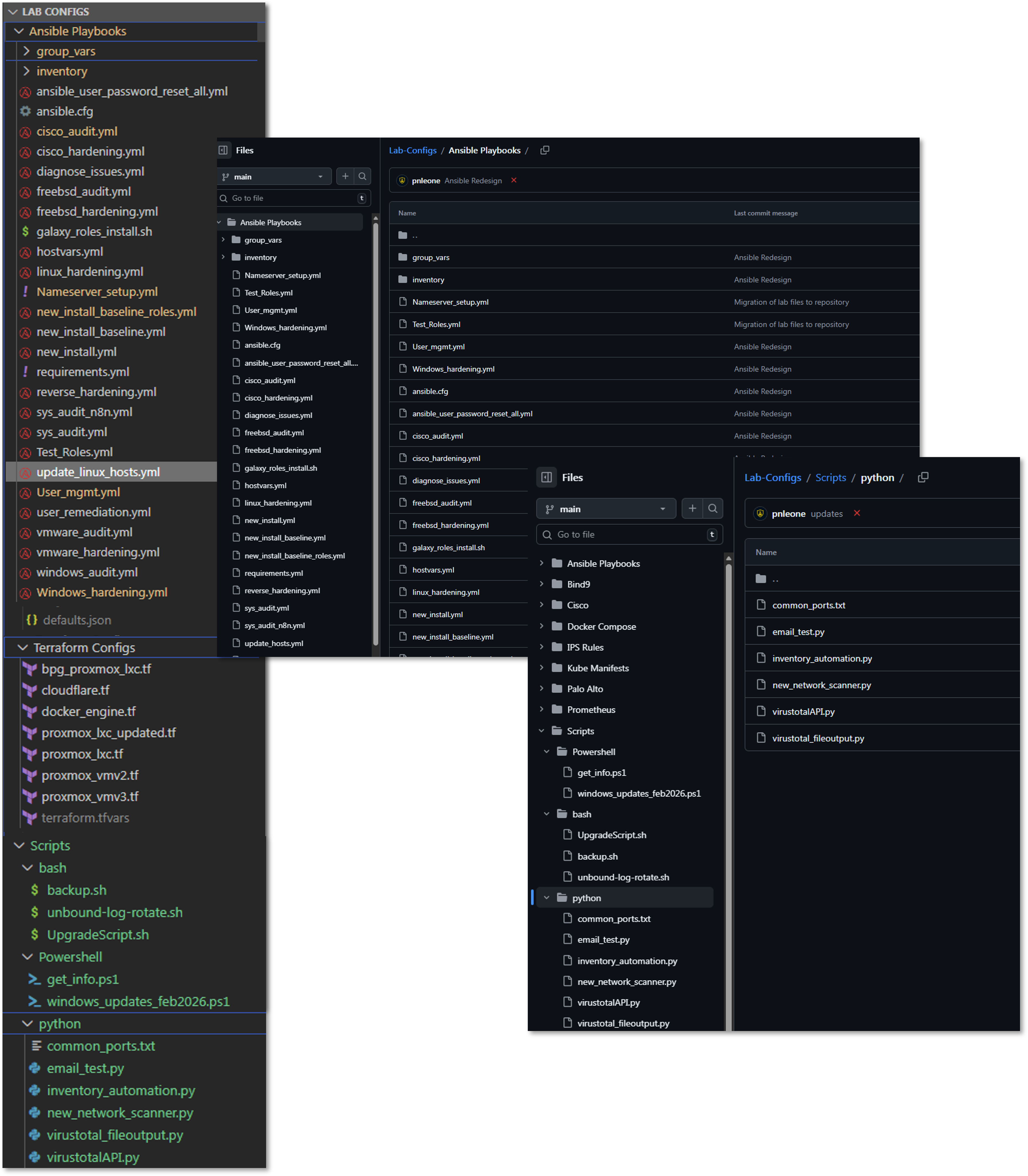
Diagram Placeholder: Terraform Project Structure Screenshots (2 images)
Project Structure:
terraform/
├── vm/
│   ├── main.tf              # VM resource definitions
│   ├── variables.tf         # Input variable declarations
│   ├── terraform.tfvars     # Sensitive values (gitignored)
│   ├── outputs.tf           # Return values (IP, VMID)
│   └── .terraform.lock.hcl  # Provider version lock
├── lxc/
│   ├── main.tf              # LXC resource definitions
│   ├── variables.tf         # Input variable declarations
│   ├── terraform.tfvars     # Sensitive values (gitignored)
│   └── outputs.tf           # Return values
└── modules/
    └── common/              # Reusable module components
Terraform Configuration Deep Dive
LXC Container Provisioning (main.tf)
terraform {
  required_providers {
    proxmox = {
      source  = "Terraform-for-Proxmox/proxmox"

    }
  }
}
variable "pm_api_token_id" {
  description = "Proxmox API token ID"
  type        = string
}

variable "pm_api_token_secret" {
  description = "Proxmox API token secret"
  type        = string
  sensitive   = true
}
variable "rootpassword" {
  description = "Cloud-init password for this VM"
  type        = string
  sensitive   = true
}
variable "lxc_name" {
  description = "Hostname of the LXC container"
  type        = string
  default     = "debian-lxc"

}

variable "lxc_id" {
  description = "VMID for the LXC container"
  type        = number
}


provider "proxmox" {
    pm_api_url          = "https://pve.home.com:8006/api2/json"
    pm_api_token_id     = var.pm_api_token_id
    pm_api_token_secret = var.pm_api_token_secret
    pm_tls_insecure     = false
}

resource "proxmox_lxc" "testct" {
  hostname     = var.lxc_name
  target_node  = "pve"
  vmid         = var.lxc_id
  ostemplate   = "Media4TBnvme:vztmpl/debian-12-standard_12.7-1_amd64.tar.zst"
  password     = var.rootpassword
  unprivileged = true
  cores        = 2
  memory       = 512
  swap         = 512
  onboot       = true
  start        = true


  rootfs {
    storage = "local-lvm"
    size    = "8G"
  }

  network {
    name   = "eth0"
    bridge = "vmbr0"
    ip     = "dhcp"
  }

  features {
    nesting = true
  }
}
Purpose: Deploy unprivileged Debian 12 containers with security isolation and resource limits suitable for containerized workloads.
Key sections:
- Provider declaration → Uses Terraform-for-Proxmox/proxmox provider
- Authentication variables → API token ID & secret, plus root password for the container
- Proxmox provider block → Points to the PVE API over HTTPS with certificate validation (pm_tls_insecure = false)
- LXC resource (proxmox_lxc):
- Hostname & VMID variable arguments provided in the terraform plan command
- Template source (ostemplate) from Proxmox storage
- Unprivileged mode for added security isolation
- Resource limits: 2 CPU cores, 512 MB RAM + swap
- Disk allocation: 8 GB on local-lvm storage
- Networking: virt‑bridge to vmbr0 via DHCP
- Features: nesting enabled (allowing Docker/Kubernetes inside the LXC)
- Boot & start flags so it powers up with the node
Resource Allocation Strategy:
- CPU: 2 cores (sufficient for most containerized apps)
- Memory: 512MB + 512MB swap (low footprint for density)
- Disk: 8GB (expandable, allocated on local-lvm for performance)
- Network: DHCP with VLAN tagging support via bridge
Security Features:
- Unprivileged Containers: UID/GID mapping prevents root escalation to host
- Nesting Enabled: Allows Docker-in-LXC for lab flexibility
- AppArmor Profile: Default Proxmox profile applied
- Resource Limits: Prevent resource exhaustion attacks
VM Provisioning (main.tf - QEMU)
Purpose: Clone cloud-init ready Ubuntu VMs with optimized storage and network configuration for performance and manageability.
terraform {
  required_providers {
    proxmox = {
      source  = "Terraform-for-Proxmox/proxmox"
      #version = "~> 0.65" # or latest
    }
  }
}

variable "pm_api_token_id" {
  description = "Proxmox API token ID"
  type        = string
}

variable "pm_api_token_secret" {
  description = "Proxmox API token secret"
  type        = string
  sensitive   = true
}
variable "ciuser" {
  description = "Cloud-init username for this VM"
  type        = string
}

variable "cipassword" {
  description = "Cloud-init password for this VM"
  type        = string
  sensitive   = true
}

variable "vm_name" {
  description = "Name of the VM"
  type        = string
  default     = "ubuntu-vm"

}

variable "vm_id" {
  description = "VMID for the VM"
  type        = number
}


provider "proxmox" {
    pm_api_url          = "https://pve.home.com:8006/api2/json"
    pm_api_token_id     = var.pm_api_token_id
    pm_api_token_secret = var.pm_api_token_secret
    pm_tls_insecure     = false
}

resource "proxmox_vm_qemu" "ubuntu-vm" {
    name                = var.vm_name
    vmid                = var.vm_id
    target_node         = "pve"
    clone               = "ubuntu-cloud"
    full_clone          = true
    cores               = 2
    memory              = 2048
    sockets             = 1
    onboot              = true
    agent               = 1
    os_type             = "l26"
    clone_wait          = 0
    ciuser     = var.ciuser
    cipassword = var.cipassword


    boot    = "order=scsi0;ide2"
    bootdisk = "scsi0"
    scsihw      = "virtio-scsi-single"

    network {
        model     = "virtio"
        bridge    = "vmbr0"
        firewall  = false
        link_down = false
    }
Key sections:
- Provider declaration → Same Terraform‑for‑Proxmox provider as above
- Authentication variables → API token ID & secret; cloud-init user and password
- Proxmox provider block → HTTPS API endpoint with TLS verification
- VM resource (proxmox_vm_qemu):
- Clones from ubuntu-cloud template (must be cloud-init ready)
- full_clone = true → independent disk image
- OS type set to l26 → Linux kernel 2.6+ (optimized for modern distros)
- Hostname & VMID variable arguments provided in the terraform plan command
- Boot settings:
- Boot from scsi0 (OS disk) before ide2 (cloud-init)
- Force virtio-scsi-single controller for best Linux I/O performance
- CPU/memory: 2 vCPUs, 2 GB RAM, 1 socket
- QEMU guest agent enabled for status reporting & IP detection
- Networking: virtio NIC on vmbr0 with firewall disabled in guest config
- Cloud-init parameters for provisioning user and password
- clone_wait = 0 → Terraform doesn't block on post-clone boot readiness
Cloud-Init Integration:
- User Creation: Provisions non-root user via ciuser parameter
- SSH Keys: Injects public keys for passwordless authentication
- Network Config: Configures DHCP or static IP via ipconfig parameters
- Package Updates: Can specify packages to install on first boot
Performance Optimizations:
- VirtIO-SCSI-Single: Modern SCSI controller with single queue (reduces overhead)
- IOThread: Dedicated I/O thread improves disk throughput
- SSD Flag: Enables TRIM for better SSD performance
- VirtIO NIC: Para-virtualized network driver (near-native performance)
Terraform Plan Output
Diagram Placeholder: Terraform Plan Output Screenshot
Terraform Workflow
| Step | Command | Purpose |
|---|---|---|
| Initialize | terraform init |
Download provider plugins |
| Validate | terraform validate |
Check syntax errors |
| Plan | terraform plan -var="hostname=test01" ... |
Preview changes |
| Apply | terraform apply -var="hostname=test01" ... |
Execute provisioning |
| Destroy | terraform destroy -var="vmid=200" |
Delete resources |
| Show State | terraform show |
View current state |
| Refresh State | terraform refresh |
Sync state with reality |
Example Provisioning Command:
terraform apply \
  -var="hostname=docker-vm-01" \
  -var="vmid=201" \
  -auto-approve
Output: IP address, VMID, MAC address assigned
State Management Strategy
Current Implementation:
- State File: Local terraform.tfstate in working directory
- Locking: None (single operator environment)
- Backup: Automated weekly backups to Proxmox Backup Server and Synology NAS
3. Configuration Management with Ansible
3.1 Architecture Overview
Ansible provides agentless configuration management through SSH-based automation, enforcing consistent baselines across all managed hosts (Linux, Windows, Cisco, VMware, FreeBSD), managing secrets securely via Ansible Vault, and orchestrating complex multi-host operations using declarative playbooks and Galaxy roles.
Security Impact
- Configuration drift eliminated through automated enforcement across 40+ hosts
- SSH hardening applied consistently via dedicated playbooks (PermitRootLogin no, key-only auth)
- Credential exposure prevented through Ansible Vault encryption (AES-256) and vault_* variable pattern
- Audit trail established via Git-based version control
- Manual errors eliminated through playbooks and connectivity pre-tasks
- Multi-platform coverage: Linux, Windows, Cisco IOS, VMware ESXi, FreeBSD (pfSense/OPNsense)
Deployment Rationale: In enterprise environments with 40+ mixed-platform hosts, manual configuration becomes error-prone and time-consuming. This approach reduces configuration time from hours to minutes while ensuring 100% consistency across systems. The lab implementation covers Linux (Debian/RHEL families), Windows Server, Cisco IOS devices, VMware ESXi, and FreeBSD firewalls, demonstrating cross-platform automation capabilities.
Architecture Principles Alignment
- Defense in Depth: SSH hardening playbooks disable weak ciphers and enforce key-based auth; firewall rules (UFW/firewalld) deployed uniformly; fail2ban configured consistently; kernel hardening via sysctl parameters; multi-platform audit playbooks provide visibility across the entire infrastructure stack
- Secure by Design: Ansible Vault encrypts sensitive variables (vault_ansible_password, vault_root_password); no plaintext credentials in playbooks; SSH keys distributed securely via cloud-init; vault.yml encrypted with AES-256
- Zero Trust: Every configuration change logged to Git; playbooks verify current configuration before making changes; connectivity pre-tasks skip unreachable hosts gracefully; password rotation workflow requires explicit vault updates
3.2 Setup Overview
Control plane: Ansible running in a Proxmox LXC
- Deployed from a Proxmox Debian-based LXC ("ansible"), using a Python virtual environment
- SSH auth is key-based via an "ansible" user
- Handles initial configuration management to achieve a standard template across all hosts
- Standard base packages, DNS, PKI and SSH configurations plus user accounts and permissions
Control Plane Configuration
| Component | Details |
|---|---|
| Ansible Controller | Debian 12 LXC (192.168.x.x) |
| Ansible Version | 2.16.x (core) |
| Python Environment | venv isolated (Python 3.11) |
| Authentication | SSH key-based (ed25519) |
| Privilege Escalation | sudo (passwordless for ansible user) |
| Inventory | Dynamic (Proxmox API) + static YAML |
| Vault Encryption | ansible-vault with AES-256 |
3.3 Inventory and Variable Structure
Inventory Design Principles
The inventory uses a hierarchical group structure with NO host duplication. Each host appears exactly once in a platform-specific group, then aggregated via [group:children] declarations for flexible targeting.
- Host Type Groups: [lxc], [vm], [new]
- OS Family Groups: [debian_lxc], [debian_vm], [redhat_lxc], [redhat_vm]
- OS Aggregate Groups: [debian], [redhat] (children of lxc+vm OS groups)
- Platform Groups: [windows], [cisco], [vmware], [freebsd], [fortigate]
- Function Groups: [monitoring], [dns], [proxy], [pki], [docker], [k3s]
- Meta Groups: [linux] (all managed Linux hosts – excludes [new])
Inventory Code Snippets (hosts.ini)
##################################################################
# DEBIAN LXC HOSTS
##################################################################
[debian_lxc]
192.168.1.108       # webserver          web.home.com
192.168.1.136       # Plex               plex.home.com
192.168.1.250       # Pi-hole            pihole.home.com     (Docker)
192.168.1.219       # Wazuh manager      wazuh.home.com

[debian_lxc:vars]
ansible_user=ansible
ansible_password="{{ vault_ansible_password }}"
is_lxc=true

##################################################################
# WINDOWS HOSTS
##################################################################
[windows]
192.168.1.152       # WinServer 2022 / DC    dc01.home.com
192.168.1.142       # WinServer 2025 / DC    dc02.home.com

[windows:vars]
ansible_connection=winrm
ansible_winrm_transport=ntlm
ansible_port=5985
ansible_password="{{ vault_ansible_windows_password }}"

##################################################################
# OS AGGREGATE GROUPS – children only
##################################################################
[debian:children]
debian_lxc
debian_vm

[linux:children]
debian
redhat

##################################################################
# FUNCTION GROUPS
##################################################################
[monitoring]
192.168.1.181       # Uptime Kuma
192.168.1.219       # Wazuh
192.168.1.246       # Grafana
Targeting Examples:
ansible-playbook playbook.yml --limit linux          # All Linux hosts
ansible-playbook playbook.yml --limit lxc            # All LXCs
ansible-playbook playbook.yml --limit debian         # All Debian (LXC + VM)
ansible-playbook playbook.yml --limit debian_lxc     # Debian LXCs only
ansible-playbook playbook.yml --limit lxc --skip-tags reboot  # Skip reboot on LXCs
Variable Structure
Variables follow a strict hierarchy: group_vars/all.yml (global defaults) → group_vars/vault.yml (encrypted secrets) → group-specific vars → host_vars/ (host-specific overrides).
Global Variables (group_vars/all.yml)
# Ansible connection
ansible_python_interpreter: auto_silent
ansible_user: ansible
ansible_password: "{{ vault_ansible_password }}"
ansible_become: true
ansible_become_method: sudo
ansible_become_password: "{{ vault_ansible_password }}"

# SSH public keys
ansible_ssh_pubkey: "ssh-ed25519 AAAAC3..."
officepc_ssh_pubkey: "ssh-ed25519 AAAAC3..."

# Wazuh agent configuration
wazuh_manager_ip: "192.168.1.219"
wazuh_manager_port: 1514
wazuh_version: "4.14.2-1"

# CheckMK agent configuration
checkmk_server: "http://192.168.1.126:5000"
checkmk_site: "cmk"
checkmk_version: "2.4.0p20-1
Vault Structure (group_vars/vault.yml - Encrypted)
vault_ansible_password: "<32-char-random-token>"
vault_root_password: "<complex-password>"
vault_paul_password: "<user-password>"
vault_ansible_windows_password: "<windows-password>"
vault_user_paul_password: "<cisco-password>"
vault_enable_password: "<cisco-enable-password>
Galaxy Roles and Collections
Ansible Galaxy provides pre-built roles and collections for common tasks. The lab uses officially maintained roles for Wazuh, CheckMK agent deployment, plus support for Windows, VMware, and Cisco hosts.
3.4 Core Playbooks - Detailed Overview
Playbook 1: Multi-Platform System Audit (sys_audit_n8n.yml)
Purpose: Comprehensive infrastructure audit across Linux, Windows, and FreeBSD hosts with JSON output for n8n workflow processing.
Key Features:
- Single-play design for all platforms (Linux/Windows/FreeBSD)
- Connectivity pre-checks skip unreachable hosts gracefully
- Platform-specific data collection with conditional blocks
- Consolidated JSON output to /tmp/audit_report.json
- Integration with n8n for HTML report generation and alerting
Data Collected:
- System: CPU cores, memory, disk usage %, memory usage %, uptime
- Network: Default gateway, nameservers, listening ports count
- Security: SSH keys count, Windows Defender status, running services
- Software: Kernel version, available updates count
Code Snippet - Connectivity Pre-Tasks
pre_tasks:
  - name: Check if host is reachable
    ansible.builtin.wait_for_connection:
      timeout: 5
    ignore_unreachable: true
    ignore_errors: true
    register: connection_check

  - name: Gather facts only for reachable hosts
    ansible.builtin.setup:
    when: connection_check is success

  - name: Skip unreachable host
    ansible.builtin.meta: end_host
    when: connection_check is failed or connection_check is unreachable
Code Snippet - Linux Data Collection
- name: Collect disk usage (Linux)
  shell: df -h / | tail -n 1 | awk '{print $5}' | sed 's/%//'
  register: disk_usage_pct
  changed_when: false

- name: Collect memory usage (Linux)
  shell: free | grep Mem | awk '{printf "%.0f", ($3/$2) * 100}'
  register: mem_usage_pct
  changed_when: false

- name: Collect package updates (Linux)
  shell: |
    if command -v apt &> /dev/null; then
      apt list --upgradable 2>/dev/null | grep -c upgradable || echo "0"
    elif command -v dnf &> /dev/null; then
      dnf check-update -q 2>/dev/null | grep -v "^$" | wc -l || echo "0"
    fi
  register: updates_available
  changed_when: false
Code Snippet - Windows Data Collection
- name: Collect disk usage (Windows)
  win_shell: |
    $disk = Get-PSDrive C | Select-Object Used,Free
    [math]::Round(($disk.Used / ($disk.Used + $disk.Free)) * 100, 0)
  register: win_disk_usage

- name: Collect Windows Defender status
  win_shell: (Get-MpComputerStatus).AntivirusEnabled
  register: win_defender_status
  ignore_errors: true
Code Snippet - JSON Consolidation
- name: Write consolidated JSON report
  copy:
    content: |
      {
        "report_generated": "{{ ansible_date_time.iso8601 }}",
        "report_date": "{{ ansible_date_time.date }}",
        "total_hosts": {{ collected_audit_data | length }},
        "hosts": {{ collected_audit_data | to_nice_json }}
      }
    dest: "/tmp/audit_report.json"
  delegate_to: localhost
  run_once: true
Use Cases:
- Weekly infrastructure audits via n8n automation
- Pre-maintenance compliance checks
- Capacity planning via disk/memory trending
- Security baseline validation (SSH keys, services, updates)
Playbook 2: User Management (user_mgmt.yml)
Purpose: Centralized user account and credential management across all Linux hosts with Ansible Vault integration.
Key Features:
- Sets ansible user password from vault_ansible_password
- Sets root password from vault_root_password
- Manages paul user with sudo access (password-based)
- Deploys SSH keys for authorized users
- Verifies ansible key-based auth after password rotation
Code Snippet - Ansible User Password Management
- name: Set ansible user password from vault
  tags: ansible_user
  ansible.builtin.user:
    name: ansible
    password: "{{ vault_ansible_password | password_hash('sha512') }}"
    update_password: always


- name: Verify ansible SSH key is still present
  tags: ansible_user, verify
  ansible.posix.authorized_key:
    user: ansible
    key: "{{ ansible_ssh_pubkey }}"
    state: present
Code Snippet - Paul User with Sudo Configuration
- name: Ensure paul user exists
  ansible.builtin.user:
    name: paul
    shell: /bin/bash
    groups: "{{ 'sudo' if ansible_os_family == 'Debian' else 'wheel' }}"
    append: true
    password: "{{ vault_paul_password | password_hash('sha512') }}"

- name: Deploy sudoers file for paul
  ansible.builtin.copy:
    content: |
      Defaults:paul rootpw
      paul ALL=(ALL) ALL, !/usr/bin/su
    dest: /etc/sudoers.d/paul
    owner: root
    group: root
    mode: '0440'
    validate: '/usr/sbin/visudo -cf %s'
Password Rotation Workflow:
- Generate 32-char token:
openssl rand -base64 24 - Update vault_ansible_password in vault.yml:
ansible-vault edit group_vars/vault.yml - Run playbook:
ansible-playbook user_mgmt.yml --tags ansible_user - Test connectivity:
ansible linux -m ping
Use Cases:
- Quarterly credential rotation (automated via n8n)
- Emergency password resets
- New host bootstrap user provisioning
- SSH key distribution after key rotation
Playbook 3: Linux Package Updates (update_linux_hosts.yml)
Purpose: Update all Linux hosts with dist-upgrade/dnf update and reboot detection.
Key Features:
- Debian: apt dist-upgrade with autoremove/autoclean
- RedHat: dnf update with latest packages
- Reboot detection for kernel updates
- Free strategy for parallel execution
- Update summary with reboot status
Code Snippet - Debian Package Updates & Reboot Detection
- name: Update all packages (Debian)
  tags: packages, update
  apt:
    upgrade: dist
    update_cache: true
    cache_valid_time: 3600
    autoremove: true
    autoclean: true
  when: ansible_os_family == "Debian"
  register: apt_update

- name: Check if reboot required (Debian)
  tags: reboot
  stat:
    path: /var/run/reboot-required
  register: reboot_deb
  when: ansible_os_family == "Debian"
Use Cases:
- Weekly package updates (n8n automation)
- Security patch deployment
- Post-vulnerability scanning remediation
- Compliance maintenance (keep systems current)
Playbook 4: Linux Hardening (linux_hardening.yml)
Purpose: Docker-aware SSH and system hardening with automatic Docker detection.
Key Features:
- SSH hardening: disable root login, enforce key-only auth
- TCP/Agent forwarding enabled for Docker/DevOps workflows
- Automatic Docker detection preserves IP forwarding
- Safe kernel parameters (sysctl hardening)
- Login banner deployment
Code Snippet - Docker Detection
- name: Detect if Docker is installed
  stat:
    path: /usr/bin/docker
  register: docker_check

- name: Set Docker presence fact
  set_fact:
    has_docker: "{{ docker_check.stat.exists }}"

- name: Configure sysctl for Docker hosts
  sysctl:
    name: net.ipv4.ip_forward
    value: '1'
    state: present
    sysctl_set: true
  when: has_docker | bool
Code Snippet - SSH Hardening
- name: Configure SSH hardening options
  lineinfile:
    path: /etc/ssh/sshd_config
    regexp: '^#?{{ item.key }}\s'
    line: '{{ item.key }} {{ item.value }}'
    state: present
  loop:
    - { key: 'PermitRootLogin', value: 'no' }
    - { key: 'PasswordAuthentication', value: 'no' }
    - { key: 'PubkeyAuthentication', value: 'yes' }
    - { key: 'AllowAgentForwarding', value: 'yes' }
    - { key: 'AllowTcpForwarding', value: 'yes' }
  notify: restart sshd
Use Cases:
- New host security baseline
- Docker host specialized hardening
- Compliance enforcement (CIS benchmarks)
- Post-compromise hardening
Playbook 5: New Install Baseline (new_install_baseline_roles.yml)
Purpose: Bootstrap new hosts with baseline configuration using Galaxy roles.
Roles Used:
- wazuh.wazuh_agent (version: 4.14.2)
- Custom bootstrap tasks (user creation, SSH, sudo)
Key Features:
- Creates ansible service account with passwordless sudo
- Deploys SSH keys for ansible and paul users
- Configures sudoers with validation
- Installs Wazuh agent and registers with manager
- Installs utility packages (curl, nano, dig, traceroute)
- Enables qemu-guest-agent for Proxmox integration
Code Snippet - User Creation
- name: Create ansible user
  ansible.builtin.user:
    name: ansible
    shell: /bin/bash
    password: "{{ vault_ansible_password | password_hash('sha512') }}"
    comment: "Ansible Automation Service Account"

- name: Ensure .ssh directory exists
  file:
    path: /home/ansible/.ssh
    state: directory
    owner: ansible
    group: ansible
    mode: '0700'

- name: Add SSH key for ansible user
  ansible.posix.authorized_key:
    user: ansible
    key: "{{ ansible_ssh_pubkey }}"
    state: present

- name: Deploy sudoers file for ansible user (passwordless)
  ansible.builtin.copy:
    content: "ansible ALL=(ALL) NOPASSWD:ALL\n"
    dest: /etc/sudoers.d/ansible
    mode: '0440'
    validate: '/usr/sbin/visudo -cf %s'
Use Cases:
- Fresh install bootstrap (first playbook to run)
- Wazuh agent deployment across new hosts
- Monitoring stack integration
- Standardized user/SSH configuration
4. Version Control and GitOps
Version Control Strategy
All infrastructure‑as‑code assets for this solution — including Ansible playbooks, Terraform configurations, and related modules — are stored in a dedicated GitHub repository using Git on the local host.
This central repository provides:
- Version history — Every change is committed with a message on what changed, enabling full audit trails for infrastructure modifications
- Consistency across environments — Ansible roles and Terraform modules are version‑locked so the same codebase can be applied to multiple hosts
- Rollback capability — Previous commits can be checked out to restore infrastructure to a known good state quickly in case of issues
Configuration files for hosted and platform services — including YAML, JSON, HTML, CSS, Python, and PowerShell scripts — are stored in a separate repository. This repository is fully integrated with Visual Studio Code, allowing seamless local and remote (via SSH) integration editing.
By keeping both provisioning (Terraform) and configuration management (Ansible) in one repository, and separating hosted/platform service configs into another, the architecture ensures that each layer of the stack is versioned, auditable, and maintainable.
5. Workflow Automation with n8n
5.1 Platform Overview
n8n is a self-hosted, low-code workflow automation platform enabling visual workflow design with conditional logic, error handling, loops, and data transformation. Deployed as a containerized service behind Traefik reverse proxy with Authentik SSO.
Security Impact
- Security operations accelerated through automated SOAR workflows
- Manual triage eliminated via automated alert enrichment
- MTTR reduced through auto-generated remediation playbooks
- Alert fatigue minimized through intelligent deduplication and correlation
- Compliance audit trails automatically documented throughout the incident lifecycle
Deployment Rationale: Security operations generate thousands of events daily, manual triage is unsustainable. n8n demonstrates Security Orchestration, Automation and Response (SOAR) capabilities where vulnerability scans trigger automated ticket creation, threat intelligence enrichment queries multiple APIs, and incident response playbooks execute without human intervention. This mirrors enterprise SOAR platforms (Splunk SOAR, Palo Alto Cortex XSOAR) where analyst efficiency is multiplied through automation.
Architecture Principles Alignment
- Defense in Depth: Automated vulnerability remediation workflows execute Ansible playbooks; firewall rule changes logged and reviewed; failed automation triggers manual fallback procedures
- Secure by Design: Credentials stored in n8n credential vault (encrypted at rest); webhook endpoints authenticated via Authentik tokens; workflow execution logs forwarded to SIEM
- Zero Trust: Every automation action logged with timestamp/user; no hardcoded credentials; API tokens expire and rotate automatically
n8n Configuration
- Version: n8n v2.7.5 (latest stable)
- Execution Mode: Main process (not queue mode for simplicity)
- Webhook URL: https://n8n.home.com
- TLS Certificate: Step-CA issued, auto-renewed
- Authentication: SSO via Authentik (no local passwords)
- Monitoring: Uptime Kuma
- Notifications: Discord webhooks, SMTP relay
Security Controls
- Credential Encryption: All API tokens encrypted at rest, Ansible automated (ansible-vault)
- Webhook Security: HMAC signature validation on inbound webhooks
- Audit Trail: All workflow executions logged with timestamp and user
5.2 Workflow 1: Lab Infrastructure Audit
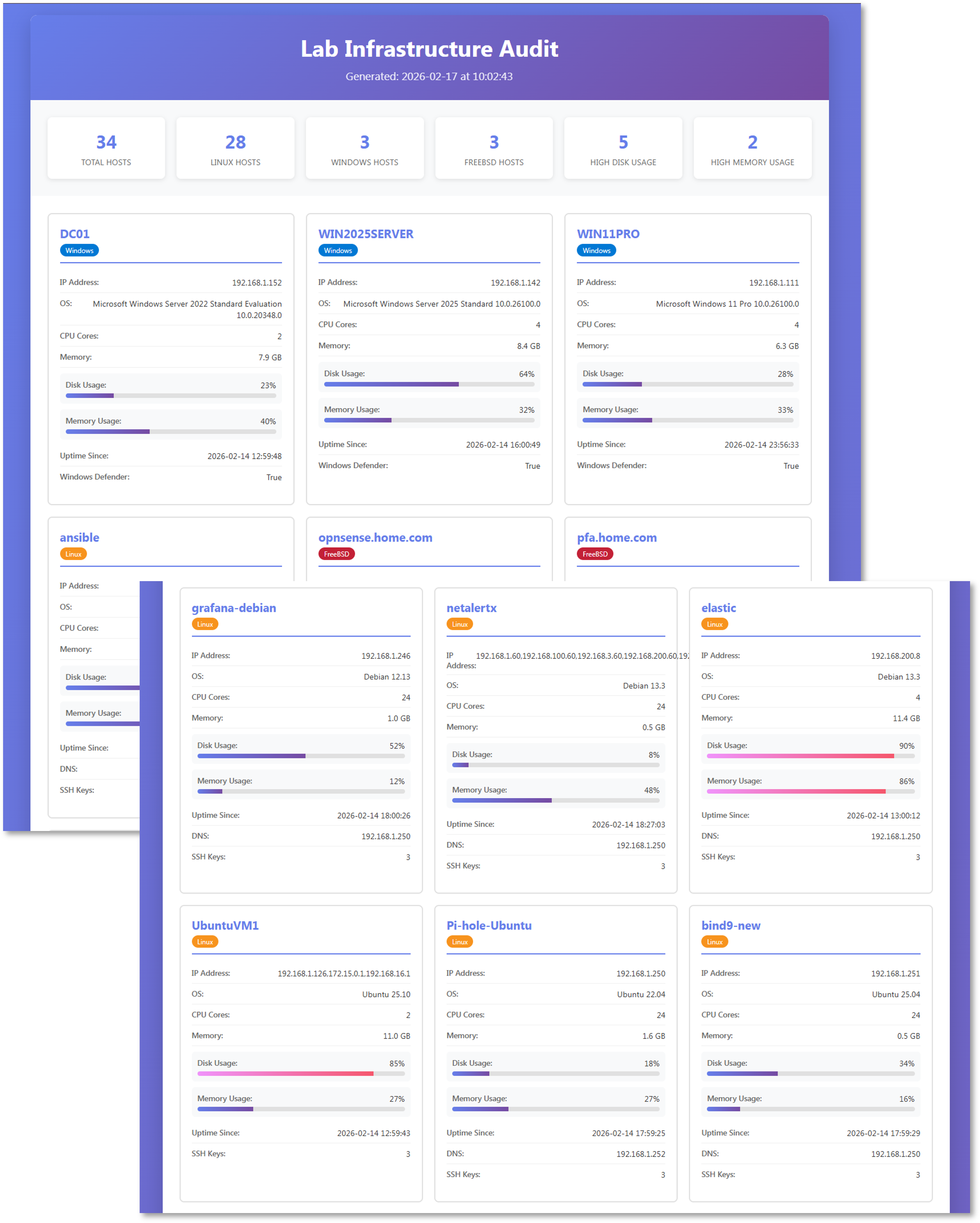
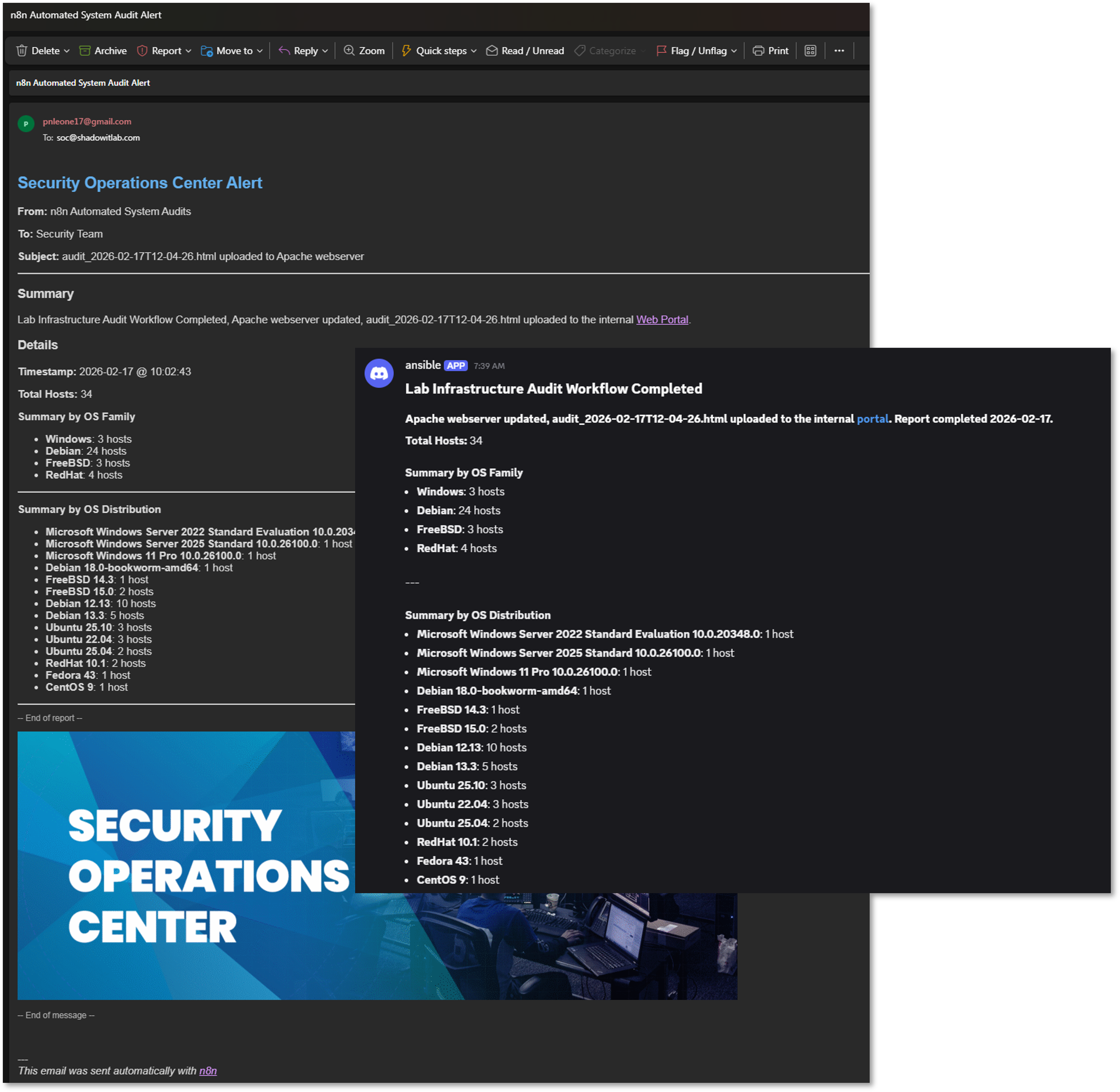
Purpose: Automated weekly configuration audit and system updates across lab infrastructure with HTML reporting and dual alerting (Discord + Email).
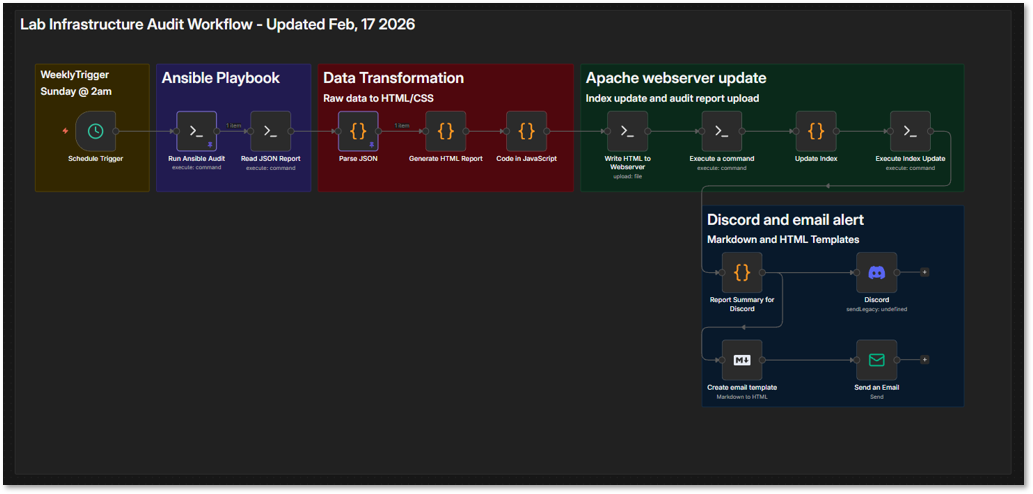
This workflow runs weekly on Sunday at 2 AM, executes the Ansible sys_audit_n8n.yml playbook, transforms the JSON output into a styled HTML report, deploys it to the Apache webserver, and sends notifications via Discord and email.
Workflow Summary:
- Scheduled Execution: Triggered weekly via n8n's Cron node (Sunday 2 AM)
- Ansible Playbook: Executes sys_audit_n8n.yml via SSH to collect system metrics
- Data Transformation: Parses JSON and generates HTML report with CSS styling
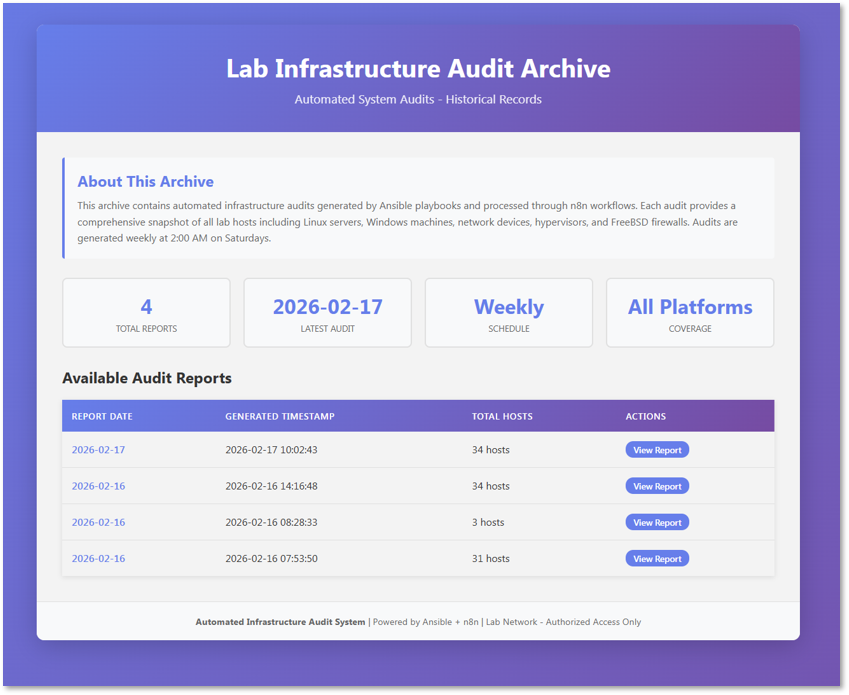
- Apache Upload: Deploys HTML to /var/www/html/ and updates index page
- Discord Alert: Sends formatted notification with report link and summary stats
- Email Alert: Sends HTML email template with audit summary
Workflow Nodes
| Node Type | Configuration | Purpose |
|---|---|---|
| Schedule Trigger | Cron: 0 2 * * 0 (Sunday 2 AM) | Weekly execution |
| SSH Node 1 | ansible-playbook sys_audit_n8n.yml | Run audit playbook |
| SSH Node 2 | cat /tmp/audit_report.json | Read JSON output |
| Code Node 1 | Parse JSON from stdout | Extract audit data |
| Code Node 2 | Generate HTML with CSS | Create styled report |
| SSH Node 3 | Write HTML to webserver | Deploy to Apache |
| SSH Node 4 | Update index.html | Add report to index |
| Code Node 3 | Generate Discord markdown | Format alert message |
| Discord Webhook | POST to webhook URL | Send Discord notification |
| Code Node 4 | Generate email HTML | Format email template |
| Email Node | SMTP send | Send email notification |
HTML Report Features:
- Responsive grid layout with host cards
- Platform-specific color coding (Linux/Windows/FreeBSD)
- Visual metrics with progress bars for disk/memory usage
- Warning/critical thresholds highlighted (>75% yellow, >90% red)
- Summary statistics cards (total hosts, high disk/memory usage counts)
- Timestamp and audit metadata in footer
5.3 Workflow 2: Threat Intelligence Aggregation
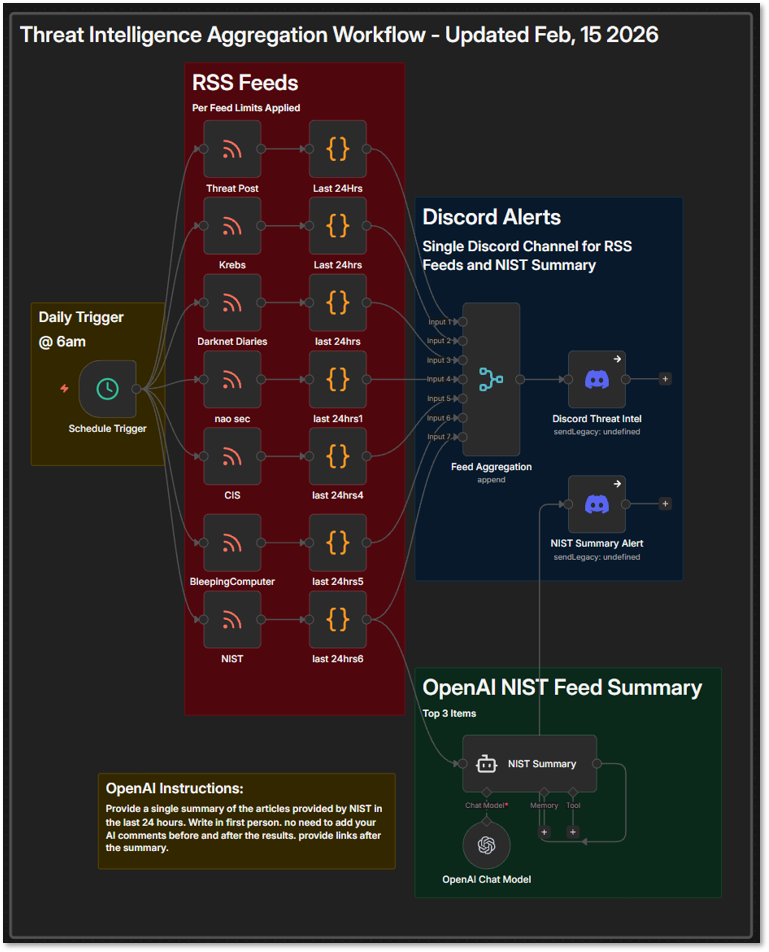
Purpose: Daily ingestion and distribution of curated cybersecurity threat intelligence with AI-powered summarization.
This workflow runs daily at 8 AM to ingest and distribute curated threat intelligence from multiple cybersecurity RSS feeds. It supports situational awareness and IOC enrichment across the lab environment.
Workflow Summary:
- Scheduled Execution: Triggered daily via n8n's Cron node (6 AM)
- RSS Feed Polling: Pulls entries from curated list of cybersecurity sources
- Feed Limiting: Filters each feed to articles added in the last 24 hours to reduce noise
- ChatGPT Integration: NIST feed summarized via OpenAI API
- Discord Notification: Formatted aggregated feed summary to #threat-intel channel
RSS Feeds:
- Darknet Diaries (https://podcast.darknetdiaries.com/)
- NIST (https://www.nist.gov/blogs/cybersecurity-insights/rss.xml)
- Krebs on Security (https://krebsonsecurity.com/feed/)
- Threat Post (https://threatpost.com/feed/)
- BleepingComputer (https://www.bleepingcomputer.com/feed/)
- CIS (https://www.cisecurity.org/feed/advisories)
- NAO SEC (https://nao-sec.org/feed)
Workflow Nodes
| Node Type | Configuration | Purpose |
|---|---|---|
| Schedule Trigger | Cron: 0 8 * * * (Daily 6 AM) | Daily execution |
| RSS Feed Reader | URLs: CIS, NIST, Krebs, ThreatPost, BleepingComputer, etc | Ingest threat intel |
| Filter Node | Limit each feed to the last 24 hours | Reduce noise |
| Merge Node | Combine all feeds | Aggregate data |
| OpenAI Node | Summarize NIST feed with ChatGPT | AI-powered summary |
| Format Node | Create Discord embed message | Visual formatting |
| Discord Webhook | POST to #threat-intel channel | Distribute to team |
Workflow Benefits:
- Centralized threat intelligence (7 sources → 1 channel)
- AI-powered summarization reduces information overload
- Daily cadence ensures timely awareness of emerging threats
- Supports incident response and vulnerability management

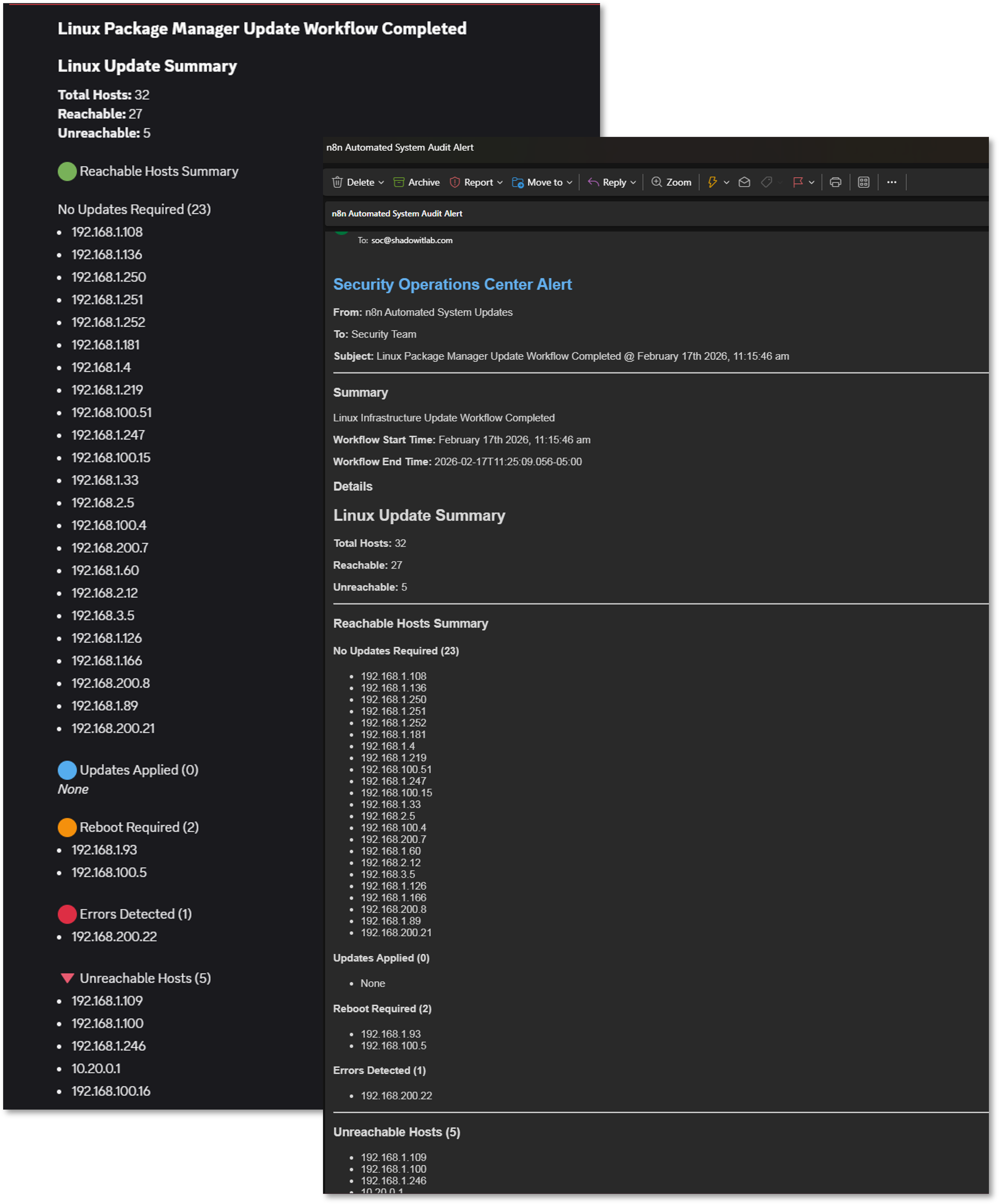
5.4 Workflow 3: Weekly Package Updates with Alerting
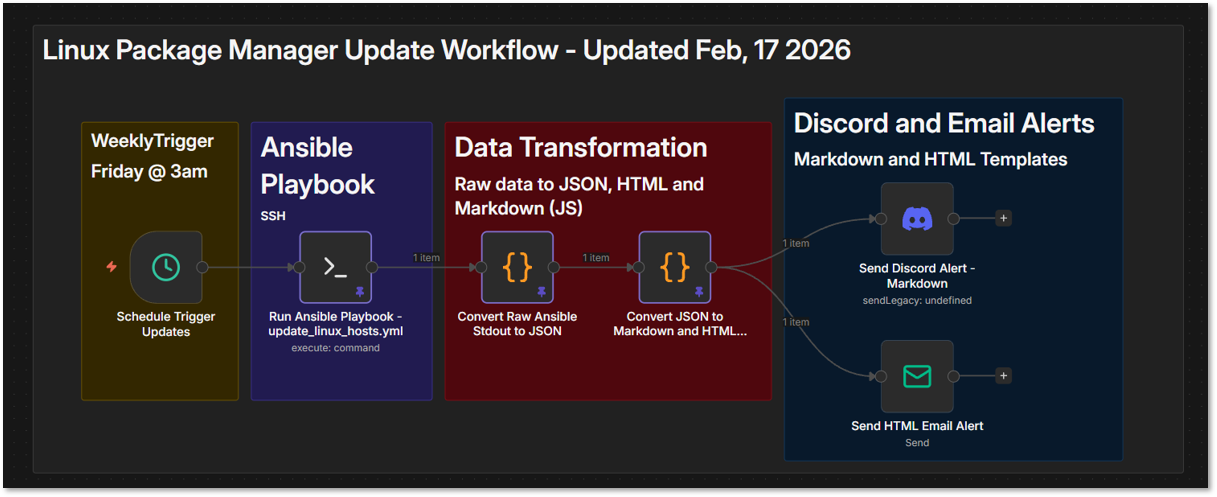
Purpose: Automated weekly package manager updates across all Linux hosts with Discord and email alerting.
This workflow runs weekly on Friday at 3 AM, executes the update_linux_hosts.yml Ansible playbook, parses the output to categorize update results, and sends formatted notifications via Discord and email.
Workflow Summary:
- Scheduled Execution: Weekly trigger (Friday 3 AM)
- Ansible Playbook: Executes update_linux_hosts.yml for apt/dnf updates
- Data Parsing: Converts raw Ansible stdout to structured JSON
- Update Categorization: Hosts grouped by status (no updates, updated, reboot required, errors)
- Markdown Generation: Creates formatted summary for Discord
- HTML Generation: Creates formatted report for email
- Discord Alert: Sends markdown summary with status counts
- Email Alert: Sends HTML email with detailed update report
Workflow Nodes
| Node Type | Configuration | Purpose |
|---|---|---|
| Schedule Trigger | Cron: 0 3 * * 5 (Friday 3 AM) | Weekly execution |
| SSH Node | ansible-playbook update_linux_hosts.yml | Run package updates |
| Code Node 1 | Parse stdout: extract reachable/unreachable hosts, summaries, recap | Convert to structured JSON |
| Code Node 2 | Generate markdown and HTML summaries with categorization | Format alert content |
| Discord Node | POST markdown summary | Send Discord notification |
| Email Node | SMTP send HTML report | Send email notification |
Data Flow and Parsing Logic
The workflow parses Ansible's stdout output to extract comprehensive update information:
- Reachable Hosts: Extracted from 'ok: [hostname]' lines
- Unreachable Hosts: Extracted from 'fatal: [hostname]' lines
- Update Summaries: Parsed from 'msg' fields containing platform, packages updated, reboot status
- Play Recap: Structured data showing ok/changed/failed/skipped counts per host
Host Categorization
Hosts are automatically categorized based on update results:
- No Updates Required: Hosts with packages_updated = False
- Updates Applied: Hosts with packages_updated = True and reboot_required = False
- Reboot Required: Hosts with reboot_required = True
- Errors Detected: Hosts with empty/null platform, packages_updated, reboot_required
- Unreachable: Hosts that failed connectivity checks
Code Snippet - Stdout to JSON Parsing
// Parse Ansible stdout into structured data
const stdout = $input.first().json.stdout;
const lines = stdout.split('\n');

// Extract reachable and unreachable hosts
let reachable = [];
let unreachable = [];

for (const line of lines) {
  const okMatch = line.match(/^ok:\s+\[(.*?)\]/);
  if (okMatch) reachable.push(okMatch[1]);

  const fatalMatch = line.match(/^fatal:\s+\[(.*?)\]/);
  if (fatalMatch) unreachable.push(fatalMatch[1]);
}

// Parse update summaries from msg fields
let summaries = [];
let currentHost = null;

for (const line of lines) {
  const hostMatch = line.match(/^ok:\s+\[(.*?)\]\s+=>/);
  if (hostMatch) currentHost = hostMatch[1];

  if (line.includes('"msg":')) {
    const msg = line.replace(/.*"msg":\s+"|",?$/g, "");
    const platform = (msg.match(/Platform:\s+(.*)/) || [])[1];
    const updated = (msg.match(/Packages updated:\s+(.*)/) || [])[1];
    const reboot = (msg.match(/Reboot required:\s+(.*)/) || [])[1];

    summaries.push({
      host: currentHost,
      platform,
      packages_updated: updated,
      reboot_required: reboot
    });
  }
}

return [{ json: { total_hosts, reachable_hosts, unreachable_hosts, update_summaries, recap } }];
Code Snippet - Categorization and Formatting
// Categorize hosts by update status
const noUpdates = [];
const updatesApplied = [];
const rebootRequired = [];
const errorsDetected = [];

for (const s of normalized) {
  if (s.error) {
    errorsDetected.push(s.host);
  } else if (s.reboot) {
    rebootRequired.push(s.host);
  } else if (s.updated) {
    updatesApplied.push(s.host);
  } else {
    noUpdates.push(s.host);
  }
}

// Generate markdown for Discord
const md = `
## Linux Update Summary

**Total Hosts:** ${total}
**Reachable:** ${reachable.length}
**Unreachable:** ${unreachable.length}

🟢 No Updates Required (${noUpdates.length})
${noUpdates.map(h => \`- ${h}\`).join("\n")}

🔵 Updates Applied (${updatesApplied.length})
${updatesApplied.map(h => \`- ${h}\`).join("\n")}

🟠 Reboot Required (${rebootRequired.length})
${rebootRequired.map(h => \`- ${h}\`).join("\n")}

🔴 Errors Detected (${errorsDetected.length})
${errorsDetected.map(h => \`- ${h}\`).join("\n")}
`;

return [{ json: { markdown: md, html: html } }];
Workflow Benefits:
- Automated weekly package updates reduce manual maintenance
- Categorized results prioritize attention (errors and reboots first)
- Dual alerting ensures visibility across communication channels
- Structured parsing enables trend analysis over time
- Unreachable host detection prevents silent failures
Use Cases:
- Weekly security patch deployment
- Compliance maintenance (systems up-to-date)
- Post-vulnerability scanning remediation
- Reboot planning based on kernel updates
- Infrastructure health monitoring
5.5 Workflow 4: Monthly Automated Ansible Token Rotation
[PLACEHOLDER - Implementation Pending]
Purpose: Automated monthly credential rotation for Ansible vault with random token generation, vault file update, user management playbook execution, and dual alerting.
Planned Workflow Summary:
- Scheduled Execution: Monthly trigger (1st of month at 4 AM)
- Token Generation: Create cryptographically random 32-char token (base64)
- Vault Update: SSH to Ansible controller and update vault_ansible_password in vault.yml
- Playbook Execution: Run user_mgmt.yml --tags ansible_user to propagate new password
- Connectivity Test: Verify Ansible can still connect to all hosts via ping
- Discord Alert: Send success/failure notification with rotation summary
- Email Alert: Send HTML email confirming rotation and test results
Planned Workflow Nodes
| Node Type | Configuration | Purpose |
|---|---|---|
| Schedule Trigger | Cron: 0 4 1 * * (1st of month 4 AM) | Monthly execution |
| Code Node 1 | Generate token: crypto.randomBytes(24).toString('base64') | Create new password |
| SSH Node 1 | Backup current vault.yml | Create vault backup |
| SSH Node 2 | ansible-vault edit vault.yml (update vault_ansible_password) | Update vault variable |
| SSH Node 3 | ansible-playbook user_mgmt.yml --tags ansible_user | Propagate new password |
| SSH Node 4 | ansible linux -m ping | Test connectivity |
| Code Node 2 | Parse ping results for success count | Verify all hosts accessible |
| IF Node | Check if ping success == total hosts | Route to success/failure |
| Code Node 3 | Generate Discord success message | Format success alert |
| Discord Webhook | POST rotation success to Discord | Send Discord notification |
| Code Node 4 | Generate HTML email template | Format email report |
| Email Node | SMTP send with rotation details | Send email notification |
| Error Handler | Rollback vault.yml and alert on failure | Handle rotation errors |
Security Considerations for Token Rotation:
- Token generation uses crypto.randomBytes (cryptographically secure)
- Vault backup created before each rotation for rollback capability
- Connectivity test verifies all hosts accessible before confirming rotation
- Error handler automatically reverts to backup vault on failure
- Credentials never logged or displayed in workflow execution history
- n8n credential vault stores vault password with AES-256 encryption
Expected Alert Content:
- Rotation timestamp
- Token generation success
- Vault update status
- User management playbook execution result
- Connectivity test results (hosts reachable/unreachable)
- Rollback status (if applicable)
5.6 Best Practices and Lessons Learned
Error Handling and Resilience:
- All SSH nodes include timeout settings (30-60 seconds)
- Workflow execution logs retained for 30 days in n8n database
Credential Management:
- All credentials stored in n8n vault (never hardcoded)
- SSH credentials use key-based auth where possible
- Webhook URLs stored as environment variables
- SMTP credentials encrypted with AES-256 at rest
Notification Design:
- Discord: Concise markdown with key metrics and report links
- Email: Detailed HTML templates with embedded CSS for compatibility
- Critical alerts include @ mentions for immediate attention
- All notifications include timestamp and workflow execution ID
Integration Patterns:
- Ansible workflows use SSH node for remote execution
- JSON output from playbooks parsed in Code nodes
- HTML and Markdown generation via JavaScript templates
- Apache webserver deployment via SSH file write operations
- Multi-platform support handled through conditional Ansible blocks
6. Scripting for Advanced Automation
Script Development Strategy
Custom scripts supplement configuration management tools for tasks requiring complex logic, performance optimization, or specialized functionality. All scripts are version-controlled in Git, documented with inline comments, and integrated into broader automation workflows.
Security Impact
- Complex security operations automated where configuration‑management tools lack native functionality
- Performance‑critical tasks (log parsing, threat‑intelligence queries) optimized beyond built‑in tool capabilities
- Security tool APIs integrated through custom automation wrappers for expanded functionality
- Rapid prototyping enables validation of security concepts before production‑grade implementation
Deployment Rationale: While Ansible/Terraform handle declarative configuration, procedural logic (API rate-limiting, stateful workflows, real-time processing) requires traditional scripting. Enterprise environments use scripts for custom integrations, API gateways, and performance-critical operations. This demonstrates ability to select appropriate automation tools—declarative vs. imperative—based on task requirements.
Architecture Principles Alignment
- Defense in Depth: Scripts validate input parameters; error handling prevents cascading failures; execution logs audited for anomalies
- Secure by Design: No hardcoded credentials (environment variables or secret managers); input sanitization prevents injection attacks; least-privilege execution (non-root where possible)
- Zero Trust: Every script execution logged with user/timestamp; API calls authenticated via short-lived tokens; output validation before downstream processing
Script Language Selection Criteria
| Language | Use Cases | Advantages |
|---|---|---|
| Bash | Linux system administration; cron jobs | Native; fast; no dependencies |
| PowerShell | Windows management; AD operations | Deep Windows integration; objects |
| Python | API integration; data processing; ML | Rich libraries; cross-platform |
6.1 PowerShell and Bash Scripting
Custom automation scripts are developed in both PowerShell (for Windows systems) and Bash (for Linux systems) to handle repetitive administrative tasks, enforce configuration standards, and respond to system events. These scripts automate activities such as user account provisioning, log rotation, backup verification, certificate renewal checks, and security baseline enforcement. PowerShell scripts leverage native Windows management frameworks like Active Directory modules and WMI, while Bash scripts utilize standard Unix utilities and interact with system APIs. Scripts are version-controlled in GitHub alongside infrastructure code, enabling rollback capability and documentation of automation logic.
Bash Script Example: Backup Automation
#!/bin/bash
#
# backup_web.sh - Versioned rsync backup with validation
# Usage: backup_web.sh <source> <target>
# Example: backup_web.sh /var/www/lab /backup
#
# Exit Codes:
#   0 - Success
#   1 - Invalid arguments
#   2 - Missing dependency
#   3 - Rsync failed
set -euo pipefail  # Exit on error, undefined vars, pipe failures

# check to make sure the user has entrered exactly two arguments.
if [ $# -ne 2 ]
then
    /usr/bin/echo "Usage: backup.sh <source_directory> <target_directory>"
    /usr/bin/echo "Please try again."
    exit 1
fi
SOURCE="$1"
TARGET="$2"

# Validate paths (prevent directory traversal)
if [[ ! "$SOURCE" =~ ^/[a-zA-Z0-9/_-]+$RetryPContinuebash]]; then
    echo "Error: Invalid source path format"
    exit 1
fi

if [[ ! "$TARGET" =~ ^/[a-zA-Z0-9/_-]+$ ]]; then
    echo "Error: Invalid target path format"
    exit 1
fi

#check to see if rsync is installed
if ! command -v rsync > /dev/null 2>&1
then
    /usr/bin/echo "This script requires rsync to be installed."
    /usr/bin/echo "Please install the package and run the script again."
    exit 2
fi
# Verify source exists
if [ ! -d "$SOURCE" ]; then
    /usr/bin/echo "Error: Source directory does not exist: $SOURCE"
    exit 1
fi

# Create target if needed
mkdir -p "$TARGET"

# Generate timestamp
TIMESTAMP=$(date +%Y-%m-%d_%H-%M-%S)
BACKUP_DATE=$(date +%Y-%m-%d)
LOG_FILE="/var/log/backup_${BACKUP_DATE}.log"

# Rsync options
RSYNC_OPTS=(
    -avz                                    # Archive, verbose, compress
    --delete                                # Remove deleted files
    --backup                                # Backup changed files
    --backup-dir="$TARGET/versions/$TIMESTAMP"  # Versioned backups
    --exclude='*.tmp'                       # Exclude temp files
    --exclude='.git'                        # Exclude version control
    --log-file="$LOG_FILE"                  # Detailed logging
    --stats                                 # Show transfer statistics
)

# Log start
/usr/bin/echo "=== Backup started at $(date) ===" | tee -a "$LOG_FILE"
logger -t backup_web "Starting backup: $SOURCE -> $TARGET"

# Execute rsync
if rsync "${RSYNC_OPTS[@]}" "$SOURCE/" "$TARGET/current/"; then
    /usr/bin/echo "=== Backup completed successfully at $(date) ===" | tee -a "$LOG_FILE"
    logger -t backup_web "SUCCESS: Backup completed"

    # Calculate backup size
    BACKUP_SIZE=$(du -sh "$TARGET/current" | cut -f1)
    /usr/bin/echo "Backup size: $BACKUP_SIZE" | tee -a "$LOG_FILE"

    # Retention: Keep only last 7 version directories
    find "$TARGET/versions/" -maxdepth 1 -type d -mtime +7 -exec rm -rf {} \;

    exit 0
else
    RSYNC_EXIT=$?
    /usr/bin/echo "=== Backup FAILED at $(date) with exit code $RSYNC_EXIT ===" | tee -a "$LOG_FILE"
    logger -t backup_web "FAILED: rsync exited with code $RSYNC_EXIT"
    exit 3
fi
This Bash script is designed to perform a backup using rsync, with versioned backups stored by date. It validates input, checks for dependencies, and logs the simulated operation.
Script: /usr/local/bin/backup_web.sh
Purpose: Incremental rsync backup with versioning and logging
| Line(s) | Purpose | Explanation |
|---|---|---|
| #!/bin/bash | Script interpreter | Ensures the script runs using Bash |
| if [ $# -ne 2 ] | Argument check | Verifies that exactly two arguments are provided |
| echo "Usage:..." | Usage message | Informs the user of correct syntax if arguments are missing |
| exit 1 | Exit on error | Terminates with exit code 1 for incorrect usage |
| command -v rsync | Dependency check | Verifies that rsync is installed and available in $PATH |
| exit 2 | Exit on missing dependency | Terminates with exit code 2 if rsync is not found |
| current_date=$(date +%Y-%m-%d) | Timestamp | Captures the current date in YYYY-MM-DD format for versioning |
| rsync_options=... | Backup options | Sets rsync flags: -a: archive mode; -v: verbose; -b: backup files; --backup-dir: dated subdirectory; --delete: remove obsolete files; --dry-run: simulate |
| $(which rsync) ... | Execute rsync | Runs rsync with defined options, syncing from $1 to $2/current |
| >> /var/log/backup_$current_date.log | Logging | Appends output to a date-stamped log file for auditability |
Linux Upgrade Script Overview
#!/bin/bash
set -e

logfile=/var/log/update_script.log
errorlog=/var/log/update_script_errors.log
hostname=$(hostname)

/usr/bin/echo "-------------------START SCRIPT on $hostname-------------------" 1>>$logfile 2>>$errorlog
check_exit_status() {
    if [ $? -ne 0 ]
    then
        /usr/bin/echo "An error occured, please check the $errorlog file."
    fi
}

if [ -d /etc/apt ]; then
    # Debian or Ubuntu
    /usr/bin/echo "Detected Debian/Ubuntu system"
    /usr/bin/sudo apt update 1>>$logfile 2>>$errorlog
    check_exit_status
    /usr/bin/sudo apt dist-upgrade -y 1>>$logfile 2>>$errorlog
    check_exit_status
elif [ -f /etc/redhat-release ]; then
    distro=$(cat /etc/redhat-release)

    if [[ "$distro" == *"Fedora"* ]]; then
        /usr/bin/echo "Detected Fedora system"
        /usr/bin/sudo dnf upgrade --refresh -y #!/bin/bash

logfile=/var/log/update_script.log
errorlog=/var/log/update_script_errors.log


check_exit_status() {
    if [ $? -ne 0 ]
    then
        /usr/bin/echo "An error occured, please check the $errorlog file."
    fi
}

if [ -d /etc/apt ]; then
    # Debian or Ubuntu
    /usr/bin/echo "Detected Debian/Ubuntu system"
    /usr/bin/sudo apt update 1>>$logfile 2>>$errorlog
    check_exit_status
    /usr/bin/sudo apt dist-upgrade -y 1>>$logfile 2>>$errorlog
    check_exit_status
elif [ -f /etc/redhat-release ]; then
    distro=$(cat /etc/redhat-release)

    if [[ "$distro" == *"Fedora"* ]]; then
        /usr/bin/echo "Detected Fedora system"
        /usr/bin/sudo dnf upgrade --refresh -y 1>>$logfile 2>>$errorlog
        check_exit_status
    elif [[ "$distro" == *"CentOS"* ]] || [[ "$distro" == *"Red Hat"* ]]; then
        /usr/bin/echo "Detected CentOS or RHEL system"
        /usr/bin/sudo yum update -y 1>>$logfile 2>>$errorlog
        check_exit_status
    else
        /usr/bin/echo "Detected unknown Red Hat-based system"
        /usr/bin/sudo yum update -y 1>>$logfile 2>>$errorlog
        check_exit_status
    fi
else
    /usr/bin/echo "Unsupported or unknown Linux distribution"
fi


        check_exit_status
    elif [[ "$distro" == *"CentOS"* ]] || [[ "$distro" == *"Red Hat"* ]]; then
        /usr/bin/echo "Detected CentOS or RHEL system"
        /usr/bin/sudo yum update -y 1>>$logfile 2>>$errorlog
        check_exit_status
    else
        /usr/bin/echo "Detected unknown Red Hat-based system"
        /usr/bin/sudo yum update -y 1>>$logfile 2>>$errorlog
        check_exit_status
    fi
else
    /usr/bin/echo "Unsupported or unknown Linux distribution"
fi

/usr/bin/echo "The script completed at: $(/usr/bin/date)" 1>>$logfile 2>>$errorlog
/usr/bin/echo "-------------------END SCRIPT on $hostname-------------------" 1>>$logfile 2>>$errorlog
This Bash script performs a distribution-aware system upgrade, logging all output and errors to dedicated log files. It supports Debian/Ubuntu, Fedora, CentOS, and RHEL, and includes error checking after each upgrade step.
| Line(s) | Purpose | Explanation |
|---|---|---|
| #!/bin/bash | Interpreter declaration | Ensures the script runs with Bash |
| logfile=/var/log/update_script.log; errorlog=/var/log/update_script_errors.log | Log file setup | Defines paths for standard output and error logs |
| echo "START SCRIPT" | Start marker | Logs the beginning of the script execution |
| check_exit_status() | Error handler | Function that checks the last command's exit code and prints an error message if non-zero |
| if [ -d /etc/apt ]; then | Distro detection | Checks for Debian/Ubuntu by presence of APT directory |
| apt update; apt dist-upgrade -y | Debian/Ubuntu upgrade | Runs update and full upgrade, logs output and errors |
| elif [ -f /etc/redhat-release ]; then | Red Hat-based detection | Checks for Fedora, CentOS, or RHEL using release file |
| cat /etc/redhat-release | Distro name | Reads the release file to identify the specific variant |
| dnf upgrade --refresh -y | Fedora upgrade | Refreshes metadata and upgrades packages |
| yum update -y | CentOS/RHEL upgrade | Performs system update using yum |
| echo "Unsupported distro" | Fallback | Handles unknown or unsupported systems |
| echo "Script completed at: $(date)" | Completion timestamp | Logs the end time of the script |
| echo "END SCRIPT" | End marker | Logs the conclusion of the script execution |
PowerShell Script Example: Windows Update Automation
[CmdletBinding()]
param(
    [switch]$SkipReboot,
    [string]$WebhookUrl = "windows_update_url"
)

$ErrorActionPreference = "Continue"
$LogPath               = "C:\Logs\Windows-Updates"
$LogFile               = Join-Path $LogPath "update_$(Get-Date -Format 'yyyy-MM-dd').log"
$MaxEventLogMsgLength  = 30000
$FailureCount          = 0

if (-not (Test-Path $LogPath)) {
    New-Item -ItemType Directory -Path $LogPath -Force | Out-Null
    Write-Host "[BOOTSTRAP] Created log directory: $LogPath"
} else {
    Write-Host "[BOOTSTRAP] Log directory exists: $LogPath"
}

Start-Transcript -Path $LogFile -Append
Write-Host "[BOOTSTRAP] Transcript started: $LogFile"

Write-Host "[BOOTSTRAP] Checking NuGet provider..."
$nuget = Get-PackageProvider -Name NuGet -ErrorAction SilentlyContinue
if (-not $nuget -or $nuget.Version -lt [Version]"2.8.5.201") {
    Write-Host "[BOOTSTRAP] Installing NuGet provider..."
    Install-PackageProvider -Name NuGet -MinimumVersion 2.8.5.201 -Force -Scope AllUsers | Out-Null
    Write-Host "[BOOTSTRAP] NuGet provider installed."
} else {
    Write-Host "[BOOTSTRAP] NuGet provider OK (version $($nuget.Version))."
}

function Write-Log {
    param(
        [string]$Message,
        [string]$Level = "INFO"
    )
    $Timestamp = Get-Date -Format "yyyy-MM-dd HH:mm:ss"
    Write-Output "[$Timestamp] [$Level] $Message"

    $EventMessage = if ($Message.Length -gt $MaxEventLogMsgLength) {
        $Message.Substring(0, $MaxEventLogMsgLength) + "`n[TRUNCATED - see log file]"
    } else {
        $Message
    }
    $EventId = switch ($Level) { "ERROR" { 3 } "WARNING" { 2 } default { 1 } }
    Write-EventLog -LogName Application -Source "WindowsUpdate" `
        -EntryType Information -EventId $EventId -Message $EventMessage `
        -ErrorAction SilentlyContinue
}

function Update-WindowsStoreApps {
    Write-Log "--- BEGIN: Windows Store App Updates ---"
    $Session = $null
    try {
        Write-Log "Opening CIM session..."
        $Session  = New-CimSession
        Write-Log "Querying MDM AppManagement class..."
        $Instance = Get-CimInstance -Namespace "root\cimv2\mdm\dmmap" `
            -ClassName "MDM_EnterpriseModernAppManagement_AppManagement01"
        Write-Log "Invoking Store update scan..."
        $Result = Invoke-CimMethod -CimInstance $Instance -MethodName UpdateScanMethod
        Write-Log "Scan result: $($Result | Out-String)"
        Write-Log "--- END: Windows Store App Updates [SUCCESS] ---"
        return $true
    }
    catch {
        Write-Log "Store update failed: $($_.Exception.Message)" -Level "ERROR"
        Write-Log "--- END: Windows Store App Updates [FAILED] ---" -Level "ERROR"
        return $false
    }
    finally {
        if ($Session) {
            Remove-CimSession $Session
            Write-Log "CIM session closed."
        }
    }
}

function Update-ChocolateyPackages {
    Write-Log "--- BEGIN: Chocolatey Package Updates ---"
    if (-not (Get-Command choco -ErrorAction SilentlyContinue)) {
        Write-Log "Chocolatey not found - skipping." -Level "WARNING"
        Write-Log "--- END: Chocolatey Package Updates [SKIPPED] ---" -Level "WARNING"
        return $true
    }
    Write-Log "Chocolatey version: $(choco --version 2>&1)"
    Write-Log "Running: choco upgrade all -y"
    try {
        $OutputStr = (choco upgrade all -y 2>&1) -join "`n"
        Write-Log "Chocolatey output:`n$OutputStr"
        if ($LASTEXITCODE -eq 0) {
            Write-Log "--- END: Chocolatey Package Updates [SUCCESS] ---"
            return $true
        } else {
            Write-Log "Chocolatey exited with code $LASTEXITCODE" -Level "ERROR"
            Write-Log "--- END: Chocolatey Package Updates [FAILED] ---" -Level "ERROR"
            return $false
        }
    }
    catch {
        Write-Log "Chocolatey exception: $($_.Exception.Message)" -Level "ERROR"
        Write-Log "--- END: Chocolatey Package Updates [FAILED] ---" -Level "ERROR"
        return $false
    }
}

function Update-WingetPackages {
    Write-Log "--- BEGIN: Winget Package Updates ---"
    if (-not (Get-Command winget -ErrorAction SilentlyContinue)) {
        Write-Log "Winget not found - skipping." -Level "WARNING"
        Write-Log "--- END: Winget Package Updates [SKIPPED] ---" -Level "WARNING"
        return $true
    }
    Write-Log "Winget version: $(winget --version 2>&1)"
    Write-Log "Running: winget upgrade --all"
    try {
        $OutputStr = (winget upgrade --all --accept-source-agreements --accept-package-agreements 2>&1) -join "`n"
        Write-Log "Winget output:`n$OutputStr"
        if ($LASTEXITCODE -ne 0) {
            Write-Log "Winget exited with code $LASTEXITCODE - some packages may have failed." -Level "WARNING"
        }
        Write-Log "--- END: Winget Package Updates [SUCCESS] ---"
        return $true
    }
    catch {
        Write-Log "Winget exception: $($_.Exception.Message)" -Level "ERROR"
        Write-Log "--- END: Winget Package Updates [FAILED] ---" -Level "ERROR"
        return $false
    }
}

function Update-WindowsOS {
    Write-Log "--- BEGIN: Windows OS Updates ---"
    if (-not (Get-Module -ListAvailable -Name PSWindowsUpdate)) {
        Write-Log "PSWindowsUpdate not found - installing..."
        Install-Module -Name PSWindowsUpdate -Force -Scope AllUsers -Confirm:$false
        Write-Log "PSWindowsUpdate installed."
    } else {
        $modVer = (Get-Module -ListAvailable -Name PSWindowsUpdate | Select-Object -First 1).Version
        Write-Log "PSWindowsUpdate already installed (version $modVer)."
    }
    try {
        Write-Log "Importing PSWindowsUpdate..."
        Import-Module PSWindowsUpdate -ErrorAction Stop
        Write-Log "Checking for available updates..."
        $Updates = Get-WindowsUpdate -MicrosoftUpdate -AcceptAll
        Write-Log "Update check complete."
        if ($Updates -and $Updates.Count -gt 0) {
            Write-Log "Found $($Updates.Count) update(s):"
            foreach ($u in $Updates) {
                Write-Log "  KB$($u.KBArticleIDs) | $($u.Title) | $([math]::Round($u.Size/1MB,2)) MB"
            }
            Write-Log "Installing (AutoReboot: $(-not $SkipReboot))..."
            Install-WindowsUpdate -MicrosoftUpdate -AcceptAll -AutoReboot:(-not $SkipReboot)
            Write-Log "--- END: Windows OS Updates [SUCCESS] ---"
        } else {
            Write-Log "No updates available - system is current."
            Write-Log "--- END: Windows OS Updates [SUCCESS - NONE NEEDED] ---"
        }
        return $true
    }
    catch {
        Write-Log "Windows update exception: $($_.Exception.Message)" -Level "ERROR"
        Write-Log "Stack trace: $($_.ScriptStackTrace)" -Level "ERROR"
        Write-Log "--- END: Windows OS Updates [FAILED] ---" -Level "ERROR"
        return $false
    }
}

function Send-DiscordNotification {
    param([bool]$Success, [int]$FailureCount)
    if (-not $WebhookUrl) {
        Write-Log "No webhook configured - skipping Discord notification." -Level "WARNING"
        return
    }
    Write-Log "Building Discord payload..."
    $Color  = if ($Success) { 3066993 } else { 15158332 }
    $Status = if ($Success) { "SUCCESS" } else { "FAILED" }
    $Payload = [PSCustomObject]@{
        embeds = @(
            [PSCustomObject]@{
                title       = "Windows Update Report: $env:COMPUTERNAME"
                description = "Status: $Status`nFailures: $FailureCount`nUser: $env:USERNAME"
                color       = $Color
                timestamp   = (Get-Date).ToUniversalTime().ToString("yyyy-MM-ddTHH:mm:ss.fffZ")
                fields      = @(
                    [PSCustomObject]@{ name = "Log File"; value = $LogFile; inline = $false },
                    [PSCustomObject]@{ name = "Reboot Skipped"; value = "$SkipReboot"; inline = $true }
                )
            }
        )
    } | ConvertTo-Json -Depth 10 -Compress
    try {
        Invoke-RestMethod -Uri $WebhookUrl -Method Post -Body $Payload `
            -ContentType "application/json; charset=utf-8" | Out-Null
        Write-Log "Discord notification sent."
    }
    catch {
        Write-Log "Discord notification failed: $($_.Exception.Message)" -Level "ERROR"
        Write-Log "Response: $($_.ErrorDetails.Message)" -Level "ERROR"
    }
}

Write-Log "=========================================="
Write-Log "===== Windows Update Script Started ====="
Write-Log "=========================================="
Write-Log "Computer  : $env:COMPUTERNAME"
Write-Log "User      : $env:USERNAME"
Write-Log "OS        : $((Get-CimInstance Win32_OperatingSystem).Caption)"
Write-Log "PS Version: $($PSVersionTable.PSVersion)"
Write-Log "Log File  : $LogFile"
Write-Log "SkipReboot: $SkipReboot"
Write-Log "=========================================="

Write-Log "Step 1 of 4: Windows Store Apps"
if (-not (Update-WindowsStoreApps)) {
    $FailureCount++
    Write-Log "Step 1 FAILED. Failure count: $FailureCount" -Level "ERROR"
}

Write-Log "Step 2 of 4: Chocolatey Packages"
if (-not (Update-ChocolateyPackages)) {
    $FailureCount++
    Write-Log "Step 2 FAILED. Failure count: $FailureCount" -Level "ERROR"
}

Write-Log "Step 3 of 4: Winget Packages"
if (-not (Update-WingetPackages)) {
    $FailureCount++
    Write-Log "Step 3 FAILED. Failure count: $FailureCount" -Level "ERROR"
}

Write-Log "Step 4 of 4: Windows OS Updates"
if (-not (Update-WindowsOS)) {
    $FailureCount++
    Write-Log "Step 4 FAILED. Failure count: $FailureCount" -Level "ERROR"
}

$Success = ($FailureCount -eq 0)
Write-Log "=========================================="
Write-Log "===== Update Script Completed ====="
Write-Log "Total Failures : $FailureCount"
Write-Log "Overall Status : $(if ($Success) { 'SUCCESS' } else { 'PARTIAL/FAILED' })"
Write-Log "=========================================="

Send-DiscordNotification -Success $Success -FailureCount $FailureCount

Stop-Transcript

if ($FailureCount -eq 0)     { exit 0 }
elseif ($FailureCount -le 2) { exit 1 }
else                         { exit 2 }
This script performs a comprehensive update sweep across a Windows system, covering:
- Windows Store apps
- Chocolatey packages
- Winget packages
- Windows OS updates
All output is captured to a transcript file with timestamps for auditability and runtime tracking. The script handles missing tools gracefully (skip vs fail), fixes the EventLog 32,766-char limit, silently pre-installs NuGet, and sends a Discord webhook summary on completion.
Script: C:\Scripts\Update-System.ps1
Purpose: Comprehensive Windows update across multiple package managers
PowerShell Update Script — Component Breakdown
| Line / Block | Purpose | Explanation |
|---|---|---|
$ErrorActionPreference = "Continue" |
Error handling | Script continues if a command fails. Individual functions return false to increment $FailureCount. |
$LogFile = Join-Path ... |
Log file path | Defines daily‑named log file under C:\Logs\Windows-Updates\. |
Start-Transcript / Stop-Transcript |
Full session capture | Records all console output to the log file including command output and errors. |
function Write-Log { ... } |
Timestamped logging | Prefixes every message with timestamp and level tag. Truncates to 30,000 chars before writing to EventLog (hard limit: 32,766). |
Get-PackageProvider (NuGet) |
NuGet bootstrap | Pre‑installs NuGet silently before PSWindowsUpdate install. Prevents interactive Y/N prompt that blocks automated runs. |
function Update-WindowsStoreApps { } |
Store updates | Uses CIM to call UpdateScanMethod on the MDM_EnterpriseModernAppManagement class. Triggers background Store refresh. |
function Update-ChocolateyPackages { } |
Chocolatey updates | Checks for choco in PATH. If found, runs choco upgrade all -y and logs full output. Returns true on exit 0. |
function Update-WingetPackages { } |
Winget updates | Checks for winget in PATH. Runs winget upgrade --all with agreements accepted. Non‑zero exit logs WARNING but does not fail. |
function Update-WindowsOS { } |
OS patch management | Installs PSWindowsUpdate if missing. Lists each KB/title/size before installing. Respects -SkipReboot flag. |
function Send-DiscordNotification { } |
Webhook alert | Builds Discord embed payload. Uses ConvertTo-Json -Depth 10 -Compress to fix nested hashtable serialization (Discord error 50109). |
if ($FailureCount -eq 0) { exit 0 } |
Exit codes | 0 = all passed, 1 = 1–2 failures (partial), 2 = 3+ failures (mostly failed). Used by schedulers to detect failure. |
Code and Output Examples
Write-Log - Timestamped Logging with EventLog Truncation
function Write-Log {
    param([string]$Message, [string]$Level = "INFO")

    $Timestamp = Get-Date -Format "yyyy-MM-dd HH:mm:ss"
    Write-Output "[$Timestamp] [$Level] $Message"

    # Truncate to 30,000 chars - EventLog hard limit is 32,766
    $EventMsg = if ($Message.Length -gt $MaxEventLogMsgLength) {
        $Message.Substring(0, $MaxEventLogMsgLength) + "`n[TRUNCATED - see log file]"
    } else { $Message }

    $EventId = switch ($Level) { "ERROR" { 3 } "WARNING" { 2 } default { 1 } }
    Write-EventLog -LogName Application -Source "WindowsUpdate" \
        -EntryType Information -EventId $EventId -Message $EventMsg \
        -ErrorAction SilentlyContinue
}
[2026-02-20 07:33:08] [INFO]    ==========================================
[2026-02-20 07:33:08] [INFO]    ===== Windows Update Script Started =====
[2026-02-20 07:33:08] [INFO]    Computer  : OFFICEPC2023
[2026-02-20 07:33:08] [INFO]    User      : pnleo
[2026-02-20 07:33:08] [INFO]    OS        : Windows 11 Pro
[2026-02-20 07:33:08] [INFO]    PS Version: 5.1.26100.7705
function Update-WindowsOS {
    Write-Log "--- BEGIN: Windows OS Updates ---"
    if (-not (Get-Module -ListAvailable -Name PSWindowsUpdate)) {
        Write-Log "PSWindowsUpdate not found - installing..."
        Install-Module -Name PSWindowsUpdate -Force -Scope AllUsers -Confirm:$false
    }
    try {
        Import-Module PSWindowsUpdate -ErrorAction Stop
        Write-Log "Checking for available updates..."
        $Updates = Get-WindowsUpdate -MicrosoftUpdate -AcceptAll
        if ($Updates -and $Updates.Count -gt 0) {
            Write-Log "Found $($Updates.Count) update(s):"
            foreach ($u in $Updates) {
                Write-Log "  KB$($u.KBArticleIDs) | $($u.Title) | $([math]::Round($u.Size/1MB,2)) MB"
            }
            Install-WindowsUpdate -MicrosoftUpdate -AcceptAll -AutoReboot:(-not $SkipReboot)
            Write-Log "--- END: Windows OS Updates [SUCCESS] ---"
        } else {
            Write-Log "No updates available - system is current."
        }
        return $true
    }
    catch {
        Write-Log $_.Exception.Message -Level "ERROR"
        return $false
    }
}
Sample Output:
[2026-02-20 07:34:56] [INFO]    Step 4 of 4: Windows OS Updates
[2026-02-20 07:34:56] [INFO]    --- BEGIN: Windows OS Updates ---
[2026-02-20 07:34:56] [INFO]    PSWindowsUpdate already installed (version 2.2.1.4).
[2026-02-20 07:34:56] [INFO]    Importing PSWindowsUpdate...
[2026-02-20 07:34:58] [INFO]    Checking for available updates...
[2026-02-20 07:36:10] [INFO]    Found 2 update(s):
[2026-02-20 07:36:10] [INFO]      KB5034441 | 2026-02 Cumulative Update for Windows 11 | 312.45 MB
[2026-02-20 07:36:10] [INFO]      KB890830  | Windows Malicious Software Removal Tool  | 4.12 MB
[2026-02-20 07:36:10] [INFO]    Installing (AutoReboot: False)...
[2026-02-20 08:11:32] [INFO]    --- END: Windows OS Updates [SUCCESS] ---
6.2 Cron Job Scheduling Strategy
Cron is used extensively across Linux systems to schedule automated tasks at defined intervals, ensuring that maintenance activities, monitoring checks, and data collection occur reliably without manual intervention. Typical cron jobs include nightly backup verification scripts, hourly certificate expiration checks, daily vulnerability scan initiation, periodic log archival and rotation, and regular system health assessments. Cron jobs are documented with inline comments explaining purpose, frequency, and dependencies, and critical jobs send success/failure notifications to the centralized Discord alerting system to ensure failures are promptly identified and addressed.
Webserver Crontab
| Minute | Hour | Day | Month | Weekday | Command | Description | Last Run Timestamp |
|---|---|---|---|---|---|---|---|
| 0 | 2 | * | * | 5 | /usr/local/bin/upgrade.sh | Weekly system upgrade | Fri, Nov 1, 2025 02:00 AM |
| 30 | 1 | * | * | 6 | /usr/local/bin/backup_web.sh /var/www/lab /backup | Weekly web backup via rsync | Sat, Nov 2, 2025 01:30 AM |
- The first job runs every Friday at 2:00 AM and executes upgrade.sh with no arguments
- The second job runs every Saturday at 1:30 AM and executes backup_web.sh with two arguments: /var/www/lab (Source directory) and /backup (Target directory)
6.3 Python Scripting for Advanced Automation
Python scripts are deployed where more complex logic, data processing, or API interaction is required. Python's extensive library ecosystem makes it ideal for tasks like parsing and correlating log data, interacting with REST APIs for service configuration, processing vulnerability scan results, generating custom reports from multiple data sources, and implementing custom security tools. Python's cross-platform nature allows scripts to run consistently across Windows and Linux systems, and virtual environments ensure dependency isolation and reproducibility.
Python Script Example: Network Scanner
import sys
import socket
from datetime import datetime
import threading
import platform
import subprocess

# Load common ports from external file
def load_common_ports(filename='common_ports.txt'):
    """
    Load port mappings from a text file
    Format: port:service_name (one per line)
    """
    ports = {}
    try:
        with open(filename, 'r') as f:
            for line in f:
                line = line.strip()
                if line and not line.startswith('#'):  # Skip empty lines and comments
                    try:
                        port, service = line.split(':', 1)
                        # Strip whitespace and remove quotes/commas
                        service = service.strip().strip('"').strip("'").rstrip(',')
                        ports[int(port)] = service
                    except ValueError:
                        print(f'Warning: Skipping malformed line: {line}')
        return ports
    except FileNotFoundError:
        print(f'Warning: {filename} not found. Using empty port dictionary.')
        return {}
    except Exception as e:
        print(f'Error loading port file: {e}')
        return {}

# Load the common ports dictionary
COMMON_PORTS = load_common_ports()

# Global verbose flag
verbose = False

def ping_host(target_ip):
    """
    Ping the host to check if it's reachable before scanning
    """
    param = '-n' if platform.system().lower() == 'windows' else '-c'
    command = ['ping', param, '1', target_ip]

    try:
        result = subprocess.run(command, stdout=subprocess.PIPE, stderr=subprocess.PIPE, timeout=5)
        return result.returncode == 0
    except Exception as e:
        print(f'Ping test failed: {e}')
        return False

def scan_port(target, port):
    """
    Function to scan a single port
    """
    try:
        if verbose:
            print(f'Scanning port {port}...')

        s = socket.socket(socket.AF_INET, socket.SOCK_STREAM)
        s.settimeout(1)
        result = s.connect_ex((target, port))

        if result == 0:
            service_info = COMMON_PORTS.get(port, "Unknown Service")
            print(f"Port {port} is open - {service_info}")

        s.close()
    except socket.error as e:
        print(f'Socket error on port {port}: {e}')
    except Exception as e:
        print(f'Unexpected error on port {port}: {e}')

def main():
    global verbose

    # Parse arguments for verbose flag
    args = sys.argv[1:]

    if len(args) < 1 or len(args) > 2:
        print("Invalid number of arguments.")
        print("Usage: python network_scanner.py <target> [-v|--verbose]")
        sys.exit(1)

    target = args[0]

    # Check for verbose flag
    if len(args) == 2 and args[1] in ['-v', '--verbose']:
        verbose = True
        print("Verbose mode enabled")

    # Resolve the target hostname to an IP address
    try:
        target_ip = socket.gethostbyname(target)
    except socket.gaierror:
        print(f'Error: Unable to resolve hostname {target}')
        sys.exit(1)

    # Ping test before scanning
    print("-" * 50)
    print(f'Running ping test on {target_ip}...')
    if ping_host(target_ip):
        print(f'Host {target_ip} is reachable!')
    else:
        print(f'Warning: Host {target_ip} may be unreachable or blocking ICMP')
        response = input('Continue with scan anyway? (y/n): ')
        if response.lower() != 'y':
            print("Scan cancelled.")
            sys.exit(0)

    # Add a banner
    print("-" * 50)
    print(f'Scanning target {target_ip}')
    print(f'Time started: {datetime.now()}')
    print("-" * 50)

    try:
        # Use multithreading to scan ports concurrently
        threads = []
        for port in range(1, 65536):
            thread = threading.Thread(target=scan_port, args=(target_ip, port))
            threads.append(thread)
            thread.start()

        # Wait for threads to complete
        for thread in threads:
            thread.join()

    except KeyboardInterrupt:
        print("\nExiting program.")
        sys.exit(0)

    except socket.error as e:
        print(f'Socket error: {e}')
        sys.exit(1)

    print("\nScan completed!")
    print(f'Time finished: {datetime.now()}')

if __name__ == "__main__":
    main()
20:FTP Data
21:FTP Control
22:SSH
53:DNS/Pi-hole/Bind
67:DHCP Server
68:DHCP Client
80:HTTP
443:HTTPS
445:SMB
2375:Docker Daemon (insecure/TCP)
2376:Docker Daemon (Secure/TLS)
4444:Metasploit
5335:Unbound
5432:PostgreSQL
6379:Redis
7655:Pulse
8001:Elastic Agent
8002:Elastic Agent
8006:Proxmox - PVE
8007:Proxmox - PBS
9000:Authentik/PHP/Netdata
9443:Authentik/Portainer
9090:Prometheus
9200:Elasticsearch
9093:Alert Manager
9094:Alert Manager - Discord
12320:Ansible
12321:Ansible
9115:Blackbox
5000:Checkmk
5050:Checkmk
6060:CrowdSec
8220:ELK Fleet
7990:Heimdall
5601:Kibana
5678:n8n
9392:OpenVAS
5055:Overseer
9617:Pi-Hole Exporter
9001:Portainer Agent
9221:Prometheus PVE Exporter
6443:K3s
3001:Uptime Kuma
1514:Wazuh
1515:Wazuh
A custom Python-based network scanner has been developed to provide tailored reconnaissance capabilities specific to the lab environment. The scanner performs several functions:
- Host Reachability Testing — Pings target hosts before attempting port scans to verify they are online, reducing wasted scan time and providing quick network inventory validation
- Port Scanning — Uses multi-threaded socket connections to rapidly identify open TCP ports across the full port range (1-65535) or targeted subsets based on scan objectives
- Service Identification — Labels discovered open ports using a custom service mapping file (common_ports.txt) that includes both standard services (SSH, HTTP, HTTPS) and lab-specific applications (Proxmox, Traefik, Authentik). This makes scan results immediately actionable by identifying what application is likely running on each open port
6.4 Script Integration and Orchestration
Scripts are integrated into broader workflows through several mechanisms. Some scripts are triggered directly by cron jobs for time-based execution. Others are called by monitoring systems in response to alerts or threshold violations (for example, a Grafana alert triggering a remediation script). Ansible playbooks orchestrate multi-step automation by calling shell scripts and Python utilities in sequence, passing parameters and handling error conditions. This layered approach combines the flexibility of custom scripts with the orchestration capabilities of configuration management tools, enabling sophisticated automation scenarios while maintaining maintainability and reusability.
7. Automation Security Controls
Control Framework
| Control Domain | Implementation | Coverage |
|---|---|---|
| Secrets Management | Ansible Vault + Vaultwarden | All credentials encrypted |
| Access Control | SSH keys only; sudo with NOPASSWD | Ansible service account |
| Code Integrity | Git version control with commit signing | All IaC assets |
| Privilege Escalation | Least privilege Proxmox service account | Terraform API access |
| Input Validation | Regex validation in scripts | Prevents injection attacks |
| Audit Logging | Syslog + Git commits + n8n execution logs | Full audit trail |
| Change Management | Git | Controlled deployments |
| Backup & Recovery | GitHub + NAS + PBS | Multiple restore points |
Authentication & Authorization
| Technology | Authentication Method | Authorization Scope |
|---|---|---|
| Terraform | Proxmox API token (non-password) | VM/LXC provisioning only |
| Ansible | SSH key (ed25519; passphrase) | sudo NOPASSWD on managed hosts |
| n8n | Authentik SSO (OAuth2) | Workflow admin access |
| GitHub | Personal access token (PAT) | Repository push/pull |
| Scripts | User context (ansible/root) | File system and service control |
Secrets Protection
| Secret Type | Storage Location | Encryption Method |
|---|---|---|
| Terraform API tokens | terraform.tfvars (gitignored) | File permissions 0600 |
| Ansible passwords | ansible-vault encrypted files | AES-256 with master key |
| n8n credentials | Vaultwarden database | Application-level encryption |
| SSH private keys | ~/.ssh/ with 0600 perms | Passphrase-protected |
| Script API tokens | Environment variables | Not persisted to disk |
Audit Trail Components
| Event Type | Logging Mechanism | Retention |
|---|---|---|
| Git Commits | GitHub repository | Indefinite |
| Terraform Apply | Local state file + stdout log | 90 days |
| Ansible Playbook Runs | Ansible log + syslog | 90 days |
| n8n Workflow Executions | PostgreSQL + execution history | 30 days |
| Script Executions | Syslog + individual log files | 30 days |
| Cron Job Runs | /var/log/cron + job-specific logs | 30 days |
9. Practical Use Cases and Workflows
Scenario 1: New VM Provisioning
Objective: Deploy new Docker host in <5 minutes
Workflow:
- Developer updates Terraform variables:
- hostname: docker-vm-03
- vmid: 203
- Run Terraform:
- cd terraform/vm
- terraform apply -var="hostname=docker-vm-03" -var="vmid=203" -auto-approve
- Terraform clones ubuntu-cloud template, provisions VM
- Output displays IP address: 192.168.100.203
- Run Ansible bootstrap:
- ansible-playbook -i hosts.yml new_install.yaml --limit docker-vm-03.home.com
- Ansible configures SSH, creates ansible user, installs packages
- VM ready for application deployment
Result: Consistent, reproducible VM provisioning with full audit trail
Scenario 2: Weekly Security Update Cycle
Objective: Keep all systems patched without manual intervention
Workflow:
- Saturday 2 AM: n8n workflow triggers
- n8n executes SSH command on Ansible controller
- Ansible playbook runs across all Linux hosts:
- Debian/Ubuntu: apt update && apt upgrade -y
- RHEL/Fedora: dnf update -y
- Playbook output converted to JSON
- JSON uploaded to GitHub (audit trail)
- Discord notification sent with summary:
- 23/25 hosts updated successfully
- 2 hosts require reboot
- Admin reviews notification and schedules reboots if needed
Result: Automated patch management with centralized reporting and alerting
Scenario 3: Rapid Disaster Recovery
Objective: Rebuild compromised VM from code
Workflow:
- Incident detected: VM compromised via vulnerability
- Admin destroys compromised VM:
- terraform destroy -var="vmid=205"
- Review Git history to find last known-good configuration:
- git log terraform/vm/main.tf
- Checkout previous commit if needed:
- git checkout abc123def terraform/vm/main.tf
- Rebuild VM with Terraform:
- terraform apply -var="hostname=web-vm-01" -var="vmid=205"
- Re-run Ansible playbooks to restore configuration:
- ansible-playbook -i hosts.yml site.yml --limit web-vm-01.home.com
- Restore application data from NAS backup
- VM back online with clean configuration
Result: Complete rebuild in <30 minutes vs. hours of manual work
Scenario 4: Threat Intelligence Distribution
Objective: Daily security awareness for lab operations
Workflow:
- Daily 8 AM: n8n workflow executes
- RSS feeds polled from multiple cybersecurity sources
- Each feed limited to 5 most recent entries
- NIST feed sent to ChatGPT for AI summarization
- Aggregated digest posted to Discord #threat-intel channel
Result: Consolidated threat intelligence reduces information overload
Scenario 5: Configuration Drift Detection
Objective: Ensure compliance with security baseline
Workflow:
- Weekly: n8n triggers Ansible audit playbook
- Playbook gathers configuration from all hosts:
- SSH config settings
- Firewall rules
- Installed packages
- User accounts
- DNS configuration
- Output compared against baseline in Git
- Drift detected on 2 hosts (unauthorized package installed)
- Discord alert sent with details
Result: Proactive detection of configuration drift and unauthorized changes
11. Security Homelab Section Links
- Executive Summary and Security Posture
- Infrastructure Platform, Virtualization Stack and Hardware
- Network Security, Privacy and Remote Access
- Identity, Access, Secrets and Trust Management
- Automation and IaC
- Applications and Services
- Observability and Response, Part 1
- Observability and Response, Part 2
- Cloud IaaS Integration – AWS, Azure and GCP