Applications and Services
Document Control:
Version: 1.0
Last Updated: January 30, 2026
Owner: Paul Leone
Architecture Overview
The lab deploys a comprehensive application stack spanning infrastructure management, security operations, monitoring, automation, and productivity services. This ecosystem provides hands-on experience with enterprise-grade platforms while demonstrating integration patterns, security controls, and operational excellence.
Core Service Categories:
- DNS Infrastructure: Multi-tier architecture with ad-blocking and DNSSEC validation
- SSH Access: Secure and auditable remote access to all hosts
- Reverse Proxy and Ingress Controller: Centralized ingress with TLS termination and SSO integration
- Vulnerability Management: Continuous scanning with OpenVAS and Nessus
- Patch Management: Comprehensive, multi-platform patch management solution with PatchMon (Linux), Windows Server Update Services, WUD (What's Up Docker) and Watchtower (Docker)
- Malware Protection Management: ClamAV (Linux, FreeBSD, MacOS), Microsoft Defender (Windows)
- Web Services: Apache2, NGINX and IIS web servers
- Miscellaneous Services: Media Management and Streaming, PDF Management, File Sharing, and Dashboard Services
Deployment Rationale:
This service architecture mirrors production enterprise environments, providing practical experience with tools used in security operations centers, DevOps teams, and infrastructure engineering roles. The layered approach to DNS, reverse proxy, and vulnerability scanning demonstrates defense-in-depth principles and operational maturity beyond simple lab exercises.
Strategic Value:
- Unified Access: Heimdall dashboard provides single pane of glass for all services
- Security First: Every service protected by SSO, TLS certificates, and network segmentation
- Operational Visibility: Prometheus metrics, health checks, and centralized logging
- Automation Ready: API-first architecture enables workflow integration
- Enterprise Patterns: Reverse proxy, DNS hierarchy, and PKI mirror production designs
Platform and Service Dashboard
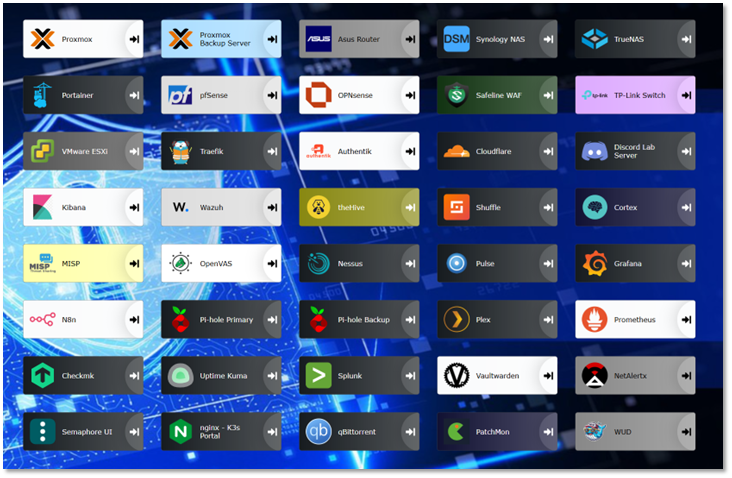
The Heimdall dashboard serves as a centralized launchpad for accessing the WebUIs of all deployed platforms and services within the lab environment. This unified interface streamlines navigation across infrastructure components.
Where supported, API integrations have been configured to surface real-time metrics and service health indicators directly within the dashboard tiles. This enables at-a-glance visibility into system status, resource utilization, and uptime without requiring manual logins or context switching. Examples include container stats, authentication flow summaries, and firewall throughput, depending on the service.
DNS Infrastructure Architecture
Deployment Overview
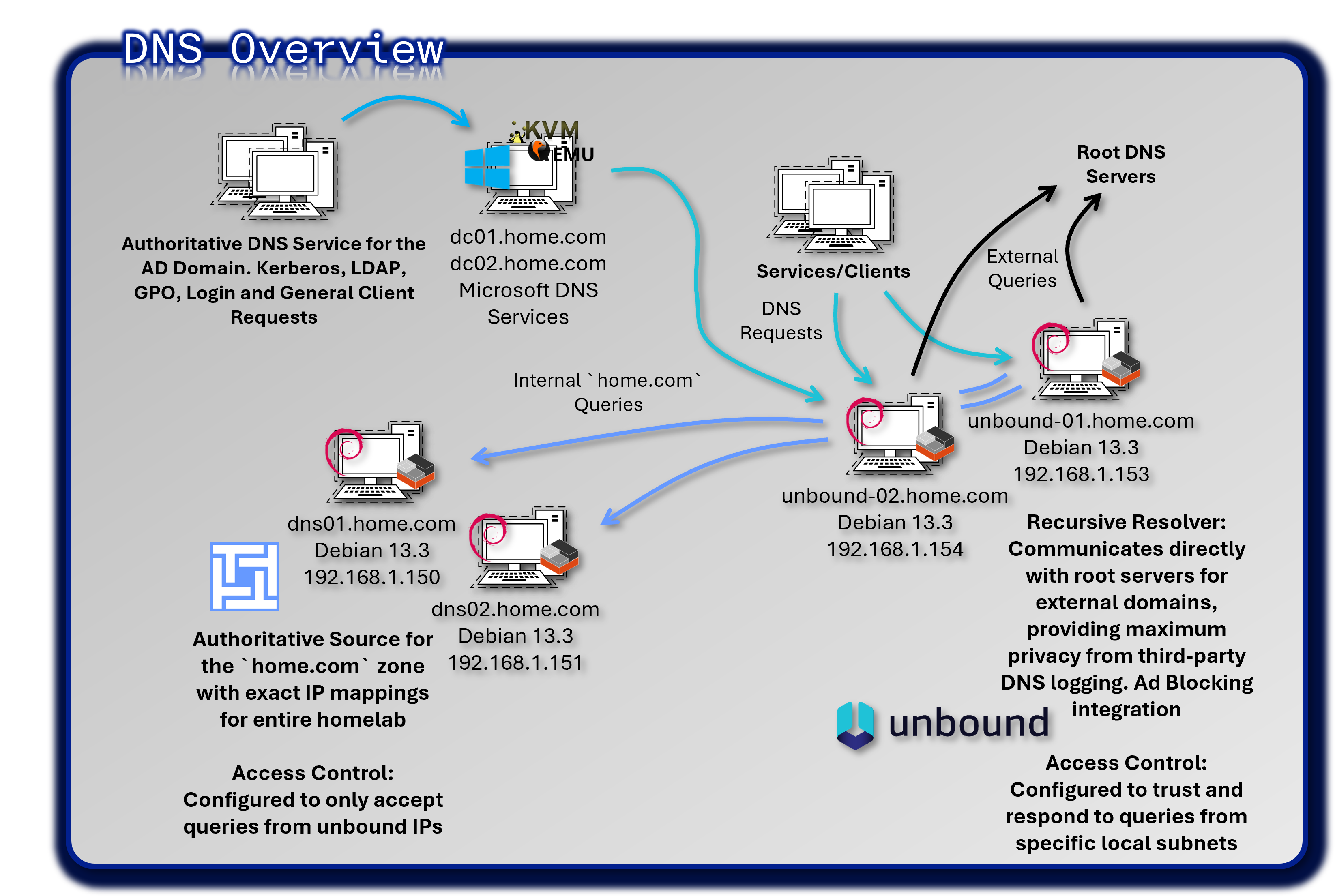
A fully redundant, four-host deployment separates recursive resolution, authoritative authority, and ad-blocking into discrete, independently resilient layers. Ad-blocking is integrated directly into Unbound. Technitium DNS provides a web-managed authoritative server with native zone-transfer support.
End-to-end query path: Client → Unbound (recursive + filtered) → Technitium (home.com authoritative) → Traefik / Backend VM
External queries: Client → Unbound → Root servers (iterative resolution from root hints)
Security Impact
- Malware C2 communication blocked at the DNS layer via integrated Unbound blocklists before outbound connections are established
- DNSSEC validation (
harden-dnssec-stripped,val-permissive-mode: no) prevents DNS spoofing and cache poisoning - Root-recursive resolution eliminates third-party visibility into DNS query metadata; no upstream resolver logs or processes query data
- CNAME cloaking and DoH/DoT egress blocking close common tracker-evasion and policy-bypass techniques
- Authoritative zone isolation (Technitium) prevents internal namespace leakage to external resolvers
- DNS query logging across both Unbound nodes enables threat hunting, anomaly detection, and forensic correlation
Deployment Rationale: DNS underpins every network connection in the lab. Compromising or disrupting DNS can neutralize monitoring, certificate issuance, service discovery, and authentication. This layered architecture separates concerns across four dedicated hosts, ensuring no single failure disables DNS services. Unbound handles both recursive resolution and ad-blocking in a single process, eliminating intermediary hops. Technitium provides GUI-managed authoritative DNS with AXFR/IXFR zone transfers, mirroring enterprise appliance capabilities.
Architecture Principles Alignment:
- Defense in Depth: Four-host, three-tier design ensures single-component failure or compromise does not disable DNS services; DNSSEC validation, root-recursive resolution, and ad-blocking provide overlapping controls at different layers
- Secure by Design: DNSSEC validation enabled by default; blocklists deployed atomically with syntax validation before reload; systemd watchdog provides self-healing; no upstream resolver dependency
- Zero Trust: Every DNS query is validated and logged; no implicit trust of external resolvers; internal zone forwarding is explicitly scoped; CNAME cloaking and DoH/DoT egress blocking prevent policy bypass
Architecture Overview
| Tier | Component | Host / IP | Primary Function | Secondary Function |
|---|---|---|---|---|
| Recursive + Filtering | Unbound-01 | 192.168.1.153 | Primary recursive resolver; root-recursive; DNSSEC validation; ad-blocking | Forward home.com queries to Technitium |
| Recursive + Filtering | Unbound-02 | 192.168.1.154 | Secondary recursive resolver; independent cache | HA failover; load-sharing |
| Authoritative | Technitium DNS01 | 192.168.1.150 | Primary authoritative for home.com; zone master |
AXFR source to DNS02 |
| Authoritative | Technitium DNS02 | 192.168.1.151 | Secondary authoritative; zone replica | Read-only failover for internal resolution |
Component Detail: Unbound (Recursive Resolvers)
Unbound-01 (192.168.1.153) is the primary recursive resolver. Unbound-02 (192.168.1.154) is a clone with node-specific TLS keys and SSH host keys, providing an independent cache for load-sharing and automatic failover. Clients configure both IPs as DNS servers; failover is handled by the client resolver with a 5-second timeout.
Recursive resolution (external domains): Root-recursive — Unbound queries root servers directly; no upstream forwarder.
# No forward-zone for "." --- Unbound resolves from root
root-hints: "/var/lib/unbound/root.hints"
Internal zone forwarding:
forward-zone:
  name: "home.com"
  forward-addr: 192.168.1.150
  forward-addr: 192.168.1.151
DNSSEC:
auto-trust-anchor-file: "/var/lib/unbound/root.key"
harden-dnssec-stripped: yes
val-clean-additional: yes
val-permissive-mode: no
Ad-blocking (generated config includes):
include: "/etc/unbound/blocklists/*.conf"
Systemd watchdog:
systemd-enable: yes

[Service]
WatchdogSec=30s
Restart=on-failure
RestartSec=5s
Component Detail: Technitium DNS (Authoritative Servers)
Technitium DNS01 (192.168.1.150) is the zone master for home.com. DNS02 (192.168.1.151) receives zone transfers and serves as a read-only secondary. Unbound forwards all home.com queries to both IPs with automatic failover.
Zone Configuration
| Record Type | Value |
|---|---|
| SOA | dns01.home.com. <serial> 900 300 604800 900 |
| NS | dns01.home.com. / dns02.home.com. |
| Glue A (dns01) | dns01.home.com. IN A 192.168.1.150 |
| Glue A (dns02) | dns02.home.com. IN A 192.168.1.151 |
| Zone Transfer ACL | AXFR allowed from: 192.168.1.151 |
| DNSSEC Signing | Optional — currently off |
Component Detail: Blocklist Automation (Integrated into Unbound)
Ad-blocking is integrated directly into Unbound via nightly-automated blocklists. An automation script runs identically on both Unbound nodes, ingesting curated domain lists, generating Unbound-compatible local-data blocks, and atomically deploying them after syntax validation. Blocked domains return NXDOMAIN.
Blocklist Sources: Hagezi PRO, DoH/DoT blockers, CNAME cloaking list, SmartTV tracking, TikTok tracking, Windows telemetry, Amazon / Apple native tracking
DNS Query Flows
External Domain Resolution
- Client → Unbound-01 or Unbound-02 (
:53) - Unbound checks: local blocklist → local cache → recursive resolution
- If blocked: return
NXDOMAIN(no outbound traffic generated) - If not blocked or cached: Unbound initiates iterative resolution from root servers (
root.hints) - Unbound queries root → TLD nameservers → authoritative nameservers for final answer
- DNSSEC signatures validated; poisoned or stripped records return
SERVFAIL - Answer cached per authoritative TTL; returned to client
Example: www.example.com — query time ~50ms (first), ~1ms (cached)
Internal Domain Resolution (*.home.com)
- Client → Unbound (
:53) - Unbound matches
home.comagainstforward-zonerule - Query forwarded to Technitium DNS01 (
192.168.1.150) with DNS02 as failover - Technitium confirms authority for
home.com; returns A/PTR record from zone - Unbound caches and returns answer to client
Example: portainer.home.com → 192.168.1.247 → Traefik → backend container
Reverse DNS (PTR Lookup)
- Client or service queries: e.g.,
51.100.168.192.in-addr.arpa - Unbound matches subnet against
forward-zoneforhome.com/ internal ranges - Query forwarded to Technitium
- Technitium returns PTR record (e.g.,
stepca.home.com)
High Availability Configuration
| Layer | Redundancy Mechanism | Failover Behavior |
|---|---|---|
| Recursive | Two independent Unbound nodes; client configures both IPs | Client DNS resolver fails over in <5 seconds |
| Authoritative | DNS02 holds full zone replica via AXFR/IXFR from DNS01 | Unbound forward-zone includes both IPs; automatic failover |
| Ad-blocking | Blocklists deployed identically on both Unbound nodes; independent caches | Blocking remains active regardless of which node handles the query |
| Watchdog | Systemd watchdog on both Unbound nodes; WatchdogSec=30s |
Unbound auto-restarted if process hangs or stops sending heartbeats |
DNS Security Controls
| Control | Implementation | Security Impact |
|---|---|---|
| Root-Recursive Resolution | Unbound queries root servers directly; no upstream forwarder configured | Eliminates third-party DNS metadata exposure; no resolver dependency |
| DNSSEC Validation | harden-dnssec-stripped: yes; val-permissive-mode: no |
Blocks cache poisoning; rejects stripped signatures |
| Ad/Malware Blocking | Nightly blocklist ingestion; atomic deployment; Unbound-native | C2 and tracker domains blocked before outbound connection |
| CNAME Cloaking Block | Dedicated blocklist targeting CNAME-based tracker evasion | Closes evasion path used by sophisticated ad networks |
| DoH/DoT Egress Block | Blocklist entries for known DoH/DoT resolvers | Prevents clients from bypassing Unbound filtering via alternate resolvers |
| Authoritative Zone Isolation | Technitium responds only to queries forwarded from Unbound ACL | Internal namespace not exposed to external or unauthenticated resolvers |
| Query Logging | Full query logging on both Unbound nodes; forwarded to SIEM | Threat hunting, anomaly detection, DGA identification, tunneling detection |
| Self-Healing | Systemd watchdog; Restart=on-failure; RestartSec=5s |
Service restored automatically; no manual intervention required |
Monitoring & Observability
Prometheus Metrics (Unbound)
unbound_queries_total— cumulative query count per nodeunbound_cache_hits_total/unbound_cache_misses_total— cache efficiencyunbound_blocked_queries_total— blocklist hit rateunbound_query_duration_seconds— resolution latency- Scrape interval: 15 seconds; Grafana dashboard: DNS query trends, block rates, cache hit ratios
Uptime Kuma Health Checks
- DNS resolution test: resolve
test.home.comvia192.168.1.153and192.168.1.154(every 30 seconds) - Technitium web UI:
https://dns01.home.comandhttps://dns02.home.com(every 60 seconds) - Alert trigger: 3 consecutive failures → Discord webhook
Discord Alerts
- Unbound service failure (Uptime Kuma / systemd watchdog)
- High query rate: >10,000 queries/minute (potential DNS tunneling or amplification)
- Blocklist update failure: nightly script exits non-zero
- Zone transfer failure: AXFR from DNS01 to DNS02 unsuccessful
Secure Shell (SSH) Access
Architecture Overview
Enterprise-grade SSH infrastructure provides secure, auditable remote access to 40+ hosts across the lab environment. This implementation emphasizes modern cryptography (Ed25519), certificate-based authentication, centralized key management, and comprehensive session logging—demonstrating zero-trust principles where every connection is authenticated, authorized, and audited.
Security Impact
- Password-based SSH attacks eliminated through key-only authentication
- Root account compromise prevented by disabling direct root login
- Centralized key management enables instant credential revocation across all hosts
- Session logging provides forensic evidence for incident investigations
- Modern Ed25519 cryptography offers strong resistance to brute-force and emerging quantum-computing attacks
Deployment Rationale:
SSH is the primary administrative access method for Linux infrastructure in enterprise environments. Weak SSH configurations are frequently exploited by attackers (botnets scan for weak passwords, default credentials, outdated crypto). This hardened SSH deployment demonstrates understanding of cryptographic best practices, privilege escalation controls, and audit logging requirements mandated by compliance frameworks (PCI-DSS 8.2, NIST SP 800-53 AC-17).
Architecture Principles Alignment:
- Defense in Depth: Multi-layer access controls (firewall IP restrictions, key-based authentication, privilege escalation via sudo, session logging)
- Secure by Design: Modern cryptography enforced by default; weak algorithms disabled; root login prohibited globally
- Zero Trust: Every session authenticated via cryptographic keys; source IP validation; session activity logged for audit
SSH Security Configuration Summary
Key Regeneration with ssh-ed25519:
- All previous keys were reissued using the Ed25519 algorithm for stronger cryptographic integrity and faster performance
- Keys are distributed manually or via internal automation (StepCA, Ansible playbook)
- Host and user keys are centrally managed
Root Login Disabled:
- PermitRootLogin no ensures that root access is never exposed over SSH
- Privilege escalation is managed locally via sudo, with logging enabled for audit purposes
Access Control and Audit:
- SSH access is restricted to specific users/groups
- Logging is centralized via Splunk for session tracking and anomaly detection
Host Hardening:
- Firewall rules (via pfSense) restrict SSH to known IP ranges
Supporting Infrastructure
- StepCA Integration: SSH certificates can be issued via StepCA to streamline access provisioning and revocation
- Firewall Rules (pfSense): SSH access is restricted to trusted IP ranges and zones
- Host Hardening: SSHD is configured with minimal exposure, and unused authentication methods are disabled
- DNS Resolution: SSH targets resolved via Pi-hole → Unbound → Bind9 chain
Example SSH Config:
Host stepca
  HostName stepca.home.com
  User admin
  IdentityFile ~/.ssh/id_ed25519
Configuration Rationale:
Why Disable Root Login?
- Audit Trail: Forces administrators to log in as themselves, then sudo to root (logs show "who did what")
- Accountability: Can't claim "root did it" when each admin has unique account
- Least Privilege: Administrators only elevate to root when necessary
Why Disable Password Authentication?
- Eliminates Brute-Force: Attackers can't guess passwords if passwords aren't accepted
- Eliminates Credential Stuffing: Leaked password databases useless without private key
- Forces MFA-Equivalent: Private key (something you have) + optional passphrase (something you know)
Why Limit Ciphers/MACs/KexAlgorithms?
- Removes Weak Crypto: Old algorithms (3DES, RC4, MD5, SHA-1) exploitable
- Prevents Downgrade Attacks: Attacker can't force connection to use weak cipher
- Compliance: PCI-DSS, NIST SP 800-131A prohibit weak cryptography
Key Management Strategy
Ed25519 Key Advantages:
- Key Size: 256-bit (equivalent to RSA 3072-bit security)
- Performance: 5x faster signature generation than RSA
- Security: Resistant to timing attacks
- Size: Smaller keys (68 bytes public, 32 bytes private)
Key Distribution:
- Administrator generates key pair:
ssh-keygen -t ed25519 -C "admin@lab" - Public key stored in Vaultwarden
- Ansible playbook deploys to authorized_keys on target hosts
- Private key stored encrypted on admin workstation
VS Code Remote SSH Integration
Configuration:
- Remote - SSH extension connects to lab hosts using SSH config
- Workspace: Shared folder on remote host
- Extensions: Installed remotely for Docker, Kubernetes, YAML
- Terminal: Integrated terminal provides direct shell access
- Port Forwarding: Automatic forwarding of service ports to local browser
Audit and Logging
Session Logging:
- Syslog: All SSH sessions logged to /var/log/auth.log
- Wazuh Integration: Threat hunting module captures all Auth events
- Elastic Integration: Auth logs forwarded via syslog-ng
- Alerts: Discord notification on root login attempts (should never happen)
Logged Events:
- Connection attempts (successful and failed)
- Authentication method used
- Source IP address
- Session duration
- Commands executed (if using sudo)
- File transfers (scp, sftp)
Compliance Dashboard (Elastic):
- Failed Login Attempts: Graph by host and source IP
- Successful Logins: Table with user, host, timestamp
- Root Login Attempts: Alert (should be zero)
- Key-based vs Password Auth: Pie chart (should be 100% key-based)
Alerting:
Multiple failed SSH login attempts in Wazuh will trigger an alert notification to Discord and email. Active Response module will block the remote IP address on all configured hosts.
Reverse Proxy and Ingress Controllers
Architecture Overview
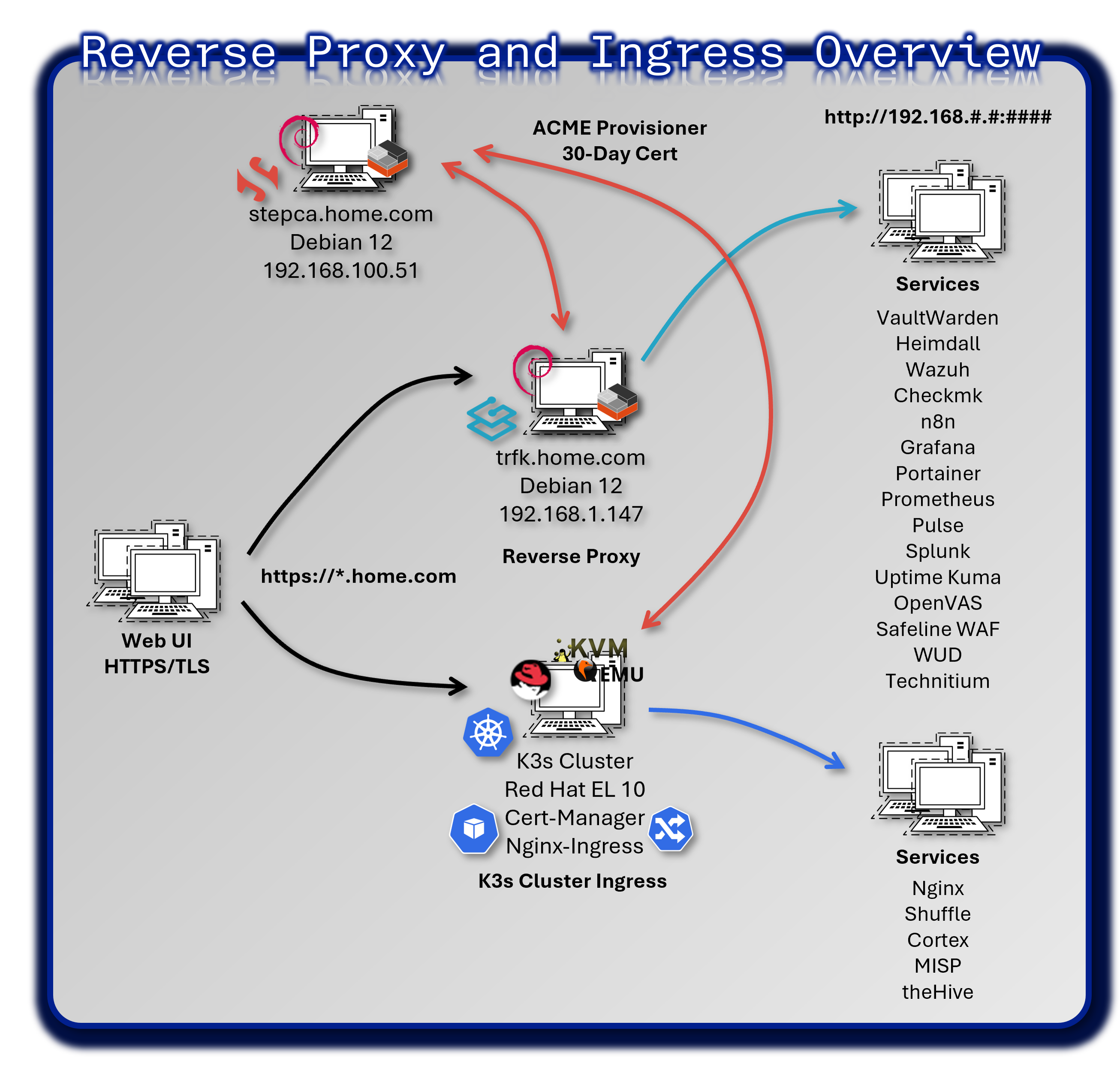
To enable secure, centralized access to internal services and simplify URL structures across the lab, reverse proxies were deployed in front of several web-facing applications. This eliminates the need to remember non-standard ports or paths, allowing services to be accessed via top-level FQDNs.
Security Impact
- TLS termination enforced at the edge, eliminating unencrypted HTTP exposure
- Centralized authentication via Authentik ForwardAuth provides SSO for all services
- Credential exposure eliminated by removing per-service password management
- Rate limiting blocks brute-force and credential-stuffing attempts
- IP allowlisting restricts access to trusted networks and administrative ranges
- Uniform security headers (HSTS, CSP, X-Frame-Options) harden all web applications against common attacks
Deployment Rationale:
Exposing multiple web services on different ports creates management complexity and security inconsistencies. Reverse proxies consolidate security controls at a single ingress point, mirroring enterprise edge architecture (NGINX, HAProxy, F5 BIG-IP). This demonstrates understanding of defense-in-depth where authentication happens at the network edge before requests reach backend applications.
Architecture Principles Alignment:
- Defense in Depth: Traefik enforces authentication before routing; WAF rules filter malicious requests; backend services isolated from direct internet exposure
- Secure by Design: TLS 1.3 mandatory; weak ciphers disabled; automated certificate renewal via Step-CA; secure headers applied by default
- Zero Trust: Every request authenticated via Authentik tokens; no implicit trust based on source IP; request metadata logged to SIEM
Traefik Reverse Proxy for Docker, LXC and VM Hosted Applications
Architecture Overview:
Traefik acts as the edge router for all HTTP/HTTPS services in the lab, providing dynamic service discovery, automatic TLS certificate management, centralized authentication, load balancing, health checks, and observability.
Traefik Container:
- DNS Resolution: Hard-coded to Pi-hole (.250) and BIND9 (.251) to prevent internal Docker DNS timeouts
- Certificate Handling: Configured with the stepca resolver, using Smallstep ACME protocol to automatically issue certificates to services
- Prometheus Metrics: Enabled with specialized labels to allow Grafana to scrape per-service traffic data
Step-CA:
- Provisioner: Updated with an X.509 template that correctly handles IP SANs and uses .Insecure.CR variables for ACME compatibility
- Validity: Hard-coded to 30-day (720h) durations to override default short-lived ACME certificates
Deployment Architecture:
| Component | Technology | Location | Purpose |
|---|---|---|---|
| Traefik Proxy | Docker container | 192.168.1.247 | Edge router |
| Configuration | YAML + Docker labels | /etc/traefik/ | Static + dynamic config |
| TLS Certificates | Step-CA | /certs/ | Automatic cert management |
| Authentik Outpost | Docker container | 192.168.1.247 | SSO forward auth |
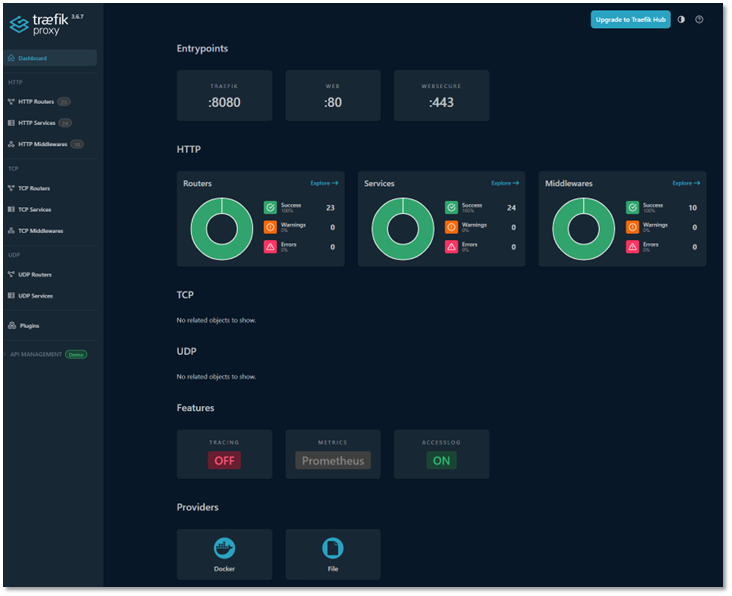
| Dashboard | Built-in and Elastic | trfk.home.com:8080 | Monitoring UI |
Entrypoints:
- HTTP :80 -- for initial requests and redirection
- HTTPS :443 -- for secure traffic termination
- Traefik :8080 -- internal dashboard and metrics
Providers:
- Docker -- for dynamic service discovery
- File (YAML) -- for static routing and middleware definitions
Features:
- Prometheus metrics -- exposed for Grafana integration
HTTP Middlewares
Traefik middlewares enforce security, access control, and routing behavior:
- Forward Authorization via Authentik: Authentik acts as an identity provider, enforcing SSO and injecting identity headers (X-Forwarded-User, X-Forwarded-Groups) for downstream services
- IP Allow List: Restricts access to trusted networks (192.168.0.0/16, localhost). Applied to sensitive services (TheHive, Grafana, Traefik dashboard)
- Secure Headers:
- Strict-Transport-Security: max-age=31536000; includeSubDomains (HSTS)
- X-Frame-Options: SAMEORIGIN (clickjacking prevention)
- X-Content-Type-Options: nosniff (MIME type sniffing prevention)
- Referrer-Policy: strict-origin-when-cross-origin (privacy)
- Content-Security-Policy: default-src 'self' (XSS mitigation)
- Redirect Web to WebSecure: Automatically upgrades HTTP requests to HTTPS for all defined routes
- Rate Limiting: Limits requests to 100/minute per IP address (prevents brute-force attacks)
- Circuit Breaker: Automatically disables routing to unhealthy backends (monitors response codes, latency)
Service Routing Table
All routers are configured with TLS and mapped to internal services via hostname:
| Hostname | Backend Service | Port | Protocol | Auth | Health Check |
|---|---|---|---|---|---|
| checkmk.home.com | CheckMK container | 5000 | HTTP | Authentik | /check_mk/ |
| dashbd.home.com | Heimdall container | 80 | HTTP | Authentik | / |
| elastic.home.com | Elasticsearch | 9200 | HTTP | Basic | /_cluster/health |
| n8n.home.com | n8n workflow engine | 5678 | HTTP | Authentik | /healthz |
| pulse.home.com | Uptime Kuma | 3001 | HTTP | Authentik | / |
| authentik.home.com | Authentik server | 9000 | HTTP | None | /-/health/live/ |
| trfk.home.com | Traefik dashboard | 8080 | HTTP | Authentik | /ping |
| grafana.home.com | Grafana dashboards | 3000 | HTTP | Authentik | /api/health |
| pihole.home.com | Pi-hole primary | 80 | HTTP | Authentik | /admin/ |
| piholebk.home.com | Pi-hole backup | 80 | HTTP | Authentik | /admin/ |
| plex.home.com | Plex media server | 32400 | HTTPS | Plex SSO | /identity |
| portainer.home.com | Portainer CE | 9443 | HTTPS | Authentik | /api/status |
| splunk.home.com | Splunk Enterprise | 8000 | HTTP | Splunk | /services/server/info |
| vault.home.com | Vaultwarden | 80 | HTTP | Vault | /alive |
| vas.home.com | OpenVAS scanner | 9392 | HTTPS | Basic | /login |
| wud.home.com | What's Up Docker | 3000 | HTTP | Authentik | / |
| whoami.home.com | Traefik whoami | 80 | HTTP | None | / |
DNS and Routing Behavior
All hostnames are defined via DNS A records pointing to the Traefik container's IP address. Traefik handles all routing internally, translating requests like:
https://portainer.home.com → https://192.168.1.126:9443
Example Router Configuration:
http:
  routers:
    portainer-router:
      rule: "Host(`portainer.home.com`)"
      service: portainer-service
      entryPoints: [websecure]
      tls:
        certResolver: stepca
      middlewares:
        - authentik
        - secure-headers

  services:
    portainer-service:
      loadBalancer:
        serversTransport: portainer-tls
        servers:
          - url: "https://192.168.1.126:9443"
        passHostHeader: true
        healthCheck:
          path: "/"
          interval: "30s"

  middlewares:
    authentik:
      forwardAuth:
        address: "http://authentik_proxy:9000/outpost.goauthentik.io/auth/traefik"
        trustForwardHeader: true
        authResponseHeadersRegex: "^X-Authentik-"
        authResponseHeaders:
          - X-Authentik-Username
          - X-Authentik-Groups
          - X-Authentik-Entitlements
          - X-Authentik-Email
          - X-Authentik-Name
          - X-Authentik-Uid
          - X-Authentik-Jwt
          - X-Authentik-Meta-Jwks
          - X-Authentik-Meta-Outpost
          - X-Authentik-Meta-Provider
          - X-Authentik-Meta-App
          - X-Authentik-Meta-Version
This allows services to be accessed via clean FQDNs without exposing backend ports.
TLS Termination and Backend Security
For services that do not natively support HTTPS or cannot integrate with the lab's PKI infrastructure, Traefik terminates TLS at the edge and forwards traffic to the backend over HTTP. This ensures:
- Secure communication between client and proxy
- Compatibility with legacy or non-PKI-compliant services
- Centralized certificate management via Step CA
Security Controls
Defense in Depth:
| Layer | Control | Implementation |
|---|---|---|
| Network | Firewall rules (pfSense) | Only 80/443 exposed |
| Edge | Traefik TLS termination | Strong ciphers only |
| Authentication | Authentik forward auth | SSO for all services |
| Authorization | HTTP headers from Authentik | RBAC enforcement |
| Transport | TLS 1.3 only | No downgrade attacks |
| Application | Secure headers middleware | HSTS CSP X-Frame-Options |
| Audit | Access logs to Elastic | Full request logging |
Monitoring and Alerting:
| Metric | Tool | Threshold | Alert |
|---|---|---|---|
| Traefik container down | Uptime Kuma | Service unreachable | Discord |
| Certificate expiry | Prometheus | <30 days | Discord |
| High error rate | Prometheus | >5% 5xx responses | Discord |
| Slow response time | Prometheus | P95 >2 seconds | Discord |
| Config reload failures | Traefik logs | Any reload error | Elastic alert |
Troubleshooting Tools:
- Dashboard: https://trfk.home.com:8080/dashboard/
- API:
curl http://traefik:8080/api/http/routers - Logs:
docker logs traefik -f --tail 100 - Debug Mode: Add
--log.level=DEBUGto container
Traefik Dashboard:
- Real-time router and service status
- Middleware configuration
- Certificate management
- Health check status
MetalLB and NGINX Ingress Controller for K3s Kubernetes-Based Services
MetalLB
MetalLB provides network load-balancer implementation for Kubernetes clusters that don't run on cloud providers. It enables services of type LoadBalancer to receive external IP addresses in bare-metal environments.
Core Features:
- Address Allocation: Assigns external IPs from a pre-configured pool to Kubernetes services
- External Announcement: Makes assigned IPs reachable on the local network via Layer 2 (ARP/NDP) or BGP
Layer 2 Mode Configuration:
In Layer 2 mode, one Kubernetes node takes ownership of the service IP and responds to ARP requests. This provides simple, switch-agnostic load balancing without requiring BGP peering.
Deployment Details:
- IP pool: 192.168.200.30-192.168.200.49 (20 addresses reserved for K3s services)
- ARP announcements via primary node (automatic failover if node fails)
- No external dependencies (works with any standard switch)
Security Impact: Eliminates need for NodePort services (which expose random high ports); centralizes ingress traffic through predictable IPs; enables firewall rules based on service IP rather than dynamic ports.
IP Address Pool Configuration:
apiVersion: metallb.io/v1beta1
kind: IPAddressPool
metadata:
  name: pool1
  namespace: metallb-system
spec:
  addresses:
  - 192.168.200.30-192.168.200.49
  autoAssign: true
---
apiVersion: metallb.io/v1beta1
kind: L2Advertisement
metadata:
  name: pool1
  namespace: metallb-system
NGINX Ingress Controller
The NGINX Ingress Controller translates Kubernetes Ingress resources into NGINX configuration, providing HTTP/HTTPS routing, TLS termination, and load balancing for cluster services.
Integration with MetalLB:
- Ingress Controller deployed as LoadBalancer service
- MetalLB assigns external IP (e.g., 192.168.200.31)
- External requests → MetalLB IP → NGINX Ingress → Backend pods
- NGINX handles TLS termination, path-based routing, and SSL passthrough
Example Ingress Configuration:
apiVersion: networking.k8s.io/v1
kind: Ingress
metadata:
  name: nginx-ingress
  namespace: nginx
spec:
  rules:
  - host: 192.168.200.32
    http:
      paths:
      - path: /
        pathType: Prefix
        backend:
          service:
            name: nginx
            port:
              number: 80
Security Features:
- TLS Termination: Certificates managed by cert-manager + Step-CA
- Authentik Integration: ForwardAuth via NGINX annotations
- Rate Limiting: NGINX limit_req directives prevent abuse
- IP Whitelisting: nginx.ingress.kubernetes.io/whitelist-source-range annotation
Architecture Benefits:
- Kubernetes-Native Design: Ingress resources define routing declaratively (no manual NGINX config)
- High Availability: Multiple NGINX replicas (2 pods) with MetalLB failover
- Separation of Concerns: MetalLB handles IP allocation; NGINX handles HTTP routing; cert-manager handles TLS
- Observability: Prometheus metrics exported by both MetalLB and NGINX Ingress
Vulnerability Management
A mature vulnerability management program provides continuous security assessment across network assets, identifying exploitable weaknesses before attackers can weaponize them. This dual-scanner approach combines OpenVAS (open-source, network-wide scanning) with Tenable Nessus (commercial-grade, authenticated deep inspection) to provide comprehensive coverage across diverse technology stacks including Linux, Windows, containers, network appliances, and Kubernetes clusters.
Security Impact
- Proactive identification of security weaknesses reduces dwell time from months (reactive patching) to days through risk-based prioritization
- Authenticated scanning uncovers privilege-escalation paths and configuration weaknesses that network-only scanners cannot detect
- Continuous assessment prevents security posture degradation between scheduled scans
Deployment Rationale:
Vulnerability management is a foundational security control mandated by NIST CSF (DE.CM-8), CIS Controls v8 (Control 7), PCI-DSS (11.2), and ISO 27001 (A.12.6.1). Deploying both OpenVAS and Nessus demonstrates real-world enterprise practices where multiple scanning tools provide defense-in-depth through overlapping coverage.
Architecture Alignment:
- Defense in Depth: Vulnerability scanning discovers weaknesses across network, OS, application, and configuration layers before attackers can exploit them
- Secure by Design: Continuous scanning validates security baselines and detects configuration drift from hardened standards
- Zero Trust: Authenticated scans verify security posture of systems regardless of network location; vulnerability data feeds into risk-based access decisions
Greenbone OpenVAS
Overview:
OpenVAS (Open Vulnerability Assessment System) provides comprehensive vulnerability scanning across network infrastructure and applications. This implementation demonstrates continuous security assessment and remediation workflow integration. The platform scans 75+ assets across four network segments weekly, identifying CVEs, misconfigurations, weak cryptography, and compliance violations.
Deployment Architecture:
| Component | Description |
|---|---|
| OpenVAS Scanner | Deployed in a dedicated container with persistent volume for scan data and logs |
| Reverse Proxy | Traefik routes requests to OpenVAS UI and API, secured via TLS. ForwardAuth middleware enforces Authentik SSO authentication |
| PKI Integration | Fullchain certs propagated via Step CA; scanner trusts internal CA for HTTPS targets |
| Dashboard Integration | Scan results exported to Grafana via custom exporter and JSON API bridge |
Scanning Architecture:
Target Scope Definition:
| Network Segment | CIDR | Asset Count | Scan Frequency |
|---|---|---|---|
| Production Network | 192.168.1.0/24 | ~40 hosts | Weekly |
| Lab Infrastructure | 192.168.100.0/24 | ~20 hosts | Weekly |
| DMZ Services | 192.168.2.0/24 | ~10 hosts | Bi-weekly |
| Kubernetes Cluster | 192.168.200.0/24 | ~5 hosts | Weekly |
Exclusions:
- Network devices without SSH/HTTP: 192.168.1.1-192.168.1.10
- IoT devices (limited patch capability): 192.168.1.200-250
- Active Directory DC (change control required): 192.168.1.10
Scan Profiles:
| Profile Name | Description | Duration |
|---|---|---|
| Full and Fast | Comprehensive scan optimized timing | ~2 hours |
| Discovery | Network and service detection only | ~15 min |
| System Discovery | OS fingerprinting and basic info | ~30 min |
| Host Discovery | Ping sweep and port scan only | ~5 min |
Scan Configuration (Full and Fast):
- Port Range: 1-65535 (all TCP ports)
- UDP Ports: Top 100 common UDP services
- OS Detection: Active fingerprinting via TCP/IP stack analysis
- Service Detection: Banner grabbing and version detection
- TLS/SSL Testing: Certificate validation, weak ciphers, protocol versions
- Web App Scanning: Directory enumeration, known vulnerabilities
- Authenticated Scans: SSH and SMB credentials for deeper inspection
Sample Reports:
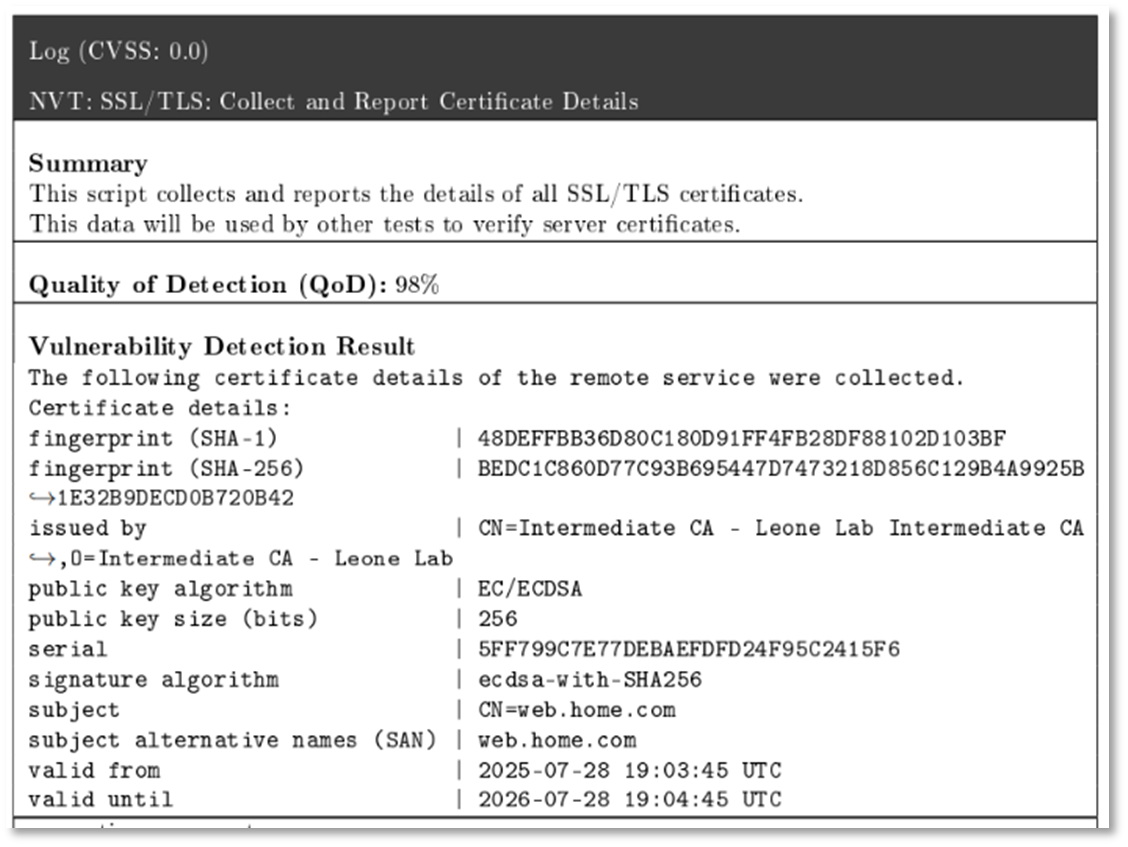
TLS/Certificate Issues:
- Weak cipher suites
- Certificate expiration
- Self-signed certificates
- Protocol vulnerabilities
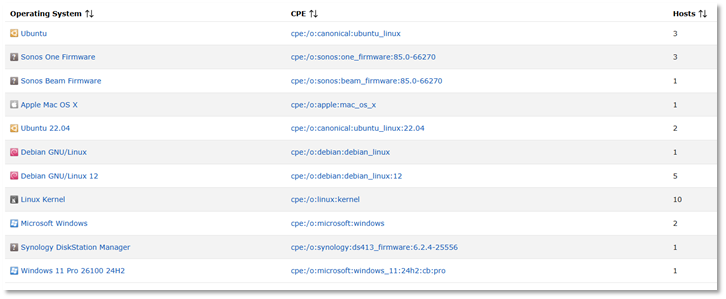
OS and Service Fingerprinting:
Proxmox Host Scan Results:
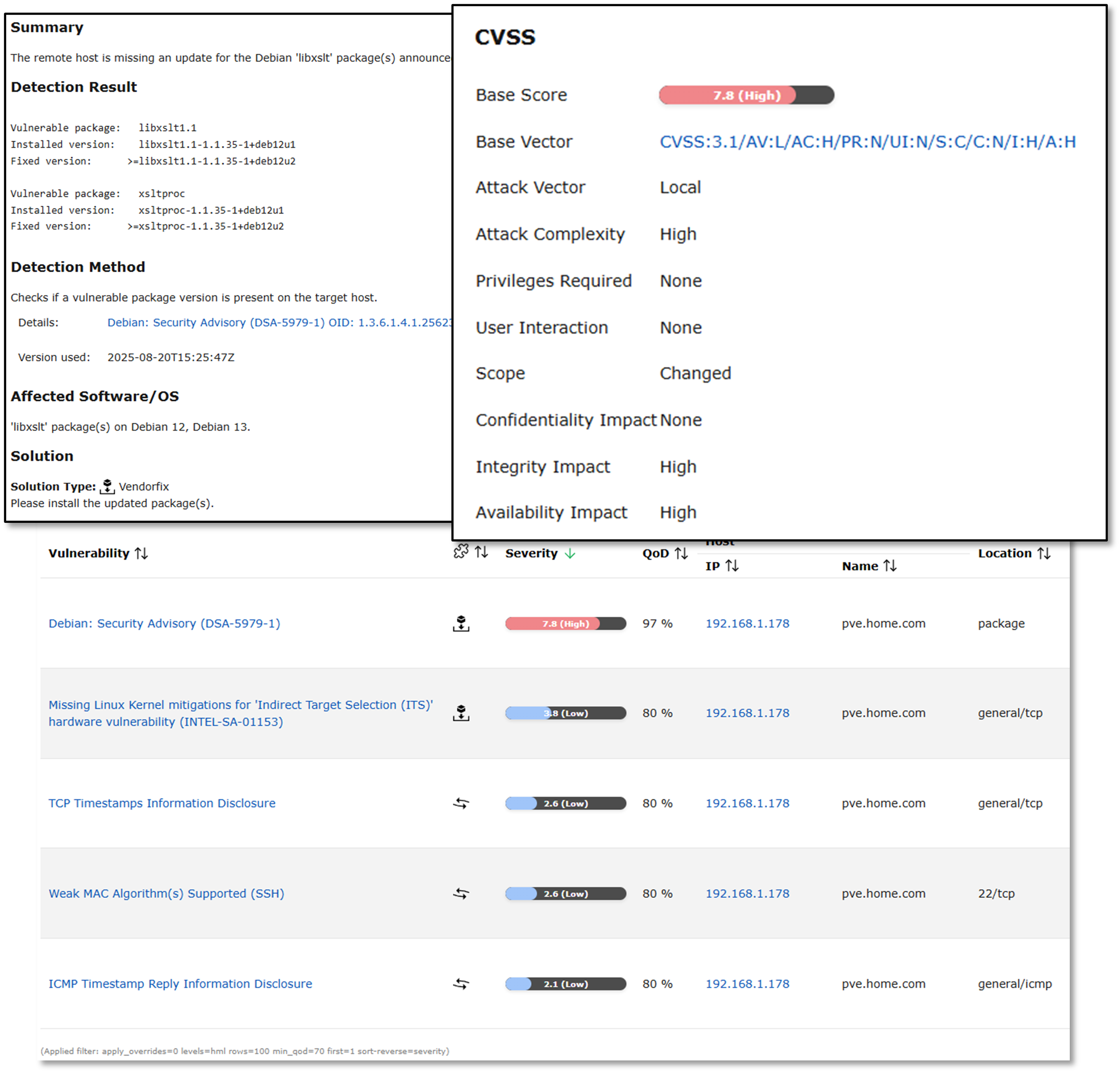
Results from a scan on Proxmox host. After the initial scan, updates to address the critical vulnerability were downloaded and applied.
Security Controls
Scanner Hardening:
Access Control:
- Traefik reverse proxy + Authentik SSO enforces MFA before accessing OpenVAS web interface
- API Authentication: GMP (Greenbone Management Protocol) API requires username/password authentication; API keys rotated quarterly
- Credential Encryption: Scan credentials (SSH keys, service account passwords) encrypted at rest using AES-256; stored in PostgreSQL database with TDE (Transparent Data Encryption)
- Audit Logging: All scan activity (task creation, target modifications, report downloads) logged to Splunk SIEM with user attribution
Scan Safety Controls:
- Non-Disruptive Checks: Safe checks enabled by default; exploit-based tests disabled to prevent system crashes
- Rate Limiting: Maximum 10 concurrent TCP connections per target; configurable to prevent network congestion or triggering IPS alerts
- Excluded Checks: DoS-inducing vulnerability tests (e.g., TCP SYN flood checks) explicitly disabled in scan configurations
- Maintenance Windows: Automated scans scheduled during low-traffic periods (Saturday 2-4 AM) to minimize business impact
- Rollback Capability: Proxmox snapshots taken before scanning critical infrastructure (VMs, LXC containers); enables instant recovery from scan-induced failures
Compliance Alignment:
Framework Mapping:
| Framework | Requirement | Implementation |
|---|---|---|
| NIST CSF | DE.CM-8: Vulnerability scans | Weekly automated scans |
| CIS Controls v8 | 7.1: Vulnerability scanning | Authenticated scans enabled |
| PCI-DSS | 11.2: Quarterly vulnerability scans | Monthly scans (exceeds req) |
| ISO 27001 | A.12.6.1: Tech vulnerabilities | Documented remediation SLA |
Tenable Nessus
Overview:
Tenable Nessus provides commercial-grade vulnerability scanning with 170,000+ plugins, advanced compliance auditing, and deep authenticated scanning capabilities. While OpenVAS provides broad network coverage, Nessus excels at OS-level inspection via credentialed scans, configuration auditing against CIS Benchmarks, and specialized assessments for Active Directory, Kubernetes, and cloud platforms.
Deployment Rationale:
Nessus complements OpenVAS by providing deeper inspection capabilities and compliance auditing features. Many enterprises deploy both tools for defense-in-depth: OpenVAS for continuous automated scanning and Nessus for quarterly compliance audits and deep-dive investigations.
Technical Implementation:
Scanning Architecture - Authenticated Host Assessments:
Nessus performs authenticated scans against key infrastructure hosts representing each major platform:
Linux and Windows Host Scanning:
- Windows Server 2022 / Active Directory scanning and enumeration
- Hostname: DC01
- IP: 192.168.1.152
- Windows 11 Pro scanning
- Hostname: win11pro2
- IP: 192.168.1.184
- Red Hat Enterprise Linux 10 with K3s node scanning
- Hostname: k3s-worker
- IP: 192.168.200.21
- Ubuntu Desktop 25.04 with Docker engine scanning
- Hostname: ubuntuGenVM1
- IP: 192.168.1.126
- Debian 12 LXC host scanning
- Hostname: stepca
- IP: 192.168.100.51
Example Remediation
Initial Scan: Debian Linux Package Vulnerabilities: - High/Medium CVSS rating - Multiple outdated packages identified - CVE details and remediation guidance provided
Detailed Vulnerability Reports:
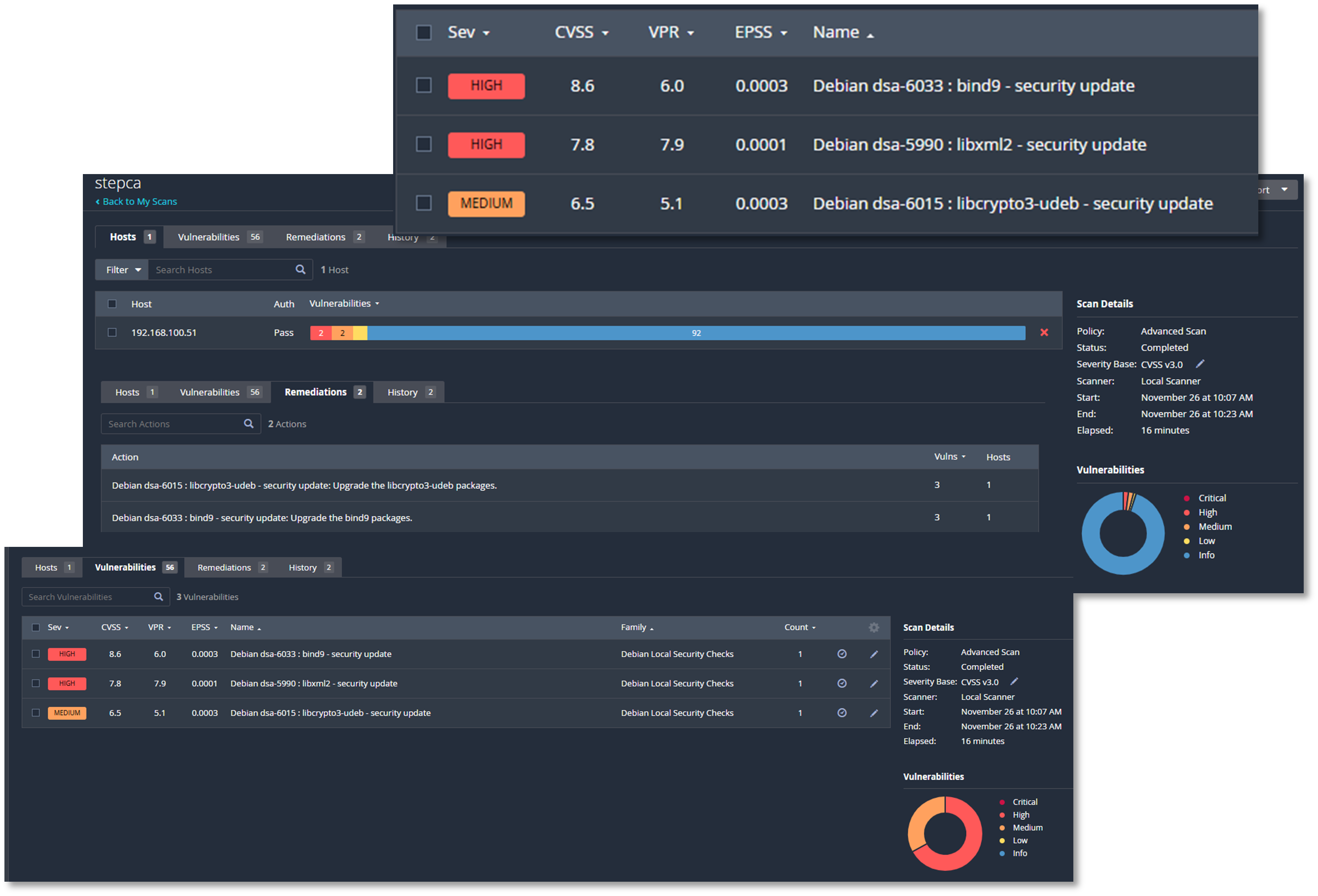
Follow-up Scan After Remediation:
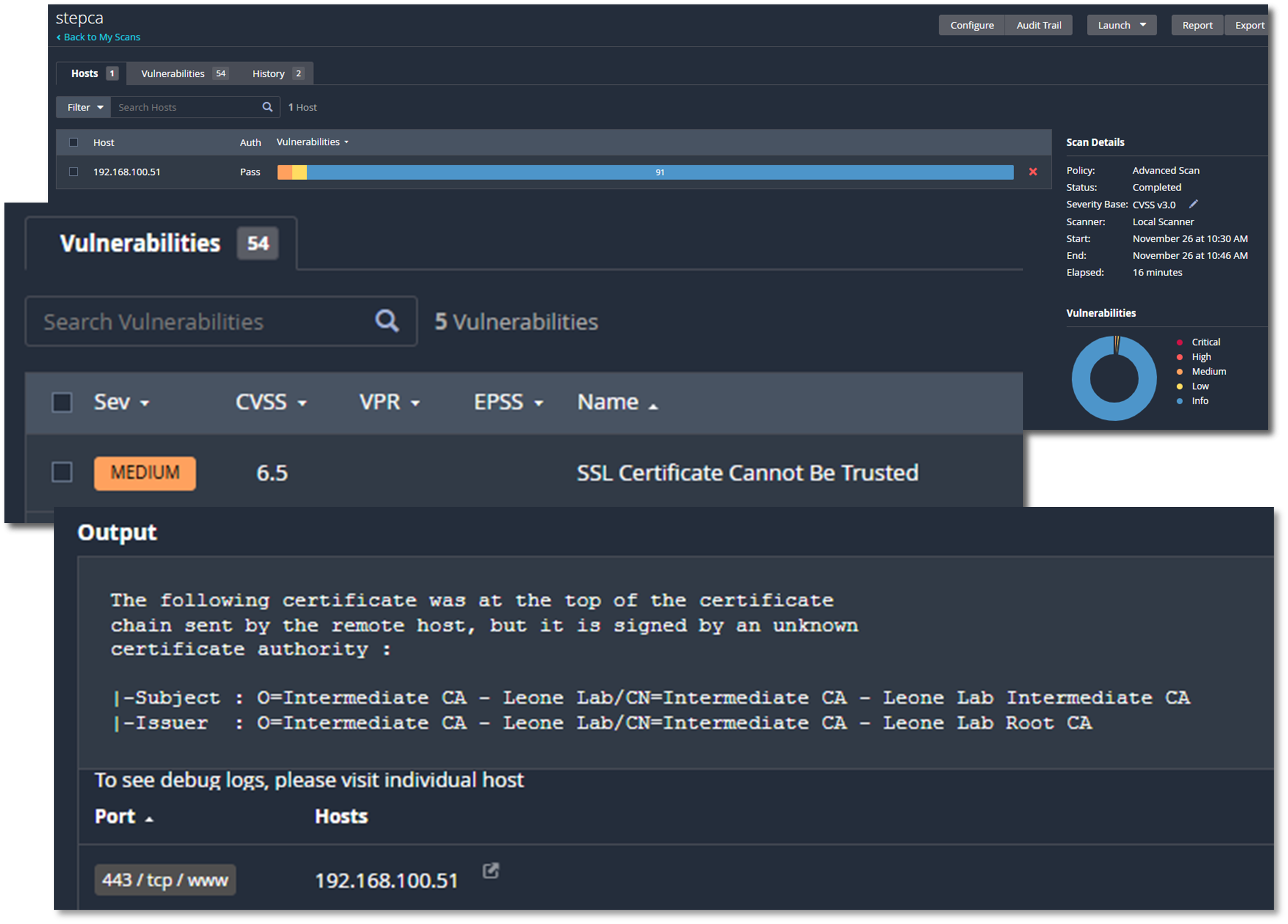
Removal of all Debian Linux package vulnerabilities. Only remaining identified vulnerability higher than "low" is a false positive related to internal lab certificate issued by an "unknown" CA.
Software Patch Management
A comprehensive, multi-platform patch management strategy ensures timely deployment of security updates across 30+ Linux hosts, 50+ Docker containers, and Windows systems. This layered approach addresses the entire technology stack, from host operating systems to containerized applications, providing centralized visibility, automated monitoring, and controlled deployment workflows that reduce attack surface while maintaining operational stability.
Security Impact
- Reduced attack surface through rapid deployment of security patches
- Centralized visibility into patch status prevents vulnerable systems from going unnoticed
- SHA-256 integrity verification protects against tampered packages and supply-chain attacks
Deployment Rationale:
Patch management is a critical component of defense-in-depth strategy, directly addressing NIST CSF "Protect" and CIS Control 7 (Continuous Vulnerability Management). Automated monitoring reduces mean time to detect (MTTD) for new vulnerabilities from weeks to hours, while coordinated deployment workflows minimize service disruption.
Architecture Alignment:
- Defense in Depth: Patches eliminate vulnerabilities at OS, runtime, and application layers before they can be exploited
- Secure by Design: Automated monitoring ensures security updates are deployed by default, not as afterthought
- Zero Trust: Continuous verification of software versions prevents reliance on outdated "trusted" configurations
Linux Software Management - PatchMon
PatchMon provides enterprise-grade visibility into Linux package states across Ubuntu, Debian, RHEL, CentOS, and Fedora systems. The platform monitors 30+ hosts via native package managers (apt, yum, dnf), tracking 5,000+ installed packages and correlating available updates with CVE databases to prioritize security-critical patches.
Key Features:
- Centralized inventory eliminates shadow IT by discovering all installed packages
- CVE mapping enables risk-based patch prioritization
- Historical tracking demonstrates continuous security posture improvement
Technical Implementation:
- Agent-Based Monitoring: Lightweight agents poll package managers every 6 hours for update availability
- Vulnerability Correlation: Available updates cross-referenced with NVD (National Vulnerability Database) to identify security patches vs. feature updates
- Multi-Distribution Support: Unified dashboard aggregates data from Debian-based (apt), RHEL-based (yum/dnf), and Arch-based (pacman) systems
- Docker Integration: Discovers containers running on monitored hosts, tracking base image versions and installed packages within containers
- Group-Based Organization: Hosts categorized by role (LXC containers, VM hosts, Docker hosts) for targeted patch campaigns
- Health Monitoring: Identifies hosts with >50 outstanding updates or >10 security updates as "at-risk" requiring immediate attention
Host Information:
| Friendly Name | System Hostname | IP Address | Group | OS | OS Version | Updates | Security Updates |
|---|---|---|---|---|---|---|---|
| apache-ubuntu | apache-ubuntu | 192.168.1.108 | LXC containers | Ubuntu | 25.04 (Plucky Puffin) | 0 | 0 |
| bentopdf | bentopdf | 192.168.2.12 | LXC containers | Debian | 13 (trixie) | 29 | 0 |
| bind9-new | bind9-new | 192.168.1.251 | LXC containers | Ubuntu | 25.04 (Plucky Puffin) | 30 | 13 |
| centos | centos | 192.168.1.93 | LXC containers | CentOS | 9 | 51 | 0 |
| crowdsec | crowdsec | 192.168.1.33 | LXC containers | Debian | 12 (bookworm) | 33 | 5 |
| Dockervm2 | Dockervm2 | 192.168.1.166 | DockerVM hosts | Debian | 13 (trixie) | 214 | 28 |
| elastic | elastic | 192.168.200.8 | VM hosts | Debian | 13 (trixie) | 37 | 0 |
| fedora | fedora | 192.168.100.5 | VM hosts | Fedora | 43 (Server Edition) | 113 | 0 |
| grafana-debian | grafana-debian | 192.168.1.246 | LXC containers | Debian | 12 (bookworm) | 66 | 3 |
| heimdall | heimdall | 192.168.200.7 | LXC containers | Debian | 12 (bookworm) | 38 | 1 |
| redhat-k3s-control | k3-control | 192.168.200.22 | VM hosts | Red Hat Enterprise Linux | 10.1 (Coughlan) | 1 | 0 |
| redhat-k3s-worker | k3-worker | 192.168.200.21 | VM hosts | Red Hat Enterprise Linux | 10.1 (Coughlan) | 1 | 0 |
| kali | kaliGenVM | 192.168.1.100 | VM hosts | Kali Linux | 2025.4 | 872 | 0 |
| overseerr | overseerr | 192.168.100.15 | DockerLXC containers | Debian | 12 (bookworm) | 47 | 4 |
| ParrotOS | parrot | 192.168.100.16 | VM hosts | Parrot Security | 7.1 (echo) | 0 | 0 |
| Pi-hole-Ubuntu | Pi-hole-Ubuntu | 192.168.1.250 | DockerLXC containers | Ubuntu | 22.04.5 LTS (Jammy Jellyfish) | 44 | 26 |
| safeline | safeline-waf | 192.168.1.89 | DockerVM hosts | Debian | 13 (trixie) | 41 | 1 |
| stepca | stepca | 192.168.100.51 | LXC containers | Debian | 12 (bookworm) | 31 | 1 |
| traefik | traefik | 192.168.1.247 | DockerLXC containers | Debian | 12 (bookworm) | 37 | 3 |
| Dockervm1 | UbuntuVM1 | 192.168.1.126 | DockerVM hosts | Ubuntu | 25.10 (Questing Quokka) | 9 | 0 |
| unbound | unbound | 192.168.1.252 | LXC containers | Ubuntu | 22.04.5 LTS (Jammy Jellyfish) | 34 | 20 |
| uptime-kuma-debian | uptime-kuma-debian | 192.168.1.181 | LXC containers | Debian | 12 (bookworm) | 0 | 0 |
| vaultwarden | vaultwarden | 192.168.1.4 | LXC containers | Debian | 12 (bookworm) | 44 | 6 |
| ansible | ansible | 192.168.1.25 | LXC containers | Debian | 12 (bookworm) | 69 | 0 |
| debian-Extlan | debian-Extlan | 192.168.2.5 | LXC containers | Debian | 12 (bookworm) | 4 | 3 |
| Jellyfin-Ubuntu | Jellyfin-Ubuntu | 192.168.200.244 | LXC containers | Ubuntu | 22.04.5 LTS (Jammy Jellyfish) | 0 | 0 |
| Plex-Ubuntu | Plex-Ubuntu | 192.168.1.136 | LXC containers | Ubuntu | 22.04.5 LTS (Jammy Jellyfish) | 34 | 21 |
| Ubuntu-pfS | Ubuntu-pfS | 192.168.100.4 | LXC containers | Ubuntu | 25.10 (Questing Quokka) | 49 | 27 |
| ubuntu-pfS2 | ubuntu-pfS2 | 192.168.200.5 | LXC containers | Ubuntu | 25.10 (Questing Quokka) | 49 | 27 |
| wazuh | wazuh | 192.168.1.219 | LXC containers | Debian | 12 (bookworm) | 0 | 0 |
| splunk | N/A | N/A | VM hosts | unknown | unknown | 0 | 0 |
| kms-iso | N/A | N/A | LXC containers | unknown | unknown | 0 | 0 |
Initial Overview - Pre-Patching
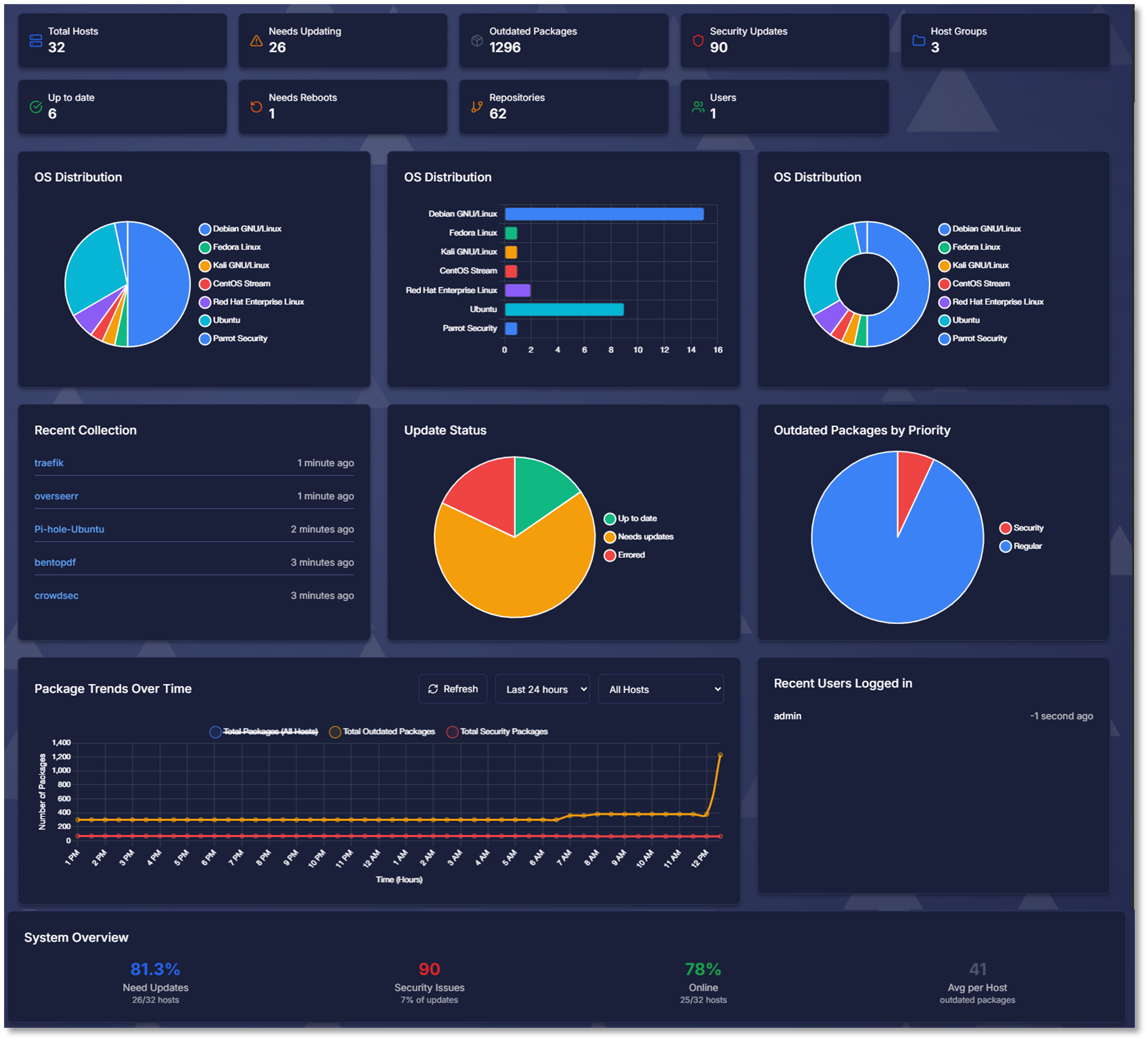
Initial Host Scan
Host: parrot, parrot-security-7, 6.12.57+deb13-amd64
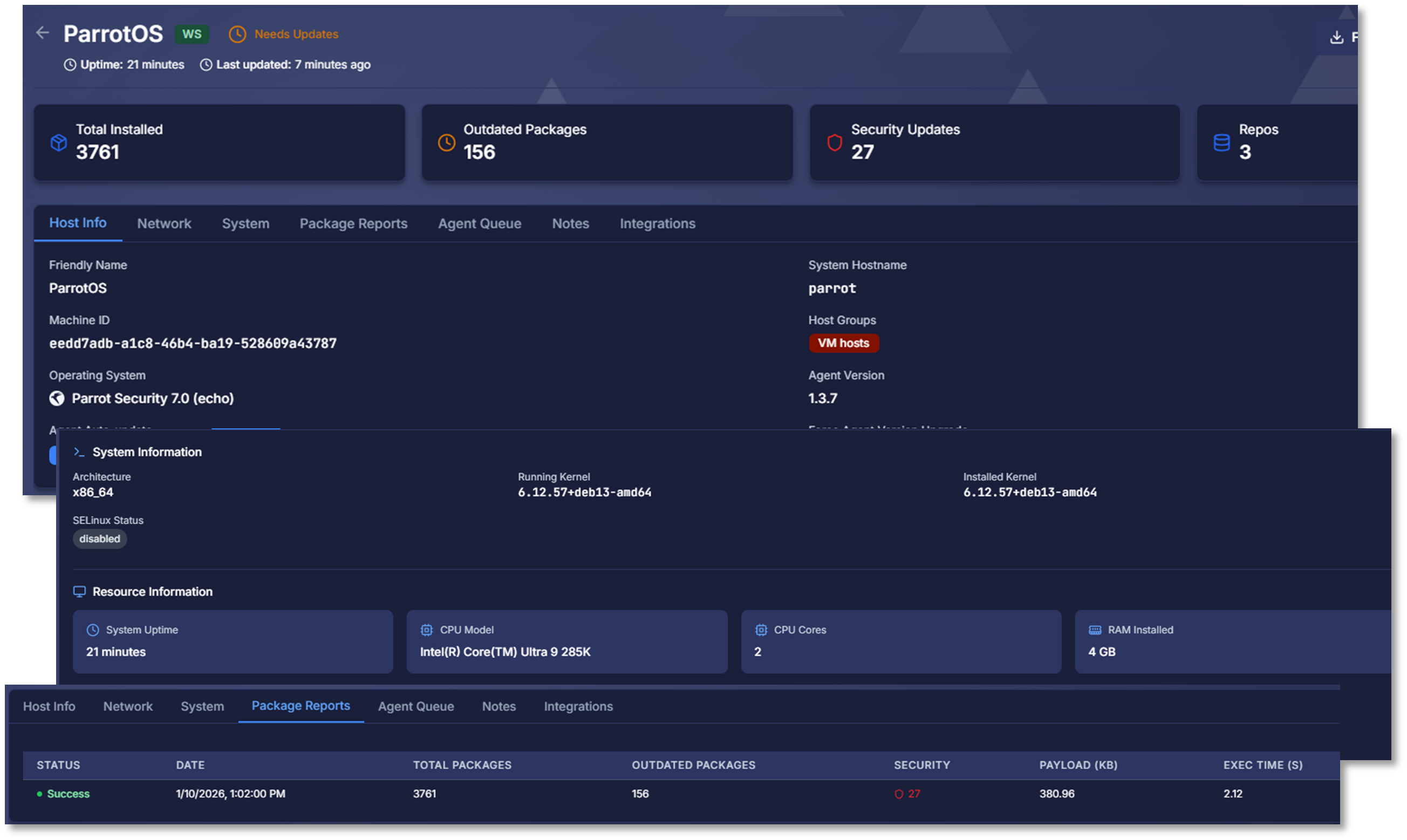
Outdated packages: 156, Security updates: 27
Post-Patching Scan
Host: parrot, parrot-security-7.1, 6.17.13+2-amd64
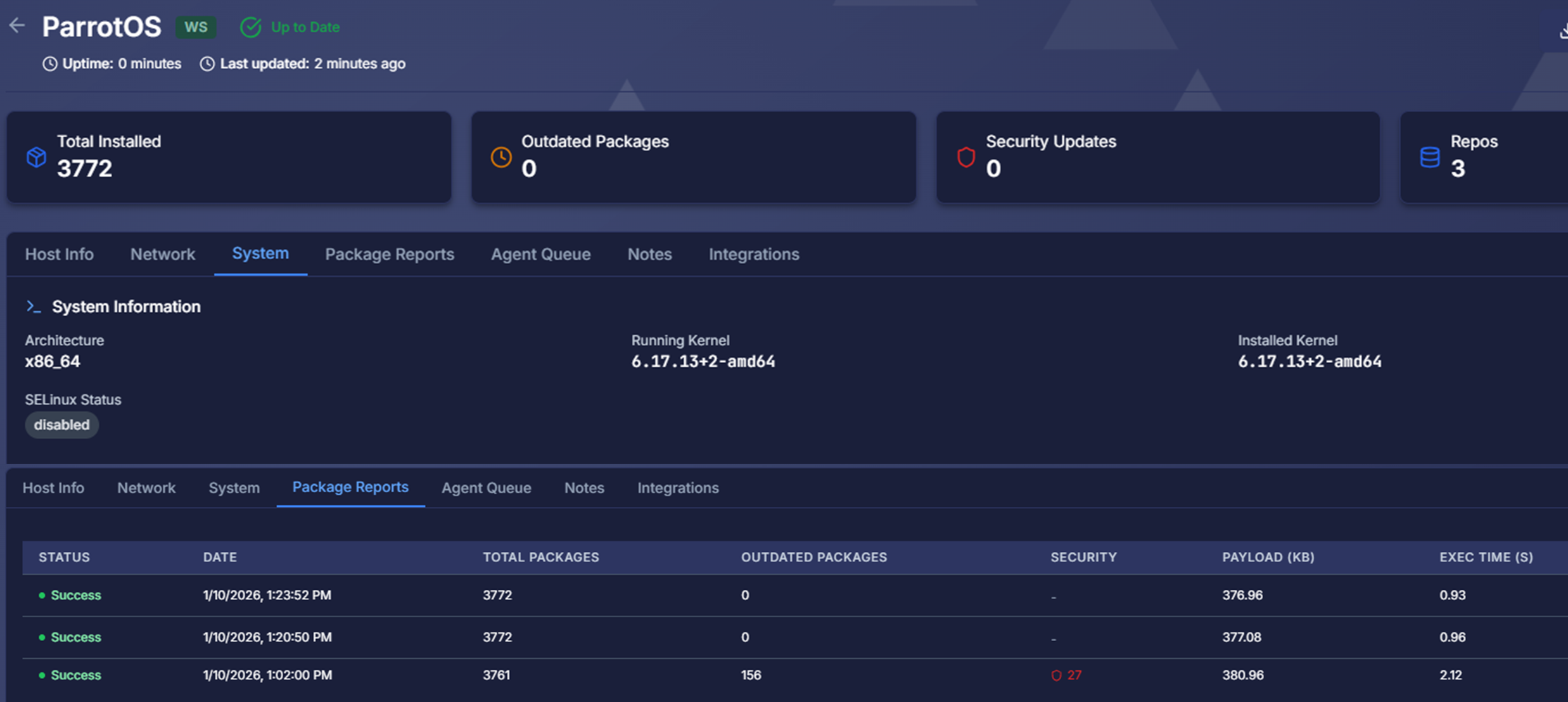
Outdated packages: 0, Security updates: 0
Windows Software Management - Windows Server Update Services (WSUS)
Windows Server Update Services provides centralized control over Microsoft product updates across Windows Server and Windows 10/11 endpoints. Unlike consumer Windows Update, WSUS enables approval workflows, phased deployments, and internal update distribution without requiring every client to download patches from Microsoft's servers.
Benefits:
- Controlled deployment prevents zero-day patches from breaking production systems
- Bandwidth optimization reduces internet consumption by 80% (clients download once to WSUS, then distribute internally)
- Compliance reporting demonstrates adherence to patch SLAs for audits
Technical Implementation:
- Centralized Update Server: WSUS server synchronizes with Microsoft Update catalog daily, downloading metadata and binaries for approved patch categories
- Approval Workflow: Administrators review updates in staging environment before approving for production deployment
- Computer Groups: Clients organized by role (Domain Controllers, File Servers, Workstations) enabling phased rollout (test group → production group)
- Automatic Deployment Rules: Critical security updates auto-approved for deployment within 24 hours; feature updates require manual approval
- Supersedence Handling: WSUS declines superseded updates automatically, preventing installation of outdated patches
- Reporting Dashboard: Compliance reports show installation status (installed, pending, failed) per computer and update
Integration with Active Directory:
- Group Policy Objects (GPOs) enforce WSUS configuration across all domain-joined Windows systems
- WSUS server URL, update installation schedules, and reboot behavior centrally managed
- Non-compliant clients automatically remediated via GPO enforcement
Docker Container Software Management
Watchtower & WUD (What's Up Docker): WUD provides visibility into outdated images, while Watchtower automates the update process for approved containers.
What's Up Docker (WUD)
WUD monitors 50+ running containers across 4 Docker engines (UbuntuVM1, Dockervm2, SafeLine-WAF, Pi-hole-Ubuntu), checking Docker Hub, GitHub Container Registry, and private registries for image updates every 6 hours.
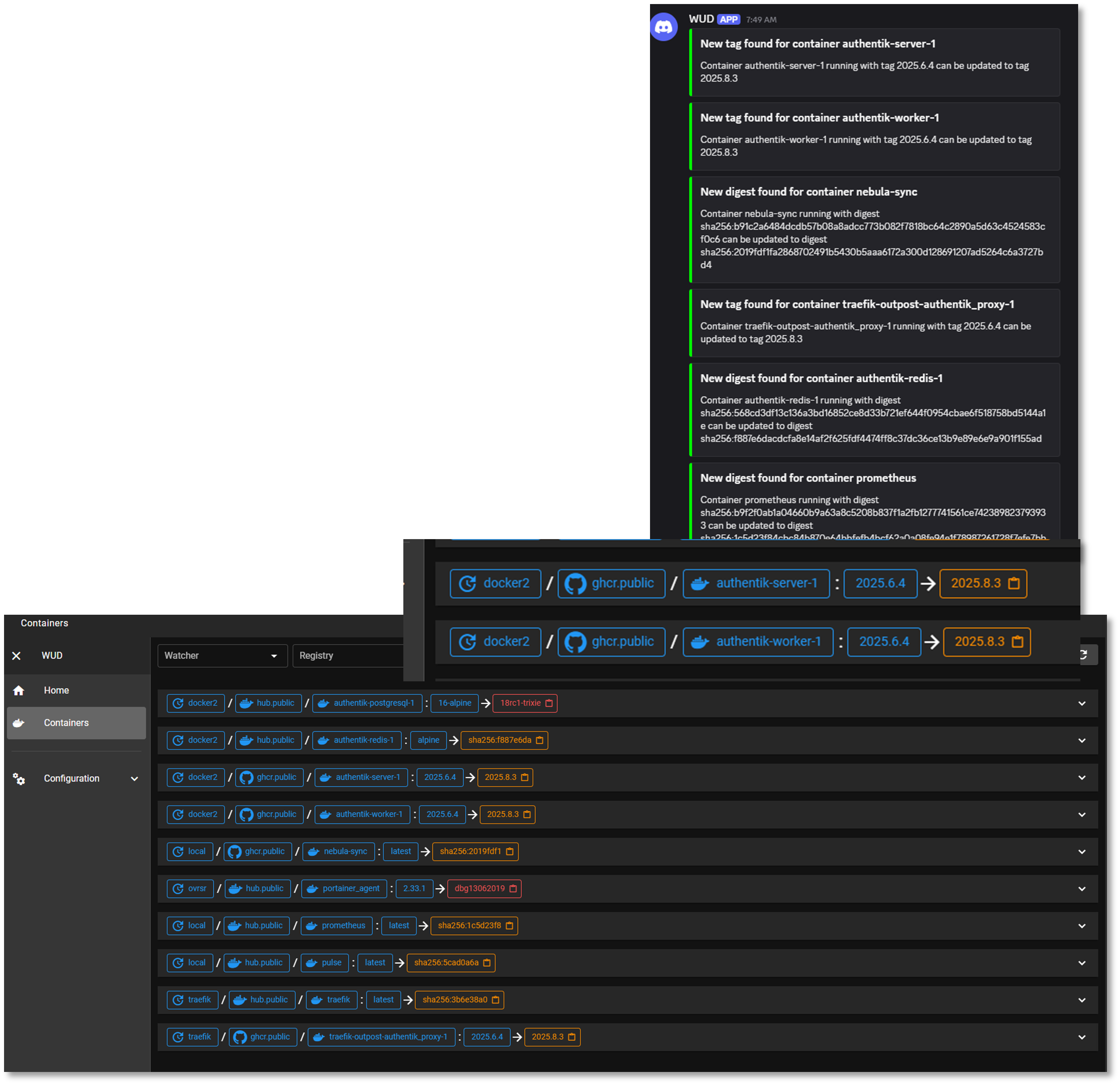
Technical Implementation:
- Multi-Engine Support: Connects to local and remote Docker daemons via TCP socket (TLS encrypted)
- Registry Integration: Authenticates with Docker Hub, GHCR, and private registries to query image tags
- Semantic Versioning: Detects new versions using semver comparison (1.2.3 → 1.2.4 = patch, 1.2.x → 1.3.0 = minor)
- Webhook Notifications: Sends Discord alerts when new versions available, including changelog links and vulnerability fix details
- Tag Tracking: Monitors specific tags (e.g., latest, stable, 1.x) and alerts when tag points to new digest


Watchtower
Watchtower monitors approved containers and automatically pulls new images, stops old containers, and starts updated versions with identical configurations. This "self-healing" approach ensures critical infrastructure containers (monitoring agents, log forwarders) remain current without manual intervention.
Technical Implementation:
- Selective Monitoring: Only updates containers with
com.centurylinklabs.watchtower.enable=truelabel, preventing unintended updates to production applications - Configuration Preservation: Recreates containers with original environment variables, volumes, networks, and port mappings
- Cleanup: Removes old images after successful update to reclaim disk space
- Rollback Capability: Failed updates trigger automatic rollback to previous image version
- Notification Integration: Sends Discord webhook on successful update or rollback event
- Scheduling: Runs daily at 1 AM during low-traffic period
Deployment Strategy:
- WUD Only (Manual Updates): Production application containers (databases, web apps) require approval before updates
- WUD + Watchtower (Auto-Updates): Infrastructure containers with low change risk (Prometheus exporters, logging agents, Grafana dashboards)
Malware Protection Management
Deployment Overview
The malware protection layer provides host-based antivirus and antimalware capabilities across all operating systems in the lab environment. ClamAV delivers open-source malware scanning for Linux, FreeBSD, and macOS systems, while Microsoft Defender provides real-time protection, behavioral analysis, and cloud-assisted threat detection for Windows hosts.
Security Impact
- Detects known malware, trojans, ransomware, and malicious binaries
- Provides real-time protection on Windows systems through Microsoft Defender
- Enables scheduled and on-demand scanning across Linux, BSD, and macOS via ClamAV
- Integrates with SIEM and SOAR platforms for automated alerting and response
- Supports file quarantine, signature updates, and threat classification
- Enhances endpoint-layer detection to complement network and SIEM telemetry
Deployment Rationale:
Malware protection is a foundational security control across enterprise environments. This deployment demonstrates the ability to manage multi-OS antivirus solutions, integrate them with SIEM/SOAR workflows, and maintain consistent scanning policies across diverse systems.
Architecture Principles Alignment:
- Defense in Depth: Adds endpoint-level malware detection beneath SIEM, EDR, and IDS layers; multiple engines reduce reliance on a single signature source; complements network-based detection with host-level scanning
- Secure by Design: Automated signature updates ensure current detection capabilities; real-time protection on Windows reduces exposure to active threats; scheduled scanning enforces consistent hygiene across all systems
- Zero Trust: No file or process is implicitly trusted; all are subject to scanning; continuous monitoring ensures rapid detection of malicious activity; integration with SOAR enforces validation before remediation actions
Web Services Architecture
Deployment Overview
The web services layer hosts internal dashboards, application endpoints, and Windows-based update services across multiple platforms. Apache2 is deployed within an LXC container to serve the external lab dashboard and internal web applications. NGINX operates within the K3s cluster, providing reverse proxying, ingress routing, and application hosting for containerized workloads. Microsoft IIS runs on Windows Server Domain Controllers to support Windows Server Update Services (WSUS) and internal enterprise web functions.
These services are protected by the SafeLine WAF, which currently secures four separate web portals—including the Apache external lab dashboard and the NGINX web server in K3s. Active protections include intelligent web threat detection, bot mitigation, and HTTP-flood DDoS protection. Where required, additional authorization is enforced through Authentik using OIDC, ensuring strong identity-based access control for sensitive dashboards and administrative interfaces.
Security Impact
- Segmented hosting reduces blast radius across LXC, Kubernetes, and Windows Server
- SafeLine WAF provides intelligent threat detection, bot filtering, and DDoS mitigation for all protected portals
- Authentik/OIDC adds identity-aware access control for sensitive web applications
- TLS termination and reverse proxying via NGINX protect backend services
- IIS supports secure distribution of Windows updates through WSUS
- Apache2 provides isolated hosting for external and internal dashboards
- Logging across all web servers supports SIEM correlation and threat hunting
Deployment Rationale:
Web services are essential for internal dashboards, update distribution, and application hosting. Deploying Apache2, NGINX, and IIS across different infrastructure layers demonstrates proficiency with multi-platform web hosting, reverse proxying, ingress management, and Windows-based enterprise services.
Architecture Principles Alignment:
- Defense in Depth: Multiple web servers isolate workloads across containers, Kubernetes, and Windows; SafeLine WAF adds a dedicated protection layer before traffic reaches backend services; reverse proxying and ingress control provide additional filtering and segmentation; WSUS reduces exposure to external update sources
- Secure by Design: TLS-secured endpoints and hardened configurations across all web servers; Authentik/OIDC enforces strong authentication and access control; segmented hosting reduces cross-service exposure; logging and monitoring integrated with SIEM and SOAR
- Zero Trust: No inbound request is implicitly trusted; all traffic passes through WAF and controlled ingress; identity-based access enforced through Authentik/OIDC; continuous monitoring validates service integrity and request behavior
Configuration:
- Apache2: Deployed within an LXC container supporting an internal dashboard
- NGINX: Deployed within K3s cluster supporting internal workloads
- Microsoft IIS: Deployed on Windows Server Domain Controllers supporting Windows Server Update Services
Service Integration Architecture
Integration Patterns:
The lab services are interconnected through multiple integration patterns, demonstrating enterprise architecture principles:
| Integration Type | Pattern | Examples |
|---|---|---|
| Authentication | SSO (OAuth2/OIDC) | Authentik → All web services |
| Observability | Metrics Pull | Prometheus → Service exporters |
| Logging | Centralized Syslog | All services → Splunk/Elastic |
| Service Discovery | DNS + Reverse Proxy | Pi-hole + Traefik |
| Secret Management | Centralized Vault | Services → Vaultwarden API |
| Certificate Distribution | ACME Protocol | Traefik → Step-CA |
| Workflow Orchestration | Event-Driven | n8n → Ansible, GitHub, Discord |
| Configuration Management | Infrastructure as Code | Ansible → All Linux hosts |
Use Cases and Deployment Scenarios
Scenario 1: Zero-Trust Web Access
Objective: Securely access Portainer from any device without VPN
Workflow:
- User navigates to https://portainer.home.com from laptop
- DNS query: Laptop → Pi-hole → Bind9 → Returns 192.168.1.126
- HTTPS request: Laptop → Traefik (192.168.1.126:443)
- Traefik checks for valid session cookie
- No session found → Redirect to Authentik SSO
- User authenticates: username + password + TOTP (Microsoft Authenticator)
- Authentik validates credentials, checks MFA, issues JWT token
- Redirect back to Traefik with OAuth2 authorization code
- Traefik exchanges code for access token, creates session cookie
- Traefik forwards request to Portainer backend (192.168.1.126:9443)
- Traefik injects headers: X-authentik-username, X-authentik-email
- Portainer receives authenticated request, user accesses dashboard
Result: Secure, passwordless access with MFA enforcement. No credentials stored in browser, session expires after 12 hours.
Scenario 2: Automated Vulnerability Remediation
Objective: Detect and patch vulnerabilities within SLA timeframe
Workflow:
- Sunday 2 AM: OpenVAS scan runs on 192.168.1.0/24 network
- Scan completes: 2 Critical, 5 High, 15 Medium vulnerabilities found
- OpenVAS generates XML report with CVE details
- n8n workflow polls OpenVAS API every hour
- n8n detects new Critical vulnerability: CVE-2024-12345 (OpenSSH RCE)
- n8n workflow:
- Parses CVE details and affected hosts
- Creates GitHub Issue with vulnerability details, affected hosts, patch commands
- Labels: security, critical, needs-patch
- Sends Discord notification to #security channel with CVE link
- Admin receives alert within minutes
- Admin reviews CVE details on NVD database
- Admin tests patch in dev environment
- Admin applies patch via Ansible playbook:
ansible-playbook -i hosts.yml patch_openssh.yml --limit affected-hosts - Ansible updates OpenSSH package on 5 affected hosts
- Admin marks GitHub issue as resolved
- Next Sunday: OpenVAS re-scan confirms vulnerability remediated
Result: 7-day critical SLA met. Full audit trail from detection → remediation → verification.
Scenario 3: DNS-Based Ad Blocking
Objective: Block ads and trackers network-wide without per-device configuration
Workflow:
- IoT device (smart TV) attempts to fetch ad: ad.doubleclick.net
- DNS query: Smart TV → Pi-hole (192.168.1.250:53)
- Pi-hole checks query against 250,000 blocklists
- Match found: ad.doubleclick.net in blocklist
- Pi-hole returns: 0.0.0.0 (or NXDOMAIN)
- Smart TV receives "no such domain" response
- Ad request fails, content loads without ad
- Pi-hole logs query for statistics
Result: Network-wide ad blocking without browser extensions. Protects all devices including IoT.
Scenario 4: Certificate Lifecycle Management
Objective: Automatic certificate renewal without manual intervention
Workflow:
- Day 0: Traefik requests certificate for portainer.home.com
- ACME HTTP-01 challenge to Step-CA
- Certificate issued: 365-day validity
- Stored in /acme.json
- Day 335 (30 days before expiry): Traefik triggers renewal
- Traefik initiates ACME renewal request
- Step-CA validates domain ownership again
- New certificate issued with fresh 365-day validity
- Old certificate replaced in acme.json
- Traefik hot-reloads certificate (no downtime)
- Day 330 (if renewal failed): Alert triggered
- Custom script checks certificate expiry daily
- Certificate <30 days → Discord alert sent
- Admin investigates: Check Step-CA logs, network connectivity
- Manual renewal if needed: Restart Traefik to retry
Result: Zero-touch certificate management. 100% uptime during renewals. Alerts only on failures.
Scenario 5: Distributed Logging and Incident Investigation
Objective: Investigate failed login attempts across all services
Workflow:
- Security team suspects brute force attack
- Analyst logs into Splunk: https://splunk.home.com
-
Runs SPL query:
index=linux sourcetype=syslog "Failed password" | stats count by src_ip, dest_host | where count > 10 | sort -count -
Results show:
- Source IP: 192.168.1.99 (unknown device)
- Target: 5 different hosts
- Failed attempts: 150 in last hour
-
Analyst pivots to authentication logs:
index=auth sourcetype=authentik | search src_ip="192.168.1.99" -
Finds Authentik login failures with username enumeration attempts
- Analyst checks network context:
- MAC address lookup: IoT device (compromised smart bulb)
- First seen: 2 hours ago
- Remediation:
- Block IP at pfSense firewall
- Disconnect device from network
- Factory reset device
- Update firmware
Result: Full attack lifecycle documented in SIEM. Incident contained within 30 minutes of detection.
Security Homelab Section Links
- Executive Summary and Security Posture
- Infrastructure Platform, Virtualization Stack and Hardware
- Network Security, Privacy and Remote Access
- Identity, Access, Secrets and Trust Management
- Automation and IaC
- Applications and Services
- Observability and Response, Part 1
- Observability and Response, Part 2
- Cloud IaaS Integration – AWS, Azure and GCP