Cloud IaaS Integration – AWS, Azure and GCP
Document Control:
Version: 1.1
Last Updated: April 01, 2026
Owner: Paul Leone
Architecture Overview
The lab extends beyond the on-premises Proxmox environment into a multi-cloud hybrid architecture spanning AWS, Azure, and Google Cloud Platform. Tailscale provides the encrypted mesh VPN fabric connecting all cloud-hosted nodes back to on-premises infrastructure without exposing management interfaces to the public internet. Each cloud provider hosts purpose-built workloads aligned with their native security services, enabling hands-on experience with enterprise cloud security patterns across the three major platforms.
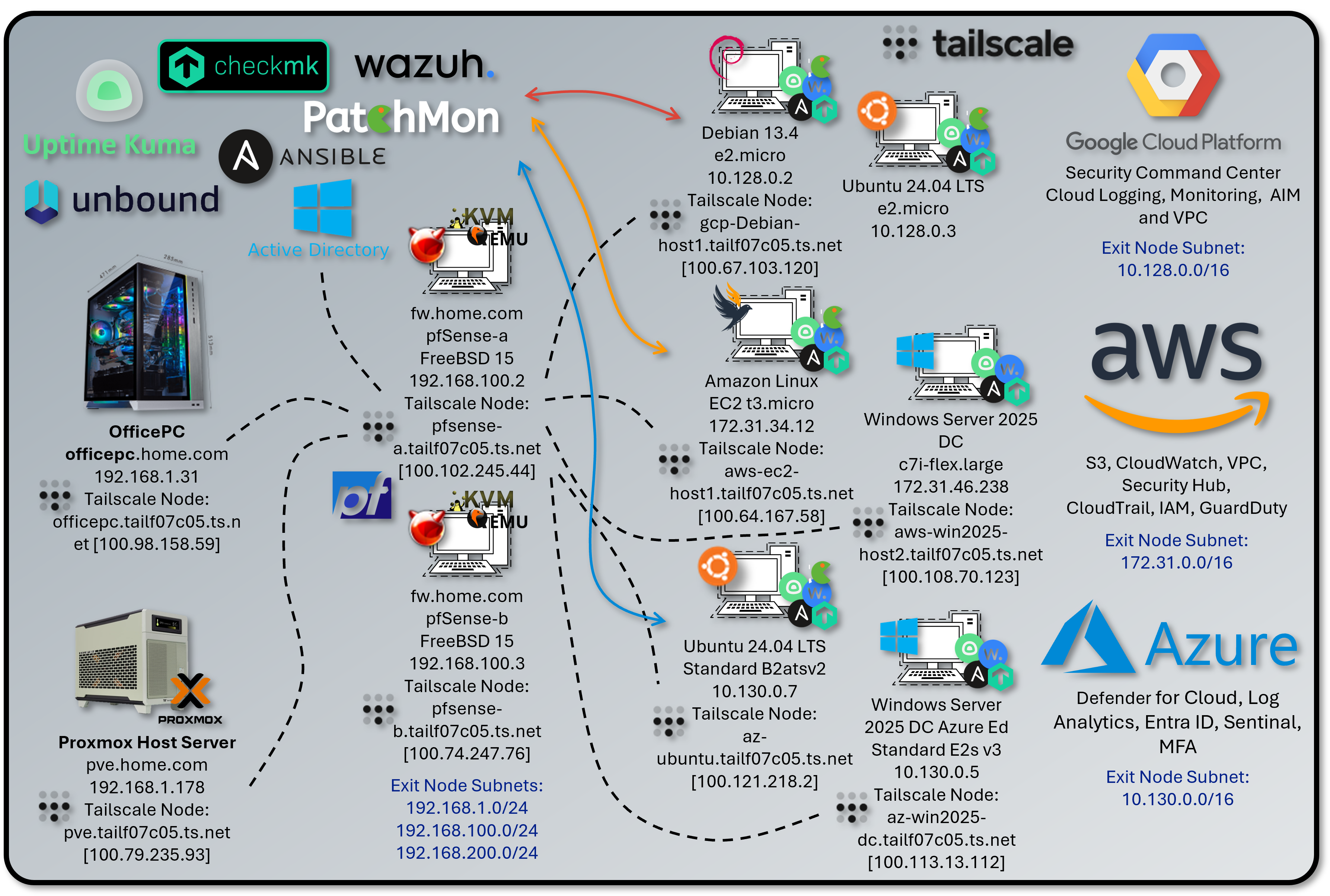
All cloud nodes integrate with a common on-premises management stack — Wazuh EDR, PatchMon, Checkmk, Ansible, and Uptime Kuma — configured consistently across providers. DNS resolution uses the lab Unbound resolvers (192.168.1.153 / 192.168.1.154) accessed via Tailscale.
| Platform | VM / Instance | OS | Primary Services | Tailscale Node |
|---|---|---|---|---|
| AWS | EC2 t3.micro | Amazon Linux 2 | S3, CloudWatch, VPC, Security Hub, CloudTrail, IAM, Lambda, GuardDuty | aws-ec2-host1.tailf07c05.ts.net [100.64.167.58] |
| AWS | EC2 c7i-flex.large | Windows Server 2025 Datacenter | S3, CloudWatch, VPC, Security Hub, CloudTrail, IAM, Lambda, GuardDuty | aws-win2025-host2.tailf07c05.ts.net [100.108.70.123] |
| GCP | e2.micro (x2) | Debian 13.4 / Ubuntu | Security Command Center, Cloud Logging, Cloud Monitoring, IAM, VPC, Cloud Armor | gcp-debian-host1.tailf07c05.ts.net [100.67.103.120] |
| Azure | Standard_B2ats v2 | Ubuntu 24.04 LTS | Defender for Cloud, Log Analytics, Entra ID, Sentinel, MFA, NSG, Azure Arc, DDoS Protection | az-ubuntu.tailf07c05.ts.net [100.96.110.40] |
| Azure | Standard_E2s v3 (Spot) | Windows Server 2025 Datacenter Smalldisk | Defender for Cloud, Log Analytics, Entra ID, Sentinel, MFA, NSG, Azure Arc, DDoS Protection | az-win2025-dc.tailf07c05.ts.net [100.113.13.112] |
Security Impact
- Cross-cloud EDR coverage via Wazuh agents reporting to the central on-premises manager at 192.168.1.219
- Cloud-native security services (GuardDuty, Security Command Center, Defender for Cloud) augment on-premises SIEM with cloud-specific behavioral detection
- Zero-trust remote access via Tailscale — cloud nodes expose no management ports to the public internet
- Unified DNS via on-premises Unbound resolvers provides consistent name resolution, ad/malware blocking, and DNSSEC validation for all cloud nodes
- PatchMon, Checkmk, and Ansible extend on-premises patch management, monitoring, and configuration enforcement to cloud workloads
- Routing isolation per cloud provider prevents unintended lateral movement between cloud environments
Deployment Rationale
Enterprise environments increasingly operate hybrid architectures where workloads span on-premises and multiple cloud providers. This deployment demonstrates proficiency with cloud-native security services, hybrid network design, and cross-environment monitoring. Each cloud provider is configured to mirror production patterns: IAM least-privilege, VPC/VNet segmentation, native logging, and endpoint agents for unified visibility.
Architecture Principles Alignment
- Defense in Depth: Multiple cloud providers create independent security domains with distinct native controls; Wazuh EDR coverage spans on-premises and cloud nodes; cloud-native threat detection operates in parallel with on-premises SIEM correlation
- Secure by Design: Cloud nodes deployed with least-privilege IAM/service account roles; all management access routed through Tailscale; native cloud audit logging enabled by default; on-premises Unbound DNS provides malware domain filtering
- Zero Trust: Tailscale ACLs enforce explicit allow rules between cloud and on-premises nodes; cloud firewall rules restrict inbound to Tailnet CGNAT space and homelab subnets; no implicit trust between cloud providers or segments
Tailscale Mesh VPN — Cross-Cloud Fabric
Deployment Overview
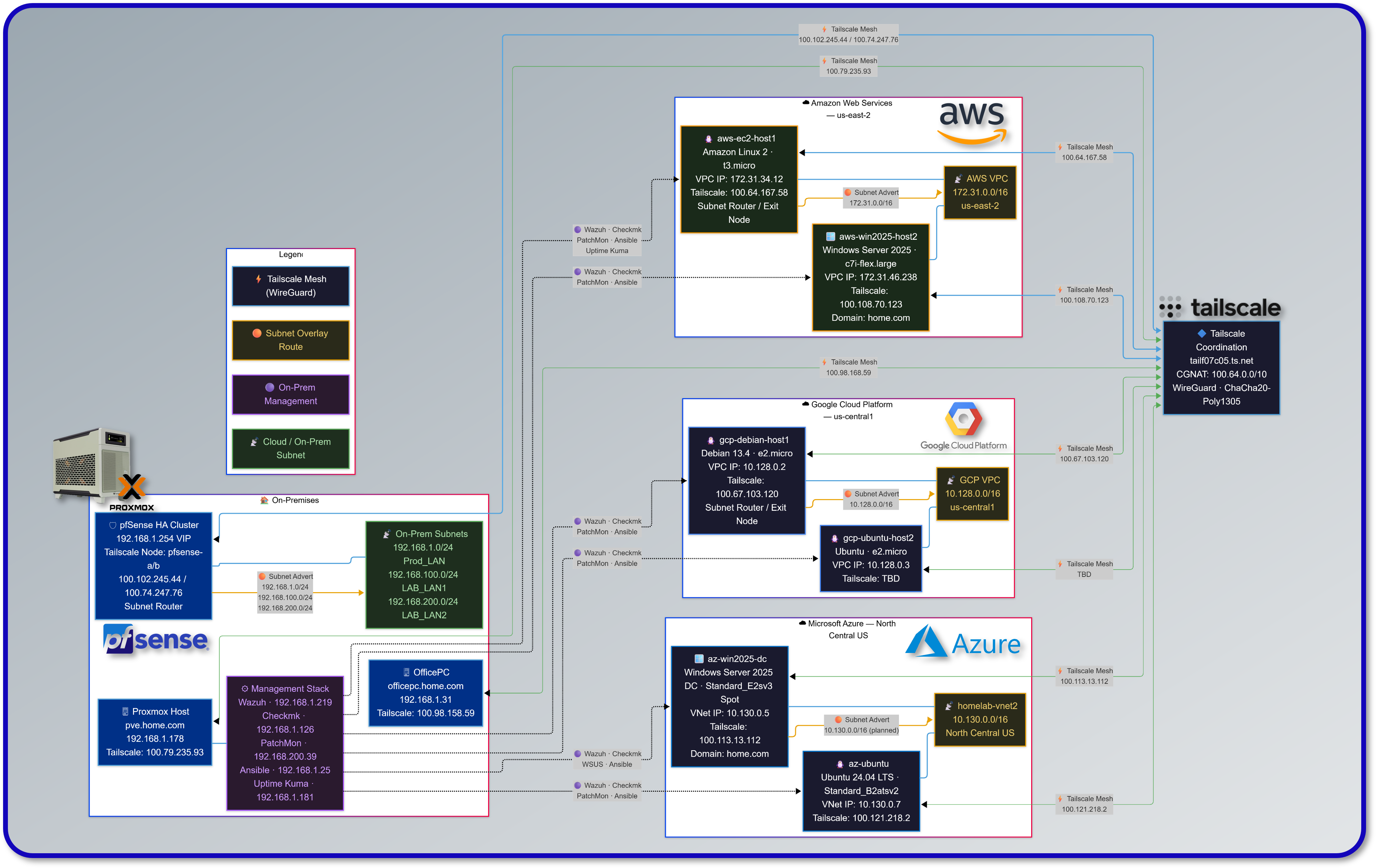
Tailscale provides the encrypted WireGuard-based overlay connecting all cloud nodes, on-premises infrastructure, and remote endpoints into a single private network. Each node is enrolled in the tailnet (tailf07c05.ts.net) and receives a stable CGNAT address (100.64.0.0/10). pfSense nodes advertise on-premises subnets into the tailnet; cloud VMs advertise their respective VPC/VNet CIDRs. This enables any tailnet member to reach cloud and on-premises subnets without requiring per-host agent installation on every workload.
Security Impact
- Eliminates public-internet exposure of management interfaces across all cloud platforms
- WireGuard encryption (ChaCha20-Poly1305) secures all inter-node traffic by default
- ACL-based policy enforces least-privilege connectivity — no implicit mesh between all nodes
- Exit node capability routes homelab egress through cloud endpoints for geo-validation and privacy testing
- Device-bound authentication prevents credential-only access; Tailscale identity is tied to machine keys
- On-premises Unbound DNS resolvers accessible to cloud nodes via Tailscale for consistent internal name resolution and filtering
Node Inventory
| Hostname | Platform | Local IP | Tailscale IP | Role |
|---|---|---|---|---|
| officepc.home.com | Windows 11 (On-Prem) | 192.168.1.31 | 100.98.158.59 | Endpoint |
| pve.home.com | Proxmox Host (On-Prem) | 192.168.1.178 | 100.79.235.93 | Endpoint |
| pfsense-a (fw.home.com) | pfSense FreeBSD 15 | 192.168.100.2 | 100.102.245.44 | Subnet Router / Exit Node |
| pfsense-b (fw.home.com) | pfSense FreeBSD 15 | 192.168.100.3 | 100.74.247.76 | Subnet Router / Exit Node |
| aws-ec2-host1 | Amazon Linux (AWS EC2) | 172.31.34.12 | 100.64.167.58 | Subnet Router / Exit Node |
| aws-win2025-host2 | Windows Server 2025 (AWS) | 172.31.46.238 | 100.108.70.123 | Endpoint |
| gcp-debian-host1 | Debian 13.4 (GCP e2.micro) | 10.128.0.2 | 100.67.103.120 | Subnet Router / Exit Node |
| az-ubuntu | Ubuntu 24.04 LTS (Azure B2ats v2) | 10.130.0.7 | 100.96.110.40 | Subnet Router / Exit Node |
| az-win2025-dc | Windows Server 2025 Datacenter (Azure E2s v3) | 10.130.0.5 | 100.113.13.112 | Endpoint |
Subnet Advertisement
| Node | Advertised Subnets | Exit Node |
|---|---|---|
| pfsense-a / pfsense-b | 192.168.1.0/24, 192.168.100.0/24, 192.168.200.0/24 | Yes |
| aws-ec2-host1 | 172.31.0.0/16 | Yes |
| gcp-debian-host1 | 10.128.0.0/16 | Yes |
| az-ubuntu | 10.130.0.0/16 | Yes |
DNS via On-Premises Unbound
Cloud nodes resolve internal hostnames and benefit from malware/ad-blocking through the on-premises Unbound resolvers, accessible via the Tailscale tunnel. Windows Server nodes that are domain-joined to home.com use the on-premises Active Directory DNS servers for AD-specific resolution.
| Resolver | IP | Role | Access Path |
|---|---|---|---|
| Unbound-01 | 192.168.1.153 | Primary recursive resolver + ad/malware blocking | Via Tailscale tunnel |
| Unbound-02 | 192.168.1.154 | Secondary recursive resolver (independent cache) | Via Tailscale tunnel |
| Technitium DNS01 | 192.168.1.150 | Authoritative for home.com (forwarded from Unbound) | Via Tailscale tunnel |
| Technitium DNS02 | 192.168.1.151 | Secondary authoritative (zone replica) | Via Tailscale tunnel |
| DC01 / DC02 (AD DNS) | 192.168.1.152 / 192.168.1.142 | Domain DNS — used by Windows domain-joined cloud nodes | Via Tailscale tunnel |
ACL Policy
Tailscale ACLs are maintained in the admin console and enforce explicit allow rules. Default policy denies all traffic not explicitly permitted.
- Homelab endpoints reach all subnet-router-advertised cloud CIDRs
- Cloud nodes reach on-premises Wazuh Manager (192.168.1.219) on TCP 1514/1515
- Cloud nodes reach Unbound DNS resolvers (192.168.1.153/154) on UDP/TCP 53
- Domain-joined Windows cloud nodes reach AD DNS (192.168.1.152/142) and domain controllers on required AD ports
- Cloud nodes reach PatchMon backend, Checkmk server, and Ansible controller via homelab subnets
- SSH (TCP 22) and RDP (TCP 3389) permitted from homelab subnets to cloud nodes only
- ICMP permitted within tailnet for diagnostics
Security Controls
| Control | Implementation | Purpose |
|---|---|---|
| Encryption | WireGuard — ChaCha20-Poly1305 | All tunnel traffic encrypted in transit |
| Authentication | Machine keys + Tailscale identity | Device-bound; no shared secrets |
| ACL Enforcement | Tailscale admin console policy | Least-privilege inter-node connectivity |
| Exit Node | pfsense-a/b, aws-ec2-host1, gcp-debian-host1 | Controlled egress routing |
| MagicDNS | tailf07c05.ts.net | Stable human-readable hostnames across tailnet |
| Internal DNS | On-premises Unbound / AD DNS via Tailscale | Consistent resolution and malware blocking |
| Key Rotation | Automatic (Tailscale managed) | Prevents stale key material |
Amazon Web Services (AWS)
Deployment Overview
The AWS deployment consists of two EC2 instances: a t3.micro running Amazon Linux 2 that serves as the Tailscale subnet router for the VPC (172.31.0.0/16), and a c7i-flex.large running Windows Server 2025 Datacenter. Both instances are enrolled in the Tailscale tailnet and integrated with the on-premises management stack (Wazuh, PatchMon, Checkmk, Ansible, Uptime Kuma). The Windows Server 2025 instance is joined to the home.com Active Directory domain via Tailscale, extending enterprise identity and Group Policy to the cloud workload. AWS native services — GuardDuty, Security Hub, CloudTrail, IAM, and CloudWatch — provide cloud-layer threat detection and audit logging that complements the on-premises SOC platform.
Security Impact
- Wazuh agent provides endpoint telemetry from both instances forwarded to the central on-premises SIEM
- Windows Server 2025 joined to home.com AD — Group Policy, WSUS, and certificate auto-enrollment apply across the VPN
- PatchMon daily checks ensure package currency across on-premises and cloud nodes in a unified dashboard
- Checkmk monitors EC2 host health (CPU, memory, disk, services) alongside all lab infrastructure
- GuardDuty delivers ML-based threat detection across VPC flow logs, CloudTrail events, and DNS query logs
- Security Hub aggregates GuardDuty, Inspector, and IAM Access Analyzer findings into a compliance dashboard
- CloudTrail captures all API activity with tamper-resistant log storage in S3
- Security groups restrict all inbound management to Tailnet CGNAT and homelab subnets
Deployment Rationale
AWS represents the dominant enterprise cloud platform. This deployment demonstrates proficiency with EC2 lifecycle management, VPC networking, IAM policy design, and cloud-native security services. The dual-instance topology — one Linux subnet router and one Windows domain member — mirrors common hybrid enterprise patterns where cloud workloads participate in on-premises identity and management infrastructure.
Architecture Principles Alignment
- Defense in Depth: VPC security groups enforce network-layer segmentation; GuardDuty behavioral detection operates independent of signature-based rules; CloudTrail + CloudWatch Logs provide a tamper-resistant audit trail
- Secure by Design: EC2 instance profiles provide IAM roles without embedded credentials; S3 bucket for CloudTrail logs configured with server-side encryption
- Zero Trust: No inbound internet-facing management ports — all access via Tailscale; IAM policies scoped to minimum required actions; VPC flow logs capture all traffic for forensic analysis
Infrastructure Configuration
EC2 Instances — Amazon Linux 2 (host1 — Subnet Router)
| Attribute | Value |
|---|---|
| Instance ID | i-0204e2e26d7f30631 |
| Hostname | aws-ec2-host1 |
| Instance Type | t3.micro |
| AMI | Amazon Linux 2 (us-east-2) |
| Availability Zone | us-east-2c |
| Private IP | 172.31.34.12 |
| Public IP | 3.16.91.166 (not used for management — Tailscale only) |
| Tailscale IP | 100.64.167.58 |
| Tailscale Hostname | aws-ec2-host1.tailf07c05.ts.net |
| Tailscale Role | Subnet Router / Exit Node (172.31.0.0/16) |
| Volume | 8 GiB gp3 |
| Key Pair | OfficePC (ed25519) |
| Source/Dest Check | Disabled (required for Tailscale subnet routing) |
| DNS Resolvers | 192.168.1.153, 192.168.1.154 (on-premises Unbound via Tailscale) |
EC2 Instances — Windows Server 2025 Datacenter (host2)
| Attribute | Value |
|---|---|
| Instance ID | i-03e9efec4fa3fe644 |
| Hostname | aws-win2025-host2 |
| Instance Type | c7i-flex.large |
| AMI | Windows Server 2025 Datacenter (us-east-2) |
| Availability Zone | us-east-2c |
| Private IP | 172.31.34.137 |
| Tailscale IP | 100.108.70.123 |
| Tailscale Hostname | aws-win2025-host2.tailf07c05.ts.net |
| Domain | home.com (domain-joined via Tailscale) |
| Monitoring | Enabled (CloudWatch) |
| Security Groups | tailscale-access, lab-services |
| Key Pair | paul-key2 |
| Source/Dest Check | Disabled |
| DNS Resolvers | 192.168.1.152, 192.168.1.142 (on-premises AD DNS via Tailscale) |
VPC Configuration
| Attribute | Value |
|---|---|
| VPC ID | vpc-07db6afa9c6097fe4 |
| CIDR | 172.31.0.0/16 |
| Default VPC | Yes |
| Region | us-east-2 (Ohio) |
| Internet Gateway | igw-0d9a301fe45791b9b |
| Route Table | rtb-00a8870decfc6d646 (main) |
Routing
| Layer | Node / Scope | Destination | Next Hop / Gateway |
|---|---|---|---|
| Tailnet | pfSense-a/b | 172.31.0.0/16 | Advertised via aws-ec2-host1 |
| Tailnet | aws-ec2-host1 | 192.168.1.0/24, 192.168.100.0/24, 192.168.200.0/24 | Advertised via pfSense Nodes |
| Home LAN | Office PC (192.168.1.31) | 172.31.0.0/16 | 192.168.1.253 (pfSense) |
| AWS VPC | VPC Route Table | 192.168.0.0/16 | ENI of EC2 Tailscale Host |
| DNS (Linux) | aws-ec2-host1 | 192.168.1.153, 192.168.1.154 | Via Tailscale tunnel to on-prem Unbound |
| DNS (Windows) | aws-win2025-host2 | 192.168.1.152, 192.168.1.142 | Via Tailscale tunnel to on-prem AD DNS |
Security Groups — lab-services Inbound Rules
| Protocol | Port | Source | Description |
|---|---|---|---|
| TCP | 22 | 192.168.0.0/16 | SSH — homelab subnets only (Linux) |
| TCP | 3389 | 192.168.0.0/16 | RDP — homelab subnets only (Windows) |
| ICMP | All | 192.168.0.0/16 | Internal diagnostics |
| TCP | 80 | 192.168.1.181/32 | Uptime Kuma — HTTP monitor |
| UDP | 33434-33600 | 192.168.0.0/16 | Internal traceroute |
Security Groups — lab-services Outbound Rules
| Protocol | Port(s) | Destination | Description |
|---|---|---|---|
| TCP | 1514-1515, 55000 | 192.168.1.219/32 | Wazuh agent ports |
| TCP/UDP | 53 | 192.168.1.153/32 | Unbound-01 DNS |
| TCP/UDP | 53 | 192.168.1.154/32 | Unbound-02 DNS |
| All TCP | * | 192.168.1.126/32 | Checkmk agent |
| TCP | 3000-3001 | 192.168.200.0/24 | PatchMon ports |
| ICMP | * | 192.168.0.0/16 | Ping testing |
| All Traffic | AD Ports | 192.168.1.152/32, 192.168.1.142/32 | AD Domain Controller — Kerberos, LDAP, DNS, GP, SYSVOL |
Security Groups — tailscale-access Inbound/Outbound
| Protocol | Port | Source / Destination | Description |
|---|---|---|---|
| All | All | 100.64.0.0/10 | Bidirectional Tailnet communication |
IAM Configuration
| Resource | Count | Notes |
|---|---|---|
| User Groups | 2 | Lab admin group, read-only group |
| Users | 2 | Admin and read-only users — no long-lived access keys on EC2 |
| Roles | 24 | Service-linked + custom instance profiles |
| Policies | 1 | Custom least-privilege policy |
Native Security Services
GuardDuty
Continuous threat detection analyzing VPC flow logs, CloudTrail management events, and Route 53 DNS query logs. ML-based anomaly detection identifies reconnaissance, credential compromise, and C2 communication without rule maintenance.
| Data Source | Detection Focus |
|---|---|
| VPC Flow Logs | Port scanning, unusual outbound connections, lateral movement |
| CloudTrail Logs | Unauthorized API calls, credential misuse, privilege escalation |
| DNS Query Logs | DGA domains, DNS exfiltration, C2 callbacks |
Security Hub
Aggregates findings from GuardDuty, Inspector, and IAM Access Analyzer. Benchmarks include CIS AWS Foundations and AWS Foundational Security Best Practices. Findings export to CloudWatch Events for automated response via Lambda.
CloudTrail
Management and API audit logging enabled for all events. Logs delivered to S3 with server-side encryption. CloudWatch Logs integration enables real-time alerting on high-risk API calls including IAM policy changes, security group modifications, and root account usage.
CloudWatch
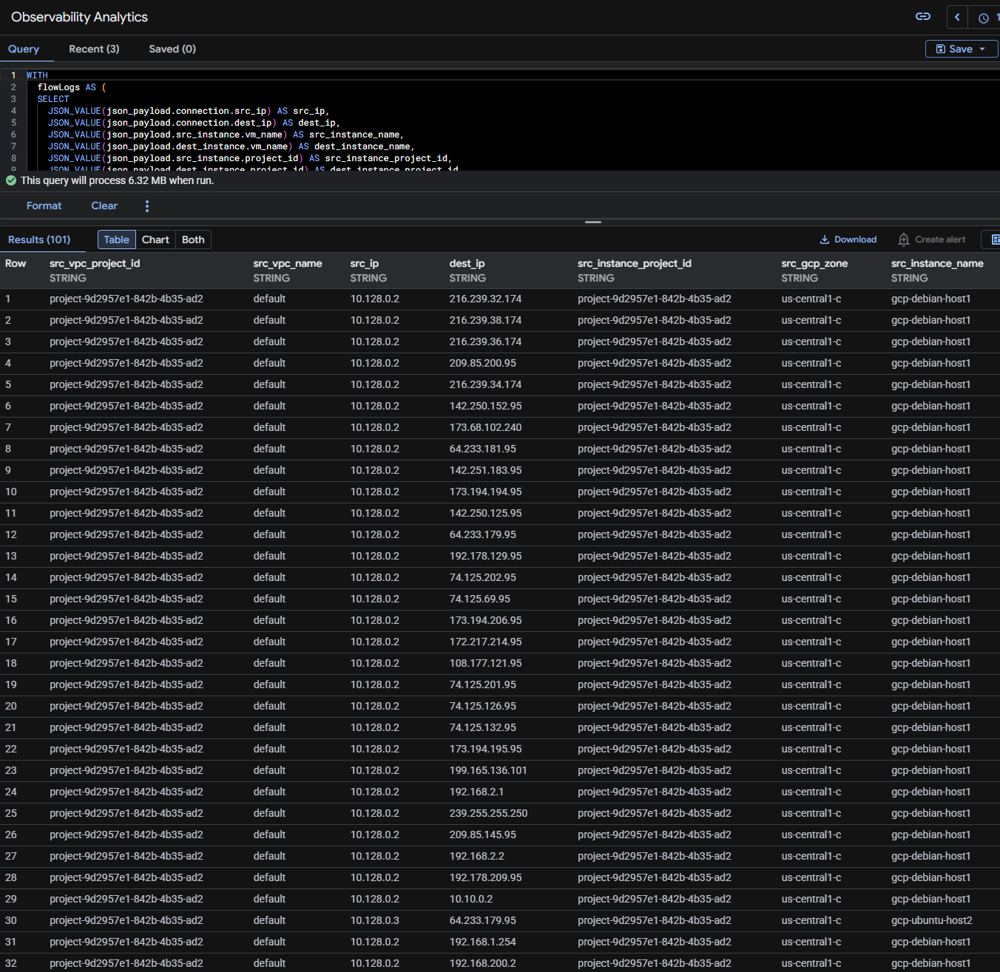
Infrastructure metrics collected from both EC2 instances via CloudWatch Agent. Custom metrics and log groups forward application and system logs. Alarms trigger SNS notifications and can initiate Lambda-based automated response. VPC Flow Logs (fl-03179f74e54bf1aa4) delivered to CloudWatch Logs capture all accepted and rejected traffic with ENI, source/destination addresses, ports, and action.
Monitoring and Alerting
| Source | Alert Type | Destination |
|---|---|---|
| GuardDuty findings | Threat detection (high/medium severity) | Security Hub + CloudWatch Events |
| CloudTrail | High-risk API activity | CloudWatch Alarms + SNS |
| CloudWatch Agent | EC2 resource thresholds | CloudWatch Alarms |
| Wazuh Agent | Endpoint security events | On-premises Wazuh Manager + Splunk SIEM |
| PatchMon Agent | Outdated packages / CVE correlation | On-premises PatchMon dashboard + Discord |
| Checkmk Agent | Host health (CPU, disk, services) | On-premises Checkmk + Discord |
| Uptime Kuma | Service availability checks | Discord webhook (#uptime-kuma) |
Google Cloud Platform (GCP)
Deployment Overview
The GCP deployment consists of two e2.micro instances in the us-central1-c zone. The primary node (gcp-debian-host1) runs Debian 13.4 and serves as the Tailscale subnet router for the GCP VPC (10.128.0.0/16), advertising the GCP network into the tailnet as an exit node. A secondary Ubuntu instance (gcp-ubuntu-host2) operates as an additional workload endpoint. Both instances are enrolled in Tailscale and integrated with the on-premises management stack. GCP native services — Security Command Center, Cloud Logging, Cloud Monitoring, IAM, Cloud Armor, and VPC firewall policies — provide cloud-native security visibility that complements the on-premises SOC platform.
Security Impact
- Tailscale subnet router on gcp-debian-host1 advertises 10.128.0.0/16 into the tailnet, enabling homelab access to all GCP workloads without public internet exposure
- Wazuh agents on both GCP instances provide endpoint telemetry forwarded to the central on-premises Wazuh Manager
- Security Command Center delivers asset inventory, vulnerability findings, and threat detection across the GCP project
- Cloud Armor policies provide WAF protection (SQLi/XSS blocking), DDoS rate limiting, and geo-based threat intelligence blocking across three policy tiers
- VPC network firewall policy (homelab) enforces Google Cloud Threat Intelligence blocking for TOR exit nodes, known malicious IPs, and sanctioned countries at the network perimeter
- Cloud Logging captures Admin Activity and Data Access audit logs for all GCP API calls
Deployment Rationale
GCP provides unique cloud security capabilities including Security Command Center for CSPM, Cloud Armor for WAF/DDoS protection with Google Threat Intelligence integration, and a strong IAM model with service accounts and Workload Identity. The layered Cloud Armor and VPC firewall policy architecture mirrors enterprise-grade GCP deployments where threat intelligence, rate limiting, and WAF rules operate at the edge before traffic reaches compute resources.
Architecture Principles Alignment
- Defense in Depth: VPC network firewall policy (homelab) provides the innermost perimeter with Google Threat Intelligence blocking; Cloud Armor adds edge-layer WAF and DDoS protection; Security Command Center provides independent asset and vulnerability visibility; Cloud Logging audit trail captures all control-plane API activity
- Secure by Design: GCP service accounts with minimal IAM roles; Cloud Armor application-level policy blocks SQLi and XSS; VPC firewall policy restricts management access (SSH) to homelab subnets
- Zero Trust: Management access exclusively via Tailscale; IAM service accounts follow least-privilege; VPC flow logs enabled for forensic traffic analysis
Infrastructure Configuration
VM Instances
| Attribute | gcp-debian-host1 | gcp-ubuntu-host2 |
|---|---|---|
| OS | Debian 13.4 | Ubuntu |
| Machine Type | e2.micro | e2.micro |
| Zone | us-central1-c | us-central1-c |
| Internal IP | 10.128.0.2 (nic0) | 10.128.0.3 (nic0) |
| External IP | 34.29.32.124 | 108.59.80.1 |
| Tailscale IP | 100.67.103.120 | TBD |
| Tailscale Hostname | gcp-debian-host1.tailf07c05.ts.net | gcp-ubuntu-host2.tailf07c05.ts.net |
| Tailscale Role | Subnet Router / Exit Node | Endpoint |
| Exit Node Subnet | 10.128.0.0/16 | N/A |
| DNS Resolvers | 192.168.1.153, 192.168.1.154 (via Tailscale) | 192.168.1.153, 192.168.1.154 (via Tailscale) |
VPC and Network Configuration
| Attribute | Value |
|---|---|
| VPC Network | default |
| Project ID | project-9d2957e1-842b-4b35-ad2 |
| Region | us-central1 |
| Zone | us-central1-c |
| Subnet CIDR | 10.128.0.0/16 (auto-mode VPC) |
| Exit Node Subnet (Tailnet) | 10.128.0.0/16 |
| SMTP Port 25 | Blocked by GCP project policy |
Routing
| Layer | Node / Scope | Destination | Next Hop / Gateway |
|---|---|---|---|
| Tailnet | pfSense-a/b | 10.128.0.0/16 | Advertised via gcp-debian-host1 |
| Tailnet | gcp-debian-host1 | 192.168.1.0/24, 192.168.100.0/24, 192.168.200.0/24 | Advertised via pfSense Nodes |
| GCP VPC | Internal routing | 10.128.0.0/9 | VPC local |
| DNS | GCP Instances | 192.168.1.153, 192.168.1.154 | Via Tailscale tunnel to on-prem Unbound |
Cloud Armor Security Policies
Three Cloud Armor policies enforce edge-layer security for GCP workloads, operating at edge, backend, and application tiers. Policies are evaluated in the order listed; lower-priority numbers are evaluated first within each tier.
tailscale — Edge Security Policy
Applied at the global load balancer level. Restricts access to Tailscale network and homelab ranges with a default deny for all other sources.
| Priority | Action | Type | Match | Description |
|---|---|---|---|---|
| 80 | Allow | IP ranges | 100.64.0.0/10 | Tailscale network |
| 100 | Allow | IP ranges | 192.168.0.0/16 | Homelab access |
| 2,147,483,647 | Deny (403) | IP ranges | * (All) | Default deny |
vm-ddos — Backend Security Policy
Backend security policy providing DDoS rate limiting for VM-level traffic.
| Priority | Action | Type | Match | Description |
|---|---|---|---|---|
| 80 | Allow | IP ranges | 100.64.0.0/10 | Tailscale access |
| 100 | Allow | IP ranges | 192.168.0.0/16 | Homelab access |
| 1,000 | Throttle | IP ranges | * | Rate limiting — prevents cost spikes and DDoS |
| 2,147,483,647 | Deny | IP ranges | * (All) | Default deny |
application-level — Backend Security Policy
Application-layer WAF policy blocking OWASP Top 10 attack patterns. SQLi and XSS rules use GCP's preconfigured expression sets (v33-stable).
| Priority | Action | Type | Match / Expression | Description |
|---|---|---|---|---|
| 10 | Deny | WAF rule | evaluatePreconfiguredExpr('sqli-v33-stable') | WAF: Block SQL Injection |
| 20 | Deny | WAF rule | evaluatePreconfiguredExpr('xss-v33-stable') | WAF: Block XSS |
| 80 | Allow | IP ranges | 100.64.0.0/10 | Tailscale overlay access |
| 100 | Allow | IP ranges | 192.168.0.0/16 | Homelab direct access |
| 1,000 | Throttle | IP ranges | * | Rate limit — prevents lab cost spikes |
| 2,147,483,647 | Deny (403) | IP ranges | * (All) | Default deny |
VPC Network Firewall Policy — homelab
The homelab VPC network firewall policy is attached to the default VPC network (42 subnets, global scope) and contains 17 rules. It replaces and extends basic per-instance firewall rules with centralized policy management, Google Cloud Threat Intelligence integration, and explicit service-level egress rules.
Threat Intelligence and Geo-Blocking (Priority 100-130)
| Priority | Direction | Source / Destination | Protocols | Action | Description |
|---|---|---|---|---|---|
| 100 | Ingress | Google Threat Intel: TOR exit nodes | All | Deny | Block TOR exit node ingress traffic |
| 110 | Ingress | Google Threat Intel: Known malicious IPs | All | Deny | Block known malicious IP ingress |
| 120 | Egress | Google Threat Intel: Known malicious IPs | All | Deny | Block egress to known malicious IPs |
| 130 | Ingress | Geolocations: CU, IR, KP, SY, XC, XD | All | Deny | Block sanctioned country ingress |
Egress — On-Premises Management Services (Priority 1000-2030)
| Priority | Direction | Destination | Protocols / Ports | Description |
|---|---|---|---|---|
| 1000 | Egress | 192.168.1.153/32, 192.168.1.154/32 | TCP/UDP 53 | DNS — Unbound-01 and Unbound-02 |
| 2005 | Egress | 192.168.1.219/32 | TCP 1514, 1515, 55000 | Wazuh agent — manager ports |
| 2010 | Egress | 192.168.1.126/32 | All | Checkmk agent egress |
| 2020 | Egress | 192.168.200.0/24 | TCP 3000-3001 | PatchMon backend |
Ingress — Homelab Access (Priority 1010-2030)
| Priority | Direction | Source | Protocols / Ports | Description |
|---|---|---|---|---|
| 1010 | Ingress | 192.168.0.0/16 | TCP 3389 | RDP from homelab |
| 1020 | Ingress | 192.168.0.0/16, 172.31.0.0/16 | ICMP | Diagnostics — homelab + AWS |
| 1030 | Ingress | 192.168.0.0/16 | UDP 33434-33600 | Traceroute from homelab |
| 1040 | Ingress | 192.168.0.0/16 | TCP 22 | SSH from homelab only |
| 2030 | Ingress | 192.168.1.181/32 | TCP 80, 443 | Uptime Kuma health checks |
Native Security Services
Security Command Center
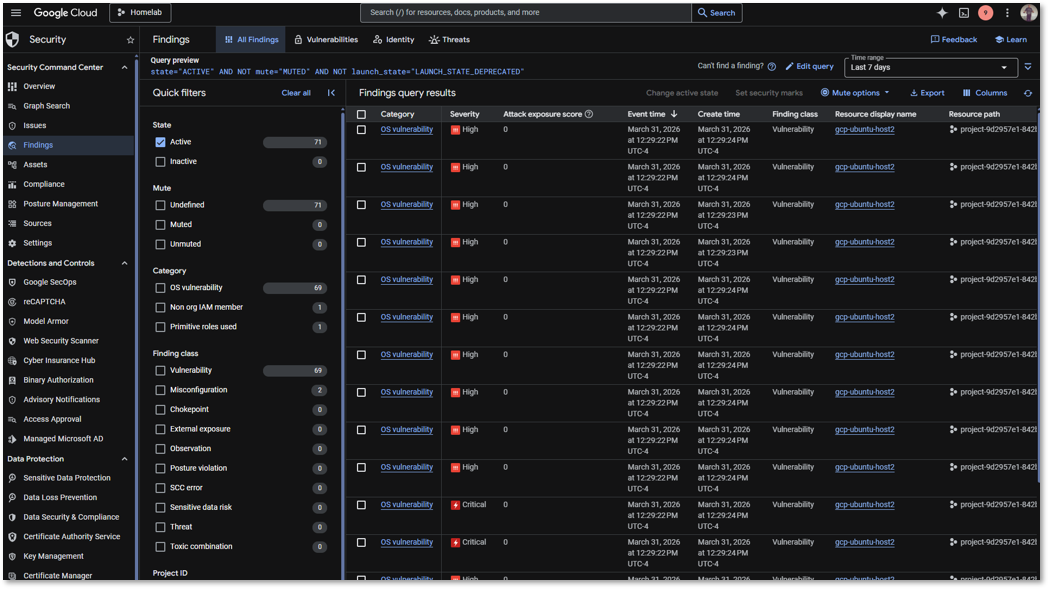
SCC provides asset inventory, vulnerability assessment, misconfiguration detection, and threat detection across the GCP project.
| SCC Capability | Function |
|---|---|
| Security Health Analytics | Detects misconfigurations: open firewall rules, public IPs, weak IAM policies |
| Asset Inventory | Continuous discovery of all GCP resources across the project |
| Vulnerability Assessment | CVE scanning for known vulnerabilities on Compute Engine instances |
| Threat Detection (Premium) | Behavioral anomaly detection for credential misuse and data exfiltration (upgrade path) |
Network Security
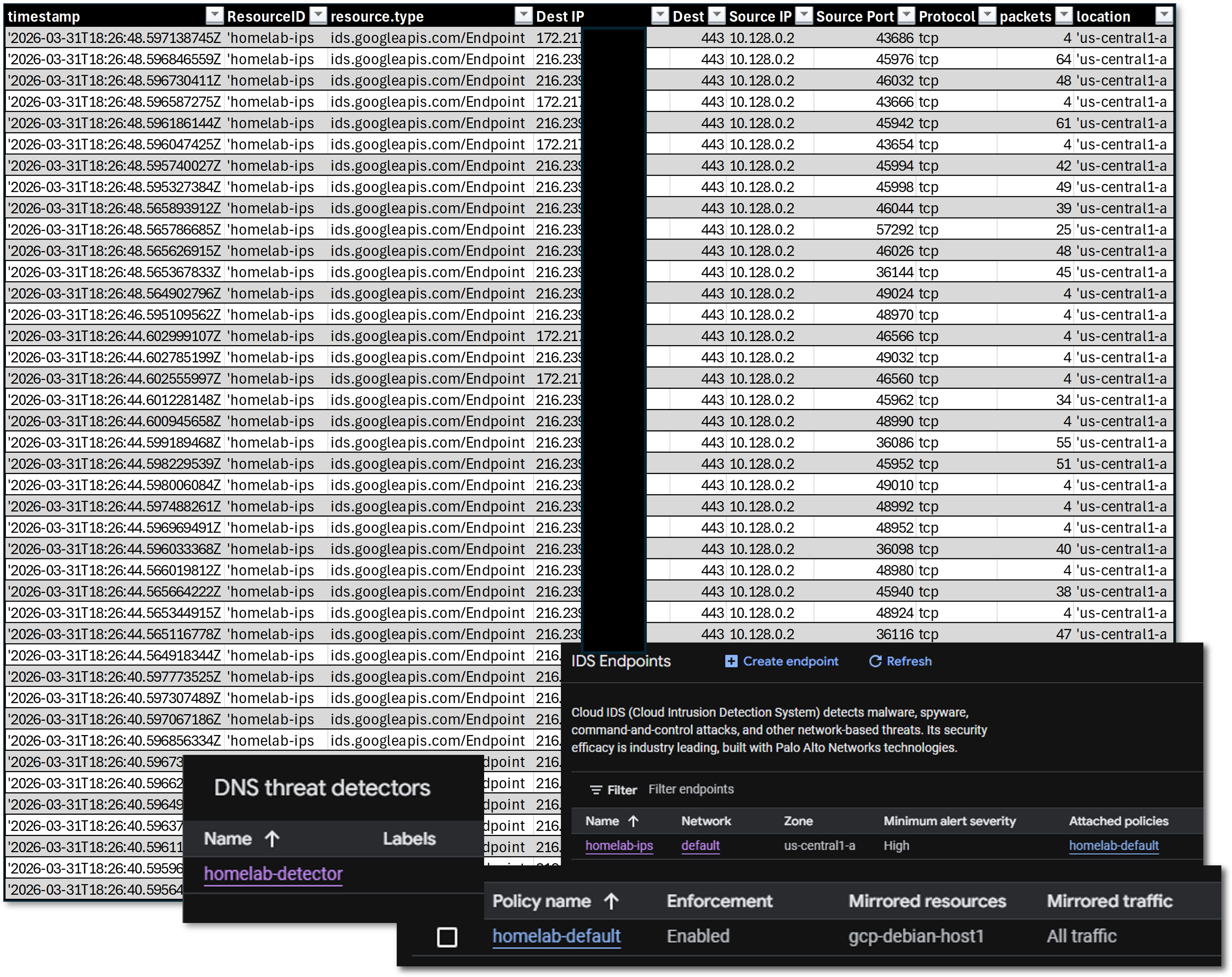
IDS Endpoint and DNS Armor
GCP is configured to mirror a single instance, gcp-debian-host1 for all traffic with a minimum lart severity of high
Cloud Logging
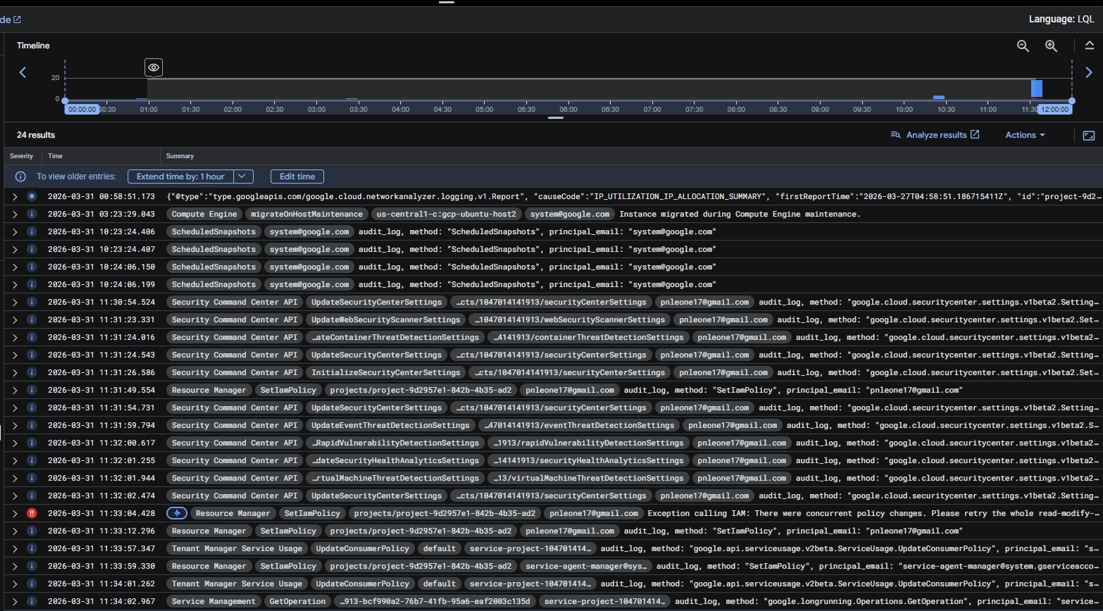
Admin Activity audit logs are enabled by default and cannot be disabled. Data Access logs capture all GCP API calls. Log entries include resource type, method, principal identity, source IP, and request/response metadata. Log-based metrics and alerting policies surface high-risk events such as IAM role modifications and firewall rule changes.
Cloud Monitoring
Infrastructure metrics (CPU, memory, disk, network) collected from GCP instances via the Cloud Monitoring agent (Ops Agent). Custom dashboards and alerting policies trigger notifications on resource thresholds. Complements on-premises Checkmk and Prometheus for cross-platform visibility.
IAM
GCP IAM controls access to all project resources. Service accounts with minimal roles are used for instance operations. No owner or editor roles assigned to compute instances. IAM policy recommendations surface over-permissive bindings.
Monitoring and Alerting
| Source | Alert Type | Destination |
|---|---|---|
| Security Command Center | Misconfiguration findings, vulnerability detections | GCP console + log-based alerts |
| Cloud Armor | WAF blocks, rate limit triggers | Cloud Logging + alerting policies |
| Cloud Logging | High-risk API activity (IAM changes, firewall modifications) | Cloud Monitoring alerting policies |
| Cloud Monitoring | Instance resource thresholds | Cloud Monitoring alert + notification channel |
| Wazuh Agent | Endpoint security events | On-premises Wazuh Manager + SIEM |
| PatchMon Agent | Outdated packages / CVE correlation | On-premises PatchMon dashboard + Discord |
| Checkmk Agent | Host health (CPU, disk, services) | On-premises Checkmk + Discord |
| Uptime Kuma | Service availability checks | Discord webhook (#uptime-kuma) |
Microsoft Azure
Deployment Overview
The Azure deployment consists of two VMs in the North Central US region: a Standard_B2ats v2 instance running Ubuntu 24.04 LTS and a Standard_E2s v3 Spot instance running Windows Server 2025 Datacenter Smalldisk. Both are enrolled in the Tailscale tailnet and provisioned via the azuredeploy.json ARM template. The Windows Server 2025 Core instance is joined to the home.com Active Directory domain over Tailscale, extending on-premises Group Policy, certificate auto-enrollment, and WSUS patch management to the cloud workload. Azure native services — Defender for Cloud, Log Analytics (homelab-log), Microsoft Sentinel, Entra ID, MFA, Azure Arc, and DDoS Protection (homelab-ddos) — provide Microsoft-native security visibility that complements the on-premises SOC platform.
Security Impact
- Wazuh agents on both VMs provide endpoint telemetry forwarded to the central on-premises Wazuh Manager (192.168.1.219) via Tailscale
- Windows Server 2025 joined to home.com AD; Group Policy, WSUS, and certificate auto-enrollment operate across the Tailscale tunnel
- NSG enforces explicit inbound/outbound rules; management restricted to Tailscale CGNAT and homelab subnets; all internet ingress denied at highest priority
- Defender for Cloud delivers CSPM posture management and workload protection with regulatory compliance benchmarking (CIS, NIST, PCI-DSS)
- Azure Arc integration applies consistent governance policies across Azure, AWS, and on-premises Proxmox nodes
- Microsoft Sentinel aggregates Azure Monitor logs with custom KQL detection rules and automated response playbooks
- Entra ID provides cloud identity with conditional access policies and MFA enforcement
Deployment Rationale
Azure completes the three-provider hybrid architecture and demonstrates proficiency with the Microsoft cloud security stack. Entra ID and Defender for Cloud are deployed in the majority of enterprise environments alongside AWS or GCP. The dual-VM topology adds a Windows Server 2025 domain member, mirroring hybrid identity patterns where cloud workloads participate in on-premises AD for centralized identity, Group Policy, and patch management.
Architecture Principles Alignment
- Defense in Depth: Wazuh EDR coverage provides endpoint-layer visibility independent of Azure-native controls; Defender for Cloud and Sentinel operate as independent detection layers above network controls; Azure Arc extends on-premises Defender governance policies to cloud VMs
- Secure by Design: VMs provisioned via secure ARM template parameters; NSG restricts SSH and RDP to 192.168.0.0/16; outbound rules explicitly permit only required management ports
- Zero Trust: All management access via Tailscale; NSG deny-by-default with explicit allow list; Entra ID conditional access enforces MFA for all administrative actions
Infrastructure Configuration
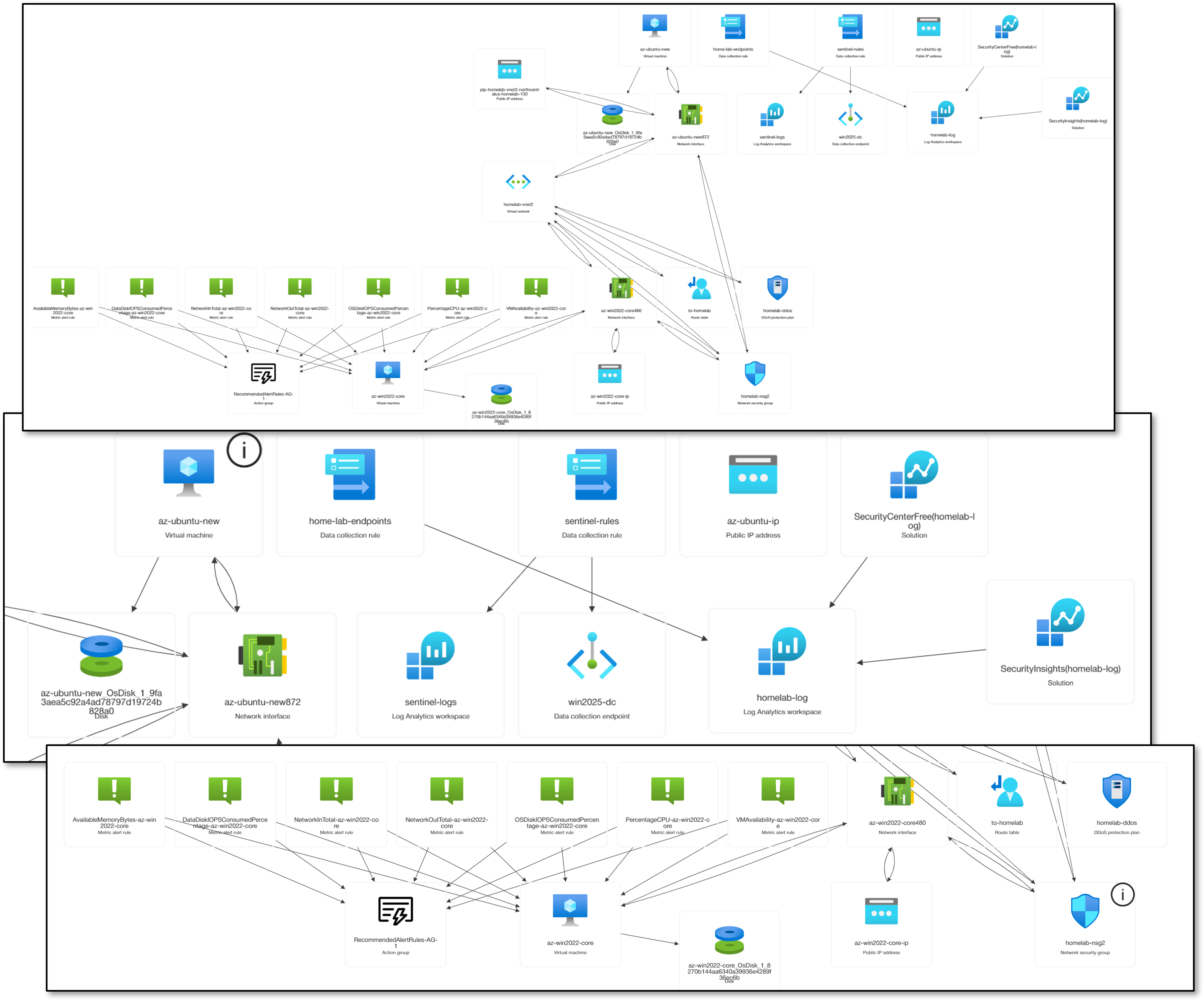
VM Instances — Ubuntu 24.04 LTS (az-ubuntu)
| Attribute | Value |
|---|---|
| VM Name | az-ubuntu |
| VM Size | Standard B2ats v2 |
| OS | Ubuntu 24.04 LTS (Canonical) |
| Priority | On-Demand |
| NIC | az-ubuntu440 |
| Admin Username | paul |
| Location | North Central US |
| Private IP | 10.130.0.7 |
| Tailscale IP | 100.96.110.40 |
| Tailscale Hostname | az-ubuntu.tailf07c05.ts.net |
| Tailscale Role | Subnet Router (10.130.0.0/16) / Exit Node |
| DNS Resolvers | 192.168.1.153, 192.168.1.154 (on-premises Unbound via Tailscale) |
VM Instances — Windows Server 2025 Datacenter (az-win2025-dc)
| Attribute | Value |
|---|---|
| VM Name | az-win2025-dc |
| VM Size | Standard E2s v3 |
| OS | Windows Server 2025 Datacenter Azure Edition Smalldisk |
| Priority | Spot |
| Eviction Policy | Deallocate |
| NIC | az-win2025-dc480 |
| Admin Username | Paul |
| Location | North Central US |
| Private IP | 10.130.0.5 |
| Tailscale IP | 100.113.13.112 |
| Tailscale Hostname | az-win2025-dc.tailf07c05.ts.net |
| Tailscale Role | Endpoint |
| Domain | home.com (domain-joined via Tailscale) |
| DNS Resolvers | 192.168.1.152, 192.168.1.142 (on-premises AD DNS via Tailscale) |
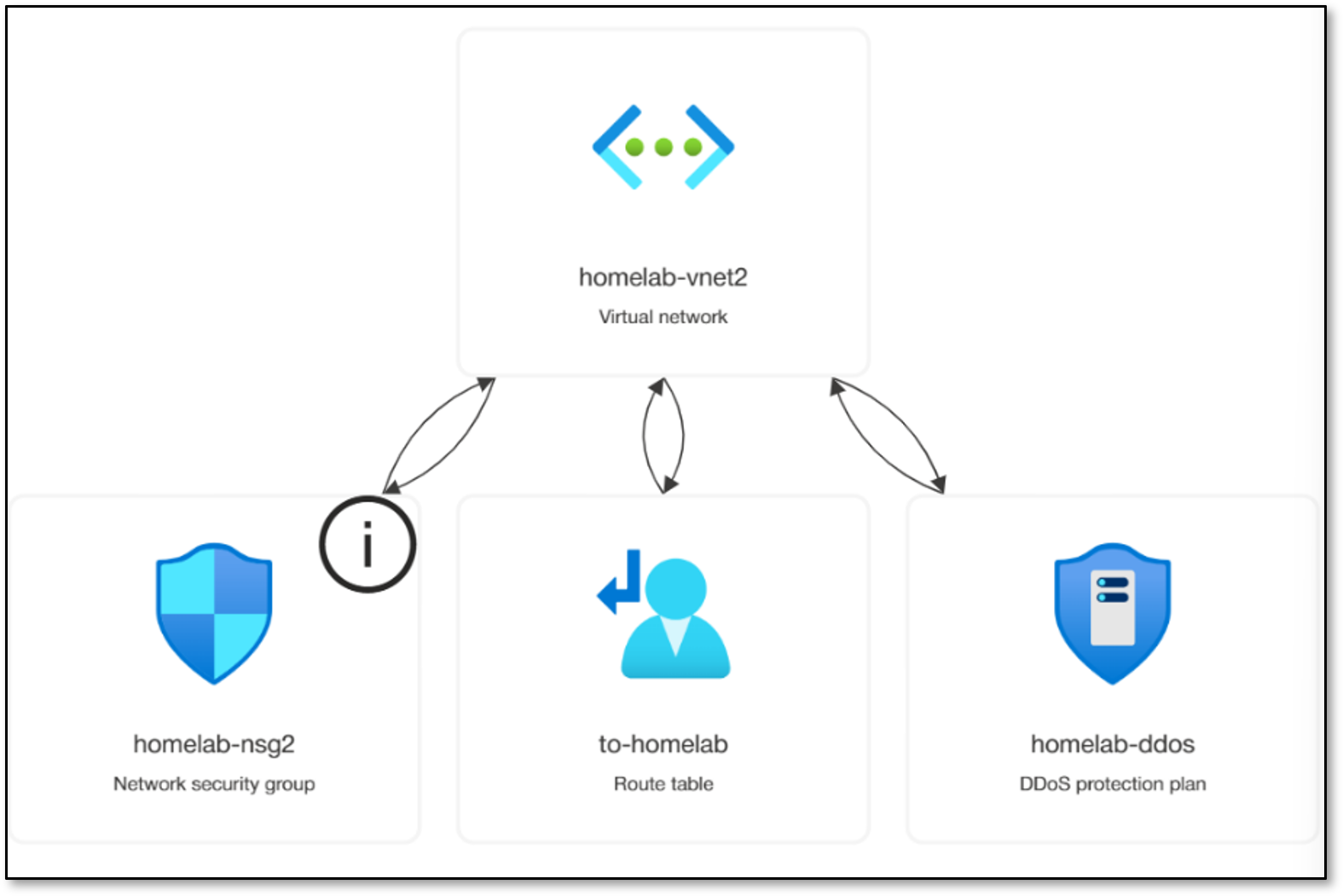
VNet and Subnet Configuration
| Attribute | Value |
|---|---|
| VNet Name | homelab-vnet2 |
| VNet Address Space | 10.130.0.0/16 |
| Subnet Name | homelab-subnet |
| Subnet CIDR | 10.130.0.0/24 |
| NSG Attached | homelab-nsg2 (applied at subnet level, North Central US) |
| DDoS Protection | homelab-ddos |
| Route Table | to-homelab |
Azure Resource Inventory
| Resource Name | Type | Location |
|---|---|---|
| az-ubuntu | Virtual machine | North Central US |
| az-ubuntu-ip | Public IP address | North Central US |
| az-ubuntu440 | Network Interface | North Central US |
| az-win2025-dc | Virtual machine | North Central US |
| az-win2025-dc-ip | Public IP address | North Central US |
| az-win2025-dc480 | Network Interface | North Central US |
| home-lab-endpoints | Data collection rule | North Central US |
| homelab-ddos | DDoS protection plan | North Central US |
| homelab-log | Log Analytics workspace | North Central US |
| homelab-nsg | Network security group | East US 2 |
| homelab-nsg2 | Network security group | North Central US |
| homelab-vnet2 | Virtual network | North Central US |
| win2025-dc | Data collection endpoint | North Central US |
| to-homelab | Route table | North Central US |
| RecommendedAlertRules-AG-1 | Action group | Global |
| SecurityCenterFree(homelab-log) | Solution | North Central US |
| NetworkWatcher_northcentralus | Network Watcher | North Central US |
Network Security Group — homelab-nsg2 Inbound Rules
| Priority | Protocol | Port | Source | Action | Description |
|---|---|---|---|---|---|
| 1000 | * | * | 100.64.0.0/10 | Allow | Tailscale CGNAT — bidirectional Tailnet communication |
| 1040 | TCP | 22 | 192.168.0.0/16 | Allow | SSH — homelab subnets only (Ubuntu) |
| 1044 | * | 6516 | Any | Allow | Windows Admin Center Access |
| 1045 | TCP | 3389 | 192.168.0.0/16 | Allow | RDP — homelab subnets only (Windows) |
| 1050 | ICMP | * | 192.168.0.0/16 | Allow | ICMP diagnostics from homelab |
| 1060 | TCP | 80 | 192.168.1.181/32 | Allow | Uptime Kuma HTTP health checks |
| 1070 | UDP | 33434-33600 | 192.168.0.0/16 | Allow | Traceroute from homelab |
| 65000 | * | * | Any | Allow | VirtualNetwork: AllowVnetInBound |
| 65001 | * | * | Any | Allow | AzureLoadBalancer: AllowAzureLoadBalance |
| 65500 | * | * | Any | Deny | DenyAllInBound |
Network Security Group — homelab-nsg2 Outbound Rules
| Priority | Protocol | Port(s) | Destination | Action | Description |
|---|---|---|---|---|---|
| 100 | * | * | Any | Allow | AzureCloud |
| 2000 | * | * | 100.64.0.0/10 | Allow | Tailscale outbound: all Tailnet destinations |
| 2010 | TCP | 1514-55000 | 192.168.1.219/32 | Allow | Wazuh agent manager event and enrollment ports |
| 2020 | * | 53 | 192.168.1.153/32, 192.168.1.154/32 | Allow | DNS: Unbound-01 and Unbound-02 |
| 2025 | * | 53 | 192.168.1.152/32, 192.168.1.142/32 | Allow | DNS: AD DNS DC01 and DC02 |
| 2030 | TCP | * | 192.168.1.126/32 | Allow | Checkmk agent egress |
| 2040 | TCP | 3000-3001 | 192.168.200.0/24 | Allow | PatchMon backend |
| 2050 | All | AD Ports | 192.168.1.152/32, 192.168.1.142/32 | Allow | AD Domain Controller: Kerberos, LDAP, DNS, GP, SYSVOL |
| 3000 | TCP | 443 | WindowsAdminCenter | Allow | Windows Admin Center Access |
| 3001 | TCP | 443 | AzureActiveDirectory | Allow | Azure Active Directory Access |
| 65000 | * | * | Any | Allow | VirtualNetwork: AllowVnetOutBound |
| 65001 | * | * | Any | Allow | Internet: AllowInternetOutBound |
| 65500 | * | * | Any | Deny | DenyAllOutBound |
Native Security Services
Defender for Cloud
Defender for Cloud provides Cloud Security Posture Management (CSPM) across the Azure subscription. The lab configuration targets high visibility at zero or low cost.
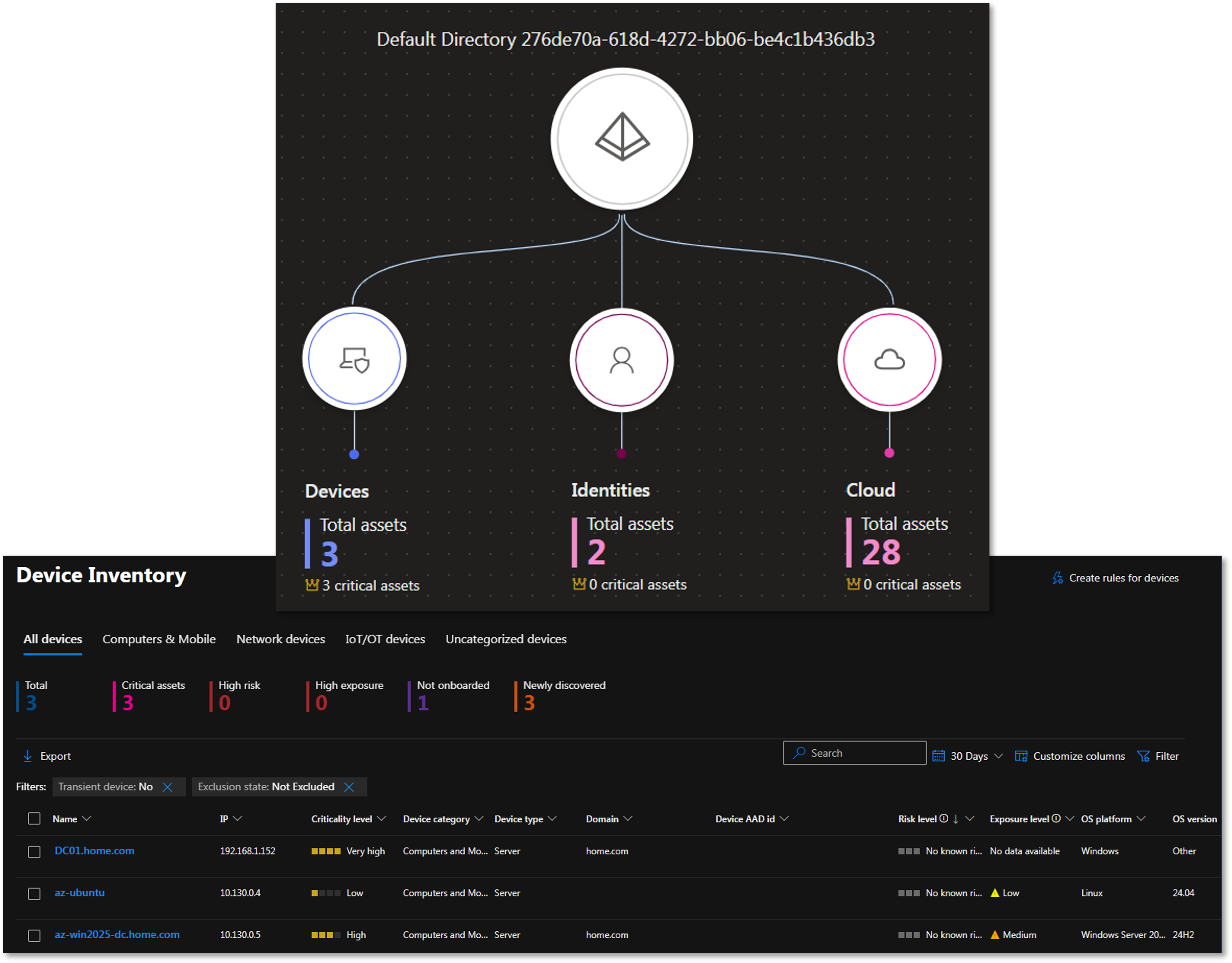
- Foundational CSPM (Free): Enabled in Defender for Cloud > Environment Settings. Provides the Secure Score dashboard and compliance tracking against CIS Azure Foundations, PCI-DSS, and NIST SP 800-53. Surfaces misconfigured NSG rules, missing MFA, public IP exposure, and unencrypted disks
- Azure Arc Integration: The Connected Machine Agent (Arc) is installed on the Azure VMs and planned for extension to Proxmox-hosted Linux VMs and AWS EC2 nodes. Arc enables Defender to apply the same governance policies and Secure Score recommendations across cloud-native, on-premises hypervisor, and multi-cloud infrastructure from a single control plane
- Defender for Servers Plan 1: Enables EDR features and Microsoft Defender for Endpoint integration on enrolled VMs. Wazuh EDR serves as the primary endpoint detection layer; Defender for Servers is deployed as a supplementary control when trial capacity is available
Microsoft Sentinel
Microsoft Sentinel serves as the cloud-native SIEM/SOAR for the Azure deployment, aggregating data from across the hybrid environment into the Log Analytics Workspace (homelab-log).
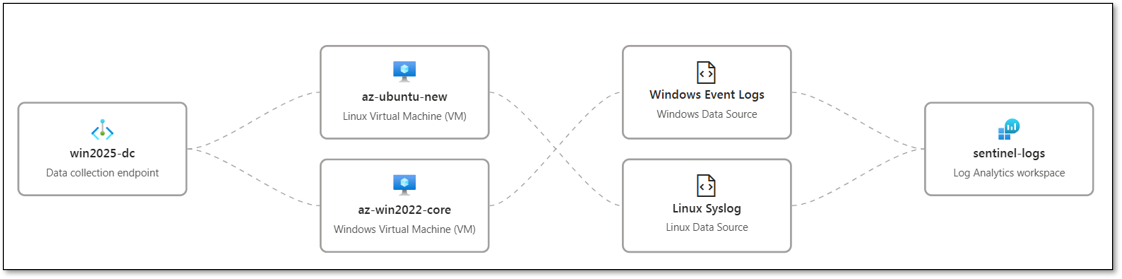
Data Connectors:
- Azure Activity (Free): Streams all ARM template deployments, resource changes, and control-plane operations from the Azure subscription into Sentinel. Provides visibility into NSG rule modifications, VM provisioning events, and IAM role assignments
- Microsoft Entra ID (Free tier): Ingests Audit Logs and Sign-in Logs from Entra ID. Tracks home.com synced user activity, conditional access policy hits, MFA challenge results, and privileged account sign-ins
- Windows Security Events via AMA: The Azure Monitor Agent (AMA) is deployed via data collection rule home-lab-endpoints. The DCR targets the Common event set (4624, 4625, 4648, 4768, 4769, 4771, 7045, 7040, 4720, 4728, 4732, 4756) and streams events into homelab-log
- Syslog via AMA (Linux nodes): Syslog forwarding configured on az-ubuntu and gcp-debian-host1 via the home-lab-endpoints DCR. The AMA collects auth, syslog, and daemon facility events
KQL Detection Rules (custom):
- NSG Deny-Inbound Spike: Alerts when the homelab-nsg2 priority-100 deny rule fires more than 20 times per hour from a single source IP
- Entra ID Sign-in from New Location: Correlates Entra ID sign-in logs against a known-good location baseline; fires when an administrative account authenticates from a country not seen in the prior 30 days
- Windows Domain Join Event: Monitors Security Event 4742 (computer account changed) and correlates with the expected domain-join window; unexpected domain joins outside provisioning windows generate a Sentinel incident
- AMA DCR Data Gap: Fires when the AMA heartbeat for any monitored VM is absent for more than 15 minutes
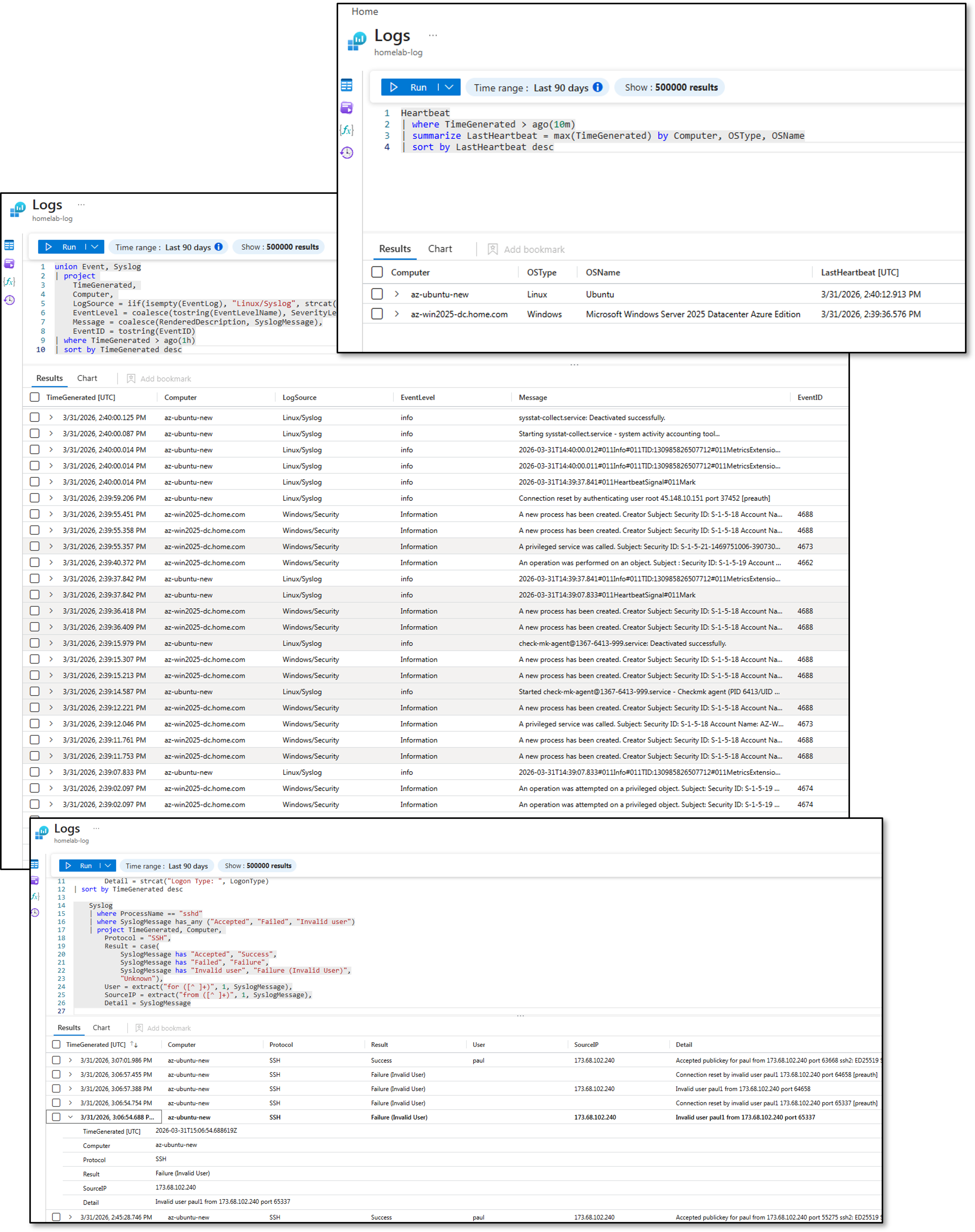
Entra ID and MFA
Entra ID serves as the cloud identity provider for Azure resource access. Conditional access policies enforce MFA for all administrative roles. Privileged Identity Management (PIM) provides just-in-time role activation for subscription-level permissions. Sign-in logs and audit events are forwarded to homelab-log for retention and correlation with Sentinel analytics rules.
Log Analytics Workspace
homelab-log is the central log repository for all Azure diagnostic data: VM performance counters, NSG flow logs, Defender for Cloud alerts, Sentinel incidents, and Entra ID sign-in events. KQL queries provide ad-hoc investigation capability. Alert rules (action group: RecommendedAlertRules-AG-1) forward critical events to notification channels and Sentinel automation rules that can trigger Shuffle SOAR webhooks on the on-premises platform.
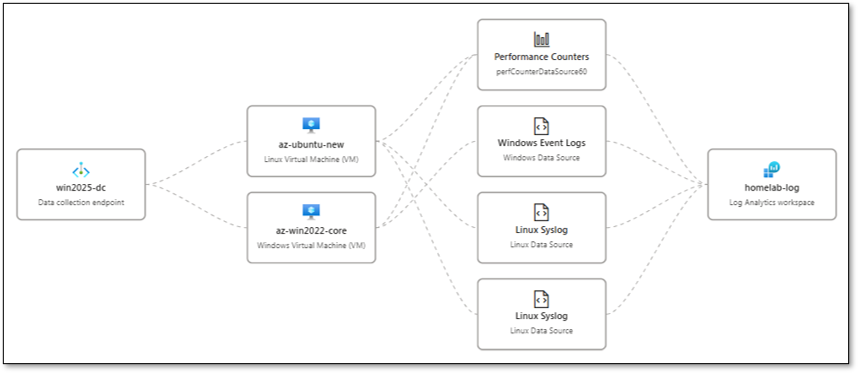
Azure Arc
The Connected Machine Agent is installed on both Azure VMs and is planned for extension to on-premises Proxmox-hosted Linux hosts and AWS EC2 instances. Arc registers each machine as a resource in Azure Resource Manager, enabling Defender for Cloud Secure Score recommendations, Azure Policy assignments, and Guest Configuration auditing to apply uniformly across cloud and on-premises workloads.
Monitoring and Alerting
| Source | Alert Type | Destination |
|---|---|---|
| Defender for Cloud | Misconfiguration findings, vulnerability detections | Azure portal + Log Analytics alerts |
| Microsoft Sentinel | Detection rule hits, incident creation | Automation rules + Shuffle SOAR webhook |
| NSG Flow Logs | Anomalous traffic patterns | Log Analytics alerting + Sentinel |
| Log Analytics | VM diagnostic thresholds | Azure Monitor alerts |
| Wazuh Agent | Endpoint security events | On-premises Wazuh Manager + Splunk SIEM |
| PatchMon Agent | Outdated packages / CVE correlation | On-premises PatchMon dashboard + Discord |
| Checkmk Agent | Host health (CPU, disk, services) | On-premises Checkmk + Discord |
| Uptime Kuma | Service availability checks | Discord webhook (#uptime-kuma) |
On-Premises Management Integration
All cloud nodes — across AWS, GCP, and Azure — are managed using the same on-premises toolchain applied to Proxmox-hosted workloads. This provides a single operational model regardless of infrastructure location: unified patch compliance dashboards, consistent security baselines, centralized alerting, and a common incident response pipeline. The toolchain reaches cloud nodes exclusively via the Tailscale mesh VPN. No management ports are exposed to the public internet.
| Tool | Function | Reach | Port / Protocol |
|---|---|---|---|
| Wazuh EDR | Endpoint detection, FIM, SCA, vulnerability assessment | All cloud nodes | TCP 1514/1515 outbound to 192.168.1.219 |
| PatchMon | Package currency tracking, CVE correlation, patch SLA tracking | Linux cloud nodes | TCP 3000-3001 outbound to 192.168.200.0/24 |
| Checkmk | Host health monitoring (CPU, memory, disk, services) | All cloud nodes | TCP 6556 inbound from 192.168.1.126 |
| Ansible | Configuration baselines, hardening, user management, patching | All cloud nodes | SSH (TCP 22) inbound from 192.168.1.25 |
| Uptime Kuma | Service availability and tunnel health checks | All cloud nodes | TCP 22/3389 inbound from 192.168.1.181 |
| WSUS | Windows patch management | Windows cloud nodes | HTTP/HTTPS outbound to 192.168.1.152 |
Wazuh EDR
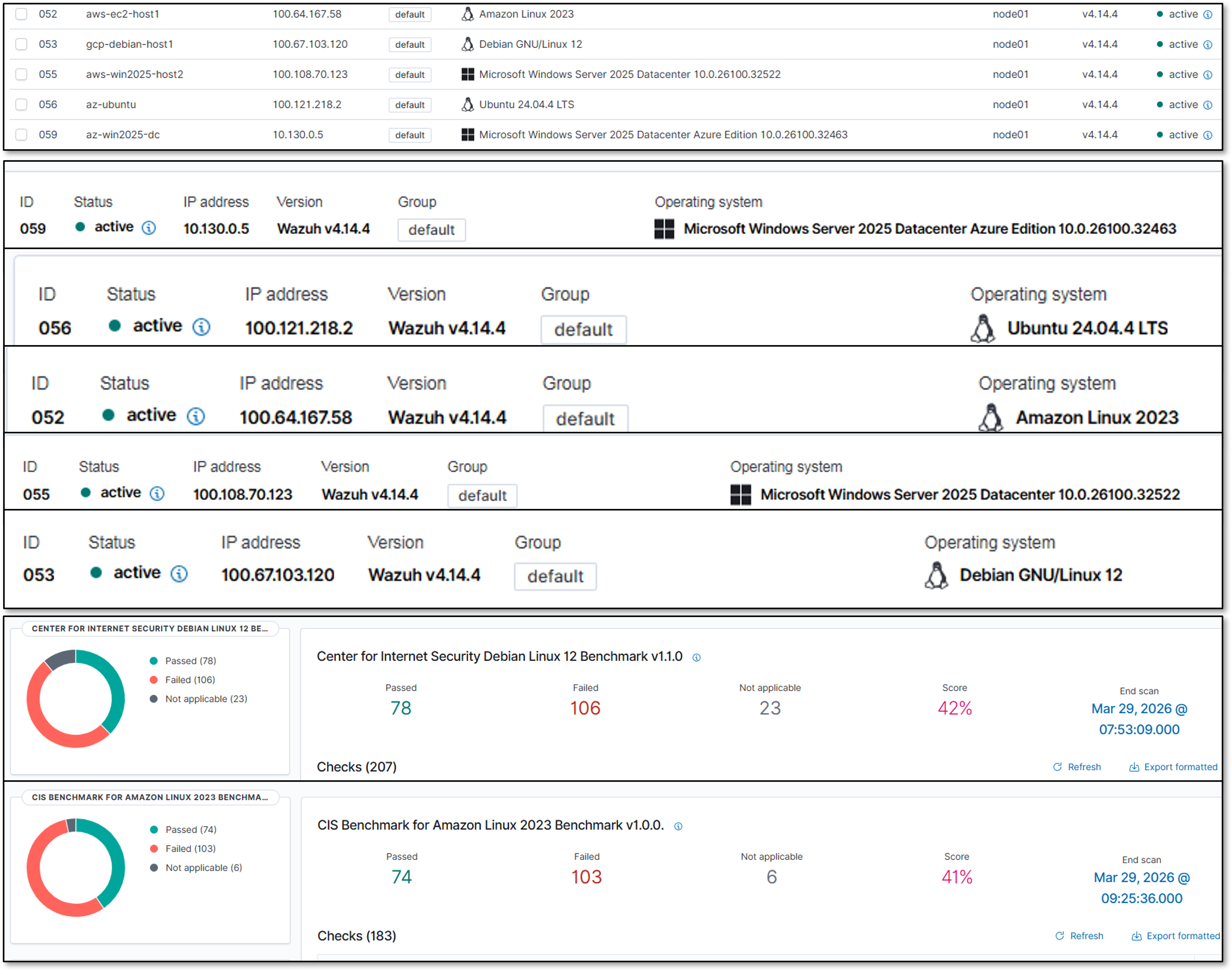
Wazuh agents are deployed on all cloud instances and report to the on-premises Wazuh Manager (192.168.1.219) via the Tailscale tunnel. The agent provides file integrity monitoring, rootkit detection, vulnerability assessment, CIS benchmark SCA, and real-time security event forwarding to the on-premises SIEM (Splunk + Elastic).
| Parameter | Value |
|---|---|
| Wazuh Manager | 192.168.1.219 (on-premises) |
| Enrollment Port | TCP 1515 |
| Event Forwarding Port | TCP 1514 |
| API Port | TCP 55000 |
| Transport | Tailscale tunnel (WireGuard encrypted) |
| Traffic Flow | Cloud Agent → Tailscale → pfSense → Wazuh Manager |
| SCA Policies Applied | CIS Amazon Linux, CIS Debian 12/13, CIS Ubuntu 22.04/24.04, CIS Windows Server 2025, CIS RHEL 10 |
| Active Response | firewall-drop, host-deny, disable-account on threshold breach |
Cloud nodes appear as named agents in the Wazuh dashboard alongside on-premises hosts. SCA compliance scores, vulnerability counts, and FIM alerts are visible in the unified Wazuh and Splunk dashboards without platform-specific configuration.
PatchMon
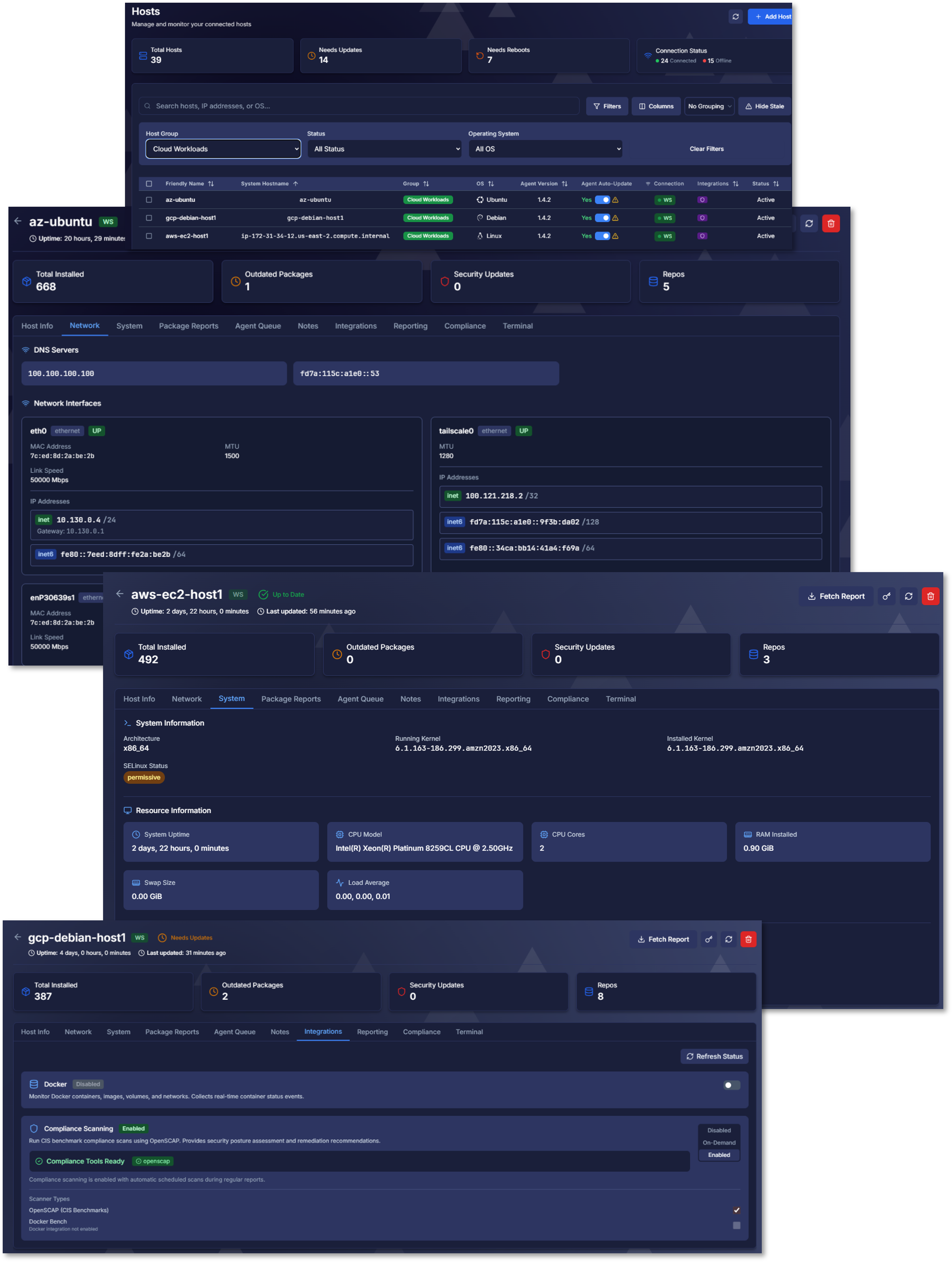
PatchMon agents are deployed on all Linux cloud nodes (Amazon Linux 2, Debian 13.4, Ubuntu 24.04 LTS). The agent polls the native package manager (yum/dnf for Amazon Linux; apt for Debian/Ubuntu) on a daily schedule and reports available updates to the PatchMon backend (192.168.200.39) via Tailscale. Package versions are correlated against the NVD database to identify CVE-linked updates and calculate per-host security update counts.
Windows cloud nodes are managed via WSUS (192.168.1.152) for Microsoft product updates. All cloud hosts appear in the unified PatchMon dashboard alongside on-premises hosts, grouped by cloud provider. Critical CVE MTTR target is maintained at <72 hours across all platforms.
Checkmk
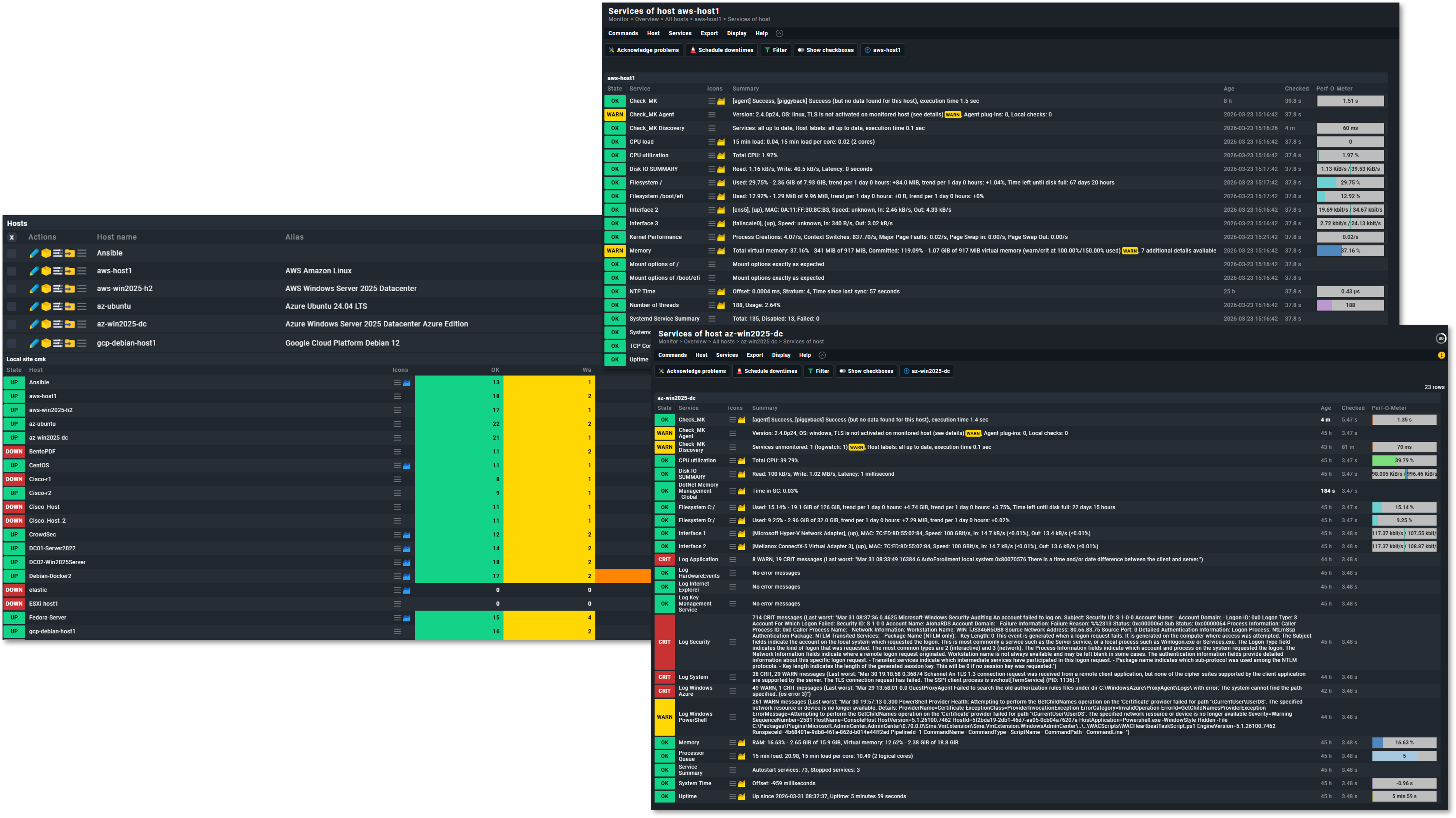
Checkmk agents are deployed on all cloud instances and report to the on-premises Checkmk server (192.168.1.126) via Tailscale. The agent provides OS-level metrics — CPU utilization, memory, disk usage, running services, and process health — consistent with the monitoring applied to on-premises Proxmox guests.
| Node | Integration Method | Key Metrics |
|---|---|---|
| aws-ec2-host1 (Amazon Linux) | Checkmk Agent (TCP 6556) | CPU, memory, disk, systemd services, network interfaces |
| aws-win2025-host2 (Windows) | Checkmk Windows Agent (TCP 6556) | CPU, memory, disk, Windows services, event log summary |
| gcp-debian-host1 (Debian) | Checkmk Agent (TCP 6556) | CPU, memory, disk, systemd services, package count |
| gcp-ubuntu-host2 (Ubuntu) | Checkmk Agent (TCP 6556) | CPU, memory, disk, systemd services, package count |
| az-ubuntu (Ubuntu) | Checkmk Agent (TCP 6556) | CPU, memory, disk, systemd services |
| az-win2025-dc (Windows) | Checkmk Windows Agent (TCP 6556) | CPU, memory, disk, Windows services |
Ansible
All cloud Linux nodes are included in the Ansible inventory and managed from the Ansible controller (192.168.1.25) via SSH over Tailscale. Windows nodes are managed via WinRM. The same playbook library applied to on-premises hosts is reused across cloud workloads with OS-family detection handling Debian/Ubuntu versus RHEL/Amazon Linux differences.
| Playbook | Function | Target Cloud Nodes |
|---|---|---|
| new_install_baseline_roles.yml | Bootstrap: Wazuh agent, SSH hardening, user accounts, Checkmk agent, base packages | All Linux cloud nodes (first provision) |
| linux_hardening.yml | SSH hardening, sysctl parameters, login banner, UFW/firewalld rules | All Linux cloud nodes (recurring) |
| update_linux_hosts.yml | OS package updates (apt dist-upgrade / dnf update) with reboot detection | All Linux cloud nodes (weekly, n8n scheduled) |
| user_mgmt.yml | ansible/paul user credentials, SSH key distribution | All Linux cloud nodes (quarterly rotation) |
| windows_baseline.yml | Windows hardening baseline, Wazuh agent install, Checkmk agent install | AWS Win2025, Azure Win2025 (first provision) |
Uptime Kuma
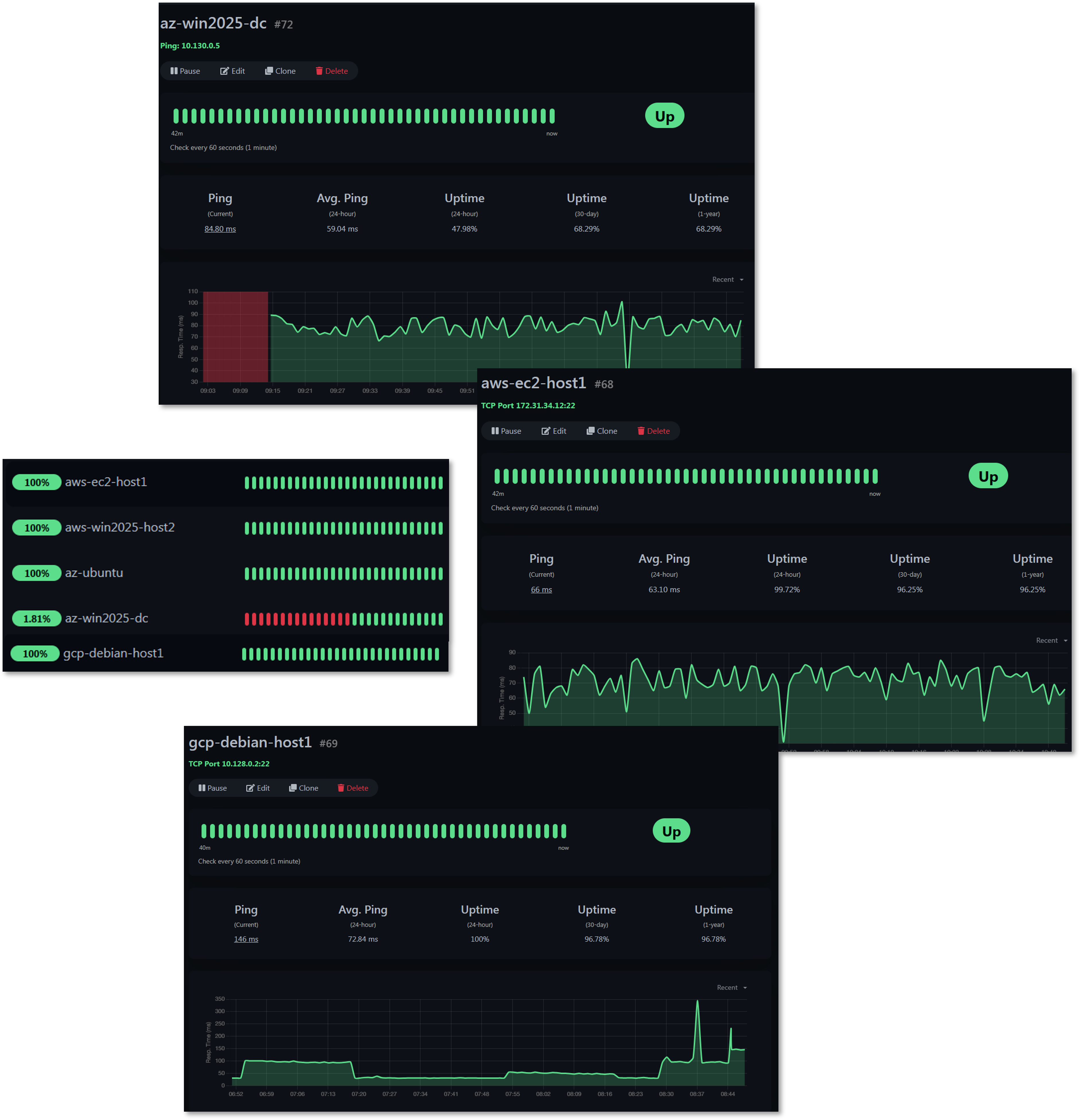
Uptime Kuma (192.168.1.181) performs Ping and TCP health checks against all cloud nodes via the Tailscale tunnel, validating both service availability and tunnel connectivity. Failures trigger Discord webhook notifications to the #uptime-kuma channel.
| Monitor | Check Type | Target | Alert Channel |
|---|---|---|---|
| aws-ec2-host1 tunnel | TCP port | 172.31.34.12:22 | #uptime-kuma (Discord) |
| aws-win2025-host2 tunnel | Ping | 172.31.46.238 | #uptime-kuma (Discord) |
| gcp-debian-host1 tunnel | TCP port | 100.67.103.120:22 | #uptime-kuma (Discord) |
| az-ubuntu availability | TCP port | 10.130.0.7:22 | #uptime-kuma (Discord) |
| az-win2025-dc tunnel | Ping | 10.130.0.5 | #uptime-kuma (Discord) |
Security Homelab Section Links
- Executive Summary and Security Posture
- Infrastructure Platform, Virtualization Stack and Hardware
- Network Security, Privacy and Remote Access
- Identity, Access, Secrets and Trust Management
- Automation and IaC
- Applications and Services
- Observability and Response, Part 1
- Observability and Response, Part 2
- Cloud IaaS Integration – AWS, Azure and GCP